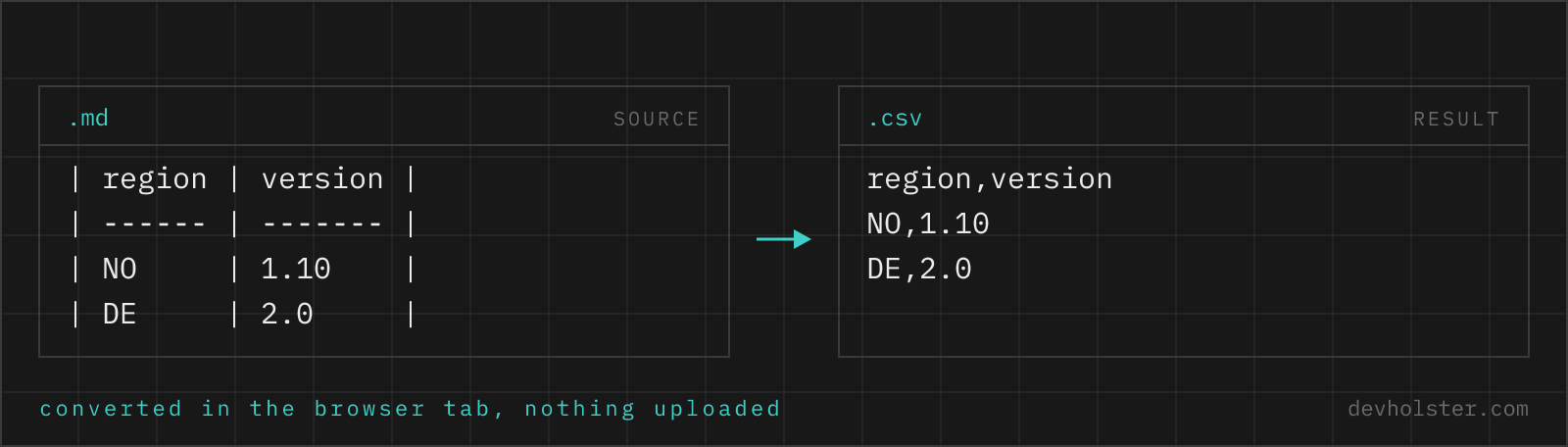
Why convert a Markdown table to CSV
Markdown tables are where data goes to be read, not processed: benchmark tables in READMEs, comparison matrices in docs, changelog summaries in wikis. The moment you want to sort that data, chart it, join it with something else or load it into a script, the pipes are in the way. CSV is the exit: every spreadsheet, every data library, every import dialog reads it.
Doing the extraction by hand means deleting pipes, trimming padding spaces, dropping the dash row and un-escaping \| sequences, tedious for one table and error-prone for ten. The parser here does those steps precisely, including the variants the GFM spec allows and hand-written tables invent.
How to use this converter
Paste the Markdown table into the left pane, whole document sections included, and the CSV appears on the right while you type. Lines without a pipe character (headings, prose, code fences) are ignored, so you can paste generously rather than selecting the table with surgical precision.
- Paste the Markdown. From raw view, an editor, or a rendered page copy; the parser accepts all pipe-table variants.
- Check the row count. The strip under the panes counts data rows (the header is not counted); a mismatch points at a malformed line in the source.
- Copy or download. The download saves a
.csvwith the UTF-8 marker Excel needs; copy gives you the raw text.
--semicolon
Semicolon-delimited output for German, French and similar Excel locales, which expect semicolons in .csv files. Leave it off for scripts, APIs and US/UK Excel.
--tsv
Tab-separated output instead of CSV. The practical use: tab-separated text pastes into an open Excel or Google Sheets grid as columns, no file and no import dialog involved. --semicolon wins if both flags are on.
What table variants are accepted
Hand-written Markdown tables drift from the textbook form, so the parser is deliberately forgiving:
| Variant | Example | Handled |
|---|---|---|
| Outer pipes present | | a | b | | Yes, the canonical form |
| Outer pipes missing | a | b | Yes, GFM allows it |
| Uneven padding | |a | b| | Yes, cells are trimmed |
| Short delimiter row | | - | - | | Yes, any dash run with optional colons |
| Alignment colons | | ---: | :---: | | Recognised and dropped with the row |
| Escaped pipes | a \| b | Unescaped to a literal pipe in the cell |
<br> in cells | line1<br>line2 | Becomes a real line break, cell gets quoted |
What is not a table to this parser: pipe characters inside fenced code blocks will be picked up if you paste the fence along, since the parser reads line by line, not a full Markdown AST. Paste tables, not entire documents containing shell pipelines, and the results stay clean.
What gets cleaned up on the way
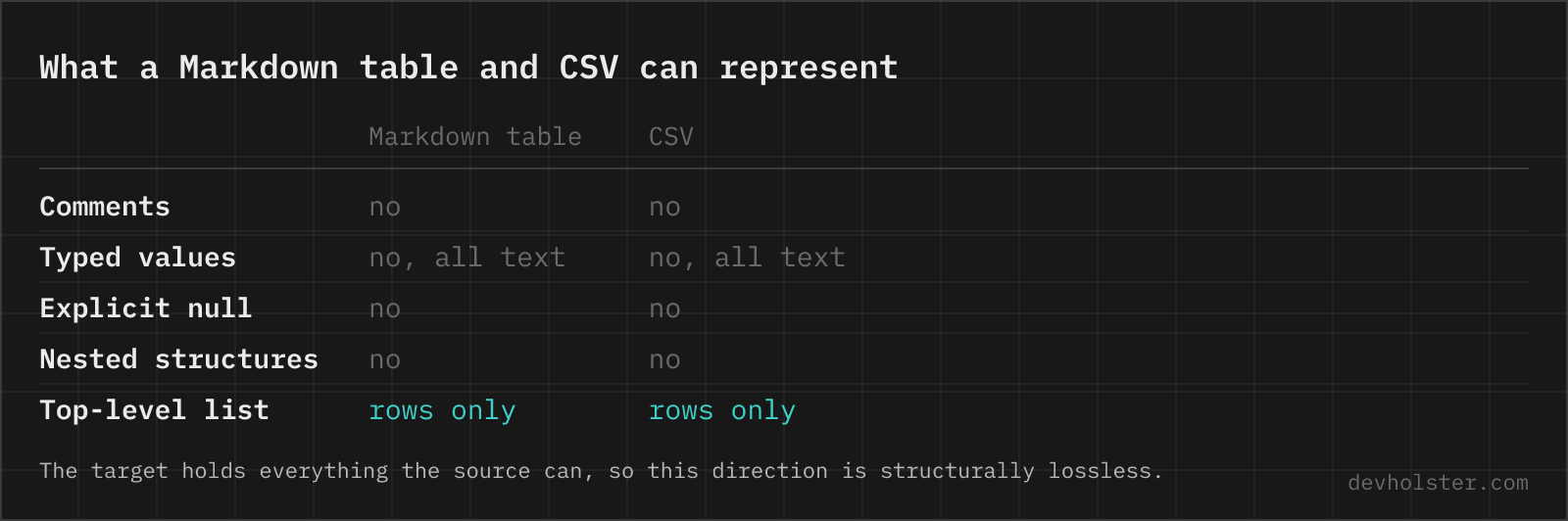
Three transformations happen between the pipes and the CSV. Cell padding is trimmed, because the spaces existed only to align the source. The delimiter row vanishes, because it is syntax, not data. And the escapes are unwound: \| back to |, <br> back to a line break. The CSV side then applies its own protection where needed, quoting cells that contain the delimiter, quotes or line breaks, following RFC 4180 exactly as our other CSV tools do.
Nothing else is altered. Formatting markers like **bold** and backticks stay as literal characters, numbers are not re-formatted, and empty cells stay empty rather than being dropped, so column positions survive.
Getting the result into Excel or Google Sheets
Three routes, in order of convenience. For a quick look: convert with --tsv on, copy the output, click a cell in the open spreadsheet, paste; both Excel and Sheets split tab-separated clipboard text into columns natively. For a file: download the .csv and double-click it, and if your Excel is a German or French locale, convert with --semicolon first or the data lands in one column. For full control over types (keeping leading zeros, forcing text columns): use Excel's Data → From Text/CSV import, which asks instead of guessing.
Pitfalls to check after converting
- Formatting markers travel along. A cell that read
**stable**in the docs is**stable**in the CSV. Whether to strip the asterisks is a judgment call; a find-and-replace handles it. - Mixed tables merge. Pasting two tables with different columns produces rows of differing width. Convert unlike tables separately.
- Numbers keep their display form. A table showing
24,500,000yields that literal string, thousands separators included; spreadsheets may read it as text. Clean display formatting in the sheet, where number tools exist. - Code-block pipes. Shell examples with pipes inside pasted fences become bogus rows. Paste the table region, not the whole document.
Getting tables out of Markdown
Is it safe to paste internal documentation into an online converter?
Only into one that parses in your browser. Internal wikis and private READMEs carry hostnames, versions, roadmap details and the occasional credential in a setup table, and an upload-based tool keeps all of it. The parsing runs here as JavaScript inside your tab, with nothing uploaded, logged or stored, and it works offline. For any other tool, watch the Network tab in devtools while converting a harmless snippet first.
How do I get a table from a GitHub README into Excel?
Open the file in raw view (the Raw button on GitHub), copy the table lines, paste them here, then copy the CSV output, or download it and open the file. Copying from the rendered page also works in many browsers because the text keeps its line structure, but raw view is the reliable route since it preserves the pipes exactly.
Does a Markdown table need the outer pipes?
No, they are optional in GitHub-flavored Markdown: a | b renders the same as | a | b |. What is not optional is the delimiter row of dashes under the header, without which the whole block stays plain text with visible pipes, and a consistent cell count per row, since GitHub truncates extra cells and pads missing ones silently. The outer pipes are still worth writing, because a column whose cells are empty at the start or end of a row is impossible to see without them, and every table formatter puts them back anyway. Parsers, including the one above, accept both styles along with the ragged spacing that hand-edited tables collect.
How do I get a Markdown table into Google Sheets?
Convert it to CSV, then paste. Google Sheets splits pasted text on commas or tabs, so CSV or TSV lands in proper columns, while raw Markdown arrives as one column of pipe-laden text. If a paste ends up in a single column anyway, use Data → Split text to columns and pick the delimiter. For files, File → Import → Upload handles CSV directly and lets you choose whether to replace the sheet or append. The same route works for Excel, except that Excel decides the delimiter from your Windows region setting, which is why a comma file sometimes needs the Data → From Text/CSV path instead of a plain paste.
How are escaped pipes (\|) and <br> tags handled?
Both are translated back into what they represent: \| becomes a literal | character in the cell, and <br> becomes a real line break, with the cell quoted in the CSV so the break stays inside it. That reverses exactly the escaping our CSV to Markdown Table converter applies, so the round trip returns your original data.
Can I extract multiple tables from one Markdown document at once?
Paste them together and they merge into one CSV, since every pipe-containing line is parsed and the prose between tables is skipped. That is occasionally what you want (same-shaped tables split by headings) and occasionally not: tables with different columns produce misaligned rows. For different-shaped tables, convert them one at a time.
Is bold, italic or code formatting inside cells preserved?
The literal characters are preserved, the rendering is not: **bold** arrives in the CSV as **bold**, `code` keeps its backticks. CSV is plain text and has no formatting layer. Strip the markers in the output if they are noise for your use case; keeping them at least loses no information.
Why does my output have fewer columns than the widest row?
Rows in hand-written tables sometimes carry stray pipes or a missing cell, and the CSV mirrors each row as it was parsed. Renderers like GitHub silently truncate extra cells to the header width, so the rendered table you compared against may hide the mismatch. Check the flagged row in the source; the fix belongs in the Markdown.