Why format JSON at all
Most JSON you meet in the wild was written by a machine for a machine: API responses, logs, exports, lockfiles. Serialisers emit it as one long line because whitespace costs bytes, and that is the right call for transfer. It becomes the wrong shape the moment a human has to answer a question about it: which field is missing, why is this array empty, where does the config for the staging environment start.
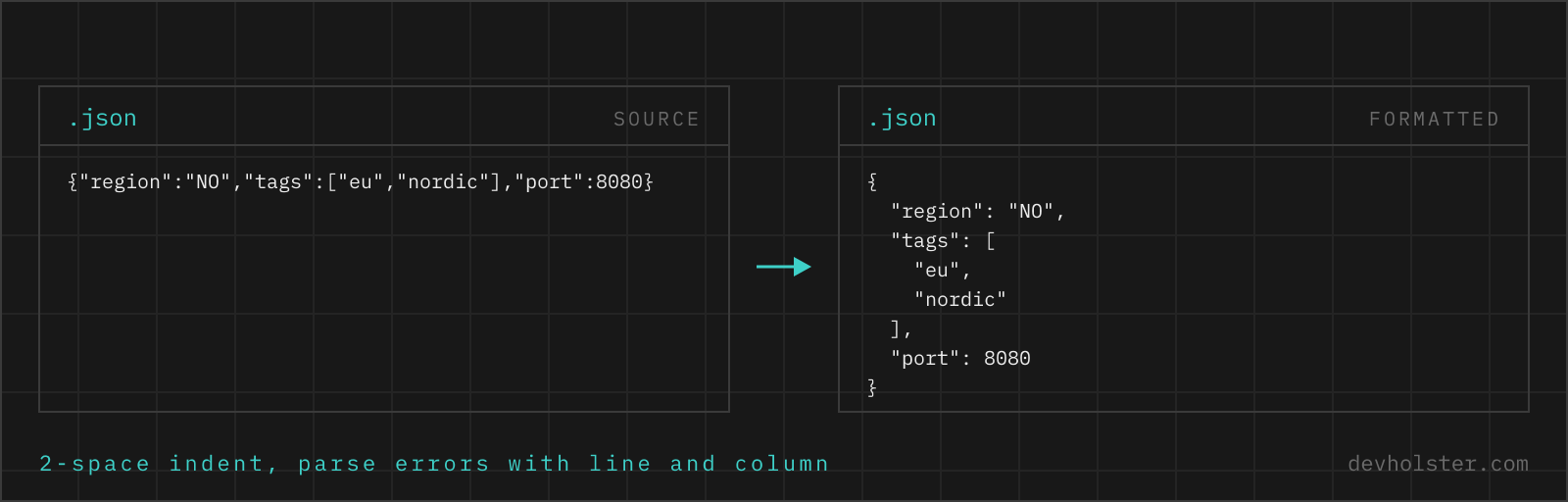
Formatting turns that single line back into an outline. One key per line, nesting shown by indentation, arrays opened up vertically. A 40 KB response that was unreadable as a line becomes a document you can scan and fold in an editor. The validator half is just as useful in the other direction: JSON edited by hand tends to pick up trailing commas and mismatched brackets, and finding those by eye in a large file is slow. A parser finds them in milliseconds and, in this tool, tells you exactly where.
How to use this formatter
Paste JSON into the left pane, or drop a .json file on it, and the formatted result appears on the right while you type. Invalid input shows the parser error inline in the output pane instead of a result, with the offending line quoted and a caret under the exact column.
- Paste or drop your JSON. An API response, a config file, a log line; anything meant to be JSON works, including broken JSON you want diagnosed.
- Pick the indent. 2 spaces, 4 spaces, tabs, or
minfor single-line minified output. - Check the numbers. The strip under the panes shows size, line count, total keys and whether the document is valid.
- Copy or download. The result goes to your clipboard or saves as a
.jsonfile.
--repair
On by default, and it does nothing at all while your JSON is valid. It only steps in after strict parsing has failed, and then it reads the input the way a person would: // and /* */ comments dropped, a trailing comma before } or ] removed, single-quoted strings requoted, unquoted keys quoted, and the Python literals True, False and None mapped to their JSON counterparts. The repair runs as one pass over the characters, so a brace or the word None inside a string value is left alone.
This is what covers the three things people paste most: a JavaScript object literal copied out of source, a Python dict printed by a script, and the output of a language model that added a comment. When repair was needed, the panel under the output says so and the VALID box reads repaired rather than yes, because the honest answer is that your input was not JSON. Switch the flag off when you want strict validation and nothing else.
--sort-keys
Re-orders every object alphabetically, recursively. Off by default because key order usually follows a reading order someone chose on purpose (id before name before the twelve optional fields). Turn it on to diff two documents or to get stable output from a source that emits keys in random order.
Escaped JSON gets unwrapped
Paste something that starts "{\"user\":… and the formatter notices that the document is a JSON string whose contents are themselves JSON. Formatting it as written would give you the same escaped line back, so a button appears offering to unwrap it one level. This is the log-line case: a service stored a serialised object in a text column and now you have quotes with backslashes in front of them.
Reading validator errors
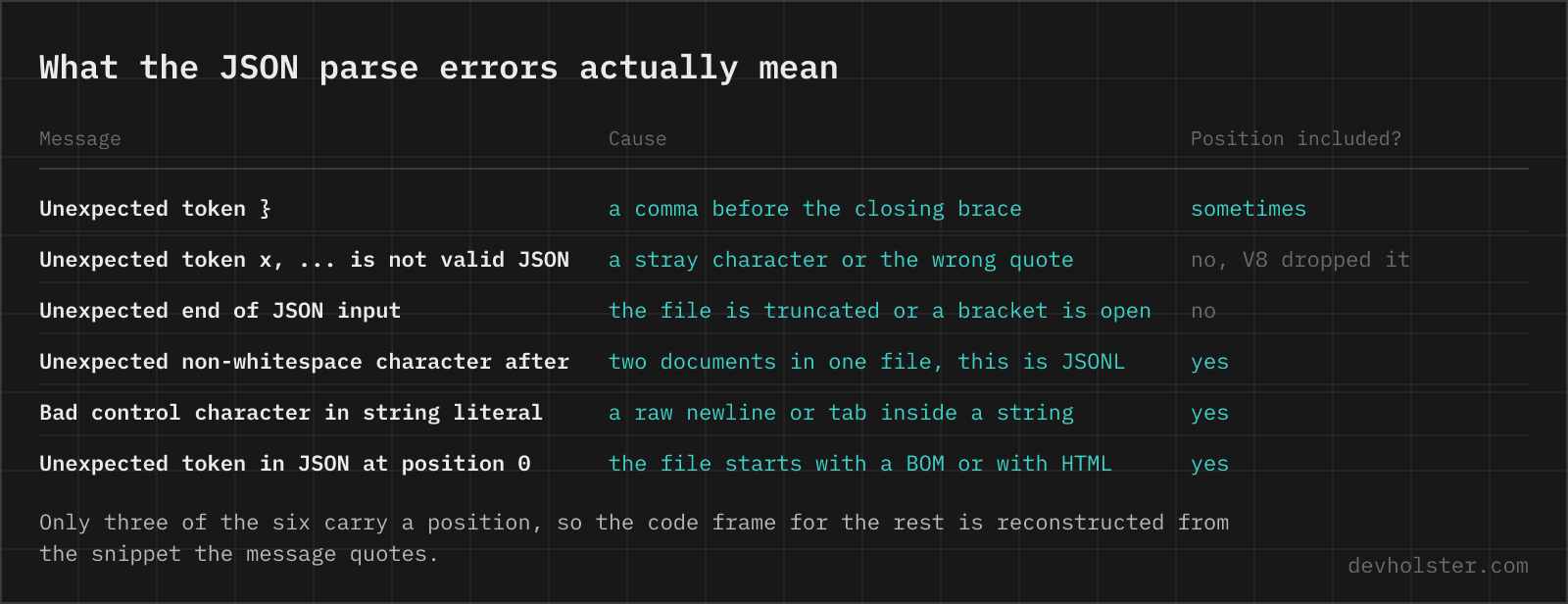
When parsing fails, this tool shows the browser's own error message, the line and column it points to, a small code frame with a caret under the character where the parser gave up, and a button that puts your cursor on exactly that spot in the input. The caret matters because the reported position is where parsing stopped, not always where the mistake is. A missing comma is usually reported at the start of the next value; an unterminated string is reported wherever the parser ran out of input, which can be the end of the file. When a document has more than one mistake, the JSON validator lists all of them in one pass and fixes them in place.
The practical technique: look at the caret position, then read one token backwards. The most frequent errors and where they actually sit:
Expected double-quoted property name in JSON at position 7 (line 1 column 8) A trailing comma after the last property. The parser reads the comma as a promise that another key follows, so it reports the position after it, not the comma itself. Older Chrome and Node versions phrased the same fault as "Unexpected token }", which is why half the answers online quote a message you will never see.
Expected property name or '}' in JSON at position 1 (line 1 column 2) A key that is not a double-quoted string: an unquoted key, or single quotes copied out of JavaScript source. JSON has one string syntax and this is it. Python says the same thing more explicitly, "Expecting property name enclosed in double quotes".
Expected ',' or '}' after property value in JSON at position 7 (line 1 column 8) A missing comma between two properties, or a document that stops early. Both look identical to the parser, because in each case it finished one value and found neither a separator nor a closing brace. If the position is the very end of the input, you have a truncated response rather than a typo.
Bad control character in string literal in JSON at position 8 (line 1 column 9) A raw line break or tab inside a string. JSON strings may not contain unescaped control characters; the newline has to be written as \n. This one shows up constantly in hand-built payloads that embed a multi-line message.
Unexpected token 'u', "{"a":undefined}" is not valid JSON A bare word where a value belongs, most often undefined or NaN leaking out of JavaScript. Note the shape of this message: it quotes a snippet instead of giving a position, which is why a formatter has to find the offending text itself to put a caret under it.
Unexpected end of JSON input Nothing to parse, or brackets that never close. An empty string produces it, and so does a response that was cut off mid-transfer. Check the length of what you actually received before checking the syntax.
One error at a time: a JSON parser stops at the first failure, so a file with five problems takes five rounds. The live re-validation makes that quick, each fix immediately shows either the next error or the formatted result.
What makes JSON invalid: the rules people trip over
JSON looks like JavaScript, and that resemblance causes most invalid documents. The grammar is far smaller than a JS object literal:
- Double quotes only. Keys and strings take
", never'or backticks. This is the single most common failure in hand-written JSON. - No trailing commas.
[1, 2, 3,]is valid JavaScript and invalid JSON. Serialisers never produce them; humans editing by hand constantly do. - No comments. Neither
//nor/* */. Files that carry comments are JSONC or JSON5, related formats that plain parsers reject. - Every key quoted.
{name: "x"}fails; it must be{"name": "x"}. - Limited literals.
true,false,null. Notundefined,NaNorInfinity, which JavaScript happily writes but JSON cannot represent. - Escaped control characters. A real line break inside a string must be written
\n. Pasting multi-line text into a string value without escaping is a classic way to break a config.
Duplicate keys are a special case: RFC 8259 calls the behaviour undefined rather than invalid, and in practice virtually every parser keeps the last occurrence. This tool follows that behaviour, so if your input has duplicates, they are silently collapsed before formatting; the key count in the stats strip can reveal that when it comes out lower than expected.
Numbers, big IDs and precision
JSON the format places no limit on number size or precision; JSON parsers do. JavaScript, and therefore this tool and nearly every online formatter, reads numbers into IEEE 754 doubles, which hold integers exactly only up to 253−1, i.e. 9007199254740991. A 19-digit value like a Twitter/X snowflake ID or a database bigint gets rounded: 12345678901234567890 comes back as 12345678901234567000.
Formatting cannot avoid this without abandoning the native parser, so the honest advice is: check whether your data carries such IDs as numbers before you rely on any JavaScript-touched output, and push whoever produces the JSON to serialise big IDs as strings. APIs that learned this lesson (Twitter's is the famous case) ship both id and id_str for exactly this reason. Floating-point values may also change spelling without changing value, 1.0 becomes 1, and 1e2 becomes 100, since the parsed number no longer remembers how it was written.
Online formatter vs. jq, Prettier and the editor
A browser tool is not always the right instrument, so here is our honest placement of it. Use this page when JSON arrives somewhere without your toolchain: a response copied from a log viewer, a blob from a ticket, a config on a machine where you cannot install anything. Zero setup, and the privacy question that hangs over most online formatters does not apply here because nothing is transmitted.
Use jq when the JSON lives in a pipeline: curl … | jq . formats, and the same tool filters, maps and slices, which no formatter UI replaces. Use Prettier or your editor's built-in formatter (Shift+Alt+F in VS Code) for JSON files inside a repository, because formatting belongs in the commit hook, not in a browser tab. The three do not compete; they cover different places where JSON shows up.
When JSON refuses to parse
Is it safe to paste API responses or config files into an online JSON formatter?
It depends entirely on where the formatting happens, and most formatters do it on their server. Real JSON is where access tokens, session data and customer records live, so a POST to an unknown backend is a data disclosure you cannot take back. Formatting and validation run here as JavaScript inside your browser tab, with no upload and no logging, and the page keeps working offline. Before trusting any such tool, open the Network tab in devtools and format something harmless: requests firing while you type mean your JSON is leaving the machine.
How do I pretty print JSON in the terminal or in VS Code?
In a terminal, pipe it through a formatter you already have: python3 -m json.tool file.json, jq . file.json, or json_pp on macOS. jq is the one worth installing, because the same command filters and transforms. In VS Code, open the file and press Shift+Alt+F (Shift+Option+F on macOS) for Format Document, which uses the built-in JSON language service. For a response you are about to inspect, curl -s url | jq . beats pasting anywhere. A browser tool earns its place when the JSON is in your clipboard rather than in a file, or when the machine you are on has neither jq nor a configured editor.
Why is my JSON invalid even though it works in JavaScript?
Because a JavaScript object literal is a superset of JSON. In JS you can write unquoted keys, single quotes, trailing commas, comments and values like undefined or NaN. JSON allows none of that: keys and strings take double quotes only, no comma after the last item, no comments, and the only literals are true, false and null. Code that console.logs fine will still fail JSON.parse. Pasting such a literal here works anyway, because --repair normalises exactly those differences before formatting and tells you it did.
How do I convert a Python dict to JSON?
In code, json.dumps(d) does it and handles the three literals Python spells differently: True becomes true, False becomes false, None becomes null. The problem is usually the other direction, a dict that was print()ed into a log or a ticket and now has to become JSON: single quotes everywhere, plus those three words. Pasting it here converts it, because --repair rewrites the quotes and maps the literals. Watch out for values that print() renders but JSON has no room for, datetime objects and tuples among them; those need fixing at the source with a default= handler in json.dumps.
Does JSON allow comments?
No. Douglas Crockford removed comments from the spec early on, partly because people were using them to smuggle parsing directives. If you need commented config, the usual routes are JSONC (what VS Code uses for its settings), JSON5, or switching the file to YAML. A common workaround inside plain JSON is a throwaway key like "_comment", which every parser accepts but tools treat as data.
What is the difference between JSON formatting and JSON minification?
They are the same transformation in opposite directions. Formatting adds line breaks and indentation so humans can read the structure; minification strips every non-significant byte so machines transfer less. The data is identical either way. This tool does both: pick an indent width for readable output or the min option for a single-line result.
Should JSON be indented with 2 or 4 spaces?
Two spaces is the dominant convention: npm writes package.json with 2, Prettier defaults to 2, and most style guides follow. Four spaces reads more clearly in deeply nested documents at the cost of pushing content toward the right margin. Any width is valid JSON, since whitespace between tokens carries no meaning. Pick one per project and stay with it, mixed indentation is what makes diffs noisy.
How do I fix "Unexpected token" errors in JSON?
Look at the position the parser reports rather than the whole file; this tool prints the line, the column and a caret under the character. The usual causes, roughly in order of frequency: a trailing comma after the last element, single quotes instead of double quotes, a missing comma between two entries, an unquoted key, or a raw line break inside a string (JSON strings must escape them as \n).
Does formatting change my JSON data?
No. The document is parsed and re-serialised, which touches only whitespace; every key, value and array position comes through unchanged, and key order is preserved unless you switch on --sort-keys. The one caveat is numeric precision: like every JavaScript-based tool, numbers pass through IEEE 754 doubles, so integers beyond 17 digits (database IDs, for example) lose exact digits. If your JSON carries such IDs as numbers, keep them as strings.
How do I open a very large JSON file?
Do not open it in an editor that parses the whole document into memory. Up to a few tens of megabytes, a browser tool or VS Code copes, though everything gets sluggish because the parser reruns on each edit. Past that, work with a streaming tool: jq reads a document lazily, jq --stream and JSON Lines input keep memory flat, and jq -c ".[] | select(…)" pulls out the subset you actually need so you can inspect that instead. Python's ijson does the same in code. If a file is measured in gigabytes, whatever produced it should have written JSON Lines, one record per line, which every tool can process without holding the file.
Why is my JSON full of backslashes before every quote?
Because it was serialised twice: an object became a JSON string, and that string was then put inside another JSON document, so every internal quote had to be escaped as \". You see it in log lines, webhook payloads and database columns that store a JSON blob as text. Parse it twice to get the data back, JSON.parse(JSON.parse(raw)) in JavaScript or json.loads twice in Python, and never try to strip the backslashes with a regex, because that breaks on any quote that was legitimately part of a value. Pasting one of these here is recognised: the formatter sees a JSON string holding JSON and offers to unwrap the outer layer for you. In the producing code the fix is to pass the object itself instead of a pre-stringified value.
What is JSON key sorting good for?
Comparing and deduplicating. Two JSON documents with the same data but different key order look completely different to a diff tool; sort both alphabetically with --sort-keys and the diff shows only real changes. It also gives you stable output from sources that serialise keys in nondeterministic order, which keeps files quiet in version control. Leave it off otherwise, since key order often follows a logical reading order worth keeping.
Why does JSON require double quotes?
Because the grammar says so, and the grammar is deliberately tiny. Allowing single quotes, backticks or unquoted strings would mean every parser in every language has to agree on the edge cases, which is exactly the ambiguity JSON was designed to avoid. The payoff of the strictness is that a JSON document parses identically everywhere, from a browser to a bank mainframe.
Is an empty file or a bare value valid JSON?
An empty file is not valid JSON, there is no document to parse. A bare value is: RFC 8259 allows any JSON value at the top level, so 42, "hello", true and null are each complete, valid JSON documents. Older tooling built against the original RFC 4627 sometimes insists on an object or array at the top level, which is why some APIs still wrap everything in braces.