What decoding actually does
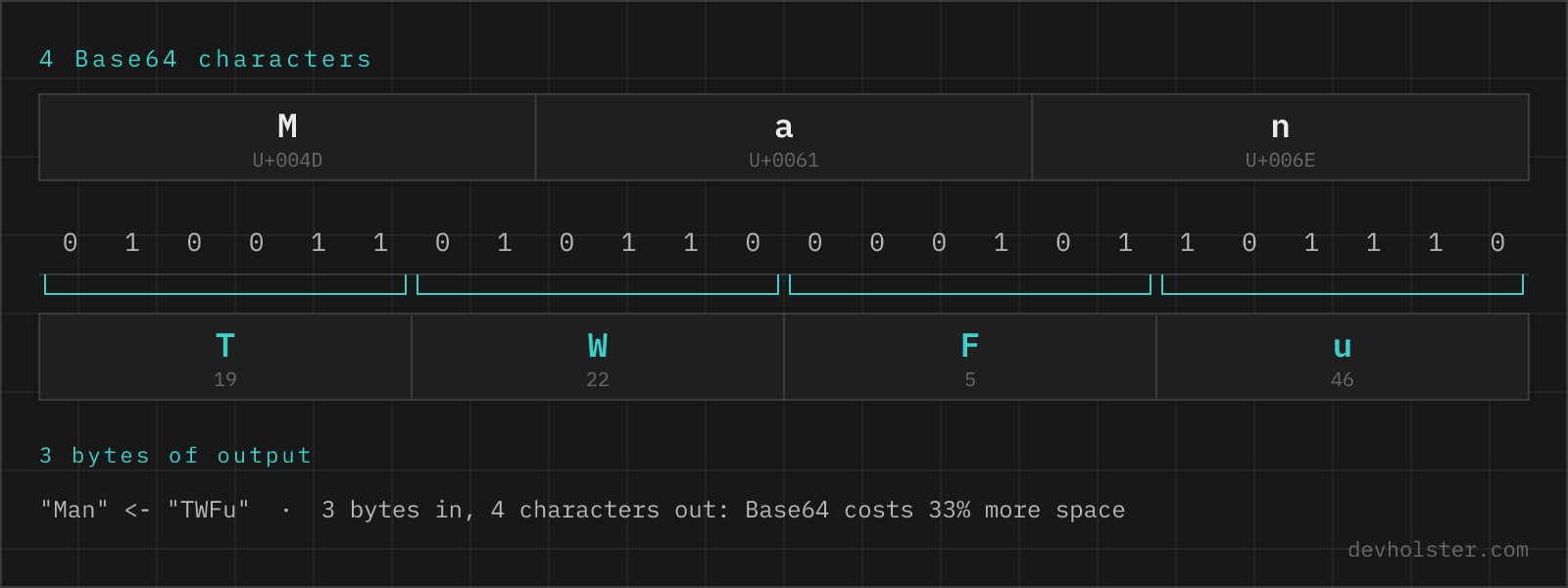
Base64 decoding reverses a mechanical mapping: every 4 characters carry 6 bits each, which reassemble into 3 bytes. Those bytes are then interpreted, and that second step is where the interesting part lives. If the bytes form valid UTF-8, you get text. If they start with 89 50 4E 47, you are holding a PNG. Base64 itself carries no type information at all, which is why a decoder has to guess, and why this one shows a hex dump instead of pretending that a JPEG is a string.
Worth stating plainly because the search term "base64 decrypt" is so common: no key exists, nothing is hidden. Base64 makes bytes survive a text-only channel, nothing else.
How to use this decoder
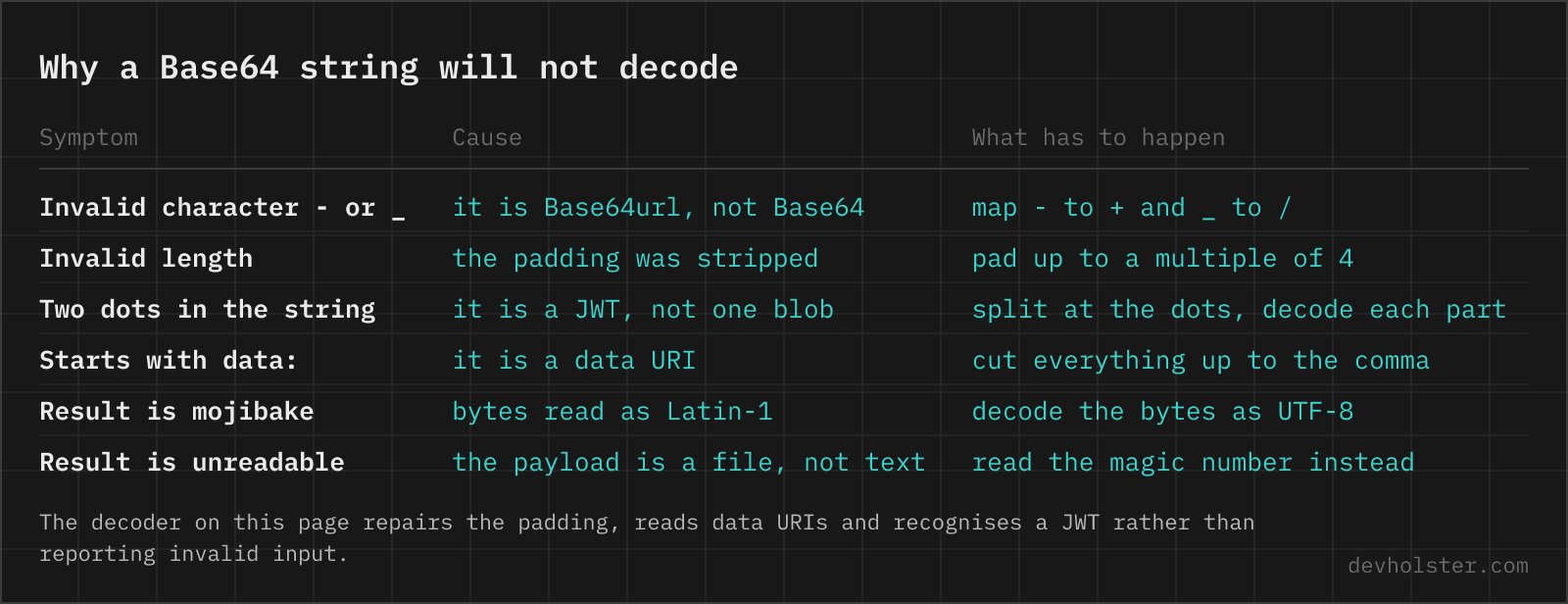
Paste into the left pane and the result appears on the right as you type. The input is normalised before decoding: whitespace and line breaks are removed, - and _ are mapped back to + and /, and missing = padding is reconstructed from the length. That covers Base64 copied out of emails, YAML files, JWTs and chat messages without any manual cleanup.
- Paste the string. Wrapped lines, a full
data:URI, a bare JWT segment or a complete three-part JWT all work. - Read the payload stat. The strip under the panes shows whether the result is text or binary, plus input and output sizes.
- Copy or download. Text copies to the clipboard; binary downloads as a file with a matching extension.
--strict
Turns off all repairs and applies RFC 4648 to the letter: only A–Z a–z 0–9 + / = are accepted, the length must be a multiple of 4, and any line break is an error. Use it to find out whether a string is actually valid standard Base64, which is the question that matters when a strict decoder in your backend rejects data that this page decodes happily. The error message names the character and its index.
A whole JWT is recognised
Paste all three dot-separated segments and you get the header and the payload decoded and pretty-printed, one after the other, plus the raw signature. Every other Base64 decoder we tried fails here, because the dots are outside the alphabet, and the standard advice is to paste one segment at a time. That is a chore nobody needs, so this page checks for the three-segment shape first and splits the token itself.
Two things it deliberately does not do. It does not verify the signature, which needs the secret or the public key, so a forged token decodes just as neatly as a real one. And it says so under the output, next to the point people miss most often: a JWT is signed, not encrypted, so everything in the payload is readable by anyone holding the token. Where the payload carries iat, nbf or exp, those are also printed as UTC timestamps, with a note when the token has already expired, since "is this token still valid" is usually the actual question.
Images are shown, not hexdumped
When the decoded bytes start with a known image signature (PNG, JPEG, GIF, WebP, BMP or ICO), the picture appears above the hex dump. This is the data-URI case: a logo pulled out of a stylesheet or an email, where the hex dump answers no question and looking at the image answers all of them. The bytes are rendered through an <img> element, which browsers treat as a non-scripting context, so even a hostile payload can only draw pixels.
Recognising what you have
Before decoding, a glance at the string usually tells you what it is:
| Clue | What it means |
|---|---|
Starts with eyJ | Encoded JSON: the first characters of {". Almost always a JWT segment or a config blob. |
Contains - or _ | Base64URL. Strict standard decoders will reject it. |
No = at the end, length not divisible by 4 | Padding was stripped, typical for JWTs and URL parameters. |
Starts with iVBORw0KGgo | A PNG file. |
Starts with /9j/ | A JPEG file. |
Starts with JVBERi0 | A PDF. |
Starts with UEsDBB | A ZIP archive, which also means a .docx, .xlsx or .jar. |
| Two dots in the string | A complete JWT. Decode one segment at a time; the dots are separators, not data. |
Why a decode fails
Three failure modes account for nearly every "invalid Base64" report we have run into.
- Truncation. The string was cut off by a log line limit, a chat client or a text field. A length that leaves exactly one leftover character is mathematically impossible in Base64, and this decoder says so explicitly instead of returning garbage.
- Alphabet mismatch. Base64URL fed to a standard decoder, or the reverse. The tell is
-/_versus+//. - Invisible characters. Copying from a rendered web page or a PDF often drags in non-breaking spaces or zero-width characters that look like nothing at all. Whitespace normalisation catches most of these;
--strictexposes them by position when you need to know they were there.
A fourth one is subtler: the decode succeeds but the result is nonsense. That means the bytes are fine and your interpretation is wrong, usually because the data was compressed or encrypted before encoding. The hex dump helps here, since a gzip payload starts with 1f 8b and encrypted data looks uniformly random.
When the payload is not text
Decoders that force every result through a UTF-8 reader turn binary payloads into a screen of replacement characters, losing the information you actually wanted. This one checks whether the bytes are valid UTF-8 (and free of stray control bytes) and switches to a hex dump when they are not: offset, hex bytes and an ASCII column, the same layout xxd produces.
That view answers the practical question, which is usually "what kind of file is this", via the magic bytes in the first row. From there, the download button writes the raw bytes to disk. If the string came in as a data: URI, the MIME type from the header decides the file extension; otherwise you get a .bin that you can rename.
Decoding elsewhere
| Environment | Command | Strict about padding |
|---|---|---|
| Linux / macOS shell | base64 -d | Yes |
| Node.js | Buffer.from(s, 'base64') | No, and it also accepts Base64URL |
| Browser | atob(s) | Yes for the alphabet, tolerant of missing padding |
| Python | base64.b64decode(s) | Yes; use urlsafe_b64decode for -_ input |
| PowerShell | [Convert]::FromBase64String($s) | Yes, notably picky |
The differences in that last column explain a lot of "works locally, fails in CI" reports: Node happily eats a JWT segment that base64 -d and .NET both reject. When a pipeline breaks on Base64, run the string through --strict here first, then decide whether to fix the producer or to normalise on the consuming side. Going the other way, our Base64 encoder lets you pick the alphabet the consumer expects.
When a string refuses to decode
Is it safe to decode a JWT or an API token in an online Base64 decoder?
Only in a decoder that runs in your browser. A server-side decoder receives the token itself, and a session token in someone else's access log is a session token you have to revoke. Decoding happens here as JavaScript inside your tab, with no upload and no logging, and the page keeps working with the network disconnected, which is the easiest proof. The safest habit regardless of tool: decode tokens from a staging environment, and treat any production token you pasted into an unknown site as burned.
Can Base64 be decrypted?
There is nothing to decrypt. Base64 is an encoding with a fixed public alphabet, not a cipher, so anyone can reverse it without a key. If a string decodes to readable text, it was never protected. If it decodes to random-looking bytes, you are probably holding encrypted data that was Base64-encoded for transport, and you still need the actual key and algorithm to read it.
How do I decode a Base64 string in JavaScript?
atob(str) gives you a binary string, which is only correct for ASCII data. For UTF-8 text the reliable pattern is: const bytes = Uint8Array.from(atob(str), c => c.charCodeAt(0)); new TextDecoder().decode(bytes). Skipping the TextDecoder step is why decoded umlauts show up as ü and similar mojibake. In Node.js: Buffer.from(str, "base64").toString("utf8").
How do I decode Base64 in Python?
import base64, then base64.b64decode(s).decode("utf-8") for text or base64.b64decode(s) alone for binary data you want to write to a file. Two gotchas: b64decode raises binascii.Error: Invalid base64-encoded string when the padding is missing, which you fix with s + "=" * (-len(s) % 4), and JWT segments need base64.urlsafe_b64decode because they use - and _ instead of + and /. Passing validate=True makes the decoder reject stray characters instead of silently skipping them.
How do I decode Base64 on the command line?
Linux and macOS: echo "eyJhIjoxfQ==" | base64 -d (GNU coreutils uses -d, the BSD/macOS version accepts -D as well). For files: base64 -d encoded.txt > out.bin. PowerShell: [Text.Encoding]::UTF8.GetString([Convert]::FromBase64String($s)). Note that the CLI tools are strict about padding and reject the URL-safe alphabet, so JWT segments often need a tr -- "-_" "+/" and manual padding first.
Why does my Base64 string fail to decode?
Four causes cover nearly everything. The string was truncated in a log or chat, so its length is invalid. It is Base64URL (containing - or _) fed to a strict standard decoder. Padding was stripped, which strict decoders reject. Or it was copied out of an email or PDF where a line break landed in the middle. This tool repairs all four by default and only complains in --strict mode, where it names the offending character and its position.
How can I tell whether a string is Base64?
Check three things: the alphabet, the length and what it decodes to. Base64 contains only A–Z, a–z, 0–9, + and / (or - and _ in the URL-safe variant) with optional trailing =, its length is a multiple of 4 once padding is counted, and it decodes to something that makes sense. The length check is the useful one, because a hex string or an ID also passes the alphabet test. Beware the false positive everyone hits: plenty of random-looking strings decode without error into meaningless bytes, so "it decoded" is not proof. A JWT is the easy case, three segments separated by dots, each Base64URL.
What is a data URI and how do I get the file back?
A data URI embeds a file directly in markup, in the form data:image/png;base64, followed by the encoded bytes. To recover the file, cut everything up to and including the comma, Base64-decode the rest into bytes and save them with the extension the MIME type in the header names. Do not paste the decoded bytes into a text editor and save from there, because the editor rewrites anything that is not valid text. Dropping the whole data URI into the decoder above, prefix included, does the split, the decode and the file extension in one step.
Why does a Base64 decoder reject a string with dots in it?
Because the dot is not in the Base64 alphabet, which is A–Z, a–z, 0–9 and either +/ or -_ for the URL-safe variant. A string with two dots in it is almost always a JWT, where the dots separate three independently encoded segments, and the usual advice is to decode one segment at a time. This decoder spots that shape and splits the token itself instead of complaining. Other dotted formats exist and are not Base64 either: signed cookies from Express or Flask use a dot to separate value from signature, and PASETO tokens use dots between version, purpose and payload.
Why does the decoded text show ü instead of ü?
That is mojibake from a UTF-8/Latin-1 mismatch, and it usually happened before the Base64 step: the text was read as Latin-1, so ü was already stored as two characters when it got encoded. This decoder reads the bytes as UTF-8 and would show the correct character if the encoder had done its job. When you see it, fix the encoding side rather than the decoding side, otherwise the corruption stays in the data.
Can decoding Base64 be dangerous?
Reading the decoded text is harmless; running it is not. Base64 is the standard wrapper for hostile payloads in phishing mails, WordPress backdoors and obfuscated npm packages, precisely because it hides a script from a casual glance and from naive scanners. Decoding shows you the payload, which is the point of the exercise. The risk starts when you save the result as an executable, paste a decoded command into a shell or open a decoded HTML file in a browser. Decode in a text pane, read it, and never let it execute.