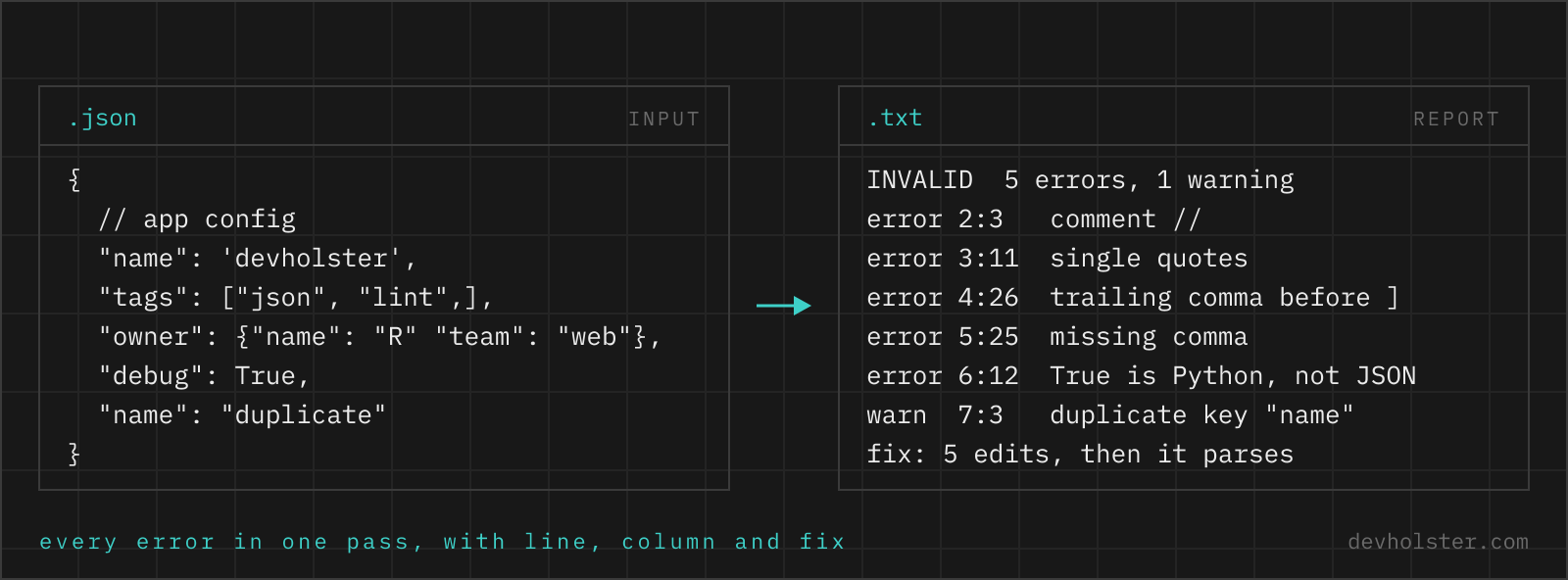
A parser stops at the first error. A document that was hand-edited, concatenated from logs or produced by a model rarely has only one, so validating it the usual way is a loop of fix, paste, next error. The validator above reads on after each failure, which is why it can list every syntax problem at once, each with line, column, a code frame and the fix, and why it can then hand back a repaired document. It also reports what a plain parser accepts without a word: duplicate keys, integers that JavaScript rounds, lone surrogates, a __proto__ key.
What counts as valid JSON
The whole grammar fits in a table. RFC 8259 defines seven kinds of value, four whitespace characters, one string syntax and one number syntax, and everything people add from JavaScript habit is outside it.
| Rule | Valid | Not JSON |
|---|---|---|
| Values | object, array, string, number, true, false, null | undefined, NaN, Infinity, True, None, dates, functions |
| Top level | any value, including a bare 42 or "text" | two values in one document |
| Strings and keys | "double quotes" only | 'single', “curly”, unquoted keys |
| Escapes | \" \\ \/ \b \f \n \r \t \uXXXX | \', \x41, a raw line break or tab inside a string |
| Numbers | -?(0|[1-9]digits)(.digits)?(e±digits)? | 01, .5, 1., +1, 0xFF, 1_000 |
| Separators | , between items, : after a key | a trailing comma, =, a missing comma |
| Whitespace | space, tab, CR, LF | non-breaking space, a BOM, U+2028 |
| Comments | none | //, /* */, # |
Two things in that table are not errors but still worth knowing. Duplicate keys are legal in the grammar and undefined in meaning, and the RFC sets no limit on number size or nesting depth, so each parser picks its own. Both come back under what JSON.parse does not report.
Reading the report
Paste or drop the document and the verdict appears on the right while you type. INVALID comes with the number of errors, warnings and notes, then one row per finding in document order: severity, a one-line title, the line and column as a button that puts your cursor on the spot, a sentence on the cause, the code frame with a caret, and the fix that was applied. Errors are things JSON.parse rejects. Warnings parse fine and still bite later. Notes are either JSON5 syntax in relaxed mode or oddities like an empty key.
One row per error, not one error per run.
After each syntax error the scanner applies a minimal repair in memory (insert the missing comma, drop the comment, requote the string) and keeps reading, so a document with a trailing comma on line 6, a Python True on line 8 and a missing comma on line 7 shows all three at once. When the repaired text parses, a fix line appears under the verdict with the list of what changed and two buttons: apply the fixes to the input, or copy the fixed JSON. A warning never changes the text, so a big integer or a duplicate key stays exactly as you pasted it. The edits are applied to the text you pasted, not to a re-serialised tree, so indentation, key order and the exact spelling of every number survive the fix.
--strict
On by default, meaning RFC 8259 and nothing else. Switched off, the JSONC and JSON5 additions (comments, trailing commas, single quotes, unquoted keys, hex numbers, +1, .5, NaN and Infinity) are reported as notes instead of errors, the verdict reads VALID with the remark that this is JSON5 or JSONC rather than strict JSON, and the fix still produces the strict version. A missing comma or a raw line break in a string is an error in either mode, because no dialect allows it.
--ndjson
Validates line by line. Every non-empty line has to be one complete JSON value (a pretty-printed document has to go through the JSON minifier first), the verdict counts failing lines, and a second value on the same line is flagged with a line break as the fix. Without the flag, a file with one document per line is reported as concatenated JSON at the start of the second line, with a hint that this option is what you want.
--big-numbers
Warns about numbers that survive the grammar and not the runtime: integers beyond 9007199254740991 with the value JSON.parse would actually produce, decimals with more than 17 significant digits, and exponents that overflow to Infinity. Switch it off when the consumer is Python, Go or Java and the warnings are noise.
The structure block at the end is a quick sanity check: top-level type, depth, number of keys and array items, strings, numbers, size in bytes and lines. A config that should be one object and comes back as "array (2 documents)" has been concatenated somewhere upstream.
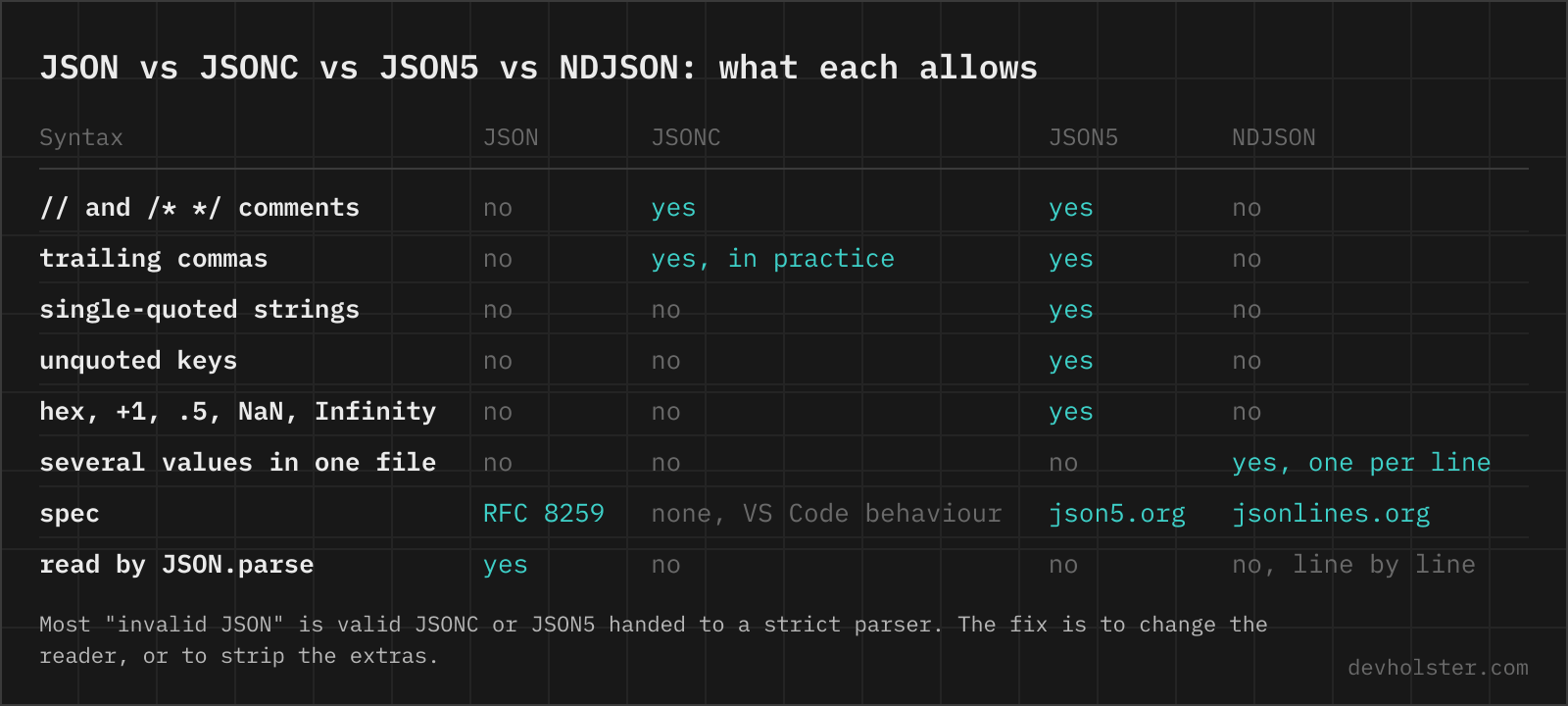
JSON, JSONC, JSON5 and NDJSON are four formats
Most "invalid JSON" is valid something else. The file was written for a tolerant parser and then handed to a strict one, typically JSON.parse, json.loads or a config loader. Knowing which dialect you are holding tells you whether to fix the file or the reader.
- JSON is the table above. Every parser in every language reads it the same way, which is the whole point of the strictness and the price it pays against YAML and TOML.
- JSONC is JSON plus
//and/* */comments, and in practice trailing commas. VS Code invented the name for its settings files, andtsconfig.jsonand.eslintrc.jsonfollow it. There is no spec, only the behaviour of thejsonc-parserpackage. - JSON5 has a spec and goes further: single quotes, unquoted keys, hex,
Infinity, multi-line strings. Babel's config files and a fair amount of hand-edited config use it. - NDJSON (JSON Lines,
.jsonl) is not a superset at all but a container: one strict JSON value per line, newline-separated, no wrapping array. Logs, exports, streaming APIs and fine-tuning datasets use it because a reader can process line 40,000 without holding the first 39,999. Concatenated JSON, several values with no particular separator, is whatjqandjson.JSONDecoder.raw_decoderead andJSON.parsedoes not.
The validator reports each of these for what it is. In strict mode a comment is an error that names JSONC, single quotes name JSON5, and a second document names NDJSON and points at the flag. The fix always produces strict JSON, since that is the only one of the four that every consumer accepts.
The error messages, verbatim
What each runtime prints, in the spelling you would paste into a search box, and what it actually means. The position is where the parser gave up, not always where the mistake is: a missing comma is reported at the start of the next value, an unterminated string wherever the input ran out.
Unexpected token } in JSON at position 42 The pre-2023 wording of V8 for a trailing comma, an empty value or a bracket that closes too early. Current Chrome and Node say "Expected double-quoted property name in JSON at position 42 (line 3 column 5)" for the same fault. Either way, look one token to the left of the position.
Unexpected token ', "'name'" is not valid JSON Single quotes. V8 quotes a snippet of the source instead of a position for an unexpected token, which is why this message has no line number. Python says "Expecting property name enclosed in double quotes", jq says "Invalid numeric literal" for the same file.
Unexpected end of JSON input The text stopped before the value was complete: an empty string, a truncated response, or brackets that were never closed. The report lists which brackets are still open and from which line. fetch().json() on an empty body is the commonest source.
Expecting property name enclosed in double quotes: line 1 column 2 (char 1) Python's json module, for an unquoted or single-quoted key. A printed dict (repr output) triggers it every time. json.dumps on the producing side is the fix, not a regex over the quotes.
JSON.parse: unexpected character at line 1 column 2 of the JSON data Firefox, same cause as the V8 message above but with a line and column and no snippet. Firefox also phrases an empty input as "JSON.parse: unexpected end of data at line 1 column 1 of the JSON data".
Unexpected non-whitespace character after JSON at position 7 (line 1 column 8) The first document was complete and more text follows: a second object, a stray bracket, or a semicolon pasted from JavaScript. Two objects in one file with a newline between them means the file is NDJSON.
Bad control character in string literal in JSON at position 3 (line 1 column 4) A raw line break or tab inside a string. Multi-line text has to be escaped as \n, and a tab as \t. Often the real problem is a missing closing quote on the previous line, which the validator tells apart by looking at how the next line starts.
invalid character '}' looking for beginning of object key string Go's encoding/json for a trailing comma before a closing brace. Go also reports "invalid character '\'' looking for beginning of value" for single quotes, and "unexpected end of JSON input" for truncation, using the same words as V8.
Illegal trailing comma before end of object: line 1 column 7 (char 6) Python 3.13 and later, which finally name the trailing comma and point at it. Before 3.13 the same file gives "Expecting property name enclosed in double quotes: line 1 column 8 (char 7)", one character further on, at the brace.
What JSON.parse does not report
A document can pass every parser and still carry data that gets lost or misread the moment it is used. None of the following raises an error anywhere, which is why the validator reports them as warnings next to the syntax errors.
$ node -e 'console.log(JSON.parse(`{"a":1,"a":2}`), JSON.parse("[9007199254740993]"))'
{ a: 2 } [ 9007199254740992 ]
Duplicate keys. RFC 8259 says names "SHOULD be unique" and describes the behaviour with duplicates as unpredictable. In practice V8, Python, Go, Jackson and .NET keep the last value and throw the earlier one away, a few libraries keep the first, and strict YAML loaders reject the document. The first "a":1 above is gone without a trace, which is exactly how a config override that "does not work" comes about. The report names the line of the earlier definition, and also flags keys that differ only by Unicode normalization, café as one code point against e plus a combining accent, which render identically and are two different keys.
Big integers. 9007199254740993 came back as 9007199254740992. JavaScript numbers are IEEE 754 doubles and hold integers exactly only up to 253 − 1, so a 64-bit database ID, a Twitter snowflake or a Discord ID loses its last digits in any JavaScript-based tool, browser devtools included. Python and Go read the same text exactly, which makes the bug invisible until the ID round-trips through a frontend. The warning shows the exact value the parse produces. The usual fix is to send such IDs as strings, the background is in our guide on JSON number precision.
Lone surrogates. "\uD83D" is a high surrogate without its low half. JSON.parse accepts it and produces a string that is not valid Unicode: TextEncoder writes U+FFFD for it, and Python's .encode() raises "surrogates not allowed". It comes from code that sliced a string in the middle of an emoji.
NUL and __proto__. \u0000 is a legal escape that PostgreSQL refuses in jsonb and that ends a C string early. A key named __proto__ parses into an ordinary own property, and then Object.assign or a recursive merge turns it into the prototype of the target: the classic prototype-pollution payload. Both are warnings with the reason, because the right response depends on who consumes the data.
Depth is the last one. The grammar has no limit, parsers do: System.Text.Json stops at 64 levels by default, jq 1.7 at 256, Jackson 2.15 and later at 1000, and Python's json raised RecursionError near 1000 up to 3.11 (3.12 reads about 10,000 levels, 3.14 more than 100,000). Past 100 levels the report says so.
Where broken JSON comes from
Almost never from a serialiser. The same five sources account for nearly everything that lands in a validator, and each leaves a recognisable mark.
| Source | What you see |
|---|---|
| JavaScript object literal copied from source | unquoted keys, single quotes, trailing commas, undefined, a ; at the end |
Python dict from print() or a log | single quotes, True, False, None |
| Language model output | a // comment, a trailing comma, a markdown fence around the whole thing, sometimes two documents |
| Word, Outlook, Google Docs, chat apps | curly quotes “ ”, non-breaking spaces, an en dash where a minus sign belongs |
| Windows editors, PowerShell 5, Excel exports | a BOM at byte 0, CRLF inside strings, a NUL at the end |
The fix button handles all five. For a whole Python dict or JavaScript object literal the JSON formatter with --repair does the same and pretty-prints the result.
Validating in the terminal and in CI
A browser tab is for the JSON in your clipboard. Files in a repository should be checked where they live, and every machine already has at least one parser for that.
$ printf '{"a":1,}' | jq empty; echo "exit $?"
jq: parse error: Expected another key-value pair at line 1, column 8
exit 5
jq empty file.jsonprints nothing on success and exits non-zero with line and column on failure. It reads concatenated documents without complaint, so it will not catch a file thatJSON.parserejects as two values.python3 -m json.tool file.json > /dev/nullis on every machine with Python, exits 1 with a line and column, and since 3.13 names trailing commas explicitly.node -e 'JSON.parse(require("fs").readFileSync(0, "utf8"))' < file.jsonvalidates with the same engine as the browser, which matters if that is where the file ends up.jsonlint(npm) andcheck-jsonfrom pre-commit run the same check over a list of files, and VS Code validates as you type, including against a schema when the file carries a$schemakey.
None of these report more than the first error, and none warn about duplicate keys or big integers. For a one-off file with several problems the report above is faster. For a pipeline, one of the four lines above in the pre-commit hook or CI job is the right place, because a broken package.json should fail before it is committed, not when a colleague pulls it.
Schema validation is a different job. A syntax check answers "is this JSON", a schema check answers "is this the JSON my program expects", with required keys, types and ranges. That takes a JSON Schema and a library like ajv or jsonschema, and this page does not do it.
JSON errors, asked and answered
How do I validate JSON in Python?
From the shell, python3 -m json.tool file.json exits 0 for valid input and 1 with a message like "Expecting property name enclosed in double quotes: line 3 column 5 (char 41)" for invalid. In code, wrap json.loads() in try/except json.JSONDecodeError and read e.lineno, e.colno and e.pos. Python 3.13 and later name a trailing comma explicitly ("Illegal trailing comma before end of object"), older versions report the generic property-name message one token later. Note that json.loads accepts NaN and Infinity and keeps the last of two duplicate keys, both without any error, so a document that passes Python can still fail in a browser.
How do I check if a string is valid JSON in JavaScript?
Call JSON.parse inside try/catch. A SyntaxError means invalid, anything else is the parsed value. There is no JSON.isValid, and a regex cannot do it, because JSON is not a regular language. Two traps: JSON.parse("123") and JSON.parse("null") succeed, since a bare value is a complete document, and response.json() throws the same SyntaxError when a fetch body is empty or HTML. If you only need the answer and not the value, the cost of parsing is the same, so parse.
How do I validate a JSON file in bash or in CI?
jq empty file.json is the usual one-liner. It prints nothing and exits 0 on success, or prints "jq: parse error: … at line L, column C" and exits with 5 (jq 1.7). Without jq, python3 -m json.tool file.json > /dev/null or node -e 'JSON.parse(require("fs").readFileSync(process.argv[1], "utf8"))' file.json do the same with exit code 1. For a whole tree: find . -name "*.json" -print0 | xargs -0 -n1 jq empty. One caveat with jq: it reads concatenated documents without complaint, so {"a":1}{"b":2} passes jq empty even though JSON.parse rejects it.
Why does my JSON have an error at position 0 or line 1 column 1?
The very first character is already not JSON. Four causes cover nearly every case: the file starts with a UTF-8 byte order mark (U+FEFF, written by Notepad and PowerShell 5), the body is an HTML error page that starts with < where an API response was expected, the input is empty (Python says "Expecting value: line 1 column 1 (char 0)", JavaScript "Unexpected end of JSON input"), or the string is literally "undefined" because a variable was never set. Open the raw bytes: xxd file.json | head -1 shows efbbbf for a BOM and 3c for a < at the start.
Can JSON keys be duplicated?
Technically yes, and every mainstream parser silently keeps the last value. Treat a duplicate as a bug.
What is the difference between JSON and JSON5?
JSON5 is JSON plus the conveniences of a JavaScript object literal: comments, trailing commas, single-quoted strings, unquoted keys, hex numbers, leading and trailing decimal points, + signs, Infinity and NaN, and multi-line strings with a backslash before the line break. It is a separate format with its own parser (the json5 npm package, Python's json5, or Babel's config loader), and JSON.parse rejects all of those additions. Every JSON document is valid JSON5, the reverse is not true. Use JSON5 for hand-edited config that humans maintain, keep plain JSON for anything another program produces or consumes.
How do I validate a JSON Lines (NDJSON) file?
Line by line, never as one document: a .jsonl or .ndjson file is many independent JSON values separated by newlines, so JSON.parse on the whole file fails at the start of line 2 with "Unexpected non-whitespace character after JSON". In the shell, jq -c . file.ndjson > /dev/null reads value after value and stops at the first broken one with a line and column (jq counts to where the bad token ended, so the line can be one too high). In Python, for n, line in enumerate(f, 1): json.loads(line) inside a try block reports every failing line. The --ndjson option above does exactly that in the browser: each non-empty line is validated on its own, and the report lists the failing line numbers instead of the first one.
Why does response.json() throw "Unexpected end of JSON input"?
Because the response body was empty. A 204 No Content, a 200 with an empty body from a misconfigured handler, or a body that was already consumed by an earlier response.text() call all produce an empty string, and JSON.parse("") throws exactly this. Check response.status and response.headers.get("content-type") before calling .json(), and read the body once with response.text() when debugging, so you can see what actually arrived. The same message for a non-empty body means the JSON is truncated, usually a proxy timeout or a stream closed mid-transfer.
What does "Expecting value: line 1 column 1 (char 0)" mean in Python?
json.loads got a string that does not start with a JSON value: most often an empty string, an HTML page or a byte order mark. requests.get(url).json() raises it when the server answered with an error page instead of JSON.
Does a JSON validator check against a schema?
No. A validator checks syntax, whether the text is JSON at all. A schema validator checks structure and types against a JSON Schema document, for example that "port" is an integer between 1 and 65535 and "name" is required. For the second job use ajv in JavaScript, jsonschema in Python, or the $schema key in VS Code, which validates as you type. This page only does the first: a document with a typo in a key name is valid JSON, and only a schema would catch that.
Why does VS Code mark my JSON as invalid when the program reads it fine?
The file is JSONC and VS Code opened it as plain JSON, or the other way round. VS Code treats settings.json, tsconfig.json, launch.json and .eslintrc.json as "JSON with Comments" and accepts // and trailing commas there, but a file named config.json gets the strict JSON mode and red squiggles under the same comment. Your program likely uses a tolerant parser (TypeScript's, or json5) that does not care. Either rename the file, change the language mode in the status bar, or map the pattern in files.associations. The comment is still not JSON, so anything that later reads the file with JSON.parse will break.
What does jq "parse error: Invalid numeric literal" mean?
Unquoted text where jq expected a value: single quotes, a bare word or an unquoted key. jq tries to read it as a number.