Why Postgres needs its own tokeniser
A formatter does not understand a query. It tokenises the text and lays the tokens out, and PostgreSQL bends the token rules in more places than any other mainstream engine. :: glues a value to its type as a cast. $$ opens a string that runs to the next $$, which is how function bodies are written. ->, ->> and #>> reach into JSON columns. Add ILIKE, RETURNING, ARRAY[1, 2, 3], LATERAL joins, DISTINCT ON and aggregate filters with FILTER (WHERE ...), and a good share of everyday Postgres contains at least one construct a generic SQL tokeniser has never heard of.
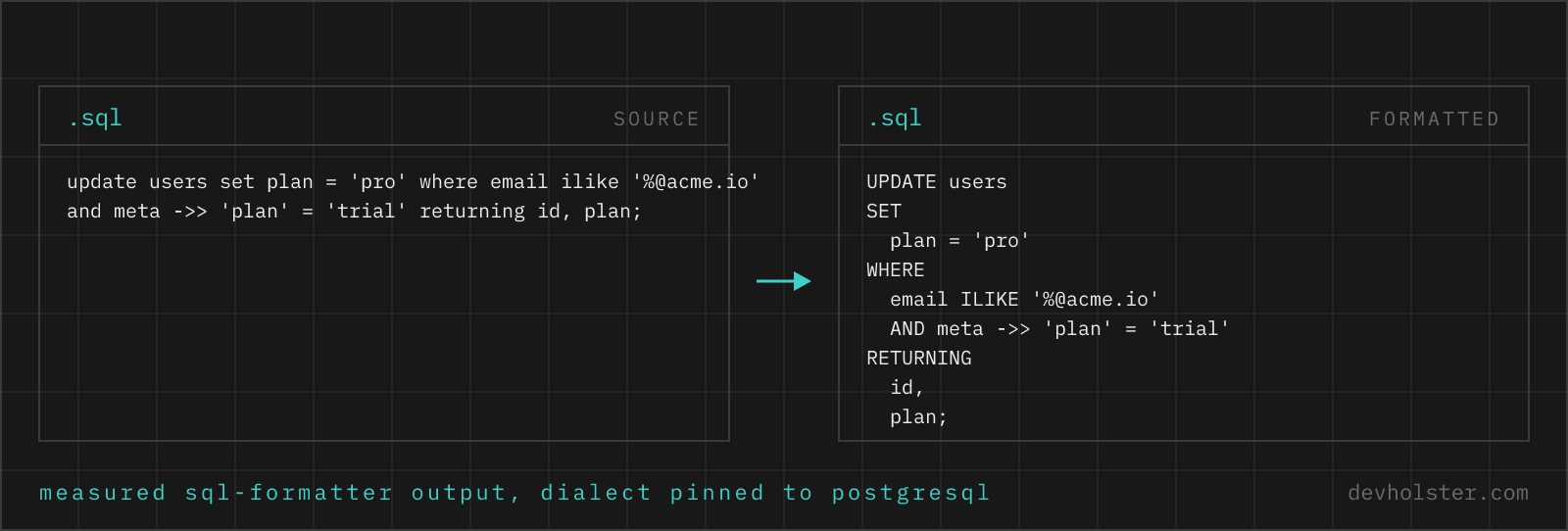
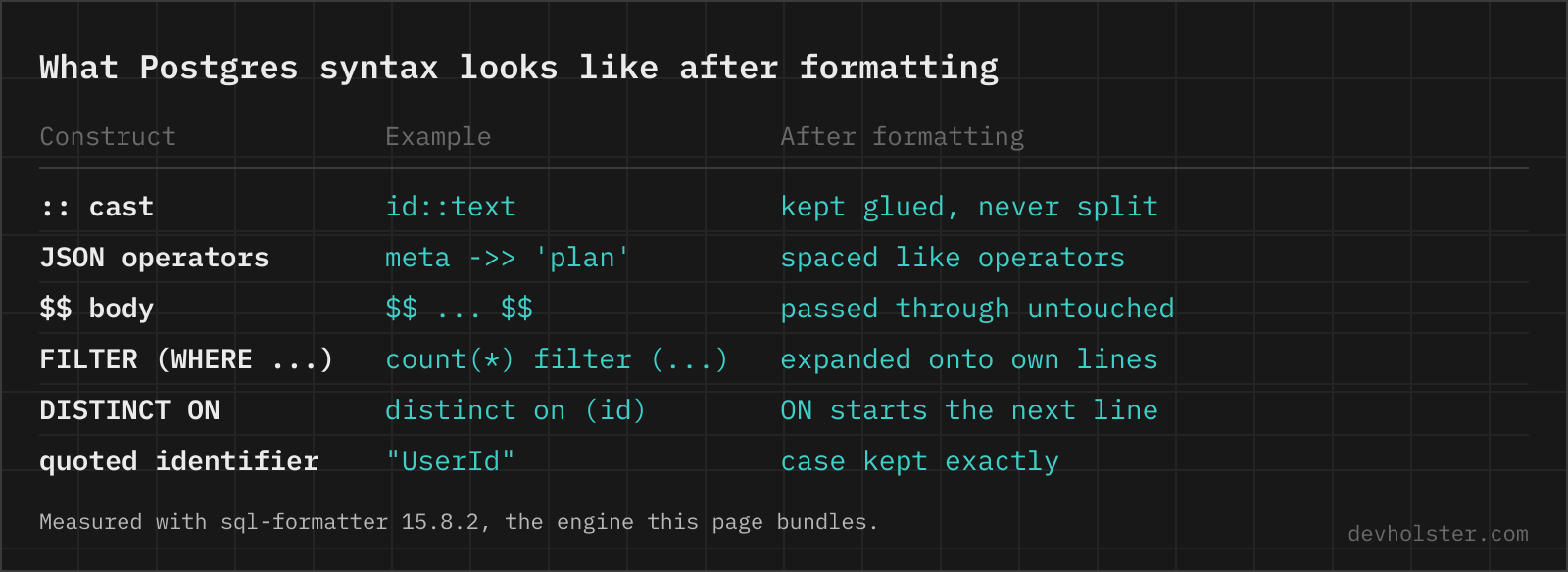
Fed to the wrong tokeniser, these constructs rarely produce an error message. They produce silently odd layout, a cast split across lines or a chunk of the query treated as one opaque blob. This page removes the problem by pinning the dialect. Casts stay glued, id::text never breaks apart. JSON operators are spaced like the operators they are, meta ->> 'plan'. RETURNING is treated as a clause and starts its own line, with the returned columns indented under it. LATERAL subqueries indent like any other join. Named parameters keep their shape too, WHERE name = :name stays that way instead of collapsing into =:name, which is what the engine does out of the box because Postgres itself only knows $1.
Two layout decisions of the engine deserve an honest mention. FILTER (WHERE ...) is expanded over several lines even when it would fit on one, and DISTINCT ON (customer_id) gets its line break between DISTINCT and ON, which looks unusual and is still correct SQL. Neither changes what the query returns.
Supabase runs vanilla Postgres underneath, so all of this applies unchanged to queries you write for RLS policies or take out of the Supabase query generator.
There is no dialect dropdown because there is no decision left to make. Paste or drop a .sql file, pick the indent, switch --uppercase for keyword case, --tabular for river-style alignment or --gap for two blank lines between statements, then copy or download. Nothing is ever executed against a database. If you work across engines, the generic SQL formatter is the same tool with dialect detection instead of a pin, and pasting the wrong engine's SQL here does not dead-end either. If the text refuses to tokenise as Postgres, MySQL backticks being the classic case, the other tokenisers are retried and a line under the output reports it: "Could not tokenise this as postgresql, formatted as sql instead."
Lowercase folding, and why identifiers are never touched
Postgres folds every unquoted identifier to lowercase before it looks anything up. SELECT userId FROM Users reads the column userid from the table users. The SQL standard says to fold to uppercase, Postgres went the other way long ago and stayed there. Double quotes switch folding off, so "Users" names a table that plain users can never reach, and once a table is created with a quoted mixed-case name, every query that touches it has to quote it forever.
For a formatter this draws a hard line. --uppercase rewrites keywords, because keyword case is pure style. It never rewrites an identifier, because in Postgres identifier case can be meaning. We measured both halves with the engine this page bundles, sql-formatter 15.8.2. A quoted "UserId" comes through character for character, and unquoted names keep exactly the case you typed.
One edge sits between the two rules. Words like day, month and year are date-part keywords to the tokeniser, so an unquoted alias named after one gets uppercased along with the keywords:
select created_at::date as day
from orders;

SELECT
  created_at::date AS DAY
FROM
  orders;
select created_at::date as "day"
from orders;

SELECT
  created_at::date AS "day"
FROM
  orders;
The uppercased version still runs, Postgres folds DAY straight back to day. It only looks wrong in the diff. Quoting the alias keeps the spelling byte for byte, and renaming it to something like signup_day avoids the collision entirely.
Dollar-quoted function bodies pass through untouched
To Postgres, everything between $$ and the matching $$ is one string literal. That is the point of dollar quoting, a plpgsql body full of single quotes needs no escaping. The formatter honours that reading. The body is a single token, so it passes through byte for byte, comments, indentation and all.
$ echo "create function is_paid(o orders) returns boolean language sql as \$\$ select o.status = 'paid' and o.total > 0 \$\$;" | sql-formatter -l postgresql -c '{"keywordCase":"upper"}'
CREATE FUNCTION is_paid (o orders) returns boolean language sql AS $$ select o.status = 'paid' and o.total > 0 $$;
Two details in that run are worth seeing. The body kept its spacing and its lowercase, as promised. So did returns boolean language sql in the header, which the tokeniser does not classify as keywords inside a CREATE FUNCTION, while CREATE FUNCTION and AS were uppercased. That is the engine as it is, not a claim we would like to be true. When the SQL inside a body should be formatted too, paste the statements between BEGIN and END in on their own and put the result back inside the $$ pair, or use pgFormatter, which parses plpgsql itself.
What this tool does not know
It has no connection, no schema and no planner. A misspelled column formats perfectly, a join without its condition formats perfectly, and PARSED under the tool means the text tokenised as PostgreSQL, nothing more. For real answers, run the query with EXPLAIN against the actual database.
Layout is the whole job.
Online tool vs. pgFormatter, pgAdmin and psql
pgFormatter is the reference. A Perl tool built only for Postgres, it parses plpgsql bodies, exposes dozens of layout options and runs in CI or a pre-commit hook. When your queries live in a repository and Postgres is the only engine, install pgFormatter and wire it into the toolchain, a browser page has no business being part of a build.
pgAdmin is weaker here than people expect. The Query Tool's Edit menu offers auto-indent, block indent and comment toggling, and that is the whole list in the pgAdmin 4 documentation as of 9.18. There is no command that reformats an existing query, so a one-liner pasted from a log stays a one-liner.
psql has no formatter at all. \e opens the current query buffer in $EDITOR, and the layout is whatever your editor produces.
This page covers the case none of them handle, the query that is not in your editor yet. A slow-query log line, SQL out of a Slack thread, a statement copied from a dashboard. Production Postgres queries carry table names, schema design and sometimes literal customer values, and none of that should travel to a stranger's server for the sake of line breaks. Formatting here stays in the tab, and when the query has to leave the machine anyway, for a ticket or a ChatGPT prompt, the SQL anonymizer swaps the names for placeholders first.
Postgres questions
Why does PostgreSQL lowercase my column names?
Because unquoted identifiers are folded to lowercase before anything is looked up. To Postgres, createdAt and createdat are the same name, and "createdAt" in double quotes is a different one. The SQL standard folds to uppercase, Postgres chose lowercase decades ago and kept it for compatibility with its own history. The practical rule that falls out is to name everything snake_case and never quote identifiers, which makes a whole class of "column does not exist" errors impossible. Once a table is created with a quoted mixed-case name, every query that touches it has to quote it forever.
What does :: mean in PostgreSQL?
It is a cast. total::numeric is Postgres shorthand for CAST(total AS numeric), and both forms produce the same plan.
What is dollar quoting ($$) in PostgreSQL?
A string literal syntax with no escaping inside. Everything between $$ and the next $$ is one string, which is why function bodies use it, since a plpgsql body written with regular quotes would need every inner quote doubled. The delimiter can carry a tag, as in $body$ ... $body$, so dollar-quoted strings can nest. To a formatter the whole block is a single token.
Should I use ILIKE or LOWER() with LIKE?
They match the same rows, indexes decide it. ILIKE cannot use a plain B-tree index, while an expression index on LOWER(col) can serve LOWER(col) LIKE prefix searches, which makes that the portable choice for anything hot. For contains searches with a leading wildcard, neither helps and you want a pg_trgm GIN index, which ILIKE does use. citext is the third option when a whole column should always compare case-insensitively.
How do I pretty-print a plpgsql function body?
General formatters skip it, the body is one string token. Use pgFormatter, or format the statements between BEGIN and END on their own.
What does DISTINCT ON do in PostgreSQL?
It keeps one row per group, the first in ORDER BY order. Standard SQL needs a window function for the same result.