A private chat room from two short IDs
This page opens a private chat between exactly two browsers, with no signup, no app to install and no chat server. You get an eight-character ID the moment you start. Send it to the other person over any channel you already have, or press copy invite link, which puts a link in your clipboard that carries both IDs. Whoever opens the link lands straight in your chat, and your tab starts waiting the moment you copy it. Treat that link like a password, because anyone who has it can take the free seat.
The room fits two people and nobody else. A third browser that shows up with the same IDs is turned away automatically, and both of you see a note that it tried.
Inside the chat, the basics work the way every messenger has trained you: Enter sends, Shift+Enter adds a line, a typing indicator shows when the other side is writing, and a message holds up to 4000 characters. What no messenger shows you is the row under the chat. It names the connection path, direct or via a server-reflexive address, read from the browser's own statistics, and it measures the round-trip time to the other tab live. A ping of 9 ms is your proof that the packets are not taking a detour through a data center.
Nothing is stored anywhere. Leave wipes the conversation from your tab, closing the tab does the same, and a reload hands you a fresh ID. If your partner drops out, your tab keeps waiting under the same IDs in case they come back.
There is one deliberate speed bump. The page touches the network only after you confirm the start screen, and it contacts nobody until a valid partner ID exists. What each party in the chain gets to see is spelled out below, before your first packet leaves.
How two browsers find each other
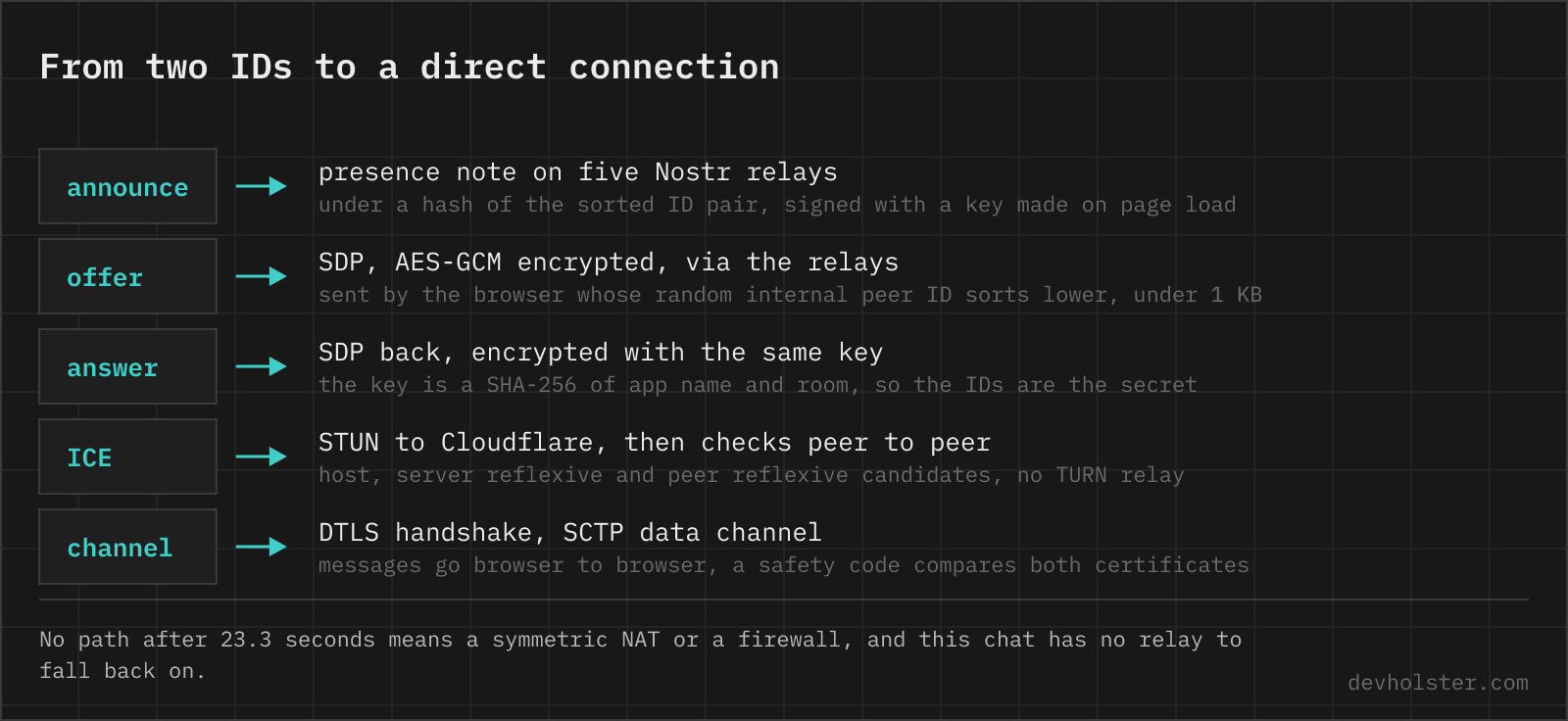
Two browsers cannot simply call each other. Neither knows the other's address, and most sit behind a router that discards anything it did not ask for. Every WebRTC connection, this chat as much as a browser video call, therefore starts with a middleman carrying two envelopes, the offer and the answer, and ends with that middleman out of the picture.
- Room. Both IDs are sorted and joined into one name,
a2b3c4d5-k7m3x9p2. Both sides compute the same name no matter who typed first, so nobody has to play host. The library underneath,trystero, hashes that name into a topic and derives an AES-GCM key from it. - Announce. Each browser connects to five public Nostr relays, picked from a built-in list of 28 by a hash of the app name, and posts a presence note under the topic. The relays forward it to anyone subscribed to the same topic.
- Offer. When the two browsers see each other, the one whose internal peer ID sorts lower sends an encrypted offer. That internal ID is a random 20-character string made fresh on every page load, not the eight characters on your screen.
- Answer and ICE. The other browser answers, both trickle their address candidates through the relays, still encrypted, and then start firing connectivity checks straight at each other.
- Data channel. The first address pair that works carries a DTLS handshake and an SCTP data channel. From here on, no message ever touches a relay.
On one network the whole sequence took 0.6 to 0.8 seconds in our tests.
The relays stay involved for as long as you are in a room. trystero keeps its WebSockets open and posts a fresh presence note about once a minute, as ephemeral Nostr events (kind 20000 to 29999) that relays are not expected to store. Each note holds a random peer ID and the topic hash, signed with a key made on page load, and leaving the chat closes the sockets.
One detail only the source code reveals. On joining, trystero prepares 20 offers in advance so it can answer quickly, and every one of them is a full RTCPeerConnection that gathers addresses and pings the STUN servers. This page closes the 19 unused ones the moment your partner is connected.
What STUN is and why this chat needs it
Your browser knows its address on the local network, something like 192.168.1.23. The rest of the internet sees your router's public address and a port the router picked on its own. Nobody can reach you on the first, and the browser cannot discover the second by itself.
STUN closes that gap with one UDP packet in each direction. The browser sends a small binding request, and the server replies with the source address and port it saw the request arrive from. That reply becomes a candidate of type srflx (server reflexive), which travels to the other side inside the encrypted signalling. RFC 8489 specifies the whole exchange.
A STUN server therefore sees your public IP address, a port and the time. It does not see which room you are in, who the partner is, or a single message, because none of that is in the packet.
This page asks one server, stun.cloudflare.com on UDP port 3478. Cloudflare runs it for exactly this job and offers it free and without a limit, no account or key needed. Setting it replaces the library's defaults, three Google servers and one from Cloudflare, so Google is out of the picture. The address is anycast, so the answer comes from a Cloudflare data centre near you.
How often the server hears from you afterwards is the browser's decision, and it is more often than most people assume. Chrome, Edge and Safari all run Google's libwebrtc, which repeats the binding request every 10 seconds for as long as the connection lives, to keep the router's port mapping open. On Wi-Fi and cable that never stops. On a network the browser rates as expensive, mobile data for example, it ends after two minutes. So Cloudflare does not only see that you connected. It sees how long you chat.
Not a single message passes through it either way, since the chat itself runs directly from tab to tab. The connectivity checks the two browsers exchange are STUN messages too, but those travel peer to peer with no server involved.
Who sees what
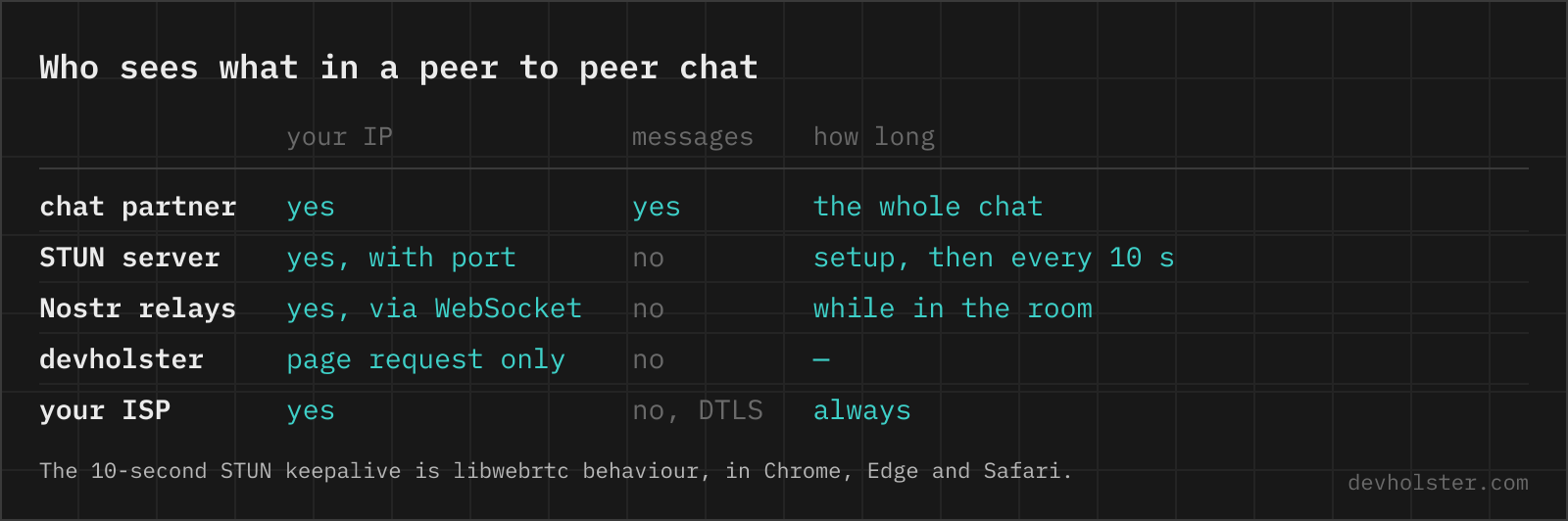
Every party in the chain learns something, and honest is better than vague. This table is the whole privacy story of a peer to peer chat, ours included.
| Your IP | Messages | Your ID | How long | |
|---|---|---|---|---|
| Chat partner | yes | yes | yes | the whole chat |
| STUN server | yes, with port | no | no | setup, then every 10 s in libwebrtc |
| Nostr relays | yes, via WebSocket | no | no, a hash of the room | while you are in the room |
| devholster | page request only | no | no | — |
| Your ISP | yes | no, DTLS | no | always |
No row gets your messages except the first one.
When a direct connection fails
A direct connection needs at least one side whose router accepts the other's packets once it has sent one out itself. Three setups break that.
- A symmetric NAT maps every destination to a new port, so the port the STUN server saw is not the port your peer can use.
- CGNAT on mobile networks puts you behind a second NAT at the carrier, often a symmetric one.
- Corporate and campus firewalls drop outbound UDP outright.
In those cases the offer and the answer still arrive, and then nothing does. trystero waits 23.3 seconds after the answer and reports that the peers could not connect after exchanging SDP. This page turns that into a plain note about symmetric NAT and firewalls, instead of spinning forever.
Everyone else fixes this with a TURN server, a relay that carries the traffic when no direct route exists. We decided against one, and the reason is the promise at the top of the page. A TURN relay would pass every message of every conversation over infrastructure we operate, which is exactly the position this chat exists to avoid. That decision has a price. Figures that circulate among WebRTC operators put the share of connections that need TURN somewhere between one in ten and one in five. We have not measured it for this page, and on mobile data or office Wi-Fi you should expect to land in that group more often. When it happens, the note under the chat links back to this section.
Encryption and the safety code
Two layers protect a conversation here, and they defend against different people.
The signalling is encrypted with AES-GCM before it reaches any relay. The key is a SHA-256 of the app name and the room name, with no password involved. So the relays cannot read the offers, but anyone who knows both IDs can compute the key and join the room. That makes the IDs the secret. Each one has 8 characters from a 31-character alphabet, about 40 bits, and a room needs both. The invite link carries both, which is why it goes only to the person you want to talk to.
The messages themselves run over DTLS between the two browsers. Each side generates its own certificate and writes the fingerprint into its SDP. Whoever could tamper with the SDP in transit could swap that fingerprint for their own and sit in the middle, decrypting and re-encrypting everything without either of you noticing. That is the attack the safety code exists to catch.
Both browsers take the two DTLS fingerprints, sort them, hash them with SHA-256 and turn the first four bytes into six digits. A browser that is genuinely connected to the other one holds the same pair and shows the same code. A man in the middle terminates two separate connections, so each side holds a different pair and the codes disagree. Read the digits to each other over a channel the relays cannot touch, a phone call or in person, and you know nobody sits between you.
The code changes on every reconnect, because every connection gets fresh certificates.
P2P chat, Signal, Matrix or Telegram
| This page | Signal | Matrix (Element) | Telegram secret chat | WebRTC chat with own server | |
|---|---|---|---|---|---|
| Account | none | phone number | account on a homeserver | phone number | usually none |
| Content end to end encrypted | yes, DTLS | yes | yes in private rooms | yes | yes, DTLS |
| Server stores messages | no | until delivered | yes, encrypted | until delivered | no |
| Offline delivery | no | yes | yes | yes | no |
| Groups | no, two people | yes | yes | no | depends |
| Partner sees your IP | yes | no | no | no | yes |
| Who sees the handshake | public relays | Signal | your homeserver | Telegram | the operator |
For most conversations, Signal is the better tool. It encrypts end to end, delivers while the other person is offline, handles groups, and never shows your IP address to the people you write to. In exchange it wants a phone number, an installed app, and trust in a server that sees who talks to whom and when.
A peer to peer chat in a browser tab wins the narrow case: nobody wants to create or reveal an account, both people are online right now, and it matters that no server ever holds a copy. It loses the moment the conversation becomes asynchronous, needs a third person, or has to hide your address from the other side.
IP leaks, firewalls and other WebRTC questions
Is there a chat that does not save messages?
Any chat can promise that, few can prove it. A peer to peer chat over WebRTC is the provable case, because no server exists that could store anything. Messages travel directly between two browsers over an encrypted data channel, live only in the two open tabs, and are gone when either tab closes. The price is that both people have to be online at the same time.
How can I chat with someone without a phone number or account?
Open a browser chat that connects over WebRTC, send the other person an invite link, and you are talking. No app, no number, no email address. Signal and Telegram both want a phone number at signup, and Matrix wants an account on a homeserver.
Is a P2P chat anonymous?
No account does not mean anonymous. Your chat partner learns your public IP address, because WebRTC sends packets straight to it, and your ISP still sees that the two addresses exchanged traffic. A VPN moves that exposure to the VPN provider. Anonymous toward an operator, yes. Anonymous toward the person you write to, no.
Does WebRTC leak my IP address?
To the other peer, yes, by design. A direct connection needs a target address, so the peer learns your public IP, and on IPv6 often the address of the device itself. What browsers stopped leaking years ago is the local network address. Chrome and Firefox hand out a random mDNS name ending in .local instead. A VPN hides the public address, as long as its client routes UDP too.
What is a STUN server?
A server that tells a device which public IP and port its packet came from. It relays no data. RFC 8489 defines it.
What is the difference between STUN and TURN?
STUN only tells a browser its public address and steps aside, the data then flows directly between the peers. TURN carries the data itself when no direct route exists, which makes it the fallback that always works and the one that costs real money, since every byte of every conversation passes through it. Running STUN is nearly free. Running TURN is a bandwidth bill.
Why does WebRTC not work behind a corporate firewall?
Because most corporate firewalls drop outbound UDP to arbitrary ports, and that is exactly what WebRTC needs. The connectivity checks between the peers go unanswered and the attempt times out. Video tools like Meet or Teams get through with a TURN relay on TCP or TLS port 443, which the firewall reads as ordinary HTTPS. Without such a relay the fix has to happen on the firewall side.
What is a symmetric NAT?
A NAT that assigns a new external port for every destination. The port a STUN server saw is useless to anyone else, so a direct connection fails unless the other side has an open NAT. Mobile carriers behind CGNAT often work this way.
Is WebRTC encrypted?
Always. Data channels run over DTLS, audio and video over SRTP, and no browser lets a page switch either off.
How do I disable WebRTC in Firefox?
Set media.peerconnection.enabled to false in about:config. Video calls and screen sharing stop working too.
How do I stop WebRTC from exposing my IP in Chrome?
Chrome has no switch for it in its settings. Administrators can set the WebRtcIPHandling policy (Chrome 91 and later) to disable_non_proxied_udp, which forces WebRTC through the configured proxy and blocks direct UDP, and Google's WebRTC Network Limiter extension applies the same setting on a personal machine. Both break direct peer to peer connections, which is the point.
Can WebRTC work without a signaling server?
Not without some channel for the offer and the answer. The standard defines what the two browsers must exchange, not how it travels. You can paste the SDP by hand through email or a QR code, and some demos do exactly that. Everything else uses a server of some kind. This page uses public Nostr relays, so no server of ours is involved, but somebody still carries the envelope.
What is a safety number in an encrypted chat?
A short code both people compare over a second channel to rule out a man in the middle. Signal shows a 60-digit number per contact, this page shows six digits derived from the two DTLS certificate fingerprints. Matching codes mean the encryption really ends at the other person. Compare it over a phone call or in person, never through the chat itself.