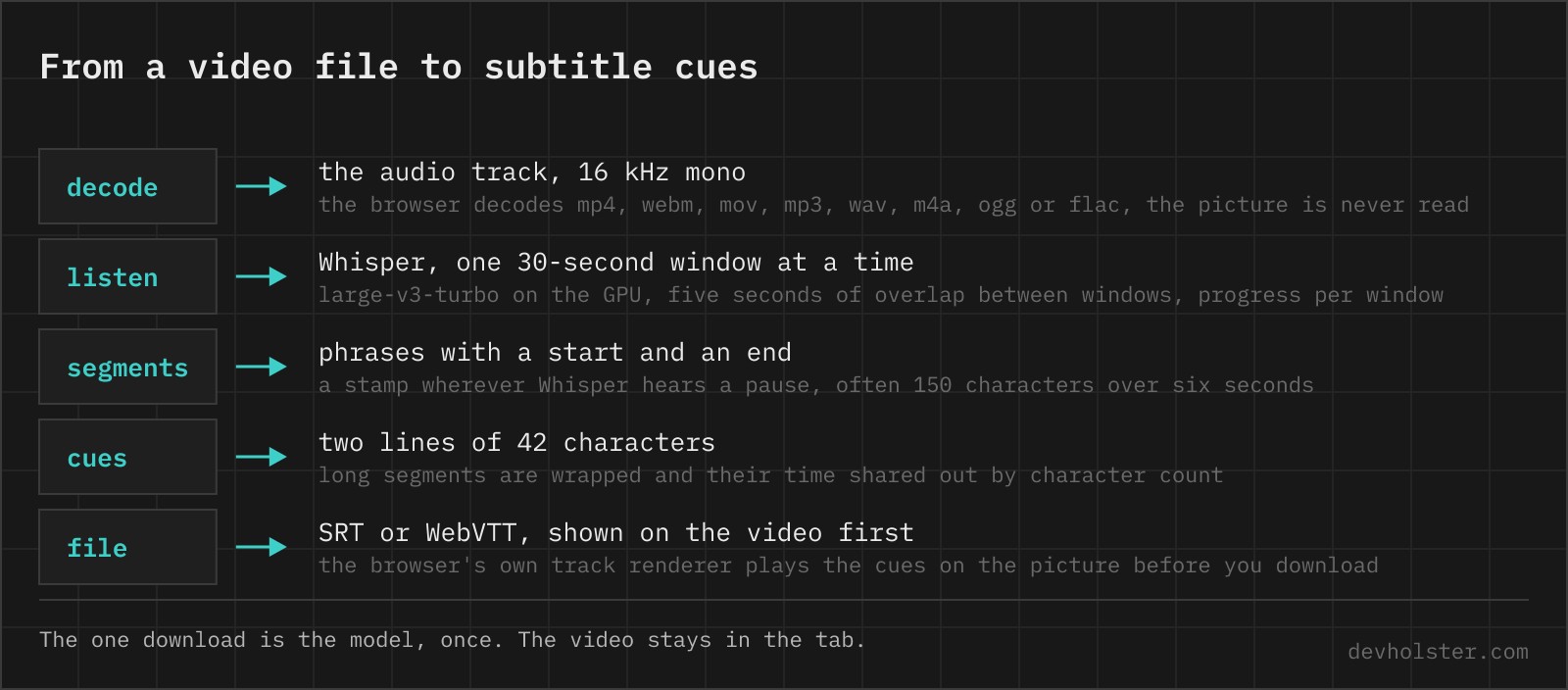
A subtitle file is a transcript with two extra requirements, the timing has to be right to within a few hundred milliseconds and no cue may be longer than a viewer can read while it is on screen. Whisper delivers the first, this page adds the second, and the browser's own subtitle renderer shows you both on the video before you download anything.
Generate subtitles from a video file
Drop a video or an audio file onto the dark stage, or open one with the button next to the timer. The first file asks for the model download, about 560 MB once, and every later visit loads it from the browser's storage. Whisper then listens to the file in 30-second windows and the bar counts them, so a long recording is a progress bar and not a blank wait.
- Set the language first. Whisper can guess it, but a guess costs an extra encoder run on every window, so the page asks instead. English is the default.
- Check the timing on the player. The cues are handed to the video element as a WebVTT track, so what you see on the picture is exactly what the file will do in VLC or on YouTube. For an audio file the player is a black frame with the subtitles on it.
- Edit in the field, then download. A typo fixed in the SRT is on the player a quarter of a second later. The three download buttons read the field, so an edit is in the .srt, the .vtt and the .txt alike, and the
.txtis the cue texts as a plain transcript.
The field also takes an existing subtitle file. Paste an SRT to get a VTT, or a VTT that needs its timing moved, and the player shows it the same way.
SRT or WebVTT, and when it matters
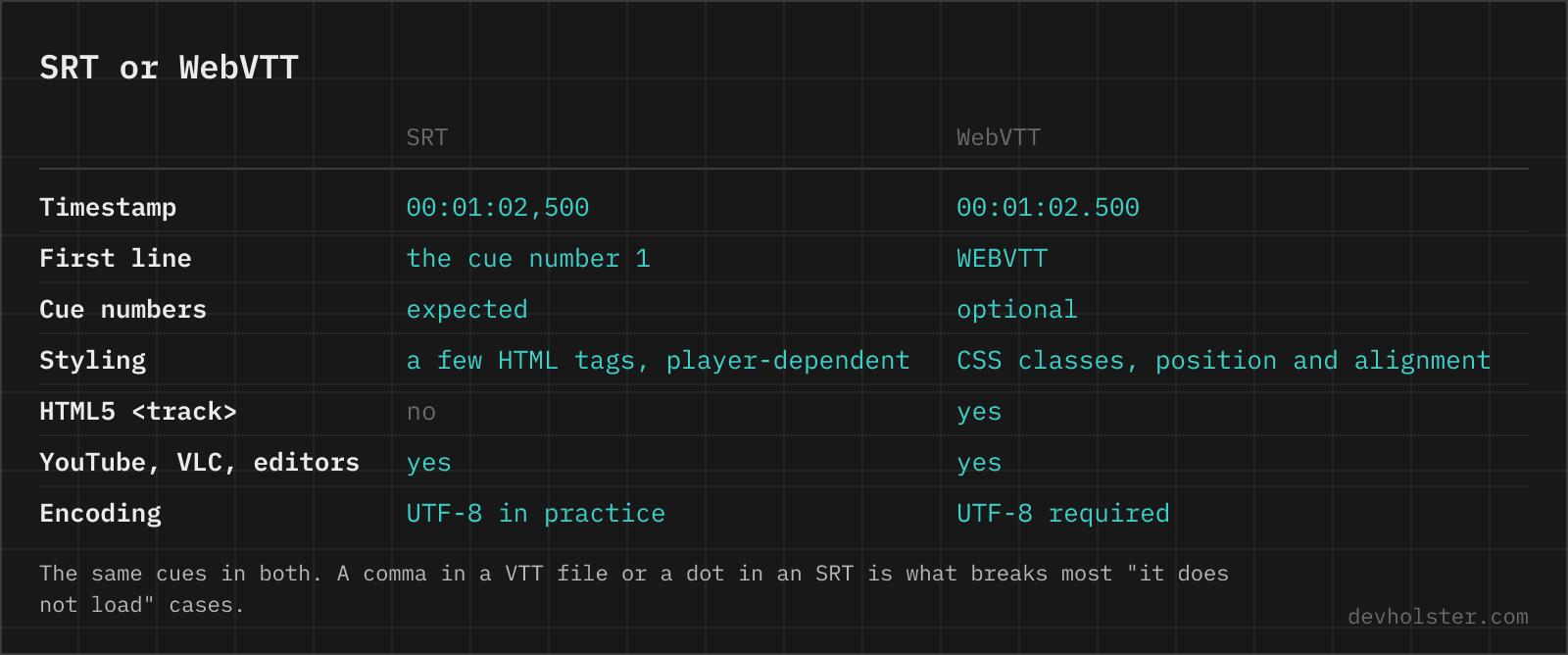
SRT is the older of the two and the one every player, editor and video platform has read for twenty years: a cue number, a timing line, the text, a blank line. WebVTT is the W3C's web version of the same idea, the format the HTML5 <track> element reads and the only one it reads. The differences are small enough to convert losslessly in either direction, which is what --vtt does with whatever is in the field.
1
00:00:01.000 --> 00:00:03.500
Welcome to the show.
WEBVTT

00:00:01.000 --> 00:00:03.500
Welcome to the show.
The left side is the mistake we see most in files that "do not load". A dot in an SRT timestamp is a VTT habit, and while VLC forgives it, stricter parsers and some upload forms do not. The reverse mistake, a comma in a VTT file, is a hard error in every browser. So is a missing WEBVTT header line.
Which one to pick is decided by the destination. A file for the web, for a video element or for a player that runs in the browser, is VTT. A file for a video editor, a media player or an upload to YouTube, Vimeo or a course platform is SRT, because it is the one they all accept without a second thought. When in doubt, download both. They are the same cues.
Why the cues are 42 characters
Whisper's own segments are phrases. It stamps a start and an end wherever it hears a pause, which on a fluent speaker is every sentence or two, and a sentence or two is often 150 characters. As a subtitle that is four lines across the picture for eight seconds, which nobody can read. The industry answer is two lines of at most 42 characters, the limit Netflix sets for Latin scripts, and a reading speed under 20 characters per second.
So each segment is wrapped at the chosen width, grouped two lines to a cue, and the segment's time is shared out among its cues by character count. A segment of 150 characters over six seconds becomes two cues, roughly 84 and 66 characters, and the split lands at three and a third seconds. That is not a word-level timestamp, but it is within a few hundred milliseconds of one, and it keeps a cue from sitting on the screen after the speaker has moved on.
32 is the width for phones held upright and for a big font. No wrap keeps Whisper's segments as they are, which is right when the file goes into an editor that does its own wrapping.
English subtitles for any language
Whisper was trained on two tasks, transcribe and translate, and the second one means it listens to any of its 99 languages and writes English straight away, timestamps and all. That is --translate. A German interview, a Spanish lecture or a Japanese product video comes out with English cues without a second tool, and the timing is the timing of the original speech.
One catch, and it is the model. Whisper large-v3-turbo, the fast one the page normally uses, was finetuned on transcription alone, and OpenAI's own README says it answers in the source language when asked to translate. We tested it and it does. So --translate loads whisper-small instead, roughly 300 MB once. It is the largest of the translating Whispers whose export runs on WebGPU here, whisper-medium trips over an ONNX Runtime error the moment it starts. Small is quick, a notch less accurate than turbo on hard audio, and its English is the plain, literal English of a machine that heard the sentence once. Our German test file came back with "why the comma is not a point in an SRT file", which is exactly what it heard. For subtitles that people will actually read, plan on an editing pass, the field is there for it.
English is the only target Whisper knows. For any other language, transcribe here and translate the text afterwards.
How long it takes
On an Apple-Silicon laptop, turbo transcribes at 1.5 to 2.5 times real time through WebGPU, so a ten-minute video takes four to seven minutes and an hour takes about half an hour. The very first run after a download is slower while the GPU compiles its shaders. Whisper-small for translation is quicker still, it has a third of turbo's parameters, and the CPU fallback without WebGPU, whisper-base, runs close to real time and is audibly less accurate.
The file itself is decoded by the browser, which means the whole audio track is held in memory as floating-point samples, at least 230 MB for an hour. That figure is the floor, the 16 kHz mono that Whisper reads. The browser first decodes the file at its own rate and channel count, and 48 kHz stereo is six times as much before it is mixed down. A feature-length film works on a laptop with memory to spare and is a bad idea on a phone.
Subtitles that are out of sync
Subtitles that are late by the same amount all the way through are the easy case. That is a cut intro, a different start offset, a file that was trimmed after the subtitles were made. --shift moves every cue by the seconds you type, negative for earlier, applied to what is in the field, so it works on a freshly generated file and on a pasted one alike, and the player shows the result at once. A cue that would end before zero is dropped, one that would start before zero starts at zero.
Subtitles that start in sync and drift are a different problem. That is a frame-rate mismatch, 25 against 23.976 frames per second, and the fix is to scale every timestamp by the ratio, not to shift them. This page does not do that.
What it will not do
No speaker labels, Whisper does not know who spoke.
No target language other than English, and no burning of the text into the picture, that is an ffmpeg job and the FAQ has the command. Languages written without spaces, Japanese or Chinese, are not wrapped because the wrap breaks on spaces, so those cues keep Whisper's segment length.
Subtitle questions, from SRT commas to Whisper
What is the difference between SRT and VTT subtitles?
The timestamp separator and the header. SRT writes 00:01:02,500 with a comma and numbers every cue, WebVTT writes 00:01:02.500 with a dot, starts with the line WEBVTT and allows CSS-like styling and positioning. Players and YouTube take both. The HTML5 track element takes only WebVTT.
Can a browser show subtitles from an SRT file?
No. The HTML5 track element reads WebVTT only. Converting an SRT means comma to dot plus the WEBVTT header line.
How do I add an SRT file to an mp4 without re-encoding?
Mux it as a subtitle stream with ffmpeg, the video and audio are copied untouched. ffmpeg -i video.mp4 -i subs.srt -c copy -c:s mov_text out.mp4 for mp4, where the subtitle codec has to be mov_text. For mkv it is ffmpeg -i video.mkv -i subs.srt -c copy out.mkv, because Matroska stores SRT as it is. A player then offers the subtitles as a track that can be switched off.
How do I burn subtitles into a video permanently?
Re-encode with the subtitles filter: ffmpeg -i video.mp4 -vf subtitles=subs.srt out.mp4. That needs an ffmpeg build with libass, which the usual packages have, and the text becomes part of the picture, so it cannot be switched off or edited afterwards. For a soft track that stays separate, mux instead of burning.
How many characters per line should a subtitle have?
Netflix limits a line to 42 characters for most Latin-script languages, two lines per cue, and a reading speed of up to 20 characters per second for adult audiences. The BBC subtitle guidelines say 37, and teletext was 32. Below 42 nothing gets cut off on a television, and 32 is the safer width for phones held upright, where 42 characters of subtitle wrap on their own.
Can Whisper translate audio into English?
Yes, with task translate, and only into English. Whisper was trained on translation as a second task next to transcription, so it listens to German or Japanese and writes English directly, timestamps included. The large-v3-turbo model is the exception. OpenAI finetuned it on transcription alone and its README says it returns the source language when asked to translate, which is why this page switches to whisper-small for the job. Any other target language means transcribing first and translating the text.
How do I generate an SRT file with Whisper on the command line?
whisper video.mp4 --output_format srt writes video.srt next to the file, one cue per segment. Add --word_timestamps True and the cues are cut at word boundaries instead, with --max_line_width 42 --max_line_count 2 for subtitle-sized cues. --output_format all writes txt, vtt, srt, tsv and json in one go.
Does Whisper give word-level timestamps?
Yes, openai-whisper with --word_timestamps True and faster-whisper with word_timestamps=True return a start and end per word, derived from the cross-attention of the decoder. Whisper's native output is segment-level, one timestamp pair per phrase, which is what runs on this page. Long phrases are cut to cue length by sharing the segment's time out by character count, which lands within a few hundred milliseconds of the word boundaries.
How do I fix subtitles that are out of sync with the video?
Shift every cue by the same offset when the subtitles start late or early throughout, which is the usual case after a re-cut intro or a different frame rate at the head of the file. VLC does it live with the G and H keys in 50-millisecond steps and forgets it on exit. Here --shift rewrites the timestamps in the file, so the fix is permanent. Subtitles that drift, right at the start and seconds off at the end, are a frame-rate mismatch and need scaling, not shifting.
Why does my SRT file not load in the player or on YouTube?
Nine times out of ten it is the timestamp format or the encoding. SRT needs a comma before the milliseconds, a blank line between cues and an arrow written as --> with the spaces. A file saved as UTF-16 or in a Windows code page shows garbage for accents or is rejected outright, so save it as UTF-8. YouTube also refuses a file whose cues overlap or run backwards in time.
What encoding should an SRT file have?
UTF-8. Every current player reads it, and WebVTT requires it outright.
Is it safe to upload a confidential recording to an online subtitle generator?
Most subtitle sites upload the file to their servers, transcribe it there and keep it for some time, which rules them out for anything under NDA, and their terms often say so in the small print. Look for one that runs the model inside the browser instead, or run Whisper locally. On this page the model runs in the tab and the only network request is the one-time model download from huggingface.co, which you can watch in the network tab while a file is transcribed.