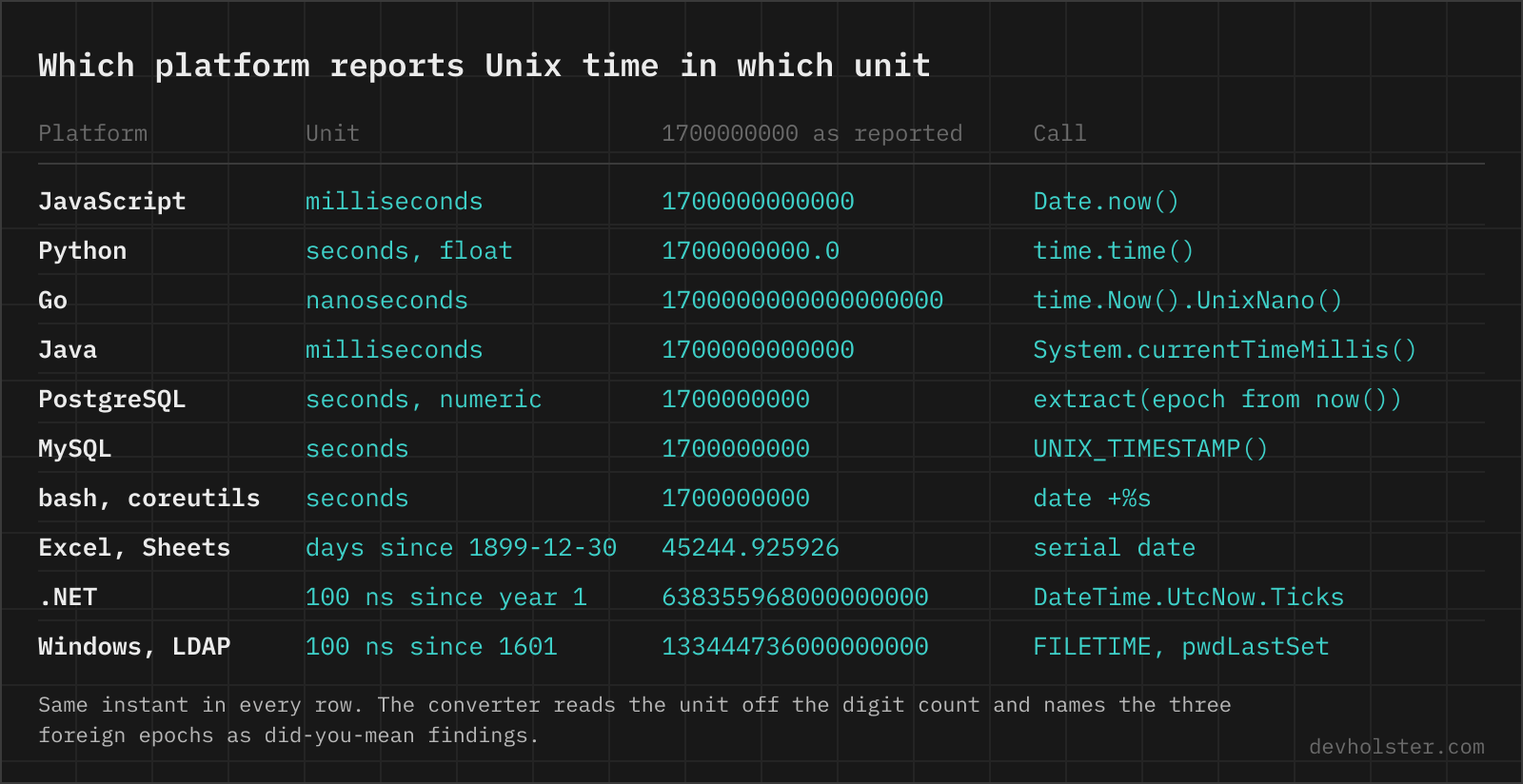
Seconds, milliseconds, microseconds or nanoseconds, by platform
The same instant, 1700000000, as each platform reports it.
| Platform | Unit | Now | The same instant |
|---|---|---|---|
POSIX time_t, C, Rust SystemTime | seconds | time(NULL) | 1700000000 |
| JavaScript | milliseconds | Date.now() | 1700000000000 |
| Python | seconds, as a float | time.time() | 1700000000.0 |
| Python, since 3.7 | nanoseconds | time.time_ns() | 1700000000000000000 |
| Go | seconds, ms, µs or ns by method | time.Now().Unix() / .UnixMilli() / .UnixNano() | 1700000000 / …000 / …000000000 |
| Java, Kotlin | milliseconds | System.currentTimeMillis() | 1700000000000 |
Java Instant | seconds plus nanos | Instant.now().getEpochSecond() | 1700000000 |
| PostgreSQL | seconds, numeric with microseconds | extract(epoch from now()) | 1700000000 |
| MySQL, MariaDB | seconds | UNIX_TIMESTAMP() | 1700000000 |
| bash, coreutils | seconds (%N for nanos on GNU and current macOS) | date +%s | 1700000000 |
| Kafka, MongoDB, Elasticsearch | milliseconds | record and document timestamps | 1700000000000 |
| Stripe, Slack, JWT claims, most REST APIs | seconds | created, event_time, exp in a JWT | 1700000000 |
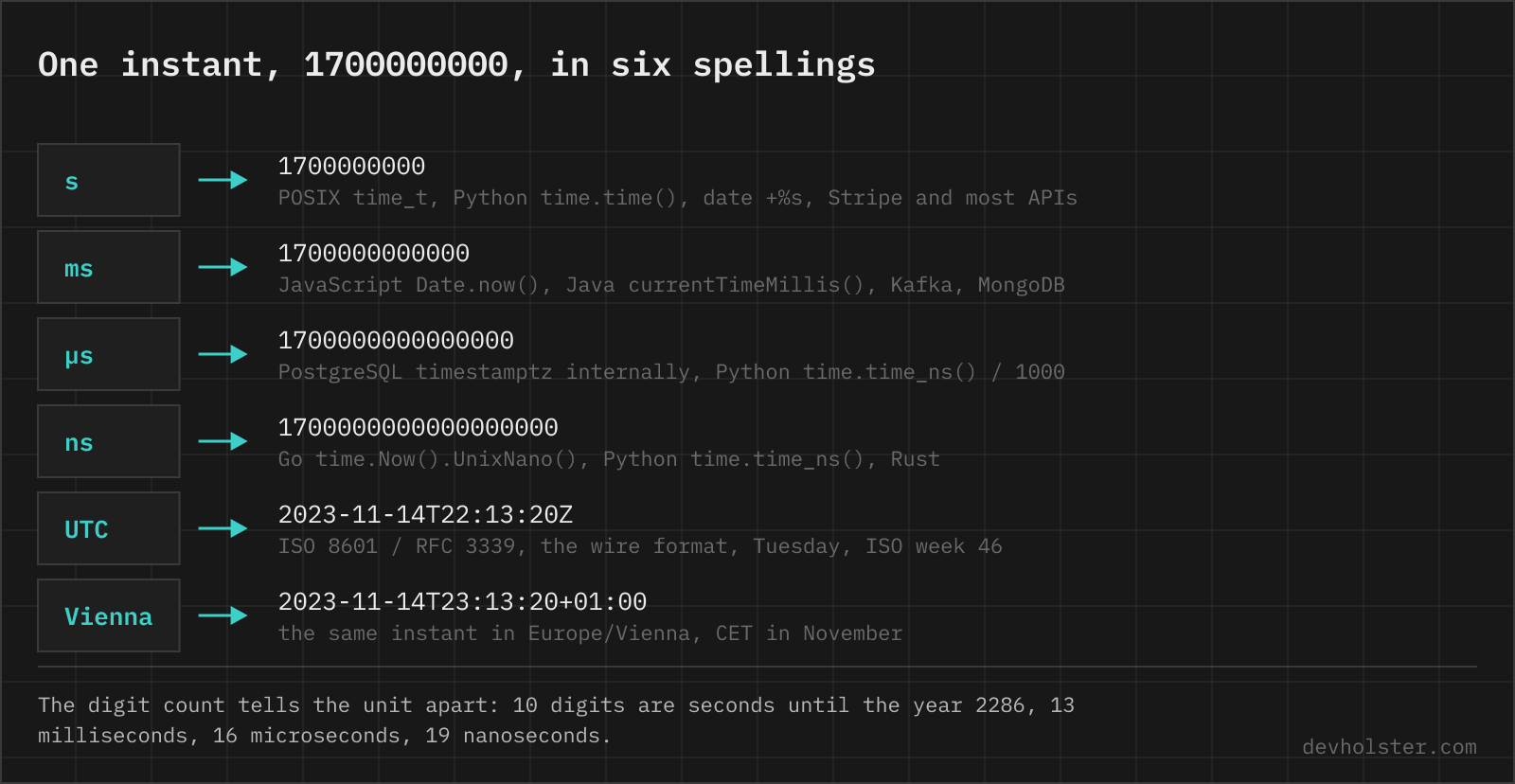
Three digits per step. Ten digits are seconds, thirteen milliseconds, sixteen microseconds, nineteen nanoseconds, and that holds from September 2001 until the year 2286. The converter above reads the unit off the digit count and prints the other three readings on their own cards, so a value copied from a Kafka header and a value copied from a Stripe payload come out as the same moment without anyone multiplying by 1000 in their head.
What the number counts
A Unix timestamp is the number of seconds since 1970-01-01 00:00:00 UTC, every day counted as exactly 86400 seconds. The POSIX definition is a formula over the calendar date, not a count of physical seconds, so the 27 leap seconds inserted since 1972 never appear in it. It carries no zone, no offset and no calendar.
How to read the converter
The big field takes anything that names an instant. A bare number is Unix time, with the unit detected from the digit count and shown as a highlighted chip next to the input. Click another chip to override, click the active one to go back to auto, or write the unit as a suffix (1700000000 ms). It also reads ISO 8601 in both forms, YYYY-MM-DD HH:mm[:ss] in your zone, RFC 2822 and HTTP dates, now, and offsets like now-2h or now + 3d. A leading @ (GNU date) and a trailing L (Java literal) are ignored.
Under the live Unix clock come the cards: local time with zone name and offset, UTC, ISO 8601 with Z and with your offset, RFC 2822, the HTTP date of RFC 9110 (the format RFC 7231 defined before it), relative time, weekday with ISO week and day of year, and the instant in seconds, milliseconds, microseconds and nanoseconds, each with a copy button. A zone picker under the cards shows the moment in any IANA zone the browser knows, and remembers your pick. The cron parser lists next runs the same way, in your zone and in UTC, with the DST window flagged.
Date to timestamp sits in the next panel: date, time and the zone they are written in. It follows the big field, and editing it writes an ISO string with the resolved offset back, so the two directions stay in step. A wall time that does not exist in that zone, or exists twice, is named as such along with the instant that was chosen.
Findings are what a plain converter lacks: the unit reading and what the number would mean one unit over, the 32-bit limit, negative values, a DST switch in your zone or the second zone on that day with its exact time, ambiguous wall times after the clocks went back, a 23:59:60 leap second, digits beyond the nanosecond, and "did you mean" rows for numbers whose magnitude fits a different epoch (Excel serial, .NET ticks, FILETIME, Cocoa), each with a "use it" button.
Several values, one per line, become a table with unit, UTC and local time per row. The code panel prints the instant as JavaScript, Python, Go, Java, PostgreSQL, MySQL and date for GNU and BSD, both directions, and "copy link" puts the value into the address bar as ?t=. The arithmetic is BigInt for nanoseconds and Intl.DateTimeFormat for zones, no date library.
Timestamp to date and back, per language
Each pair is the shape the code panel prints, filled in for 1700000000 and cut to the essentials. Forward converts the number to an instant, back recovers the number.
| Language | Forward | Back |
|---|---|---|
| JavaScript | new Date(1700000000 * 1000).toISOString() | Math.floor(new Date('2023-11-14T22:13:20Z').getTime() / 1000) |
| Python | datetime.fromtimestamp(1700000000, tz=timezone.utc) | datetime.fromisoformat('2023-11-14T22:13:20Z').timestamp(), the Z needs 3.11 |
| Go | time.Unix(1700000000, 0).UTC() | t.Unix(), t.UnixMilli(), t.UnixNano() |
| Java | Instant.ofEpochSecond(1700000000L) | Instant.parse("2023-11-14T22:13:20Z").getEpochSecond() |
| PostgreSQL | to_timestamp(1700000000) | extract(epoch from timestamptz '2023-11-14T22:13:20Z') |
| MySQL | FROM_UNIXTIME(1700000000), session zone | UNIX_TIMESTAMP('2023-11-14 22:13:20'), session zone |
| GNU date | date -u -d @1700000000 | date -u -d '2023-11-14T22:13:20Z' +%s |
| BSD, macOS date | date -u -r 1700000000 | date -u -j -f %FT%TZ '2023-11-14T22:13:20Z' +%s |
Two rows carry a trap. Python's fromtimestamp without tz= returns a naive datetime in the machine's local zone, and .timestamp() on a naive datetime assumes that same zone, so the round trip is only stable on one machine. MySQL's pair runs through the session time zone in both directions, which is why the converter wraps its MySQL snippet in CONVERT_TZ from +00:00. JavaScript is the odd one out on units. It wants milliseconds in and gives milliseconds out, and the * 1000 is where most bugs in this table are born.
2038, the exact second
A signed 32-bit time_t holds values up to 231 − 1 = 2147483647, which is 2038-01-19 03:14:07 UTC. One second later the counter wraps to -2147483648 and a program that still uses the 32-bit width reads 1901-12-13 20:45:52. The converter flags any instant past that second, and the preset "the 2038 limit" shows the last good one.
Desktop and server platforms moved on years ago: 64-bit Linux, macOS and every current language runtime use 64-bit time, and glibc 2.34 (2021) plus Linux 5.6 (2020) offer 64-bit time_t even on 32-bit CPUs for code compiled with _TIME_BITS=64. What remains are the places where a timestamp is stored as an int32 by format rather than by type: embedded firmware, old file formats, protocol fields, and MySQL's TIMESTAMP column, whose documented range ends at exactly that second (DATETIME goes to 9999). The first failures will not wait until 2038. Anything computing a date twelve years ahead, a mortgage schedule, a certificate expiry, a retention policy, hits the limit in 2026.
Milliseconds in a 64-bit integer have no practical limit, and nanoseconds in a signed 64-bit integer run out in the year 2262, which Go (UnixNano) and pandas (Timestamp) document and nobody else needs to worry about.
Time zones, DST and why EST is ambiguous
A timestamp has no zone, so a converter needs one to print wall time, and the only unambiguous way to name a zone is an IANA identifier such as Europe/Vienna or America/New_York. Those names carry the full rule history, when DST starts and ends each year and what the rules were in 1980. An offset like +02:00 is one output of those rules at one instant, and an abbreviation is worse than either.
| Abbreviation | Can mean | Offsets |
|---|---|---|
EST | Eastern Standard Time (US), Eastern Standard Time (Australia) | −05:00, +10:00 |
CST | Central Standard Time (US), China Standard Time, Cuba Standard Time | −06:00, +08:00, −05:00 |
IST | India, Ireland, Israel | +05:30, +01:00, +02:00 |
BST | British Summer Time, Bangladesh Standard Time | +01:00, +06:00 |
CET / CEST | Central European winter / summer time | +01:00 / +02:00, switching twice a year |
This is why the converter shows the long zone name and the numeric offset, and why the zone picker lists IANA identifiers rather than abbreviations. It is also why the DST findings exist. On the two nights a year when a zone changes its offset, one hour of wall time either does not happen or happens twice. 2024-03-31 02:30 does not exist in Vienna, and 2024-10-27 02:30 exists twice there, an hour apart. A converter that does its zone math with a fixed offset gets both wrong silently. This one resolves them with the browser's IANA database and says what it did.
RFC 2822 still allows EST and friends in mail headers, and the HTTP date format of RFC 9110 avoids the problem by allowing only GMT, which is why the HTTP card always ends in those three letters.
Excel serial dates, .NET ticks, FILETIME, Cocoa
Unix time is not the only counter in circulation, and a number pasted from the wrong system is read as Unix time without complaint. The converter recognises the common ones by magnitude and offers the other reading in the findings.
| Epoch | Counts | Since | 1700000000 as |
|---|---|---|---|
| Unix | seconds | 1970-01-01 | 1700000000 |
| Excel, Google Sheets | days, time as the fraction | 1899-12-30 | 45244.925926 |
.NET DateTime.Ticks | 100 ns units | 0001-01-01 | 638355968000000000 |
Windows FILETIME, Active Directory (pwdLastSet, lastLogon) | 100 ns units | 1601-01-01 | 133444736000000000 |
| Cocoa, Core Data, iMessage | seconds | 2001-01-01 | 721692800 |
| GPS time | seconds, with leap seconds | 1980-01-06 | 1384035218 (18 s ahead of UTC) |
The Excel case is the one that arrives most often, usually as a CSV exported from a sheet where the date column was formatted as General. 45292.5 is 2024-01-01 12:00, and read as Unix seconds it is 12:34 on the first day of 1970. The two 18-digit counters are told apart by their leading digit, 6 for ticks and 1 for FILETIME, and the FILETIME form is exactly what an LDAP query against Active Directory returns for password and logon attributes. GPS is listed for completeness only. It counts real seconds including the leap seconds UTC has inserted, so it is currently 18 seconds ahead and the converter does not guess it.
Epoch time questions
What is the current Unix timestamp?
date +%s in a terminal, Date.now() in a browser console (that one is milliseconds). In August 2026 the value is around 1755000000.
Is Unix time UTC?
Yes. It counts seconds since 1970-01-01 00:00:00 UTC and carries no timezone of its own. Only the formatting step is local.
How many digits does a Unix timestamp have?
Ten in seconds, from 2001-09-09 (1000000000) until 2286-11-20 (9999999999). Thirteen in milliseconds, sixteen in microseconds, nineteen in nanoseconds, all for the same period. Nine digits means a date before September 2001, and anything with eleven or twelve digits is almost always milliseconds with digits missing or seconds with a stray multiplication. The digit count is how the converter above picks the unit, and a chip next to the input switches it if the guess is wrong.
Is a Unix timestamp in milliseconds or seconds?
Seconds by definition, milliseconds in practice wherever JavaScript or Java produced the number. time_t, date +%s, Python time.time(), Stripe and most REST APIs use seconds. Date.now(), System.currentTimeMillis(), MongoDB dates and Kafka record timestamps use milliseconds. Tell them apart by magnitude. 1.7 billion is seconds, 1.7 trillion is milliseconds. Passing milliseconds where seconds are expected lands you in the year 55000, the other way round in January 1970.
How do I get the Unix timestamp in Python?
time.time() returns the current epoch as a float in seconds (1755590400.123456), int(time.time()) gives whole seconds, and time.time_ns() an integer in nanoseconds since Python 3.7. For a datetime object, dt.timestamp() returns the float, but a naive datetime is interpreted in the local zone of the machine, the classic source of an off-by-one-hour timestamp between a laptop and a server. Make it timezone-aware first.
How do I get the current timestamp in JavaScript?
Date.now() returns milliseconds since the epoch as a number. For seconds, Math.floor(Date.now() / 1000). new Date().getTime() is the same value with an object allocated first, and performance.now() is not a Unix time at all but milliseconds since the page loaded. To turn a seconds value back into a Date, multiply by 1000 first: new Date(1700000000 * 1000).
How do I get the Unix timestamp in bash?
date +%s on both GNU and BSD systems. Milliseconds need GNU date, date +%s%3N, and nanoseconds date +%s%N. macOS ships BSD date, which only learned %N recently, and %3N still prints a literal 3N there. On an older Mac the workarounds are python3 -c "import time; print(time.time_ns())" or coreutils and gdate. Converting the other way differs too, date -d @1700000000 on Linux, date -r 1700000000 on macOS.
How do I convert epoch to date in PostgreSQL?
SELECT to_timestamp(1700000000) returns a timestamptz, 2023-11-14 22:13:20+00 when the session runs in UTC. It accepts a double, so milliseconds work as to_timestamp(1700000000123 / 1000.0). Back again, SELECT extract(epoch FROM now()) gives a numeric with microseconds (a double before PostgreSQL 14), and extract(epoch FROM ts)::bigint the whole seconds. With a plain timestamp (without time zone) column the extract is computed as if the value were UTC, which is correct only if you stored UTC in it.
How do I convert a Unix timestamp to a date in Excel?
Put =A1/86400+DATE(1970,1,1) in a cell and format it as a date and time. Excel counts days since 1899-12-30, so dividing the seconds by 86400 turns them into days and the DATE() term moves the origin. For milliseconds divide by 86400000. Back the other way: =(A1-DATE(1970,1,1))*86400. The result is UTC. Add or subtract your offset as a fraction of a day (2/24 for +02:00) if you want local time. Google Sheets uses the same serial numbers, so the formulas carry over unchanged.
What happens to Unix time in 2038?
A signed 32-bit time_t reaches its maximum, 2147483647, at 2038-01-19 03:14:07 UTC and wraps to -2147483648, which reads as 1901-12-13 20:45:52. 64-bit Linux, macOS and every current language runtime are unaffected. The problem sits in 32-bit embedded systems, file formats and columns that store time as int32, and in MySQL TIMESTAMP columns, whose documented range ends at that same second (DATETIME is fine). glibc has had 64-bit time_t on 32-bit platforms since 2.34 and Linux since 5.6, but a binary compiled without _TIME_BITS=64 still uses the old width.
Why does my date show January 1970 or the year 56000?
A unit mix-up. A seconds value passed to an API that expects milliseconds (new Date(1700000000)) lands about 20 days after the epoch, in January 1970. A milliseconds value passed to an API that expects seconds (datetime.fromtimestamp(1700000000000)) lands in the year 55840, or raises ValueError: year must be in 1..9999 in Python. Divide or multiply by 1000 at the boundary, and only there.
How do I convert a timestamp in MySQL?
FROM_UNIXTIME(1700000000) gives a DATETIME, UNIX_TIMESTAMP('2023-11-14 22:13:20') the integer back. Both go through the session time zone. FROM_UNIXTIME returns local wall time, and UNIX_TIMESTAMP reads its argument as local wall time. If the server or connection runs in anything other than UTC, the same value means a different instant on a different connection. SET time_zone = '+00:00' at the start of the session settles it, as does the CONVERT_TZ wrapper the converter prints under MySQL above.
Can a Unix timestamp be negative?
Yes. Negative values are instants before 1970-01-01, and -14182940 is the moon landing. Some old APIs refuse them.