A voice room from one link
This page opens a voice room for up to eight people, every browser connected directly to every other one, like a small TeamSpeak server with the server removed. Opening a room gives you a twelve-character code, shared as a link or QR code, and whoever opens it lands in the room. How the browsers find each other, public Nostr relays for the encrypted connection offers and Cloudflare's STUN server for the public addresses, is the same as on the peer-to-peer chat, and that page walks through every step of the setup, including what those servers get to see. Your voice never touches any of them. It travels over DTLS-SRTP straight to the other browsers, one encrypted stream per listener.
Next to every name sits a six-digit safety code, hashed from the DTLS certificates of your connection with that person, the same check the chat and the video call use. And as in every peer-to-peer connection, everyone in the room sees your IP address.
The console next to the map speaks IRC. /nick renames you, /vol sets one person's volume up to 200 percent, /stats prints the connection numbers per person, /who lists the room with safety codes, and the keys M and D toggle mute and deafen from anywhere on the page.
Push to talk, voice activation or an open microphone
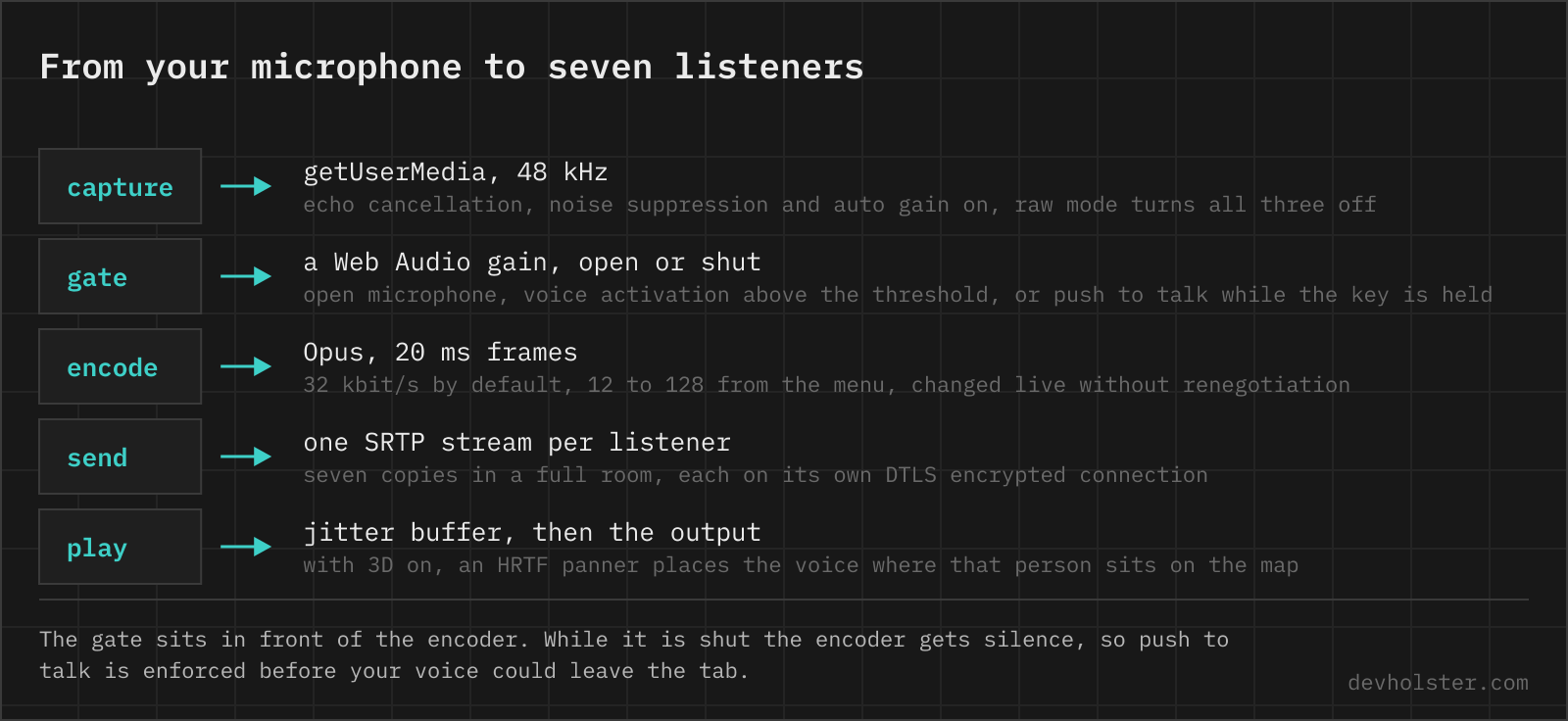
The microphone runs through a gate before anything is encoded, so the mode decides what leaves the tab, not what the others politely ignore. Open sends whenever the microphone is on. Voice activation opens the gate while your level is above a threshold you drag directly on the live meter, and holds it open for 400 ms after you stop, so the ends of sentences survive. Push to talk sends only while a key is held.
The push to talk key is yours to pick, any key or a side mouse button, and space is the default. On a phone the key becomes a hold-to-talk button.
A browser has no global hotkeys. Key events reach a tab only while it has focus, which is fine for talking next to a document and useless inside a game. The page says so next to the key hint the moment focus leaves, and the honest answer for gaming with this tab in the background is voice activation, with the threshold set just above your keyboard noise.
Why the room stops at eight
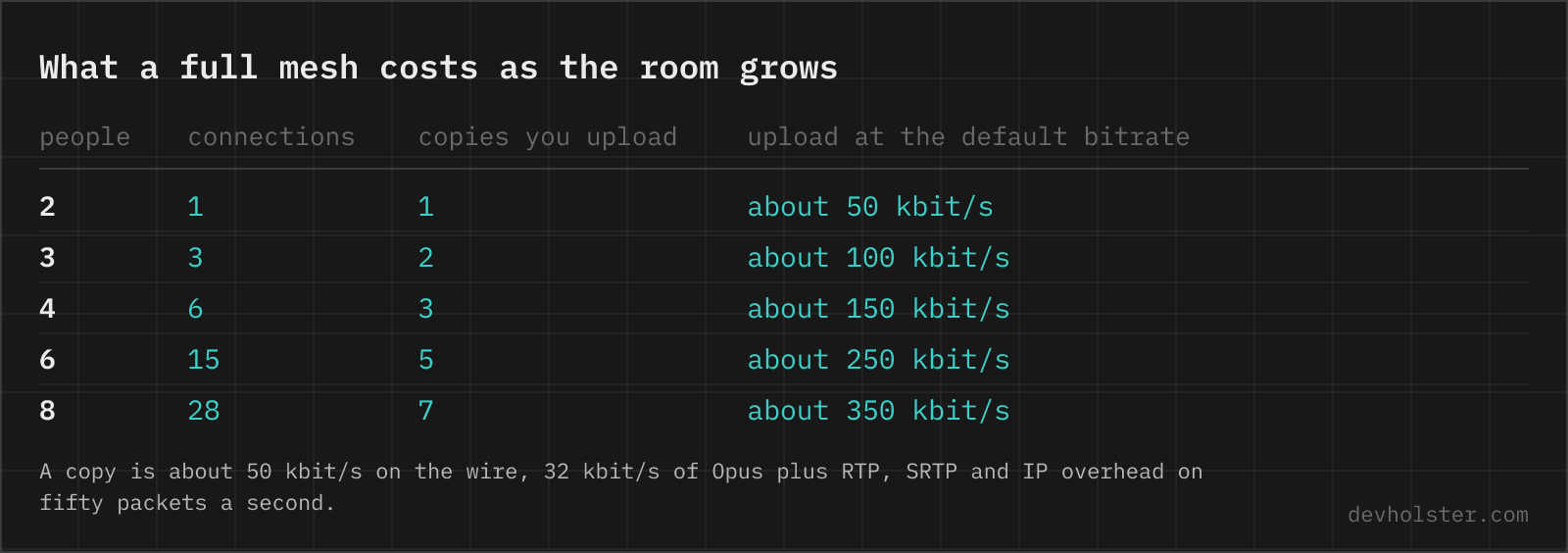
No server means nothing mixes the room into one stream, so every browser sends its voice to every other one separately. Two people need one connection. Eight people need 28, and each of the eight uploads seven copies of everything they say. At the default bitrate a copy costs about 50 kbit/s on the wire, 32 kbit/s of Opus plus packet overhead, so a full room asks your uplink for roughly 350 kbit/s. Voice is the one medium cheap enough for this arithmetic, the same mesh with 720p video would saturate a home upload at three people.
The cap at eight is a decision, not a limit in the code, and it costs us the guild-sized crowd deliberately. Past eight the mesh starts punishing whoever has the weakest uplink, and one struggling connection makes the room worse for everyone listening to it.
The map under the room shows the whole mesh, not only your own links. Every browser reports its connections to everyone else every two seconds, so the lines between two other people carry their measured round trip, and a pair that cannot reach each other turns red on every screen while both keep talking to everyone else. That failure has a name, symmetric NAT, and the chat article explains why this page has no relay to fall back on.
What the delay is made of
Voice tolerates less delay than anything else a browser carries. ITU-T G.114 puts the ceiling for a conversation that still feels natural at 150 ms mouth to ear, and mouth to ear is the number that matters, not the ping.
The page estimates it per person as half the round trip, plus the receiver's jitter buffer, plus one 20 ms Opus frame. The jitter buffer is the part worth watching. It is the queue in which the receiving browser holds packets so an uneven network comes out even, it grows on its own when jitter rises, and every millisecond it grows is added to every word you hear. Capture and playback buffers of the sound hardware never show up in getStats, so the real figure sits above the estimate, which is why the page calls it an estimate and not a measurement.
A direct connection has one built-in advantage here, the path is one network leg instead of two. TeamSpeak, Mumble and Discord carry every word up to a server and back down, and a well-placed server keeps that detour small. The direct path skips it entirely, and the worst round trip in the room stands on the map, live, including the connections that are not yours.
Bitrate, packet loss and the raw microphone
Voice here is Opus at 48 kHz in 20 ms frames, 32 kbit/s by default. The menu goes from 12 to 128 kbit/s and a change applies mid-sentence, because the cap lives in the sender's parameters rather than in the negotiated session.
sdp = sdp.replace('a=fmtp:111 ',
'a=fmtp:111 maxaveragebitrate=32000;'); const p = sender.getParameters(); p.encodings[0].maxBitrate = 32000; await sender.setParameters(p);
Two codec flags appear in the per-person stats when both sides agreed on them. fec means every packet carries a rough copy of the previous frame, so a single lost packet is patched instead of heard, and dtx means the sender stops sending packets during silence. Both are Opus features, and both help most on the flaky Wi-Fi where you notice them.
The raw microphone switch turns off echo cancellation, noise suppression and automatic gain. For speech those three are the difference between a usable room and a noisy one. For an instrument or a good audio interface they are the problem, noise suppression eats sustained notes and automatic gain pumps, so raw mode plus 96 or 128 kbit/s is the music setting. With speakers instead of headphones, raw mode also means the others hear themselves, because echo cancellation was the thing preventing that.
3D voices on headphones
The 3D switch plays every voice through an HRTF panner at that person's position on the map, and dragging them around you moves their voice. Farther away is quieter. Any stereo headphones work, speakers do not, since the panned path bypasses the echo cancellation and the room starts hearing itself.
Eight voices in one ear are a wall, eight voices around you are a table.
TeamSpeak, Discord, Mumble or this page
| This page | TeamSpeak | Discord | Mumble | |
|---|---|---|---|---|
| Server | none | rented or self-hosted | Discord runs them | self-hosted |
| Account | none | none, pick a nickname | required | none, a client certificate |
| Runs in the browser | yes | no | yes | no |
| Room size | eight | 32 slots without a paid license | no practical limit | set by the server |
| Voice path | browser to browser | via your TeamSpeak server | via Discord's servers | via your Mumble server |
| End to end encrypted | yes, DTLS-SRTP | no, the server decrypts | rolling out since 2024, DAVE | no, the server decrypts |
| Positional audio | yes, drag on the map | via game plugins | no | yes, via game plugins |
| Who sees your IP | everyone in the room | the server | Discord | the server |
For a community that meets every evening, the server products win. A rented TeamSpeak or a self-hosted Mumble is always on, people come and go without a fresh invite, channels and ranks persist, and Discord adds text history and rings members who are offline. All of them hide your IP address from the room, which matters among strangers.
The mesh wins the spontaneous case. Up to eight people who are online right now and want to talk within the next thirty seconds, where nobody installs anything, administrates anything or creates an account. Nothing is recorded anywhere, and once the last tab closes, the room has never existed.
It is the wrong tool past eight people, and for anyone whose network needs a relay, because this page has none.
Latency numbers, bitrates and the push to talk that stops working
Is there a TeamSpeak alternative that needs no server?
A WebRTC mesh in the browser is the only one, because WebRTC is the one way two devices can exchange audio directly without either of them running server software. Every other route, TeamSpeak, Mumble, Ventrilo or a Discord server, has a machine in the middle that someone rents, patches and administrates. A mesh room trades that machine away and pays with a hard ceiling of a few people.
How much upload bandwidth does a group voice chat use?
Through a server you upload one stream, about 50 to 100 kbit/s in Discord or TeamSpeak, no matter how many people listen. In a peer to peer mesh you upload one copy per listener, so a full room of eight costs about 350 kbit/s at a 32 kbit/s Opus bitrate. Any DSL line manages that, a weak mobile uplink may not.
What is a good latency for voice chat?
Under 150 ms mouth to ear, the ceiling ITU-T G.114 gives for a conversation that still feels natural, and gamers usually want half of that. Mouth to ear is more than the ping. Half the round trip plus the receiving jitter buffer plus one 20 ms codec frame is the part software can measure, and capture and playback hardware come on top.
Which audio codec do Discord, TeamSpeak and Mumble use?
All three use Opus, like every WebRTC voice chat. What you hear differ on is bitrate, processing and the network, not the codec.
Why does push to talk in the browser stop working when I switch to a game?
Browsers deliver key events only to the focused tab, and there is no global hotkey API a web page could use. A native app like TeamSpeak registers a system-wide hotkey, a browser cannot. For talking while a game has focus, use voice activation, which keeps working in a background tab.
Why does voice activation cut off the first word?
The gate opens once your level crosses the threshold, so the sound that crossed it is already half gone by the time anything is sent. Lower the threshold until the gate opens on your normal voice rather than your loud one, or move the microphone closer. The few hundred milliseconds of hold time most tools add fix the ends of sentences, never the starts.
Why does music sound terrible over Discord and other voice chats?
Voice processing is tuned against music. Noise suppression treats sustained tones as noise and eats them, automatic gain pumps the volume up and down, and echo cancellation garbles anything polyphonic. Turn all three off and raise the bitrate to 96 kbit/s or more, and Opus carries music well.
What Opus bitrate should I use for voice?
24 to 32 kbit/s is enough for a clean fullband voice, which is why 32 is the default here while Discord ships 64. More buys little for speech. The step that earns its bandwidth is music or a good microphone with processing off, that wants 96 or 128.
Do I need special headphones for 3D audio?
No. HRTF rendering computes the effect into an ordinary stereo signal, any headphones work. Speakers do not, the two channels mix in the air.
How many people can a voice chat without a server handle?
About eight. Voice is cheap enough that a full mesh carries a small group, with each browser uploading one copy of roughly 50 kbit/s per listener. Video kills the same idea at three or four people, which is why every group video product runs servers.
Is Discord voice chat peer to peer?
No. Every Discord call and voice channel runs through Discord voice servers, which is also why other participants never see your IP address. Since 2024 Discord has been rolling out end to end encryption for audio and video under the name DAVE.