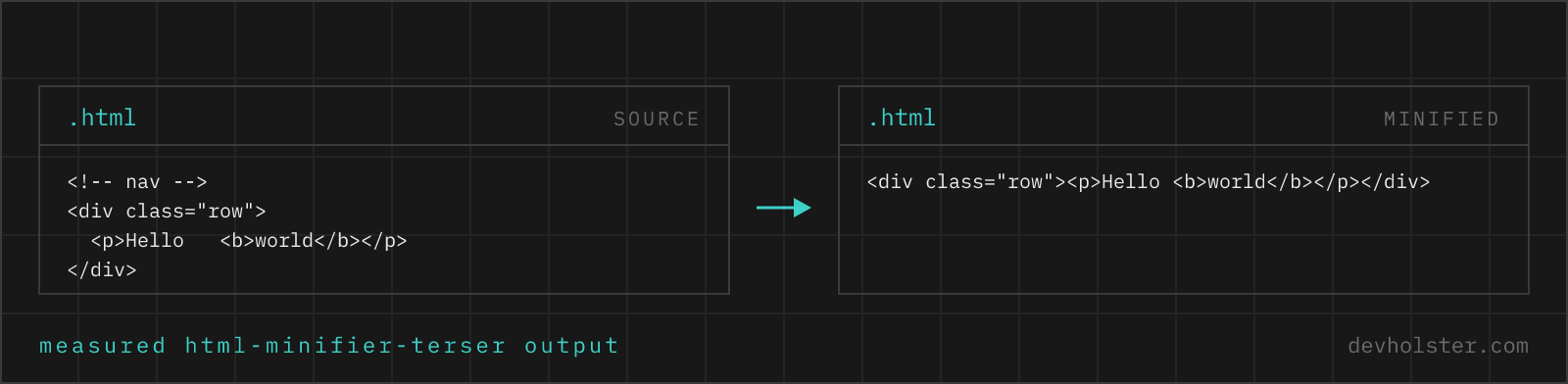
Why minify HTML at all
HTML is the first byte a browser gets and the file that references everything else, so it sits on the critical path by definition. It is also the file people most often forget: a build pipeline that lovingly minifies CSS and JavaScript frequently ships markup with four levels of template indentation and a comment block naming the developer who wrote it in 2019.
That said, be honest about the size of the prize. HTML is largely text, text does not compress away, and your host almost certainly gzips the response already. The clear wins are elsewhere: HTML that never passes through a compressing server. An email template, where every kilobyte counts against Gmail's clipping threshold. A snippet stored in a database column. An iframe body assembled at runtime. Those are the cases where minification is the only lever there is.
How to use this minifier
Paste HTML into the left pane, or drop an .html file on it, and the minified markup appears on the right while you type. The engine is html-minifier-terser, which parses the document rather than pattern-matching the text, so pre, textarea and anything inside a script or style block are handled by the rules that apply to them rather than by luck.
- Paste or drop your HTML. A full document, a template fragment, an email body.
- Decide about whitespace. If the page relies on spaces between inline elements, switch on
--conservativebefore you read the numbers. - Read the numbers. Original size, minified size, percentage saved, and the gzipped size of the result.
- Copy or download as a
.min.htmlfile.
--minify-inline
On by default. Sends the contents of every <style> block through a CSS minifier and every <script> block through Terser. On a page with a decent chunk of inline CSS this is where most of the saving comes from, since markup itself has little slack. Switch it off if a script block contains something the JavaScript parser will reject, a template placeholder like {{ value }} for instance, which is common in server-rendered templates.
--conservative
Off by default, and the flag to reach for when a layout shifts. Whitespace between inline elements is preserved either way, so this is not the flag that protects <span>a</span> <span>b</span>. What it does is keep one space between block elements as well, which matters in exactly one situation: block tags styled display: inline-block, where the gap between them is rendered even though the tags are not inline. The minifier never sees your stylesheet, so it cannot know, and that is why this is a switch rather than a decision it makes for you.
--keep-comments
Off by default. Ordinary comments are noise in shipped markup. Turn it on when a downstream system looks for marker comments in the document, which is how several CMS and email platforms inject content.
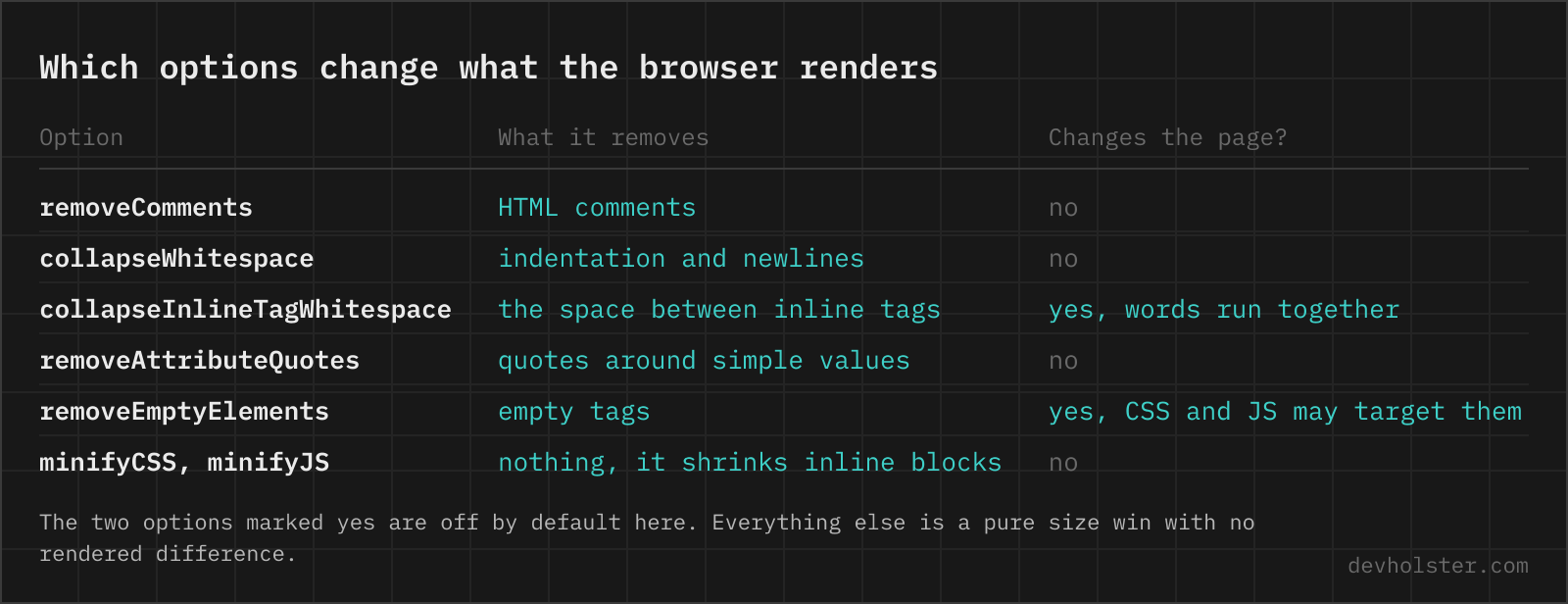
The whitespace problem, which is the whole game
In CSS and JavaScript, whitespace between tokens is meaningless and a minifier can delete all of it. HTML does not work that way. The rendering rule is that a run of whitespace collapses to a single space, and that single space is drawn when it sits between inline content. So the gap in <a>Docs</a> <a>Blog</a> is on the page; delete it and the two links touch.
The good news, and the thing worth knowing before you go looking for a safer tool: this is handled by default. Whitespace between inline elements is collapsed to one space, never removed, and the same goes for the spaces around a <strong> in the middle of a sentence. What gets removed is the indentation between block elements, where nothing is rendered.
| Source | Default | --conservative |
|---|---|---|
<span>a</span> <span>b</span> | <span>a</span> <span>b</span> | <span>a</span> <span>b</span> |
<div>⏎ <p>a</p>⏎</div> | <div><p>a</p></div> | <div> <p>a</p> </div> |
Which leaves one genuine hazard, and it is the second row. A block element styled display: inline-block is laid out like inline content, so the whitespace between two of them is rendered, the notorious four-pixel gap between inline-block cards. The minifier only sees the markup, never your stylesheet, so it cannot tell a <li> that behaves like a block from one that behaves like inline-block. That is what --conservative is for, and it is the only reason to reach for it.
Our own habit: leave it off, because most layouts built in the last decade use flexbox or grid, where whitespace between children is ignored entirely. Switch it on if the page uses inline-block for layout, or if you compare the two outputs and something moves.
Three elements keep every byte regardless of settings, because their content is literal: <pre>, <textarea> and any element you have set to white-space: pre in CSS. The first two are handled automatically here. The third cannot be, for the same reason as above, so a code block styled with a class rather than a pre tag is the one case you have to check yourself.
What happens to inline CSS and JavaScript
With --minify-inline on, a <style> block goes through the same value shortening and rule merging our CSS minifier applies, and a <script> block goes through Terser, the same engine behind our JS minifier. On a landing page with critical CSS inlined in the head, that is usually the majority of the total saving.
Two things worth knowing, and both are gentler than you might expect. A script block containing template syntax, {{ user.name }} or <%= id %>, is not valid JavaScript; rather than failing the whole document, the minifier leaves that block exactly as written and carries on with the rest. Broken JavaScript behaves the same way. So a server-rendered template still minifies, it just does not gain anything inside those blocks. And a script tag with a non-JavaScript type, application/ld+json for structured data or text/x-template for a client-side template, is skipped by design, which means your JSON-LD block comes out byte for byte as you wrote it.
The transformations we deliberately leave off
html-minifier-terser offers about forty options, several of which trade a handful of bytes for a class of bug. The ones not enabled here, and why:
- Removing attribute quotes. Saves two bytes per attribute, all of which gzip would have found anyway, and produces markup that breaks the first time someone hand-edits a value to include a space.
- Removing optional closing tags.
</li>and</p>are optional in the spec and the parser recovers correctly, but the resulting document is unreadable to a human and confusing to any tooling that does its own light parsing. - Collapsing boolean attributes to bare names.
required=""becomesrequired, which is fine, andrequired="required"torequiredis fine too, but the option in the library also touches attributes that only look boolean. - Sorting attributes and class names. Purely a compression trick, and it makes every diff of a minified file useless.
What is on by default and safe: redundant attributes removed (type="text" on an input, language="javascript" on a script), the type attribute dropped from script and style tags where HTML5 makes it implied, and the doctype shortened to <!doctype html>.
How much you actually save
For a typical content page, expect 10 to 20 percent off the raw size, dominated by indentation and inline code. After gzip the difference narrows to something in the single digits, because indentation is the most compressible thing a file can contain. A page heavy on inline critical CSS is the outlier in the good direction; a page that is mostly prose is the outlier in the other.
Which is the honest summary: minify your HTML because it is free and automatic in every modern build, not because it will change a Lighthouse score. If the page is slow, the cause is almost never the markup.
Online minifier vs. a build step
Astro, Next.js, Nuxt and SvelteKit all minify production HTML without being asked, so for a project the answer is to check that it is happening rather than to do it by hand. For a template-engine setup, minify the templates or cache the minified output; running a minifier on every request spends CPU per visitor to save bytes a compressor would mostly have found.
The browser page is for the markup that has no build behind it. An email template going into a campaign tool with a size limit. A widget you are handing to a client to paste into their CMS. A fragment out of devtools you want to size up. And the case we use it for most: checking what a chunk of inline CSS actually costs before deciding whether it belongs in the head.
HTML minification questions
Can minifying HTML break the layout?
It can, and whitespace is the reason, though the common fear is misplaced. A space between two inline elements is rendered, so removing it would push "one two" together; every serious minifier including this one collapses that space to exactly one character rather than deleting it, so inline text and spaced links are safe by default. The case that does break is a block element styled display: inline-block, where the gap between two of them is drawn even though the tags are block-level. A minifier reads only the markup and never your stylesheet, so it cannot know, which is what the conservative option exists for. Flexbox and grid layouts ignore that whitespace entirely and need nothing.
Does whitespace matter in HTML?
Between block elements, no. Inside and between inline elements, very much. The rendering rule is that any run of whitespace in the source collapses to a single space, and that single space is drawn. So <span>a</span> <span>b</span> shows a gap and <span>a</span><span>b</span> does not. Three elements ignore the rule entirely and keep every byte: pre, textarea, and anything with white-space: pre in CSS. A correct minifier treats those as untouchable, which this one does.
Is it safe to remove quotes from HTML attributes?
Technically yes for values without spaces, quotes, equals signs, backticks or angle brackets, and the HTML spec has always allowed it. In practice it saves two bytes per attribute that gzip would have compressed anyway, and it produces markup that breaks the moment someone appends a space to a value by hand. We leave it off, and recommend leaving it off, because a saving that only shows up before compression is not worth a class of bug that only shows up later.
How do I minify HTML in a build?
Most frameworks already do it. Next.js, Nuxt, Astro and SvelteKit minify their production HTML output without configuration. For a hand-built pipeline, html-minifier-terser is the reference implementation and has plugins for webpack (html-webpack-plugin passes options straight through), Gulp and Eleventy. If your HTML is served dynamically from a template engine, minifying per request costs CPU on every hit, so cache the result or minify the templates instead.
Should I minify HTML if my server uses gzip?
The gain is smaller than for CSS or JavaScript, and it is still real. Indentation and repeated tag names compress extremely well, so gzip already removes most of what a minifier would; expect the minified-plus-gzipped file to come out perhaps 5 to 10 percent under the original-plus-gzipped one. Where minification pulls ahead is the HTML that never gets compressed: an email template, a snippet embedded in a JSON field, an iframe body assembled at runtime.
Do HTML comments get removed, and what about conditional comments?
Ordinary comments are removed by default. Conditional comments for old Internet Explorer are a special case, because <!--[if lt IE 9]> is markup that IE acted on rather than a note to the reader; removing it changed behaviour. That question is now historical, since IE 11 lost support for conditional comments and the browser itself is gone, so the safe default in 2026 is to remove all of them. Switch on the keep-comments option if you have a build step downstream that looks for a marker comment, which is how some CMS and email systems inject content.
Why is my minified HTML barely smaller?
Because your HTML was probably mostly content rather than structure, and text does not minify. The savings come from indentation, comments, redundant attributes and inline code; a page that is three paragraphs and a heading has almost none of those. Check the gzip number rather than the raw one, and if you want the page to be meaningfully smaller, the levers are elsewhere: images, fonts, third-party scripts, and the CSS and JavaScript the page pulls in.
Does minifying HTML affect SEO or accessibility?
Not by itself. Crawlers parse minified HTML exactly as browsers do, and the document outline, headings, alt text and ARIA attributes come through unchanged. Two indirect effects are worth naming. Page speed is a ranking signal, so a smaller render-blocking payload helps a little. And a minifier that strips whitespace too aggressively can visually run words together, which is a real accessibility regression even though the markup is still valid, so the conservative option is the right default when a page has heavy inline formatting.
What is the difference between minifying and compressing HTML?
Minifying rewrites the markup into fewer bytes that still parse identically; compressing (gzip, brotli) encodes the bytes for transfer and the browser unpacks them before parsing. They are independent and they stack. Since almost every host compresses HTML automatically and almost none minify it, minification is the half you have to arrange yourself, and it is also the half with the smaller payoff. Do both, in that order, and do not treat either as a substitute for the other.