Two browsers, one drop zone
This page moves files directly between exactly two browsers, and nothing else ever holds them. You get an eight-character ID the moment you start. The other person types it in, opens your invite link or scans the QR code, and the drop zone unlocks once the connection stands. The IDs, the invite link and the way two browsers find each other through public Nostr relays and Cloudflare's STUN server are the same as on the peer-to-peer chat, and that page walks through every step of the setup, including what the relays and the STUN server get to see.
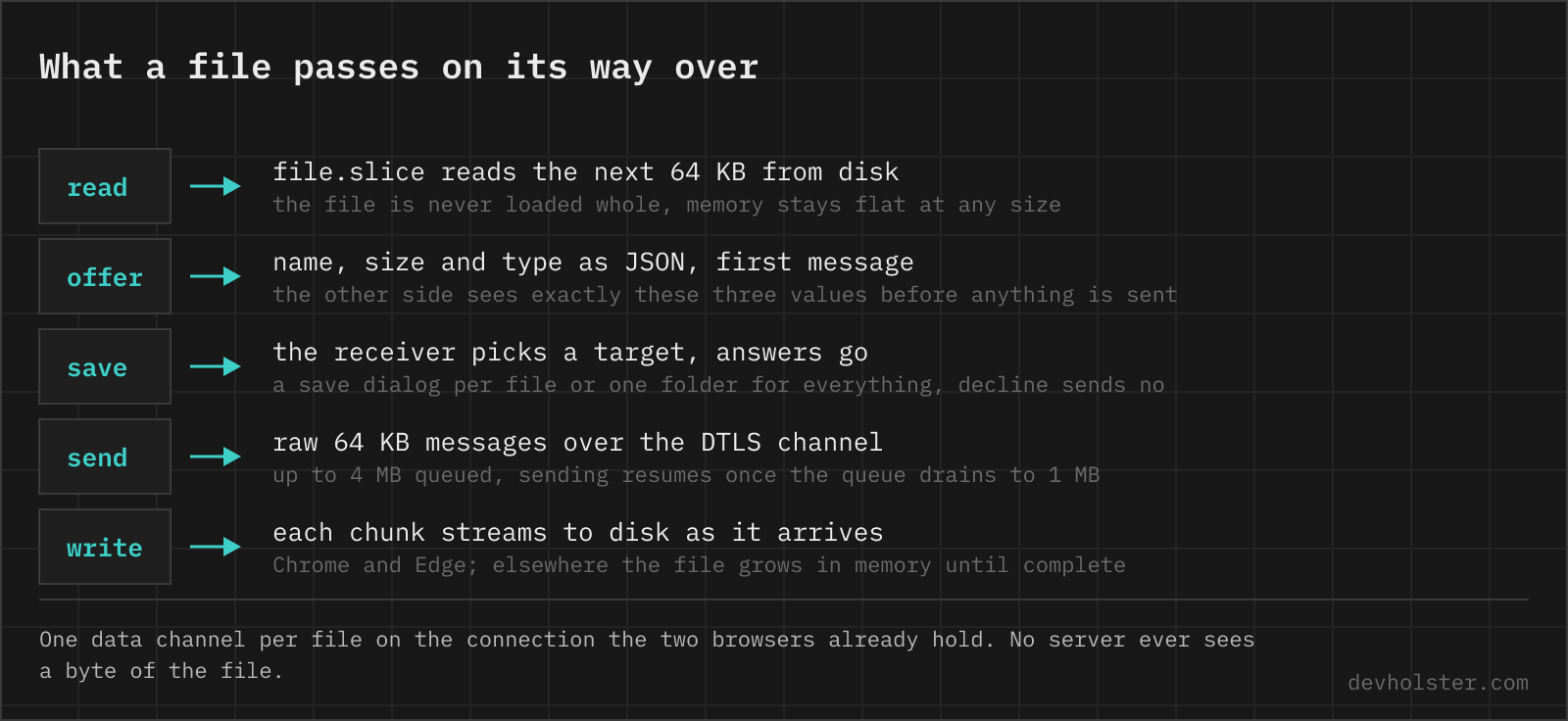
Sending is dropping. Every file you drop is announced to the other side with its name, size and type, and nothing beyond those three values leaves your machine until the other person clicks save. They can decline instead, and either side can cancel a running transfer at any point. Each file gets its own row with progress, current speed and time left, and its own encrypted data channel on the connection the two tabs already share, so several files run at once without taking turns.
The six-digit safety code above the drop zone hashes the certificate fingerprints of both ends, the same check the chat and the video call use. Read it to each other over the phone once and a relay in the middle is ruled out.
As in every peer-to-peer connection, the other person sees your IP address.
Why upload services cap out and this page does not
An upload service has to store your file, and storage is what its limits protect. Every transfer sits on a disk in a data center until the link expires, so the free tier gets a cap and a countdown. WeTransfer's free plan currently allows 10 transfers or 3 GB in total per rolling 30-day window, and Wormhole stores at most 5 GB per file, deleted after 24 hours.
Here there is nothing to protect, because there is no storage. The sender reads the file from disk in 64 KB slices, pushes each slice into the encrypted data channel, and the receiving browser writes it out on the far side. No copy accumulates anywhere in between, which is why the sending side has no size limit at all. A 20 GB file passes through the same few megabytes of memory as a 2 MB one.
const buf = await file.arrayBuffer();
channel.send(buf);
const slice = file.slice(sent, sent + 65536);
channel.send(await slice.arrayBuffer());
The price of having no server is that there is no store and forward. Both tabs stay open until the last byte is through, and if the two networks cannot reach each other directly, mobile carriers and office firewalls are the usual suspects, the transfer does not start at all. This page deliberately runs without a TURN relay, and the chat article explains when a direct connection fails.
Where an incoming file lands
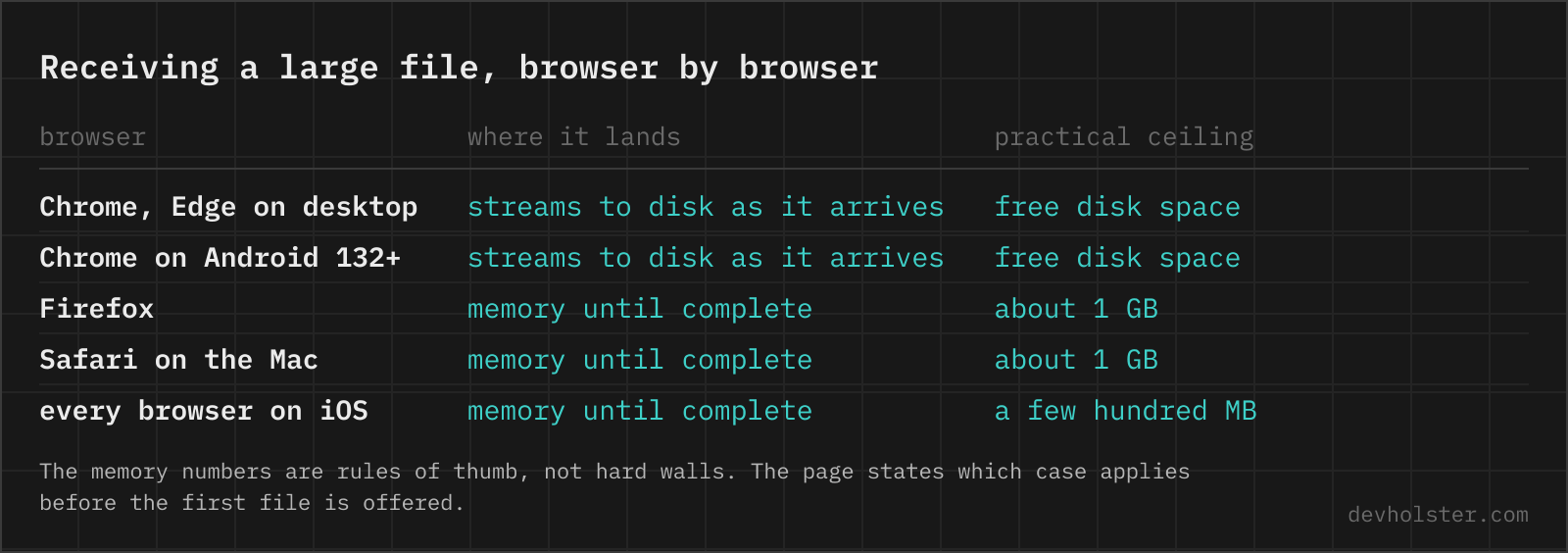
The interesting limit sits on the receiving side, and it depends entirely on the browser. Chrome and Edge on the desktop, and Chrome on Android since version 132, have the File System Access API. The save dialog hands the page a writable stream, and every chunk goes to disk the moment it arrives, so a file of any size passes through a few megabytes of memory and nothing more. Choose a folder once and every incoming file lands there without another dialog, with name collisions numbered the way downloads are, photo (2).jpg.
Firefox and Safari have no save picker, so an incoming file grows in memory until it is complete and becomes a regular download at the end. Up to roughly 1 GB that works fine. Beyond it, receive in Chrome or Edge, and on iPhones and iPads, where every browser runs on Safari's engine, plan for a few hundred MB rather than gigabytes. The page checks which case applies and says so before the first file is offered.
In both modes nothing touches the disk before you click save, and a cancelled or broken transfer deletes the partial file instead of leaving half a download behind.
What sets the speed
A data channel message may carry 64 KB in any browser without asking what the other side negotiated, the safe figure under the message size rules of RFC 8831. So 64 KB is the chunk size here. The sender keeps up to 4 MB of chunks queued in the channel and reads the next slice from disk once the queue drains below 1 MB. That backpressure is visible on the page, the send queue chart saws between the two marks for as long as a transfer runs.
Between two tabs on one machine this moves 26 MB/s, about 420 chunks per second, and a 150 MB test file arrived with a SHA-256 identical to the source. Across a real network the slower of your upload and their download sets the pace, and on home connections that is almost always the sender's upload. The page prints no estimate for that case, because we have not measured one.
DTLS already authenticates every packet on the wire, so the page does not hash the finished file. We accept that a write error on the receiving side would go unnoticed, and checked the pipeline once with that SHA-256 comparison instead of making every transfer pay for a hash over gigabytes.
The round-trip chart tells you something during a transfer too. The ping travels over the same connection as the chunks and queues behind them, so a round trip that climbs while a transfer is fast means the link is running at capacity, not that something is wrong.
When a transfer breaks
A cancelled file says which side cancelled, a closed tab reads as connection was closed. There is no resume, an interrupted file starts over from zero. The page warns before you close a tab mid-transfer, and folders are skipped at the drop zone.
To send a folder, zip it first.
WeTransfer, Wormhole, AirDrop or scp
| This page | WeTransfer free | Wormhole | AirDrop | scp | |
|---|---|---|---|---|---|
| Path | browser to browser | via WeTransfer's storage | server up to 5 GB, then peer to peer | device to device nearby | machine to machine over SSH |
| Size limit | none from the sender | 10 transfers or 3 GB per 30 days | 10 GB | none | none |
| Both online at once | yes | no | only above 5 GB | yes, within range | yes |
| Server keeps a copy | never | until the link expires | below 5 GB, for 24 h | no | no |
| Works on | any current browser | any browser | any browser | Apple devices only | anything with shell access |
| Recipient needs | the invite link | the download link | the link | to accept the prompt | an account on the machine |
For a recipient who is asleep in another timezone, an upload service wins, because store and forward is the one thing a serverless transfer cannot do. AirDrop wins between two Apple devices in the same room. scp wins when you have shell access on one end and both machines are yours anyway.
The browser transfer wins one case clearly. Two people online right now, a file bigger than the free caps, and nobody willing to create an account or install anything. Wormhole above 5 GB is the same mechanism, a browser to browser stream with the tab kept open, with server storage as the fallback below.
It is the wrong tool when the other person cannot stay online until the end, and when both sides sit behind carrier-grade NAT, because there is no relay to fall back on.
Size caps, slow transfers and where the file actually lands
How can I send a 10 GB file to someone for free?
Without paying, two roads exist: a cloud account with 10 GB of free space, or no upload at all. Free transfer services stop earlier, WeTransfer's free plan allows 10 transfers or 3 GB in total per 30 days, Wormhole tops out at 10 GB. A peer to peer transfer over WebRTC has no server and no cap. The file streams from your disk to theirs while both tabs stay open.
Is WebRTC file transfer safe?
The transport is encrypted with DTLS in every browser and no page can switch that off, and in a direct transfer no server ever holds a copy. The risks live next to the transport. The other person sees your IP address, and whoever has the invite link can take the second seat, so treat the link like a password. Comparing the six-digit safety code out loud rules out a man in the middle.
What is the maximum message size of an RTCDataChannel?
64 KB works in every browser without negotiation. Peers can advertise more through max-message-size in the SDP, but a sender that stays at 64 KB never has to check what the other side accepts, which is why file transfer tools slice at exactly that size.
Can I send a folder over WebRTC?
Not as a folder. Zip it, send the archive, unzip on the other side.
Does Firefox support the File System Access API?
No. Firefox and Safari implement only the Origin Private File System, a hidden per-site store, not the save and folder pickers a streamed download needs.
Why does my file transfer fail at exactly 4 GB?
A wall at 4 GB is almost always FAT32, the file system most USB sticks and SD cards ship with, whose largest possible file is 4 GiB minus one byte. Save to an internal drive, or reformat the stick as exFAT, and the same transfer goes through.
How fast is a WebRTC file transfer compared to scp?
The wire decides, not the protocol. Both encrypt, both run as fast as the slower end of the connection allows, and neither is an order of magnitude ahead of the other on the same link. The real difference is reach: scp needs SSH access and a reachable port, a WebRTC transfer needs two open tabs and crosses most NATs without any server access.
Why does the transfer stop when I lock my phone?
The phone suspends the browser to save battery, and a suspended tab stops sending within seconds. A peer to peer transfer has no server to take over, so keep the screen on until the last byte is through.
Is there an AirDrop alternative for sending files from iPhone to Windows?
AirDrop never leaves Apple hardware. The closest cross-platform match is a WebRTC transfer page in the browser. The same link opens on the iPhone and on the PC, and the file moves directly between the two devices, on the same Wi-Fi or across the internet.
How do I send large video files without losing quality?
Send the file as a file, not through a messenger. Chat apps like WhatsApp recompress video hard. A cloud link, scp or a peer to peer transfer moves the bytes unchanged, so the copy that arrives is the copy you had.