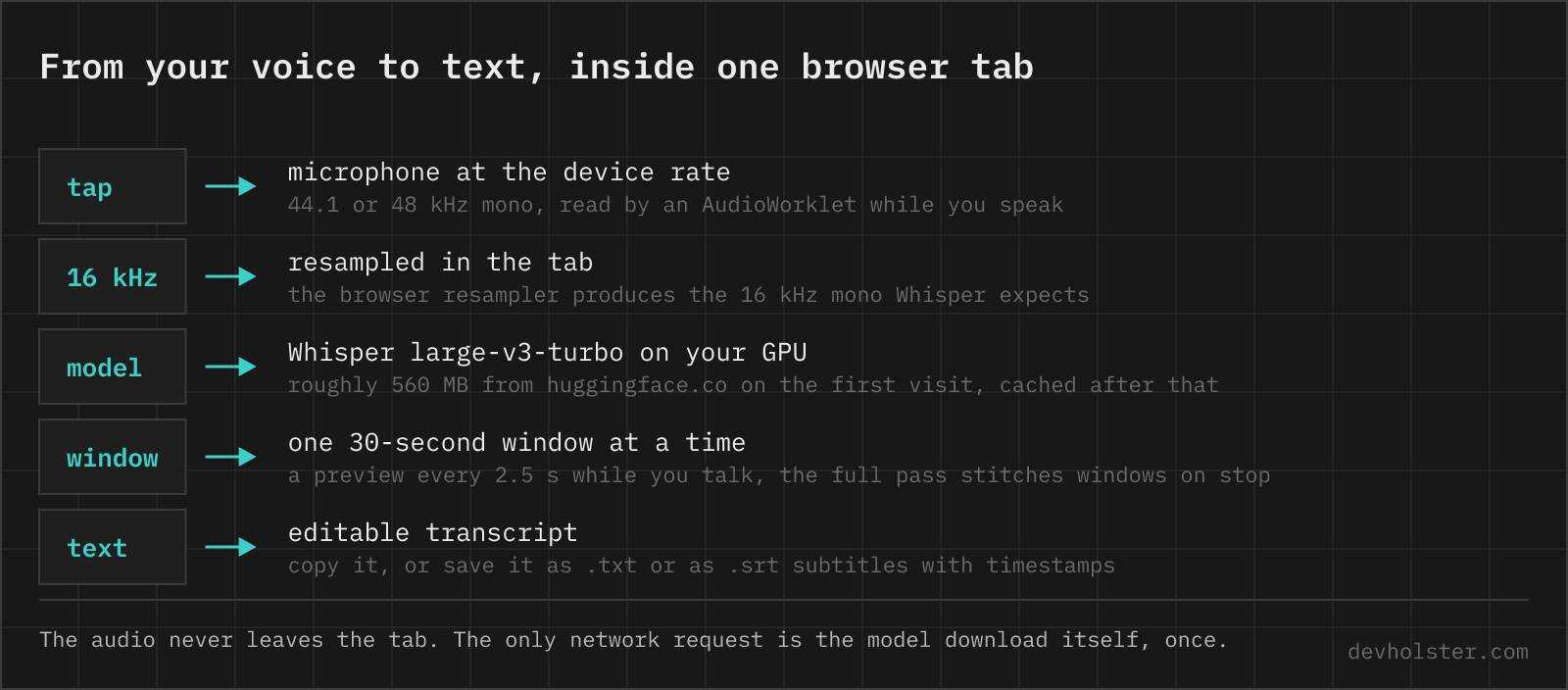
The fastest speech recogniser on your machine is the one the browser already ships, and in Chrome, until version 139, it was also the one that phoned home on every take. This page starts with that engine, asks Chrome for the on-device version where it exists, and keeps OpenAI's open Whisper model in the tab for the browsers that have no recogniser, the ones that block it, and the recordings you drop here.
Dictate, or drop a recording
Tap the microphone, talk, tap again. The words appear in the field while you speak, greyed in as guesses and firmed up phrase by phrase, and when you stop the whole take is there, ready to edit, copy, or save as .txt or .srt.
- Pick your language first. The browser's recogniser does not guess it, a German take with
--languageon English comes back as English-sounding nonsense. The sixteen languages in the first group are the ones every browser engine knows. The rest of the list is Whisper's, and picking one of those is a good reason to switch--whisperon. - Need subtitles?
--timestampsputs every phrase on its own line with its start time, and the.srtdownload carries start and end cues either way. - Want it local?
--whisperdownloads the model once, roughly 560 MB with a progress bar, and from then on the audio never leaves the tab. The setting is remembered.
The chip at the right end of the option bar names the engine in use and where it runs, so you never have to guess.
Which engine hears you, and where
Browsers have shipped dictation for years through the Web Speech API. What they do not always ship is the recogniser itself. Chrome streams the audio to Google, Edge to Microsoft, and Firefox has the interface with nothing behind it. Safari is the exception. WebKit hands the audio to the system's speech recogniser and requires on-device recognition whenever the language supports it, so on an Apple-Silicon Mac or a recent iPhone the audio stays put for the main languages and only otherwise goes to Apple's servers. Safari does not tell the page which of the two it got. The Chrome behaviour was the reason the first version of this page refused the API altogether and ran Whisper for everything.
Chrome 139 changed the trade. A page can now ask SpeechRecognition.available() whether a language can be recognised on the device, install the pack with SpeechRecognition.install() inside a click, and set processLocally so the audio stays on the machine. This page does exactly that. On the first tap it starts the install in the background and lets that take go through Google's service, the next take runs locally, and the chip switches from "on Google's servers" to "on this device".
In Chrome and Edge without that pack, the browser engine means the vendor's servers, and the page says so in the status line before you speak.
When the browser engine is missing or refuses, Whisper takes over by itself. Brave answers every start with a network error because it blocks Google's backend, Safari reports service-not-allowed when dictation is switched off in the system, and an unsupported language or a dead connection end the same way. In each case the page tells you why it switched, keeps the phrases it already had, and shows the download button for the model.
When Whisper is the better pick
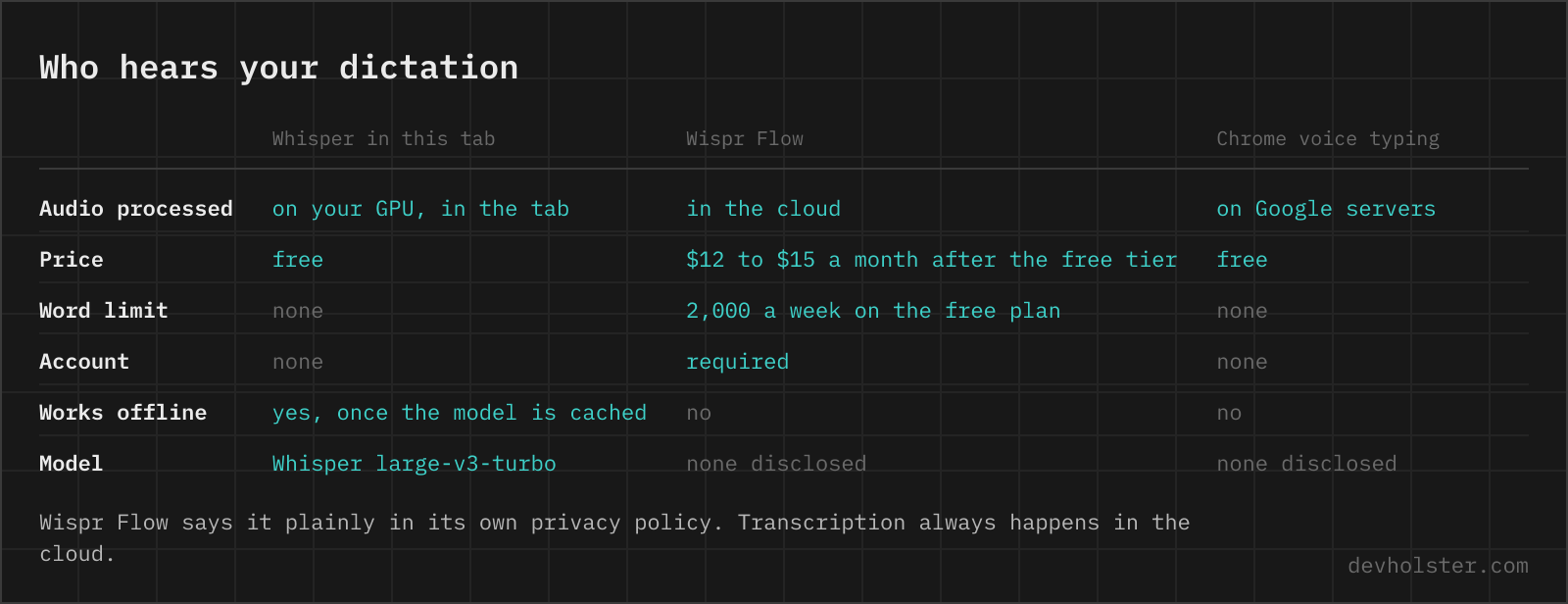
The browser engine wins on latency and on the empty download bar. Whisper wins on four things. Anything confidential, because nothing leaves the tab. Recordings, because the Web Speech API listens to a microphone and cannot read a file. The 83 languages the browser engines do not offer. And noisy or accented audio, where a model trained on five million hours of real-world speech is noticeably more robust than a dictation service tuned for clean phone audio.
We would rather make the browser engine the default even though it hands the audio to Google on most machines, because the alternative is half a gigabyte before the first word and most people dictate a message, not a deposition. What that costs us is the clean answer this page used to give. The privacy answer is now "it depends on the engine", so we print the engine where you can see it.
Accuracy, engine by engine
Google's recogniser is excellent on English and the other big languages and returns the text within a second of the phrase ending. It returns it without punctuation in most languages, and there is no switch for that. Safari's dictation punctuates by itself on recent systems. Both struggle with names and product terms, which come back as the nearest common word.
Whisper large-v3-turbo is OpenAI's pruned large-v3. The encoder, the half that listens, is unchanged. The decoder went from 32 layers to 4, roughly eight times faster in the table of OpenAI's Whisper repository at 809 million parameters, with a minor quality drop against full large-v3. Punctuation, casing and sentence boundaries come out of the model. Its weak spots are long digit sequences, which sometimes come back reformatted, and silence or music, where it can invent text or loop a phrase.
One expectation to set for Whisper. The very first transcription after the download is slower, because the GPU compiles its shaders on first use. From the second run on, an Apple-Silicon laptop transcribes at 1.5 to 2.5 times real time, and the SPEED stat shows your machine's multiple.
From mp3, voice memo or video to subtitles
Drop an audio file onto the dark stage, or open one with the button next to the timer. Anything the browser can decode works, which covers mp3, wav, m4a, ogg, flac and webm, and video files, where the audio track is what gets read. Recordings always go through Whisper, so the first file asks for the model download if it is not stored yet, and the file waits for it.
Whisper natively sees 30 seconds at a time, so longer material is cut into 30-second windows with a five-second overlap and stitched back together. You see one transcript with segment timing behind it, and the .srt download turns that timing into subtitle cues ready for a player or a video editor.
There is no length cap. An hour-long recording is an hour of work for your GPU, which at two times real time means about half an hour of it.
What it will not do
No speaker labels, neither engine knows who spoke. No translation here, turbo was finetuned for transcription and returns the source language even when asked. The subtitle generator loads a model that can and writes English cues for a recording in any language. No punctuation from Chrome's server engine, you add it in the field. And without WebGPU the Whisper fallback drops to the small whisper-base model on the CPU, audibly less accurate.
Dictation questions, from Chrome to Whisper
Does Chrome voice typing send audio to Google?
By default yes. The Web Speech API in Chrome streams the microphone to Google's recogniser and gets text back. Since Chrome 139 a page can ask for on-device recognition with processLocally, which downloads a language pack once and then keeps the audio on the machine. This page asks for it and prints which of the two it got in the option bar.
Why does the Web Speech API not work in Firefox?
Firefox has no recognition backend. The SpeechRecognition interface exists behind the media.webspeech.recognition.enable flag, but nothing answers it, so pages that need dictation in Firefox bundle a model like Whisper or run one on a server.
What is the difference between webkitSpeechRecognition and SpeechRecognition?
None, the prefix is history. Chrome and Safari still expose only the prefixed name, so feature-detect both.
Why does speech recognition return no punctuation in Chrome?
Google's server recogniser behind the Web Speech API returns bare words for most languages, and there is no option to change that. Safari's dictation punctuates by itself on recent versions, and Whisper always does. On this page the transcript is editable, so a missing full stop is a keystroke.
Why does SpeechRecognition stop after a few seconds of silence?
Chrome ends a continuous session on its own after a stretch of silence, and Chrome on Android ends it after every phrase, each time firing end without an error. The usual fix is to start the recogniser again from the end handler until the user actually stops, which is what this page does, with a guard against a service that ends three times in a row without hearing anything.
Why does the Web Speech API fire a network error?
The browser could not reach its recognition service. Brave ships Chrome's API but blocks the Google backend, so every start ends in network there. Offline machines and corporate proxies produce the same error. This page switches to Whisper in the tab when it sees one.
Does speech recognition work offline in the browser?
Only with an on-device engine. Chrome 139 and later can run recognition locally once the language pack is installed. Safari requires on-device recognition from the system whenever the language supports it, which covers the main languages on Apple-Silicon Macs and recent iPhones. Whisper in this tab works offline once the model is cached.
Is it safe to dictate confidential notes into an online speech to text tool?
Find out which engine runs first, because the answer differs by page and by browser. The browser's built-in recogniser sends audio to Google, Apple or Microsoft unless it runs on the device, most dictation products transcribe in their own cloud, and most transcription websites upload the file. A page that bundles Whisper does the recognition inside the tab. Here the option bar names the engine, and --whisper forces the local one.
Is Whisper free to use?
Yes. OpenAI released the code and every model size under the MIT license.
How do I transcribe an audio file to text for free?
pip install -U openai-whisper, then whisper interview.mp3 --model turbo writes .txt, .srt and .vtt files next to the recording. That needs Python and a one-time model download. Without installing anything, drop the file onto the transcriber on this page. mp3, wav, m4a, ogg, flac and webm all decode, video files too.
Which Whisper model should I use, turbo or large-v3?
Turbo, unless you need translation. It keeps large-v3's encoder, cuts the decoder from 32 layers to 4, and OpenAI measured only a minor accuracy drop for transcription at roughly eight times the speed. Reach for large-v3 when translating or on the hardest audio, and for tiny or base when only a CPU is available.
Why does Whisper repeat the same sentence over and over?
That is Whisper's best-known failure mode, a repetition loop. It usually starts on long silence, music or crosstalk, where the decoder has nothing solid to anchor on and starts feeding its own output back to itself. Cut the silent stretches, or put voice activity detection in front (faster-whisper bundles Silero VAD for exactly this). Chunked processing helps too, because a loop then dies at the next window boundary instead of poisoning the rest of the file.
How long does Whisper take to transcribe one hour of audio?
At the 1.5 to 2.5 times real time that large-v3-turbo reaches on an Apple-Silicon GPU through WebGPU, an hour of audio takes 25 to 40 minutes. A dedicated NVIDIA card running faster-whisper is quicker, a bare CPU far slower. The SPEED stat under the tool shows the multiple your machine reaches.