Why format YAML at all
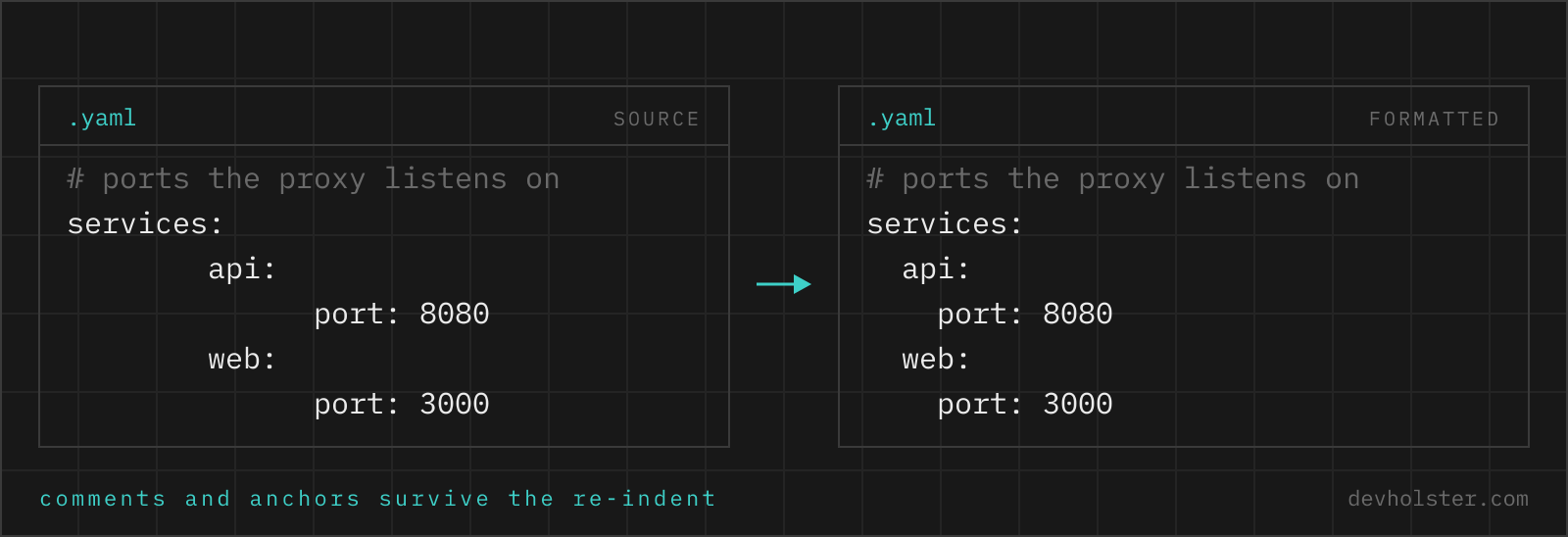
YAML is the format people edit by hand, so its files pick up mess the way JSON never does. A Kubernetes manifest that three people have touched has two-space indentation in one block and four in the next, list items sometimes flush with their key and sometimes indented, quoted strings alternating between single and double, and a stretch of trailing whitespace nobody noticed. All of it is valid; all of it makes diffs harder to read than they should be.
Formatting normalises that layout in one pass, which is worth doing before a pull request and after generating YAML from a template. The validator half matters more. Because YAML derives structure from whitespace, a mistyped space changes meaning rather than raising an obvious error, and the parser message often lands a line or two below the actual problem. Pasting the file into a parser that names the position is faster than eyeballing columns.
How to use this formatter
Paste YAML into the left pane, or drop a .yaml file on it, and the formatted result appears on the right while you type. Files that fail to parse show the error inline in the output pane, with the offending line quoted and a caret under the column.
- Paste or drop your YAML. A Kubernetes manifest, a compose file, a workflow, an Ansible playbook; multi-document files with
---separators work too. - Pick the indent. 2 or 4 spaces. There is no tab option, because YAML forbids tabs for indentation.
- Check the numbers. The strip under the panes shows size, line count, total keys across all documents, and whether the file parses.
- Copy or download. The result goes to your clipboard or saves as a
.yamlfile.
--flat-seq
Counts the - marker as part of the indentation, so lists sit one level shallower. With the default 2-space indent that puts the dash flush with its key:
| Default (indented) | --flat-seq (kubectl style) |
|---|---|
ports: - 8080 - 8443 | ports:- 8080- 8443 |
Both parse identically. The flush form is what kubectl get -o yaml emits and saves two columns per nesting level, which is why deep manifests often use it. With 4-space indentation the dash moves in by two instead, so the item content still lands on the 4-space grid.
--strip-comments
Removes every # comment. Useful when you are handing a config to a tool that chokes on them, or trimming a template down to the lines that matter. Off by default, since comments in YAML are usually the documentation.
Why most online YAML formatters delete your comments
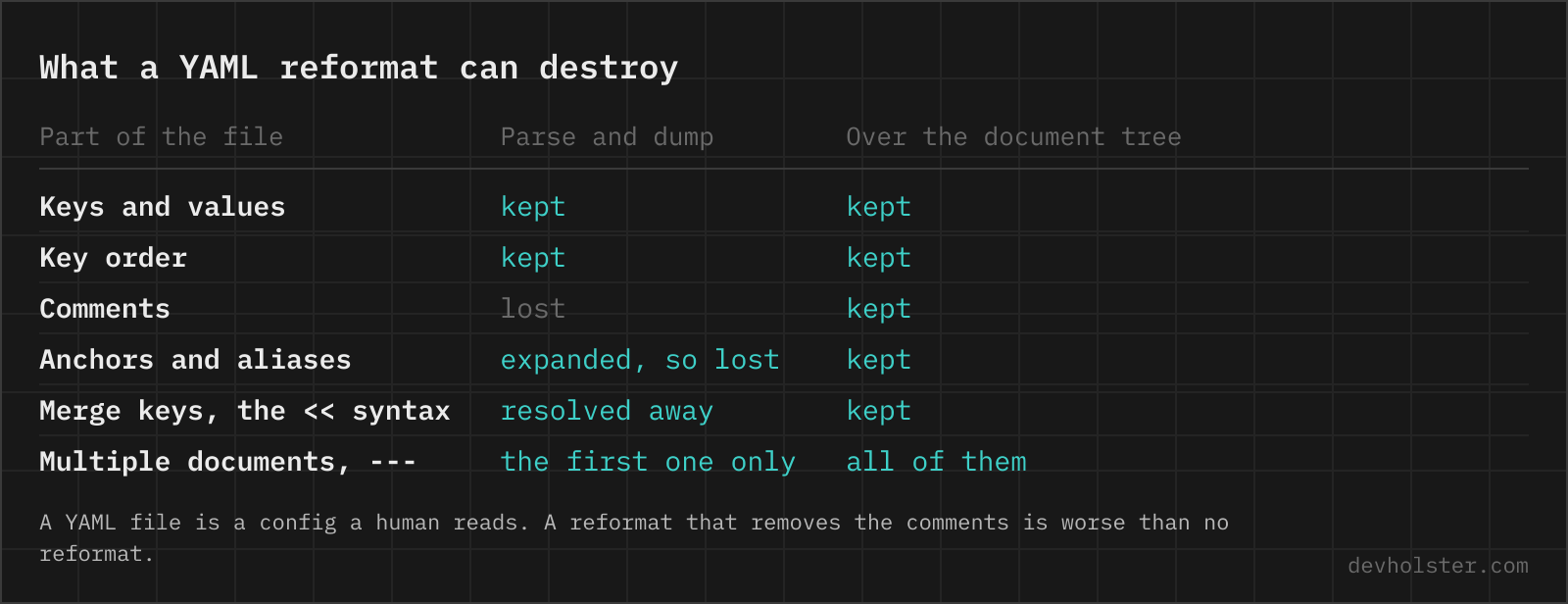
This is the failure mode that made us build the tool this way. Take a formatter, paste a docker-compose file with a dozen explanatory comments and an anchor block, press format, and get back clean YAML with every comment gone and every alias expanded into a full copy. The data is intact; the file is not the same file.
The cause is architectural. The quick way to build a YAML formatter is dump(load(input)): parse into a plain object, serialise it back. That object has no place to store a comment, so comments vanish at the parse step, long before formatting begins. Anchors and aliases die the same way, since the object graph no longer records that two branches were once the same node. Quoting style, block scalars and document markers get normalised to whatever the serialiser prefers.
This formatter operates on the document tree the parser produces, comments and anchors attached, and re-renders that tree with new indentation. Comments stay attached to the node they annotate, &defaults and <<: *defaults stay as written, and block scalars keep their indicators. The sample file in the empty output pane has both a comment and a merge key, so you can see it happen.
The indentation rules that actually cause errors
- No tabs, ever, for indentation. This is not a style preference, the spec forbids it. Editors set to insert tabs are the most common source of "found character that cannot start any token".
- Keys at one level must share a column. A single extra space before a key makes it a child of the previous one, or an error, depending on context. Errors are the lucky case; silent restructuring is the other one.
- List dashes may be flush or indented, but not mixed within a block. Either style is fine for the whole file; alternating inside one mapping is where it breaks.
- Block scalars indent relative to their key. Everything more indented than the
|line belongs to the string. Under-indent one line of an embedded shell script and it becomes a YAML key. - Two spaces after the dash for mapping items. When a list item is itself a mapping, its keys align after the dash, and following keys must line up with the first one, not with the dash.
Reading YAML error messages
YAML parsers report where they gave up, and with whitespace-driven syntax that is regularly one or two lines past the mistake. A missing space after a colon is noticed when the value turns out to be nonsense; a wrongly indented key is noticed at the following line, which suddenly cannot belong anywhere. So read the caret position as a starting point and move upward. The output pane shows the message, a code frame with the caret, and a button that puts your cursor on that character in the input.
| Message | What it usually means |
|---|---|
| Nested mappings are not allowed in compact mappings | A colon inside an unquoted value, typically a URL or a time like 12:30. Quote the value. |
| All mapping items must start at the same column | One key shifted by a space, or a mix of tab and space indentation. |
| Implicit keys need to be on a single line | A missing space after the colon, so key:value was read as one long scalar. |
| Map keys must be unique | The same key twice in one mapping, often after a copy-paste. Later keys win in most parsers, which is how the wrong image tag ships. |
| Unexpected scalar at node end | Usually an unquoted string containing #, { or [, which start a comment or flow collection. |
| Unresolved alias | An *alias whose &anchor is missing, defined later, or in a different document of the same file. |
Implicit typing, and the warning we print about it
YAML types unquoted scalars by how they are spelled, and formatting does not change that. The rules are worth carrying around: yes, no, on, off, y, n are booleans in YAML 1.1 and plain strings in 1.2, so the meaning of your file depends on which parser generation reads it. Numbers with leading zeros were octal in 1.1. Dates parse to date objects in some implementations. And the famous one: a list of country codes containing NO comes back with false in the middle, the Norway problem.
A formatter cannot fix this without changing your data, so this one does the next best thing and points at it. After every successful format, the output is scanned for plain scalars that two parser generations would read differently, and each one is listed under the pane:
y,n,yes,no,on,offin any capitalisation, which are booleans to a 1.1 parser and text to a 1.2 one.- Leading-zero numbers such as
0755, read as octal by 1.1. - Colon-separated numbers such as
12:30:00, read as sexagesimal by 1.1. - Unquoted dates such as
2024-01-05, which become date objects in several implementations rather than the string you wrote. - Version-shaped numbers such as
1.10, which every parser including 1.2 turns into the number 1.1, quietly dropping the zero.
We have not found another online YAML formatter that reports this, and the version-number variant has bitten us more than once, which is why it is here. The advice behind the warning: quote anything that is data rather than YAML vocabulary. Version strings, zip codes, phone numbers, git SHAs that happen to be all digits, any identifier with leading zeros. Keys and structural words stay unquoted; values a human would call data get quotes. If the same file has to behave under both 1.1 and 1.2 parsers, that habit is the only reliable defence.
Online formatter vs. yamllint, Prettier and the editor
Use this page when YAML shows up outside your toolchain: a manifest pasted into a ticket, a workflow you are debugging on someone else's machine, a compose file from a vendor, output from kubectl get -o yaml that needs to be readable before you can reason about it. No install, and nothing leaves the tab, which is the part that matters when the file has a registry secret in it.
Use yamllint in CI for the checks a formatter does not make: line length, truthy values, duplicate keys, document start markers. Use Prettier for YAML files inside a repository, since formatting belongs in a pre-commit hook rather than a browser tab. And for Kubernetes specifically, remember that neither this tool nor a linter knows the API schema, kubectl apply --dry-run=server is what tells you the manifest is actually correct.
Indentation, comments and errors
Is it safe to paste Kubernetes manifests or CI files into an online YAML formatter?
Only if the formatter runs in your browser rather than on its server. YAML is where cluster names, registry credentials, webhook URLs, internal hostnames and the occasional base64 Secret live, so an upload-based tool hands over a map of your infrastructure. Formatting and validation happen here as JavaScript in your tab, with no upload and no logging, and the page keeps working offline. If you are on someone else's tool, watch the Network tab in devtools while formatting, and assume any manifest that triggered a request now needs its secrets rotated.
What does "mapping values are not allowed in this context" mean?
A colon followed by a space turned up where the parser was already reading a scalar, so it tried to start a second key inside a value. The usual cause is an unquoted string containing a colon, such as title: Release: 2.0 or a Windows path, and the fix is to quote the whole value. The other frequent cause is a line indented one level too far, which makes a key look like part of the line above. YAML reports the position where parsing broke, not where the mistake is, so check the line before the one in the message. Two sibling errors with the same root: "did not find expected key" usually means inconsistent indentation, and "could not find expected ':'" usually means an unclosed quote swallowing the following lines.
Why do online YAML formatters delete my comments?
Because most of them parse the YAML into a plain object and dump it back out. A comment is not part of the data model, so it is gone by the time serialisation starts, together with anchors, aliases and the choice of quoting style. This tool formats the document tree instead of the parsed data, which is why # comments come back in place. Test any formatter with a commented file before you trust it with a real one.
How do I fix YAML indentation errors?
Three rules cover almost every case: use spaces, never tabs, since YAML forbids tabs for indentation outright; indent nested keys consistently, typically by two spaces; and make sure every key at the same logical level starts in the same column. Paste the file here and the parser points at the first line where the structure breaks. Note that the reported line is often one below the real mistake, because the parser only notices at the next line.
Should YAML be indented with 2 or 4 spaces?
Two spaces is the de-facto standard: Kubernetes documentation, GitHub Actions, docker-compose and Ansible examples all use it, as does Prettier. Four spaces is legal and more readable in shallow files, but nesting in Kubernetes manifests runs deep enough that four spaces pushes lines past 80 characters fast. What actually breaks files is mixing widths within one document, or using tabs at all.
Are tabs allowed in YAML?
Not for indentation. The spec forbids it, and every conforming parser rejects a tab used to indent a block, usually with a message about finding a tab character that violates indentation. Tabs inside a quoted string value are fine. The reason is that tab width is a display setting, so a tab-indented file would mean different things in different editors, which is exactly what YAML’s whitespace-driven structure cannot tolerate.
What are YAML anchors and aliases?
An anchor (&name) marks a node, an alias (*name) refers back to it, and the merge key (<<: *name) folds an anchored mapping into another one. They exist to avoid repeating blocks, which is why docker-compose and GitLab CI files use them heavily. They are also the first thing a naive formatter destroys: parse-and-dump expands every alias into a copy. This formatter keeps them as written.
Should list items be indented under their key?
Both forms are valid and mean exactly the same thing. Indented lists (key, then two spaces, then the dash) are what Prettier and most style guides produce; flush lists (dash in the same column as the key) are what kubectl and many Kubernetes examples show, and they save two columns per level in deeply nested manifests. Use the --flat-seq option here to switch between them. Pick one per repository, because the diff noise from mixing them is real.
How do I handle multiple YAML documents in one file?
Separate them with a line containing only three dashes. This is standard for Kubernetes, where one file often holds a Deployment, a Service and an Ingress. Not every consumer accepts multi-document files, kubectl and docker compose do, many application config loaders do not. This formatter reads all documents, formats each and keeps the --- separators.
How do I comment out a block of lines in YAML?
One # per line, because YAML has no block comment syntax at all. Editors do the tedious part: Ctrl+/ (Cmd+/ on macOS) toggles comments on the selection in VS Code, JetBrains IDEs and Sublime. The # has to be at the start of the token, and an inline comment needs a space before it, otherwise it becomes part of the value: port: 8080 # prod is a comment, port: 8080# prod is not. For temporarily disabling a whole section there is one alternative worth knowing: move the block under a key nobody reads, for example prefix it with x- as docker-compose and GitHub Actions both accept, which keeps the YAML valid and the block visible.
Why did my version number 1.10 turn into 1.1?
Because unquoted, it is a float, and floats drop trailing zeros. The same class of accident turns 08 into an error in old parsers reading it as octal, and 2024-01-05 into a date object rather than a string. Anything that is data rather than YAML vocabulary belongs in quotes: version numbers, phone numbers, zip codes, git SHAs that happen to be all digits, and IDs with leading zeros.
How do I write a multi-line string in YAML?
Use a block scalar: the pipe (|) keeps line breaks as written, the greater-than sign (>) folds lines into a single paragraph with spaces. Add a dash (|- or >-) to strip the trailing newline, or a plus (|+) to keep all trailing newlines. This is how you embed scripts in GitHub Actions and certificates in Kubernetes secrets, and the choice between | and > changes the resulting string, so it matters.
What is the difference between a YAML formatter, validator and linter?
A formatter rewrites layout without changing data. A validator answers whether the document parses at all, which is what the VALID stat in this tool reports. A linter goes further and judges style and risk: line length, duplicate keys, truthy values written as yes/no, missing document start markers. yamllint is the standard linter; a formatter cannot replace it, and it cannot replace schema validation against the Kubernetes API either.