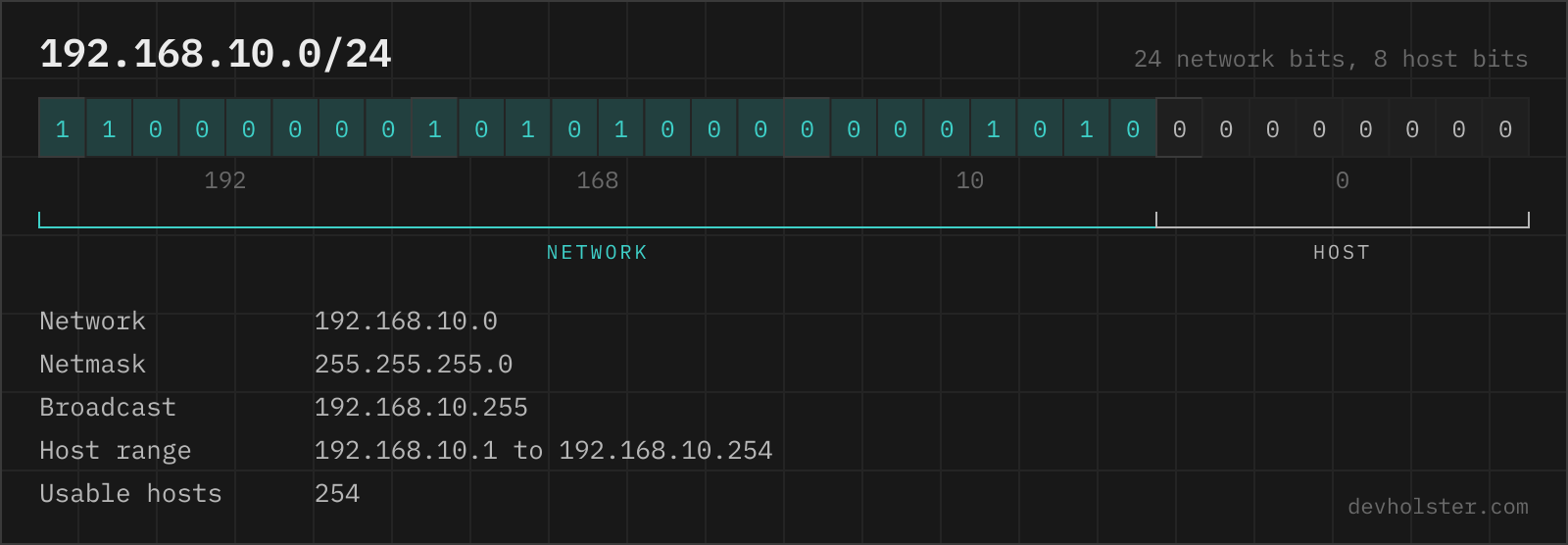
Every subnetting question is the same question: where in the 32 bits does the network end and the host part begin? This calculator puts that boundary on screen as a clickable bit bar and derives everything else live: network and broadcast address, host range, netmask and wildcard mask, the split into smaller subnets, and the findings that the numbers alone do not show, like an address that sits in CGNAT space or a subnet that loses five addresses to AWS instead of two.
One boundary, two halves
An IPv4 address is 32 bits. A prefix length like /20 says: the first 20 bits name the network, the last 12 name the host inside it. Everything a subnet calculator outputs follows mechanically from that single number:
- The netmask is the prefix drawn as bits: 20 ones, 12 zeros, read in octets as
255.255.240.0. - The network address is the address AND the mask: all host bits forced to 0.
- The broadcast address is all host bits forced to 1.
- The size is 2 to the power of the host bits: 2^12 = 4096 addresses, of which 4094 are assignable.
The reason people still get it wrong at 2 a.m. is that the boundary usually falls in the middle of an octet, where decimal notation hides it. 172.16.10.5/20 does not look like it belongs to 172.16.0.0, but AND the third octet 10 with 240 and the 10 vanishes. The bit bar above exists for exactly this case: the orange boundary sits inside the third octet group, and the octet values under the bits show what survives the mask.
How to read the calculator
Type an address with a prefix (192.168.1.0/24), with a netmask (192.168.1.0 255.255.255.0) or with a wildcard mask (0.0.0.255, recognized by its leading zeros and read as the inverted netmask). A bare address is treated as a /24 and the assumption is flagged. Everything recomputes as you type; nothing is uploaded, all math runs in this tab.
The bit bar is interactive: click any bit to move the network boundary there, or step the prefix with the +/− buttons. Watching the broadcast address and host count react to a moving boundary teaches subnetting faster than any table. Below it, every value in the addresses panel copies with a click, the findings panel names the range you are in (private, CGNAT, link-local, documentation space) and the traps you are near, and the split panel divides the network into equal smaller subnets with their host ranges.
If you type a host address rather than a network address, the calculator does not refuse: it computes the containing network, tells you what it did, and carries on. That covers the most common real task, "which subnet does this IP belong to", without a detour.
--aws and --azure
Both clouds reserve five addresses per subnet instead of the classic two. These flags switch the usable-host math and the first-host address to the cloud's rules, name the five reserved addresses for your concrete subnet, and warn when the size is outside what the provider accepts (AWS: /16 to /28, Azure: /29 or larger).
CIDR to netmask to hosts
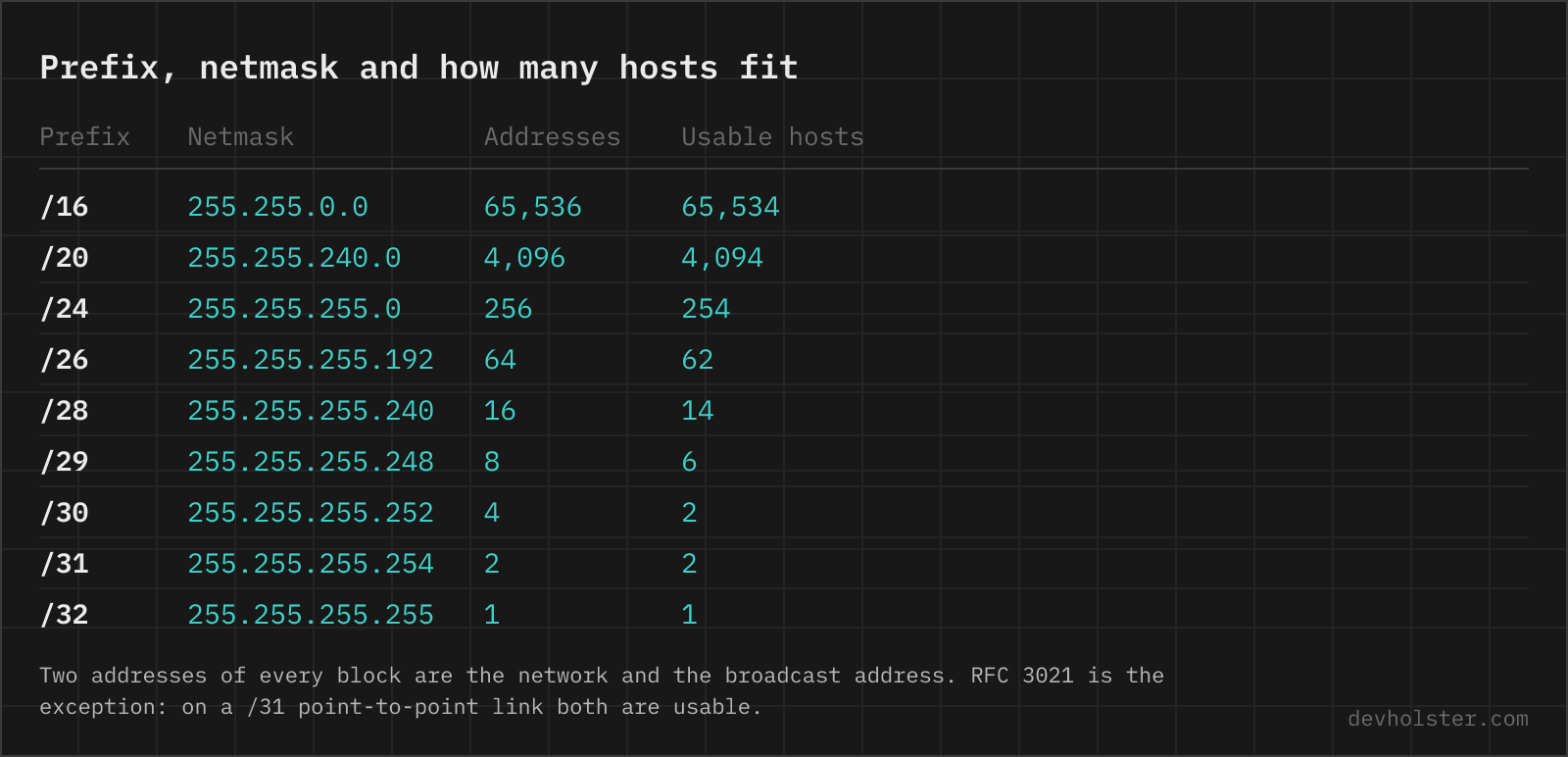
The whole table, /8 through /32. Usable hosts is total minus 2, except where RFC 3021 says otherwise at the bottom:
| CIDR | Netmask | Addresses | Usable hosts |
|---|---|---|---|
| /8 | 255.0.0.0 | 16,777,216 | 16,777,214 |
| /12 | 255.240.0.0 | 1,048,576 | 1,048,574 |
| /16 | 255.255.0.0 | 65,536 | 65,534 |
| /20 | 255.255.240.0 | 4,096 | 4,094 |
| /21 | 255.255.248.0 | 2,048 | 2,046 |
| /22 | 255.255.252.0 | 1,024 | 1,022 |
| /23 | 255.255.254.0 | 512 | 510 |
| /24 | 255.255.255.0 | 256 | 254 |
| /25 | 255.255.255.128 | 128 | 126 |
| /26 | 255.255.255.192 | 64 | 62 |
| /27 | 255.255.255.224 | 32 | 30 |
| /28 | 255.255.255.240 | 16 | 14 |
| /29 | 255.255.255.248 | 8 | 6 |
| /30 | 255.255.255.252 | 4 | 2 |
| /31 | 255.255.255.254 | 2 | 2 (RFC 3021) |
| /32 | 255.255.255.255 | 1 | 1 (host route) |
Two patterns worth memorizing instead of the table: each step down doubles the network count and halves the size, and the "interesting" octet of the mask is always 256 minus a power of two (128, 192, 224, 240, 248, 252, 254, 255). A mask octet like 250 is the immediate tell that a config was typed by hand and is wrong; the calculator rejects non-contiguous masks with exactly that explanation.
Netmask, wildcard mask and where each is written
The same boundary has three spellings, and mixing up where each belongs causes real outages:
| Spelling | Example | Where it lives |
|---|---|---|
| CIDR prefix | /20 | routing tables, cloud consoles, firewall rules, everywhere modern |
| Netmask | 255.255.240.0 | interface configs (ifconfig, Windows adapter settings), DHCP options |
| Wildcard mask | 0.0.15.255 | Cisco ACLs, OSPF network statements |
The wildcard mask is the netmask with every bit flipped: ones mark the bits the ACL ignores. Since IOS accepts either value without complaint in most positions, an ACL written with 255.255.240.0 where 0.0.15.255 was intended matches almost nothing and fails silently. The calculator always prints both forms side by side, and it accepts a wildcard in the input, recognized by its leading zero bits. The one shape it refuses is the discontiguous wildcard, the kind IOS allows for matching every odd subnet in a range: it has no netmask equivalent, so there is no single network for the calculator to describe.
Private and special ranges
The findings panel checks the address against the reserved ranges, because the same arithmetic means something different depending on where it happens. The ones that matter in practice:
| Range | What it is |
|---|---|
10.0.0.0/8, 172.16.0.0/12, 192.168.0.0/16 | private space (RFC 1918), never routed publicly |
100.64.0.0/10 | carrier-grade NAT (RFC 6598), the ISP's middle layer, not for your LAN |
127.0.0.0/8 | loopback, the whole /8, not just 127.0.0.1 |
169.254.0.0/16 | link-local / APIPA, self-assigned when DHCP fails |
192.0.2.0/24, 198.51.100.0/24, 203.0.113.0/24 | TEST-NET-1 through 3, reserved for documentation |
198.18.0.0/15 | device benchmarking (RFC 2544) |
224.0.0.0/4 | multicast group addresses |
240.0.0.0/4 | reserved "class E", refused by most stacks |
Memorize the exact edges of RFC 1918 space. The 172 range is the one people get wrong, because /12 is an unusual size: it ends at 172.31.255.255, and 172.32.0.0 onward is public space owned by someone whose traffic you will blackhole if you treat it as internal. The 100.64.0.0/10 range causes the mirror-image mistake, looking public enough that people try to use it as such.
/31, /32 and the small prefixes
The minus-two rule has two exceptions, both at the bottom of the table. A /31 contains two addresses, and RFC 3021 defines point-to-point operation where both are hosts: no network address, no broadcast. Router-to-router links are exactly two devices, so the /30 that older gear needs wastes half its addresses on formalities. On any reasonably current platform, number links as /31s.
A /32 is one address with no range at all. It appears as a host route in routing tables, as the target of a firewall rule, and as the address of a loopback interface on routers, where the address must not imply any link. When a firewall rule says 203.0.113.7/32, the /32 is not pedantry: leaving the prefix off some systems defaults to a classful mask and quietly widens the rule.
A /30 still has its place as the compatibility choice for point-to-point links, and as the smallest subnet with a working broadcast, which some protocols on the link still expect.
Subnets in AWS and Azure
Cloud VPCs keep CIDR notation but change the host math, and capacity planning with the classic formula produces subnets that fill up early. AWS reserves five addresses in every subnet: network, VPC router, DNS resolver, one for future use, and broadcast (VPCs do not forward broadcast, but the address stays blocked). Azure reserves five with a nearly identical list. The practical consequences:
- An AWS
/28, the smallest allowed subnet, has 11 usable addresses, not 14. Load balancers want subnets of /27 or larger for headroom. - The first assignable host is
.4of the block, not.1. Hardcoding.1as a gateway convention breaks; in AWS the router answers on.1but you cannot assign it. - AWS accepts subnet sizes from /16 to /28 only; Azure goes down to /29. A /30 or /31 cannot be created in either, so link-style addressing plans do not translate.
The --aws and --azure flags above apply these rules to the subnet you typed and name the five reserved addresses concretely, which is easier to review than remembering the offsets.
Splitting a network
Subnetting a block is repeated halving. Take 10.20.0.0/16 for an office: adding two bits makes four /18s of 16,382 hosts each, adding eight makes 256 /24s. Two rules keep a plan valid:
- Subnets start on multiples of their own size. The /26s of a /24 begin at .0, .64, .128, .192; a block from .32 to .95 is not a subnet, no mask can describe it.
- Sizes may be mixed, but blocks must not overlap. One /25 (.0 to .127) plus two /26s (.128 to .191, .192 to .255) tile a /24 exactly.
The split panel does the tiling for one target size and lists each subnet with its host range, ready to paste into an IPAM sheet or a terraform variable. For the reverse direction, growing networks, the practical advice is to leave gaps: allocate the second /24 of a plan at an even boundary so that both can later merge into one /23 without renumbering. Aggregation only works when the two halves are aligned neighbors; the CIDR calculator does that merging for whole lists, and also turns arbitrary start-end ranges into the minimal set of blocks.
Subnetting IPv6 follows the same boundary logic with different sizes and habits (nibble steps, /64 everywhere); the IPv6 subnet calculator covers that side, including the address compression rules IPv4 does not have.
Subnetting questions
How do I calculate a subnet mask from a CIDR prefix like /26?
Write that many 1-bits from the left and fill the rest with zeros: /26 is 26 ones, so 11111111.11111111.11111111.11000000, which reads as 255.255.255.192. The shortcut for the interesting octet: subtract the leftover bits from 8 and take 256 minus 2 to that power, so /26 leaves 6 host bits, 2^6 = 64, 256 − 64 = 192. The same works backwards: 255.255.240.0 has 4 zero bits in the third octet, so it is /20.
How many usable hosts fit in a /24, /25, /26 or /30 subnet?
The formula is 2^(32 − prefix) − 2, because the network address and the broadcast address cannot be assigned to hosts. A /24 holds 254 usable hosts, a /25 126, a /26 62, a /27 30, a /28 14, a /29 6 and a /30 just 2. The two exceptions are /31 (2 usable, RFC 3021 drops network and broadcast for point-to-point links) and /32 (a single host route). Cloud subnets differ again: AWS and Azure each reserve 5 addresses per subnet, not 2.
What are the network address and the broadcast address actually used for?
The network address (all host bits 0, like 192.168.1.0 in a /24) names the subnet itself: routing tables, firewall rules and IPAM systems refer to the subnet by it, and no host may use it. The broadcast address (all host bits 1, like 192.168.1.255) reaches every host in the subnet at once; DHCP discovery and ARP-adjacent protocols still depend on it. That is why every classic subnet loses exactly these two addresses from its usable count.
What are the private IP address ranges?
RFC 1918 defines three: 10.0.0.0/8 (10.0.0.0 to 10.255.255.255, about 16.7 million addresses), 172.16.0.0/12 (172.16.0.0 to 172.31.255.255, about 1 million) and 192.168.0.0/16 (192.168.0.0 to 192.168.255.255, 65,536). They are never routed on the public internet, which is why any number of networks can reuse them behind NAT. The common trap is 172.16.0.0/12: it ends at 172.31.255.255, so 172.32.x.x is public space that belongs to someone.
What is a /31 subnet used for, and how is it different from a /30?
A /31 holds exactly two addresses and RFC 3021 lets point-to-point links use both, with no network or broadcast address. A /30 holds four addresses but only two are usable, since network and broadcast still apply. For router-to-router links the /31 therefore halves the address cost, and every mainstream router OS from the last two decades supports it. The /30 remains the compatible fallback for old equipment that predates RFC 3021.
How do I find the network address of an IP like 172.16.10.5/20?
Bitwise-AND the address with the netmask. /20 is 255.255.240.0; ANDing the third octet 10 (00001010) with 240 (11110000) gives 0, so 172.16.10.5/20 sits in 172.16.0.0/20, which runs through 172.16.15.255. Getting this wrong by writing the host form into a router or cloud console is common, and some systems (AWS among them) reject a subnet definition whose host bits are set instead of silently fixing it.
How do I know if two IP addresses are on the same subnet?
AND both addresses with the subnet mask; if the results match, they are in the same subnet. 192.168.1.130 and 192.168.1.10 with mask 255.255.255.128 (/25) give 192.168.1.128 and 192.168.1.0, so they are in different subnets and traffic between them needs the router, even though both start with 192.168.1. This mismatch is a frequent cause of "can ping the gateway but not the neighbor" situations after a /24 was split without every host getting the new mask.
Why does AWS show fewer usable IPs in a subnet than the math says?
AWS reserves five addresses in every VPC subnet: the network address, the next one for the VPC router, the second for the Amazon DNS resolver, the third for future use, and the broadcast address, which a VPC never forwards but still blocks. A /28, the smallest AWS subnet, therefore offers 16 − 5 = 11 assignable addresses, not 14. Azure reserves five as well (network, gateway, two for DNS mapping, broadcast) and allows /29 as its minimum. Plan capacity with the minus-five figure, not the classic minus-two.
What is the 100.64.0.0/10 address range?
Carrier-grade NAT space, defined in RFC 6598. ISPs number the segment between your router and their NAT layer with it, so seeing a 100.64-100.127 address as your WAN address means your connection has no public IPv4 address of its own: port forwarding and inbound connections will not work, and hosting anything requires IPv6 or a tunnel. It is deliberately not RFC 1918 space, because customer LANs already use those ranges and the two must not collide.
Is 255.255.255.255 a subnet mask or an address?
Both exist, and they are different things. As a mask, 255.255.255.255 is /32: a single host route with exactly one address, common in routing tables and firewall rules. As an address, 255.255.255.255 is the limited broadcast address that reaches all hosts on the local segment and is never forwarded by routers; DHCP clients use it before they have any configuration. Which meaning applies is decided purely by where the value is written.
How do I split a /24 into smaller subnets?
Each extra prefix bit doubles the count and halves the size: a /24 splits into 2 × /25 (126 hosts each), 4 × /26 (62 each), 8 × /27 (30 each) or 16 × /28 (14 each). The subnets start at fixed multiples of the block size, so the four /26 of 192.168.1.0/24 begin at .0, .64, .128 and .192, and a subnet may not straddle those boundaries. Mixed sizes work too (one /25 plus two /26), as long as every block starts on a multiple of its own size; that mixed-size approach is VLSM, variable-length subnet masking, and every modern routing protocol carries the mask per route to support it.