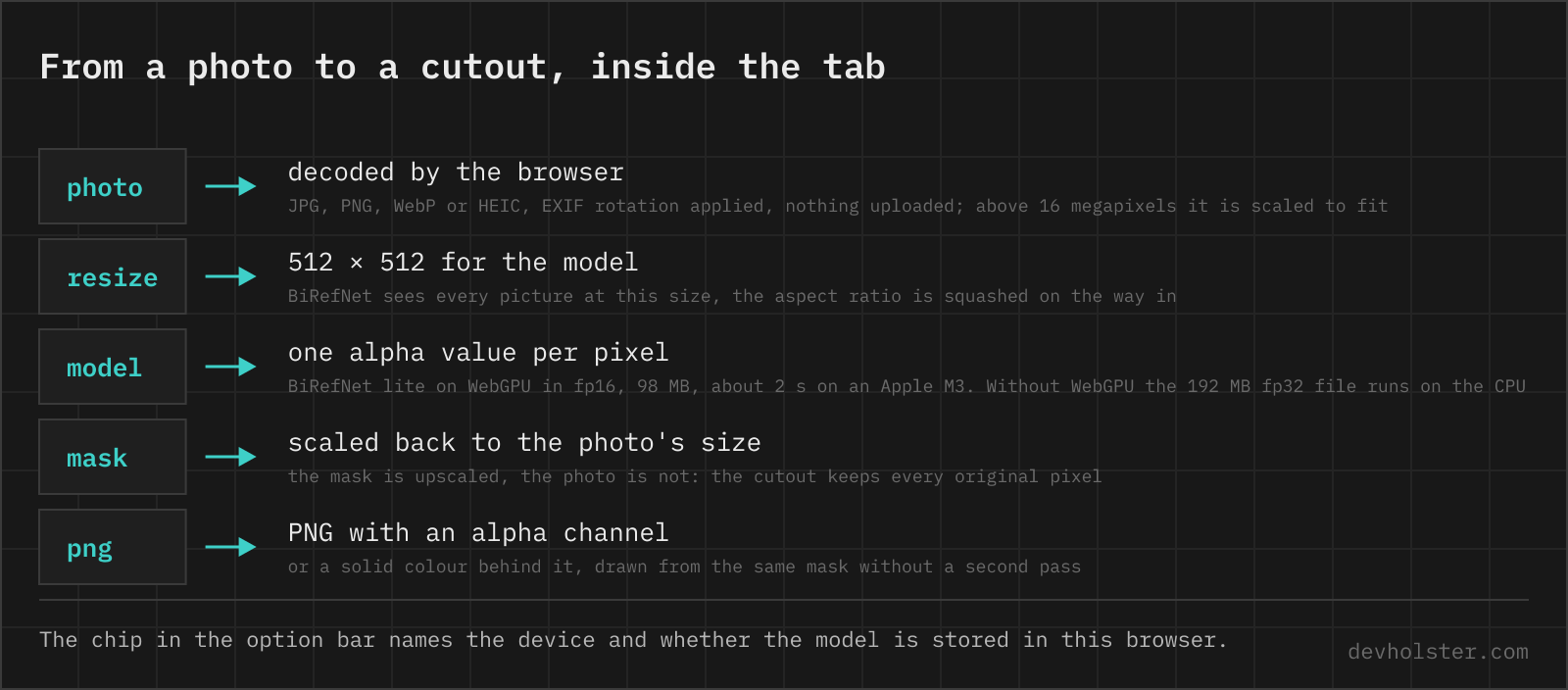
The picture stays on this machine. That is the whole reason this page exists. Most of the popular background removers upload the photo, keep it for a while, and several sell the full-size download back to you. Here an open model runs on the GPU inside the tab, the way a game would, and the browser never opens a connection with the picture in it.
How to remove the background from an image here
Drop a photo on the panel, paste one with Ctrl+V, or click to pick a file. On the first visit the result panel shows a download button instead, because the model is 98 or 192 MB depending on the GPU and comes from Hugging Face. Press it once, the file stays in the browser, and from then on a cutout takes about two seconds on a laptop GPU. A photo above 16 megapixels, 8 on a phone, is scaled down to that area first, and the note under the picture says so.
The result shows the original and the cutout in one frame, split by a handle you can drag. The checkerboard behind the cutout is transparency. Drag the handle to the far left to see only the result, or switch --compare off to get rid of the handle altogether.
--bgis what goes behind the cutout.transparentgives a PNG with an alpha channel,whiteandblacka solid fill, andcolouropens a picker. With a fill the rim pixels are blended toward that colour by their transparency, which is the defringe step an editor would do by hand. The fill is drawn from the mask the model already produced, so changing it does not run the model again.--edgehardens the rim. At 0 the mask keeps its 256 levels, at 10 every pixel is either in or out. Somewhere in between takes a halo away without eating the hair, and it is redrawn from the stored mask in a fraction of a second.--maskshows the mask itself as a grey image, white for subject and black for background, which is the quickest way to see where the model hesitated.download .pnganddownload .webpwrite the cutout at the image's own size, the WebP at quality 90 and usually a fifth of the PNG.copy pngputs the PNG on the clipboard, and it pastes into Slides, Keynote, Figma, Slack or a mail as a picture with the transparency intact.- The stats strip counts the pixels, the share of them the model kept, the time the model took and the size of the PNG.
The chip at the right end of the option bar names the device the model runs on and whether it is stored. The bin next to it removes the model from the browser again. Nothing is downloaded before you press the button, and nothing on a visit that never does.
What the model does with the picture
BiRefNet is a dichotomous segmentation model by Peng Zheng and colleagues, published in 2024 with code and weights under the MIT licence and trained on DIS5K, a dataset of objects labelled down to the single hair and the gap in a fence. The lite variant runs on a Swin-tiny backbone, the small one of the family. It takes a picture at 512 by 512 pixels and returns one value per pixel, how much of it belongs to the subject. That value becomes the alpha channel of the cutout.
Two things follow from the fixed input size. A 12-megapixel phone photo is first shrunk to 512 by 512 for the model, the mask comes back at that size, and the page scales the mask, not the photo, back up to the original. The colour pixels of the cutout are the ones you dropped, untouched. The edge of the mask is where the scaling shows, as a soft band a few pixels wide on a big photo, the effect the next section is about. And the model does not care about the aspect ratio, so a panorama is squashed to a square on the way in and stretched back on the way out. It copes, but portrait and landscape photos near 4:3 get the cleanest edges.
The model runs on WebGPU in fp16, which is the 98 MB file, and on an Apple M3 a photo takes about two seconds once the shaders are compiled, a little more for the first one. Without WebGPU, Firefox on most systems and any browser with graphics acceleration switched off, the fp32 file runs on the CPU in WebAssembly instead, 192 MB and about seven seconds per photo on the same machine. The page says which path it is on.
Why 512 pixels and not the 1024 the model was trained at. The published 1024 exports split the decoder's feature maps into a thousand small tensors, and that needs more storage buffers per shader than WebGPU allows on Apple GPUs and more memory than the WebAssembly heap has. We hit both. The 512 re-export by Studio Ludens runs everywhere we tried, at a small cost in edge detail on very large photos.
The mask has 256 levels, not two. A pixel can be 30 percent subject, and hair, smoke and the edge of a glass are exactly that. The FOREGROUND stat counts the pixels above half.
Hair, glass and the white fringe
Every background remover fails in the same three places, and it helps to know which failure you are looking at.
The first is the fringe. A pixel at the edge of a subject photographed against white is a blend of subject and white, and the model can only decide how transparent that pixel is, not what colour it was underneath. Put the cutout on a dark background and a thin light rim appears. That is not a mask error. It is the original colour of the edge, and the fix is a defringe step in an editor, or a --bg colour that is close to the original background, which hides it.
The second is fine structure. Single hairs, a wire fence, the spokes of a wheel. BiRefNet was built for exactly this, its training set is the DIS5K collection of thin and hollow objects, and it keeps most stray hairs and the gaps in a fence. What it loses at 512 pixels is the finest of them on a big photo, where one model pixel covers eight of yours. For a product photo or a headshot it does not matter. For a portrait in wind, run a tighter crop.
The third is judgement. The model keeps what it takes to be the subject, and on a picture with two people, a person holding a bicycle or a cat on a sofa, it may keep one and drop the other. It has no idea what you wanted. Crop before you drop, and for two subjects run two crops.
Which background remover
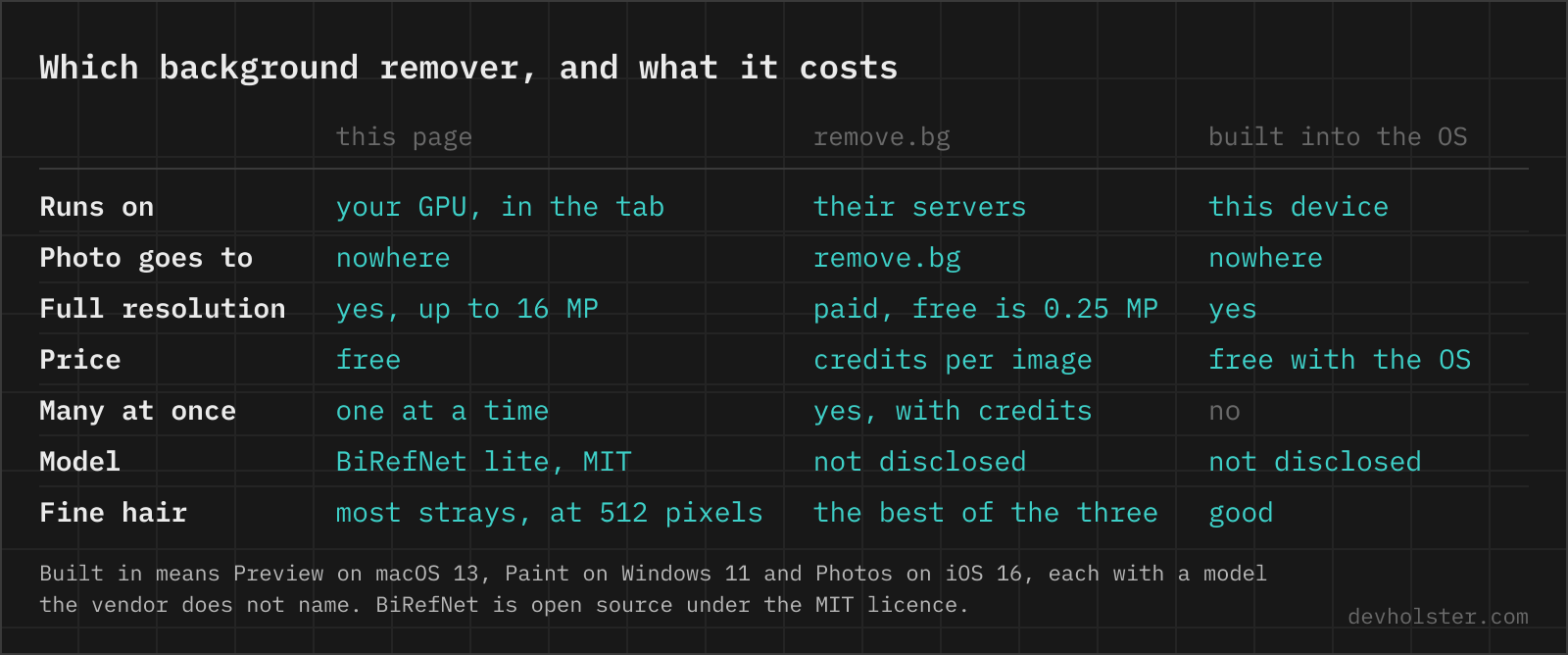
For most people it is the one already on the device. Preview on macOS 13 and later, Paint on Windows 11 and the Photos app on iOS 16 and later all cut a subject out for free, on the device, with a model Apple and Microsoft do not name. They are one click and they are good. Use them first.
The web tools at the top of the search results, remove.bg first among them, are a different trade. The picture is uploaded, and at remove.bg the free result is a 0.25-megapixel preview while the full-size file costs credits. Several of the others sell the download the same way. In return you get batch processing, an API, and edge quality at the top of the field, because they can run a model that would never fit in a browser.
This page sits between the two. It is for the photo that is on a machine without a built-in tool, for the colour fill, for the copy-to-clipboard, and for the case where the built-in tool cut badly and you want a second opinion from a model you can name. It has no batch mode and no brush.
We would rather ship one model that runs everywhere than the biggest one. The full BiRefNet in the browser means half a gigabyte and a wait of many seconds on a good laptop, and on a phone it does not run at all. The lite model at 512 pixels is the same architecture at a fifth of the size, and on most photos the difference is invisible. If your work is print-size portraits, run the full model in rembg on a machine with a GPU.
The model and its licence
BiRefNet is open source in the plain sense. Peng Zheng publishes the code and the weights under the MIT licence, which allows any use, commercial included, as long as the copyright notice travels along. The ONNX file this page loads is a re-export of the lite weights at 512 pixels under the same licence, fetched from its repository on Hugging Face and stored in your browser. A cutout you make here is yours, the licence says nothing about outputs.
The sample photo is our own portrait, because the example pictures in model repositories come with licences of their own. Every model and library on this site is listed with its licence on the open source page.
PNG, WebP or JPG for the result
PNG is the default download, because it is the one format with an alpha channel that every program on earth opens. It is also the largest, easily 3 MB for a 12-megapixel cutout. For a website take the WebP button instead, it keeps the transparency at a fraction of the size, or convert the PNG to AVIF for a little less again. JPG cannot hold transparency at all, so a cutout saved as JPG comes back on white or black, whatever the converter chose.
Background removal, the questions people actually search
How do I remove the background from a photo for free?
Your operating system probably does it already. On an iPhone with iOS 16 or later, touch and hold the subject in Photos and it lifts off. On a Mac, open the picture in Preview and choose Remove Background from the Tools menu, or right-click the file in Finder and pick Quick Actions. Windows 11 has a Remove background button in Paint. All three keep the photo on the device. A browser tool like this page is the option when the picture is on another machine, when you want a colour behind it, or when the built-in one cuts badly. Most of the popular web tools upload the picture, and several sell the full-size download.
Why does the cutout have a white edge or halo?
Because the pixels at the edge were a mix of subject and background before the cut, and the mask only changes how transparent they are, not their colour. A light background leaves a light rim, a green screen leaves a green one. The fix is a defringe or matte step in an editor (Layer, Matting, Defringe in Photoshop, or Color to Alpha in GIMP), or a background colour close to the original one. A mask that is upscaled from 512 pixels adds a second effect on big photos, a soft band a few pixels wide, and that is the one you see when you zoom in on a 4000-pixel cutout.
Can a JPG have a transparent background?
No. JPEG has no alpha channel. Save the cutout as PNG or WebP, or flatten it onto a colour first.
How do I remove a background in Python?
pip install "rembg[cli]" and then rembg i photo.jpg cutout.png. The first run downloads u2net, 176 MB, into ~/.u2net. rembg p in-folder out-folder does a whole directory, and -m birefnet-general-lite switches to the BiRefNet model this page uses, -m birefnet-general to the full one, which cuts cleaner at hair and costs a 900 MB download. In code it is from rembg import remove, then remove(input_bytes) returns the PNG bytes.
Is it safe to upload a photo to an online background remover?
Most of them upload the picture to their servers, keep it for a while, and say so in the privacy policy. That matters for photos of people, product shots under embargo and anything with a face in it. Check whether the page says where the processing happens. Tools that run the model in the browser, this one included, never send the picture anywhere. You can watch the network tab while it works.
What is the free resolution limit on remove.bg?
0.25 megapixels, about 625 by 400 pixels, for the free download. The full-size file costs credits. There is no cap here because nothing is processed on a server.
BiRefNet or RMBG-2.0, which is better for background removal?
They are the same architecture. RMBG-2.0 is BRIA's fine-tune of BiRefNet on its own licensed photos. BRIA reports better numbers on its benchmark, the BiRefNet authors on theirs, and on an ordinary photo you will struggle to tell the two apart. The difference that matters is the licence. BiRefNet is MIT, RMBG-2.0 and RMBG-1.4 are free for non-commercial use only and need a paid agreement for anything else. The lite BiRefNet on this page gives up some edge detail for a fifth of the size.
Can I remove the background from many images at once?
Here, one at a time. For a folder, rembg p in out on the command line.
How do I remove a white background with ImageMagick?
magick photo.png -fuzz 10% -transparent white cutout.png. That is a colour key, not a segmentation. It works on a flat, evenly lit white and takes every white pixel inside the subject with it, shirts and teeth included. Raise -fuzz for an off-white background, and add -trim to crop the empty margin.
Why did the model cut off part of the subject?
BiRefNet is a salient object model. It keeps what it judges to be the main subject and drops the rest, so a second person at the edge, a hand-held object or a reflection can go with the background, and a subject that fills the whole frame can lose its edge. Crop closer, or for two subjects run the crops separately. There is no brush here to paint the mask back, that is a job for an editor.