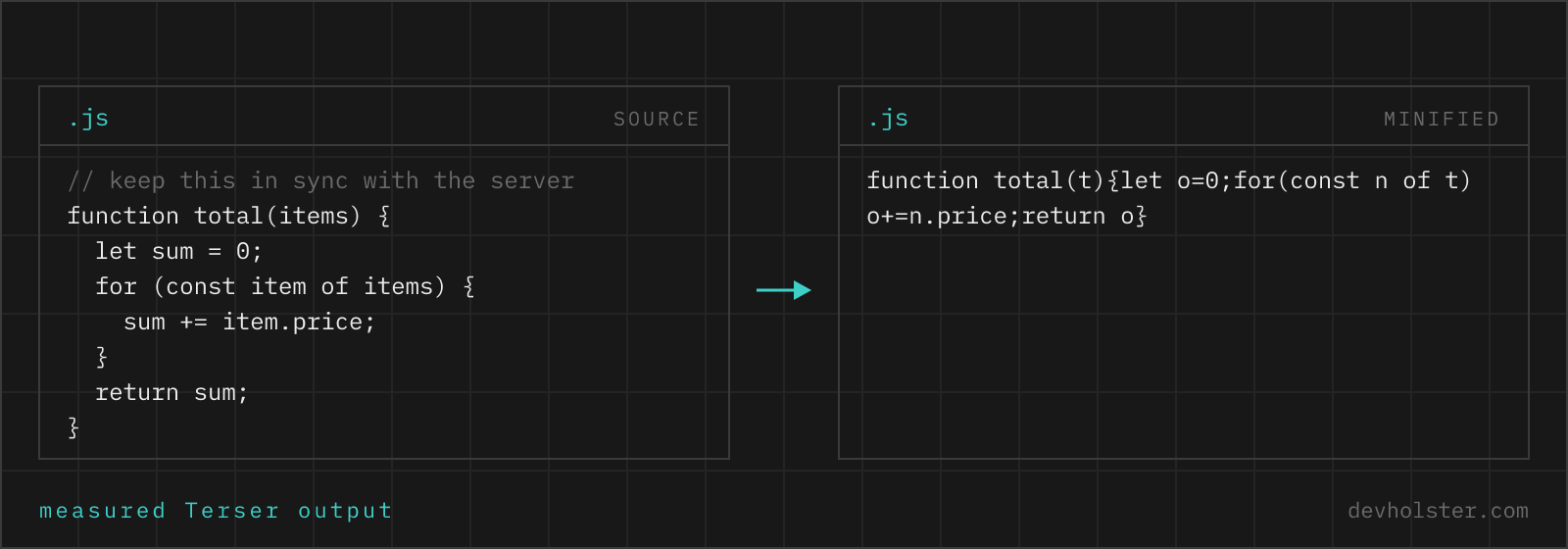
A complete guide to minifying JavaScript: what the transformation actually changes, how much you save in practice, the handful of patterns that genuinely break under a minifier, and when an online tool beats wiring up a build step.
What a JavaScript minifier actually does
A minifier rewrites your JavaScript into the smallest source text that still does exactly the same thing. It is not compression in the zip sense: the output is still valid, executable JavaScript that you can drop straight into a <script> tag. What disappears is everything the engine does not need in order to run your program.
| Transformation | Before | After |
|---|---|---|
| Whitespace and line breaks | if (a) { b(); } | if(a)b() |
| Comments | // skip out-of-stock | removed |
| Name mangling | calculateTotal | t |
| Dead code elimination | if (false) { heavy(); } | removed |
| Constant folding | 60 * 60 * 24 | 86400 |
| Expression rewriting | if (a) x(); else y(); | a?x():y() |
| Boolean shortening | true / false | !0 / !1 |
Every one of these is semantics-preserving. Your functions receive the same arguments, throw the same errors and return the same values. The only observable differences are the ones you asked for, such as dropped console calls, and the identifier names visible in a stack trace.
How to minify JavaScript with this tool
The workflow is deliberately short. Paste your code into the left pane, or drag a .js file onto it, and the minified result appears on the right as you type. There is no run button, no account and no upload step, because the minifier itself is running in this tab.
- Paste or drop your source. A snippet, a whole file or an inline script block, all work the same way.
- Check the numbers. The strip below the panes shows the original size, the minified size, the percentage saved and the gzipped transfer size, which is what a visitor actually downloads.
- Copy or download. Take the output straight to your clipboard, or save it as
source.min.js.
minify / uglify mode
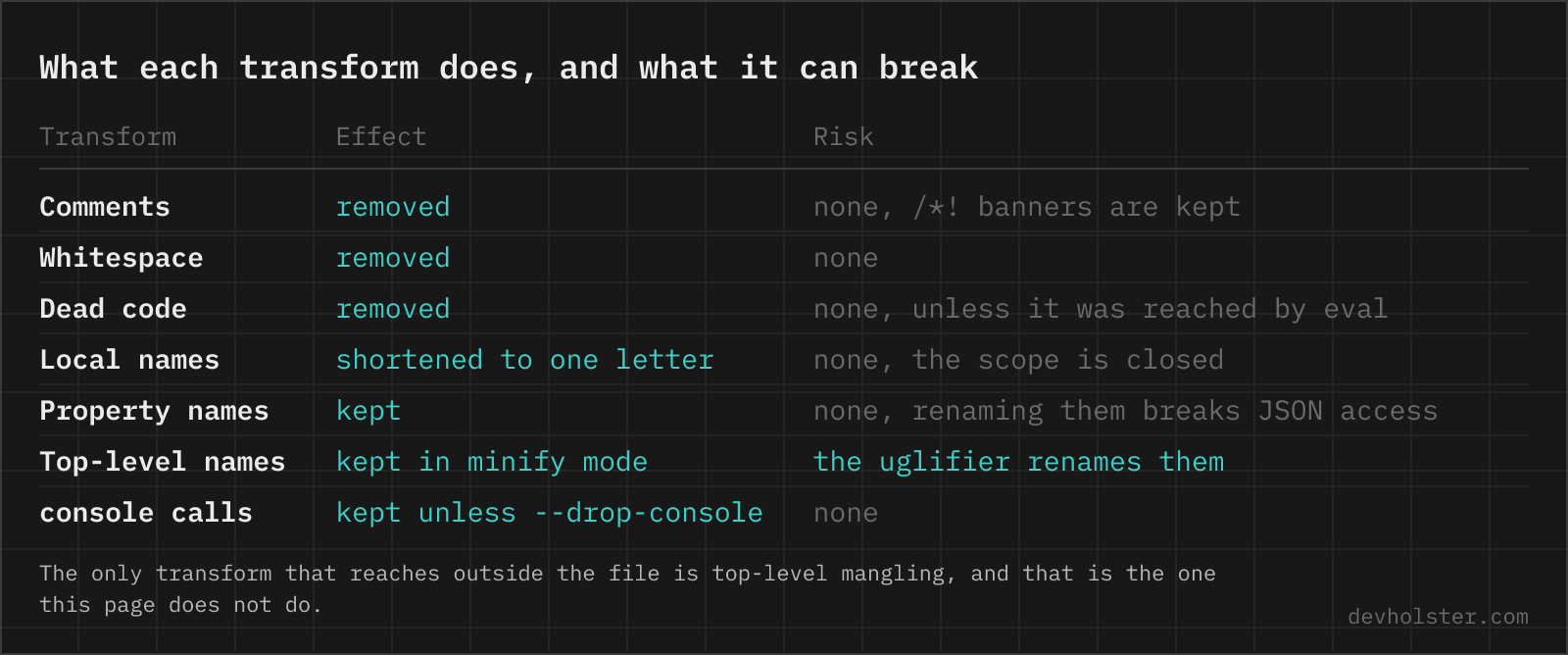
Minify mode, the default here, never touches names at the top level of the file, so scripts that expose globals keep working. Uglify mode turns on Terser's toplevel mangling: top-level functions and variables get renamed to single letters too, which squeezes out a few more percent from standalone files. The same tool with uglify preselected lives at the JS Uglifier page, where the differences are covered in depth.
--mangle
Renames local variables, function parameters and inner function declarations to single letters. This is where most of the savings in real application code come from, since descriptive names are exactly what you want in source and exactly what nobody needs at runtime. Names that are visible outside the file, such as exported bindings and object properties, are left alone.
--drop-console
Strips console.* calls from the output. Handy for the debugging leftovers that always survive a code review, and worth turning off when a log line is intentional.
--keep-license
Preserves banner comments that start with /*!. Most permissive open source licences (MIT, BSD, Apache) require the copyright notice to travel with the code, and this is how bundlers keep that promise. Turn it on whenever you minify third-party libraries.
How much smaller does minified JavaScript get?
For handwritten, well-commented application code, expect the minifier alone to remove 40 to 70 percent of the bytes. Once your server adds gzip or Brotli on top, a total reduction of 80 to 90 percent against the raw source is normal. The table below shows the shape of a typical result for a mid-sized module.
| Stage | Size | Of original |
|---|---|---|
| Raw source | 120 KB | 100% |
| Minified | 48 KB | 40% |
| Minified + gzip | 16 KB | 13% |
| Minified + Brotli | 14 KB | 12% |
Two things move that number a lot. Code with long comment blocks and verbose naming shrinks far more than average, which is why heavily documented libraries post impressive ratios. Code that is mostly data, long strings, base64 blobs or URLs barely shrinks at all, because there is no syntax to throw away. If a file refuses to get smaller, it has usually been minified once already.
Minify, compress, obfuscate, bundle: which is which
These four terms get used interchangeably in tutorials, and mixing them up leads to real mistakes, such as expecting minification to protect source code.
Minification
Rewrites the source text to be smaller while preserving behaviour. The output is still readable JavaScript if you reformat it. This is what this tool does.
Compression
Gzip and Brotli encode the file for transfer. The browser decompresses it before parsing, so compression is invisible to your code and is configured on the server or CDN, not in your build. It stacks with minification rather than replacing it.
Obfuscation
Deliberately makes code hard to understand: control flow flattening, string arrays, dead branches, self-defending wrappers. It usually makes files bigger and slower, and it delays rather than prevents reverse engineering. Reach for it only under a specific threat model, never as a default build step. Not to be confused with anonymizing, which goes the other way. The JavaScript anonymizer keeps the code readable and only swaps your names for placeholders, for a snippet that has to go to a forum or an LLM.
Bundling
Resolves your imports and merges many modules into one file, with tree shaking to drop unused exports. Bundlers such as Vite, webpack, Rollup and Parcel call a minifier at the end of that process, which is why the two get conflated.
When minification breaks your code
Minifiers are conservative by design, so failures are rare and almost always trace back to code that inspects itself at runtime. These are the patterns worth knowing:
- Reading function or class names. Anything relying on
fn.name, a constructor name in a log line, or a registry keyed byClass.namewill see mangled single letters after minification. - Dependency injection by parameter name. Classic AngularJS resolved services from the argument names of a function. Mangling renames those arguments and injection fails at runtime. The array annotation syntax exists precisely to survive this.
- eval and with. Code inside an
evalstring that references local variables cannot be tracked by the minifier, so renaming breaks the lookup. Terser handles the common cases defensively, but the pattern is best avoided anyway. - Function.prototype.toString. Frameworks that parse a function body back into source (some ORMs, older reactive libraries, GLSL shaders stored as functions) see the rewritten body, not what you wrote.
- Property mangling. Renaming object properties, as opposed to local variables, will break every string-based access such as
obj["myKey"]and any JSON boundary. It is off in this tool and off by default in bundlers, and unless you maintain a reserved-names list it should stay that way. - Fragments that are not standalone files. If a script expects to be concatenated with others and shares top-level variables with them, minify the concatenated result, not each fragment on its own.
Minify, then actually load the page and click through the parts of it that touch the code you just changed. Two minutes of smoke testing catches every item on this list.
Online minifier or a build step?
If you already run a bundler, minification is a flag, not a task. Vite, webpack, Rollup, Parcel and Next.js all minify production builds by default, and the sensible move is to leave that alone. Under the hood you are looking at Terser (thorough, the reference implementation), esbuild (extremely fast, marginally larger output) or SWC (a Rust rewrite used by Next.js).
An online minifier earns its place in the cases a build step does not cover:
- A site with no build tooling at all: a WordPress theme, a Shopify snippet, a static HTML page, a landing page shipped over FTP.
- A one-off script such as a tracking helper, a widget embed or a cookie banner, where installing a toolchain costs more than the file is worth.
- Checking what a bundler would produce, or measuring how much a dependency really costs before adding it.
- Working on a locked-down or offline machine where installing packages is not an option.
- Minifying a snippet that came from somewhere else and never enters your repository.
For anything that ships repeatedly, move it into the build eventually. Manual steps are the ones that get skipped.
Debugging minified JavaScript
Once code is mangled, a production stack trace points at line 1, column 12043 of a wall of single-letter variables. Source maps fix that: a separate .map file records how every position in the output corresponds to the original source, and browser devtools and error monitoring services use it to show you the real file, line and variable names.
This tool returns minified code only, without a map, which is the right trade-off for the snippets it is aimed at. For a production application, generate source maps in your build and upload them to your error tracker rather than serving them publicly, so your team gets readable traces without publishing the source. When you need to read minified third-party code, a beautifier restores the formatting even though the original names are gone for good.
Why JavaScript size matters more than image size
Byte for byte, JavaScript is the most expensive thing a page ships. An image is decoded on a background thread and shown; a script has to be downloaded, parsed, compiled and executed on the main thread, and until that finishes the page cannot respond to the person looking at it. On a mid-range Android phone, the parse and compile cost alone runs several times slower than on the laptop the code was written on.
That cost lands directly on the metrics you are measured against. Largest Contentful Paint suffers when render-blocking scripts sit in the head; Interaction to Next Paint suffers when long tasks keep the main thread busy. Both feed into how search engines judge page experience, and both are what a visitor experiences as "this site feels slow". Size limits show up in infrastructure too: edge runtimes such as Cloudflare Workers cap bundle size outright, so minification can be the difference between deploying and not.
Minification is the rare optimisation with no downside. You do not change a line of code, you do not change behaviour, and you get a meaningfully smaller file for the cost of one build flag or one paste.
JavaScript minification questions
Is it safe to minify proprietary or client code in an online minifier?
Not in most of them, because they POST your source to a backend that can log and keep it. That is a real problem when the code is under NDA, unreleased, or owned by a client who never agreed to it leaving your machine. This minifier is Terser compiled to JavaScript running inside your browser tab, so nothing is uploaded and nothing is logged, and the page keeps minifying with the network disconnected. The check that works on any tool: open devtools, switch to the Network tab and watch what happens when you press its minify button.
Does minifying JavaScript break my code?
For ordinary application code, no. Minification is a set of semantics-preserving transformations, so the minified output behaves exactly like the input. It breaks only when your code depends on things minification is allowed to change, such as function or variable names read at runtime, dependency injection by parameter name (old AngularJS), or calling eval on a string that references local variables. See the section on when minification breaks code above.
What is the difference between UglifyJS and Terser?
Terser is a maintained fork of UglifyJS that added full ES6+ support. UglifyJS 2 could not parse modern syntax such as arrow functions, classes, template literals or optional chaining, which is why the ecosystem moved on. This tool runs Terser, so anything your browser can parse it can minify. The verb "uglify" stuck around as a synonym for minify, but the tool behind it is almost always Terser or esbuild today.
Can it minify ES6, ES2020 and newer syntax?
Yes. Modules, classes, arrow functions, async/await, optional chaining, nullish coalescing, private class fields and top-level await all parse and minify. Note that minification is not transpilation: the output keeps whatever syntax level you put in, so if you need to support older browsers, run Babel, SWC or esbuild first and minify the transpiled result.
How do I remove console.log statements from production code?
Let the minifier drop them instead of deleting them by hand. Terser has drop_console (exposed here as the --drop-console option, on by default), esbuild has --drop:console, and every bundler passes the flag through, so the calls disappear from the build while staying in your source where they are useful. Deleting them manually costs you the logging next time you debug, and a lint rule that forbids console entirely tends to get disabled within a week. Keep the option off when console output is deliberate, for example a library that warns about a deprecated option or a support banner, and note that dropping the calls does not remove whatever expensive expression you passed as an argument in every case.
Do I still need gzip or Brotli after minifying?
Yes, and you get both benefits at once. Minification removes characters the parser does not need; gzip and Brotli then compress the repeated patterns in whatever is left. Minified code compresses slightly less well in percentage terms but is still far smaller in absolute bytes, which is what the browser downloads. Almost every CDN and host enables compression by default, so in practice the only step you control is minification.
Can I un-minify code that was already minified?
You can reformat it, not restore it. A beautifier re-indents the code and puts statements back on their own lines, which makes minified third-party code readable enough to follow. What it cannot bring back are the original variable names and comments, because mangling threw that information away. If you own the code, the correct answer is a source map, not a beautifier.
Does minified JavaScript hide my source code from users?
No, and you should not treat it as protection. Anything the browser executes can be read, reformatted and debugged by anyone who opens devtools. Minification is a size optimisation that happens to make code less pleasant to read. If code must stay secret, it belongs on a server, not in a bundle.
Does minification help SEO and Core Web Vitals?
Indirectly but measurably. Smaller scripts download, parse and compile faster, which improves Largest Contentful Paint and Interaction to Next Paint, and those metrics feed into how search engines assess page experience. Minification alone will not rescue a page that ships several megabytes of JavaScript, but it is the cheapest single improvement available: no code changes, no risk, a few seconds of work.
How do I minify a script for WordPress, Shopify or a plain HTML page without npm?
Paste the file contents here, copy the output and save it next to the original as script.min.js, then point your template or theme at the minified file. Keep the unminified source in version control, because that is the file you will edit next time. For an inline <script> block, paste only the JavaScript between the tags, not the tags themselves.
Why is my minified file barely smaller than the original?
Usually because it was already minified. Vendor bundles you download from a CDN, files ending in .min.js and anything produced by a modern bundler are compressed already, so a second pass has nothing left to remove. The other common case is a file that is mostly string literals, data or long URLs: minification only removes syntax, and there is no syntax to remove in data.
Should I minify CSS and HTML as well as JavaScript?
CSS yes, HTML rarely worth doing by hand. CSS minifies well (cssnano, esbuild, Lightning CSS) and stylesheets are render-blocking, so the bytes you remove sit directly in the critical path. HTML minification saves far less, because gzip already handles the repetition in markup, and the aggressive options that collapse whitespace or drop optional closing tags can change rendering in ways that are annoying to debug. Our order of effort: minify JavaScript, minify CSS, make sure the server sends gzip or Brotli, then stop worrying about HTML unless a page is unusually large.