What Base64 is (and is not)
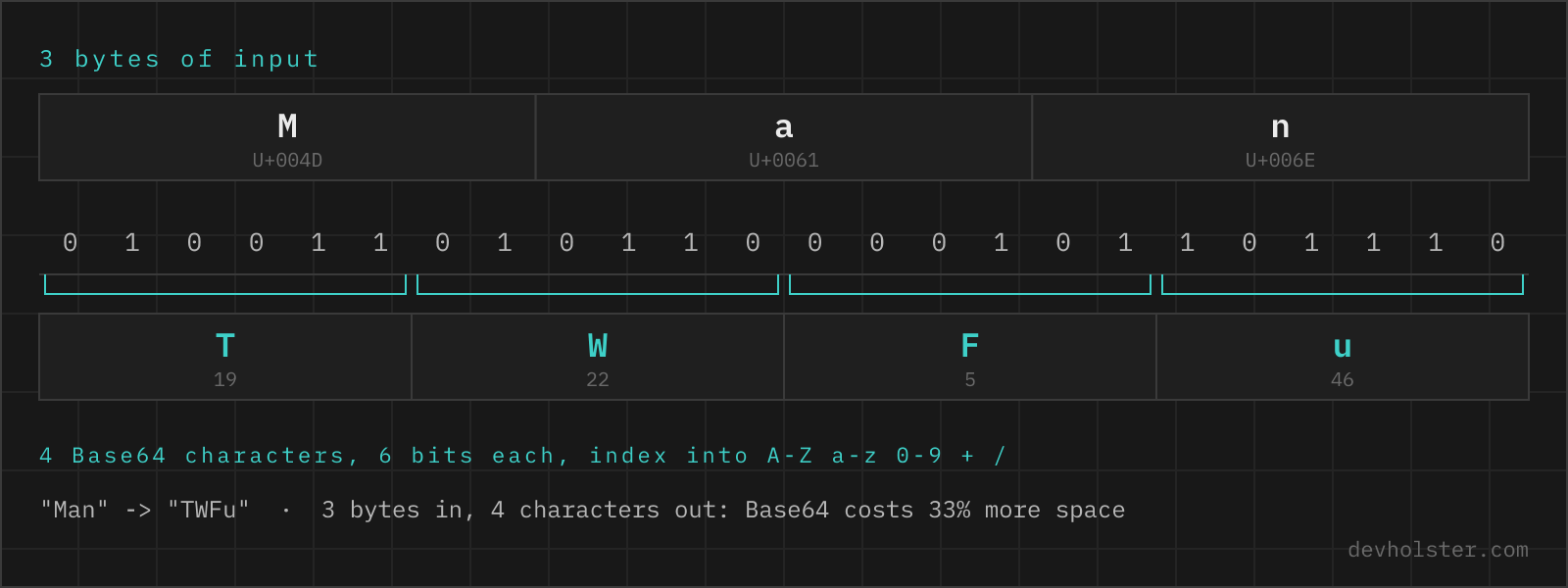
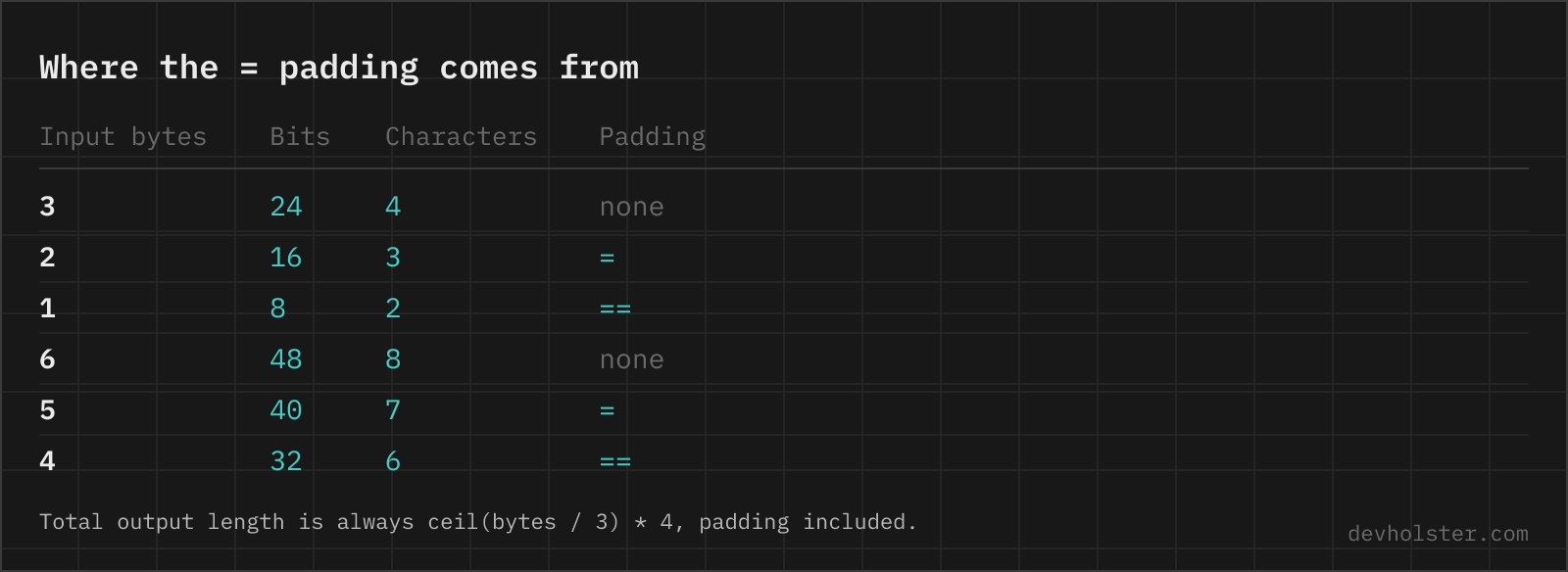
Base64 maps arbitrary bytes onto the 64 printable ASCII characters of the RFC 4648 alphabet (A–Z, a–z, 0–9, + and /) so that binary data can travel through channels built for text: JSON strings, HTTP headers, URLs, email bodies, XML documents. Every 3 input bytes become 4 output characters, and a final = or == pads incomplete blocks.
Two things it is not. It is not compression, since the output is a third larger than the input. And it is not encryption: there is no key, and decoding is a table lookup anyone can perform. A Base64-encoded password in a config file is a plain-text password with extra steps, a point worth repeating because "encode" and "encrypt" get mixed up in half the Stack Overflow questions on the topic.
How to use this encoder
Type or paste into the left pane and the Base64 string appears on the right while you type. Dropping a file works too, and this is where the encoder does something most online tools get wrong: a dropped binary file (an image, a PDF, a font) is read as raw bytes and encoded byte for byte, producing the same output as base64 file.png on the command line. Tools that read every dropped file as text silently corrupt binary input.
- Paste text or drop a file. UTF-8 text, umlauts, emoji and raw binary all encode correctly.
- Check the overhead stat. The strip under the panes shows input size, output size and the growth in percent, normally +33 to +37%.
- Copy or download. Copy puts the string on your clipboard; download saves it as a text file.
--url-safe
Switches to the Base64URL alphabet from RFC 4648 §5: + becomes -, / becomes _, and the trailing = padding is stripped. This is the variant JWTs, web push keys and most API tokens use, because the standard alphabet's +, / and = all collide with URL syntax.
--wrap-76
Inserts a line break every 76 characters, the MIME convention from RFC 2045. Email bodies and some legacy tools expect wrapped Base64; everything web-facing (data URIs, JSON, headers) wants one unbroken line, so the flag stays off by default.
--data-uri
Wraps the result as data:<type>;base64,…, ready to paste into a CSS url() or an <img src>. The MIME type comes from the file you dropped, so a dropped SVG produces data:image/svg+xml;base64,… and a dropped WOFF2 the matching font type; typed text uses text/plain;charset=utf-8.
Embedding an asset is the single most common reason people Base64-encode anything, and every other encoder we looked at hands back the payload and leaves you to type the prefix from memory. Getting it wrong is quiet rather than loud: a data URI with the wrong MIME type simply does not render, with nothing in the console to say why. The flag also implies an unwrapped single line, since a line break inside a data URI breaks it. When the file is the starting point rather than the text, the file to Base64 and image to Base64 pages are built around exactly that workflow, including ready-made CSS and HTML snippets for images.
The btoa unicode trap
The single most common Base64 bug in JavaScript: btoa('café') throws InvalidCharacterError. btoa predates the typed-array era and only accepts strings whose code points fit in one byte, so any umlaut, accent or emoji kills it. The fixes that "work" by stripping or mangling characters are worse than the crash, because they corrupt data silently.
The correct route is to serialise the string to UTF-8 bytes first and encode those:
const bytes = new TextEncoder().encode('Hello from the café 👋');
const b64 = btoa(String.fromCharCode(...bytes));
// modern runtimes: bytes.toBase64()
This encoder does exactly that, which is why the sample input with its café and its emoji round-trips cleanly. It also means the character count and the byte count in the stats strip can differ: é is one character but two UTF-8 bytes, and an emoji is one glyph but four bytes. Base64 size math always runs on bytes.
Standard Base64 vs Base64URL
| Standard (RFC 4648 §4) | Base64URL (§5) | |
|---|---|---|
| Character 62 | + | - |
| Character 63 | / | _ |
| Padding | = required | usually omitted |
| Typical home | MIME, data URIs, Basic auth | JWTs, URLs, filenames, cookies |
The two variants are byte-identical apart from those two characters, but mixing them up still breaks things: a strict standard decoder rejects - and _, and a + inside a URL query string turns into a space on the server. If the encoded value ends up in a URL, a filename or a JWT-shaped token, use --url-safe; everywhere else, standard Base64 is the right default.
Size overhead, in numbers
Base64 stores 6 bits per character, so the output is input × 4/3, rounded up to a full 4-character block. Concretely:
| Input | Output (standard) | Growth |
|---|---|---|
| 3 bytes | 4 chars | +33% |
| 100 bytes | 136 chars | +36% |
| 10 KB image | 13.4 KB string | +34% |
| 1 MB PDF | 1.33 MB string | +33% |
Two follow-on effects matter in practice. Base64 output barely compresses, so a gzip- or brotli-served HTML file with large inline data URIs grows by nearly the full 33%, while the same image as a separate file would have been compressed (or already was, for JPEG/PNG). And JSON APIs that tunnel file uploads as Base64 strings pay the tax on every request, which is why multipart uploads exist.
Where Base64 shows up
- Data URIs:
data:image/png;base64,…inlines an image into HTML or CSS. Our Base64 decoder recognises the prefix and gives you the file back. - HTTP Basic auth:
Authorization: Basiccarriesuser:passwordin Base64. - JWTs: header and payload are Base64URL-encoded JSON, which is why a token starts with
eyJ, the encoding of{". - Email attachments: MIME encodes every attachment as wrapped Base64, the origin of the 76-character convention.
- Certificates and keys: the body of a PEM file between the
BEGIN/ENDmarkers is Base64-encoded DER. - Kubernetes secrets: values in a
Secretmanifest are Base64-encoded, a fact regularly mistaken for a security feature. It is transport encoding, nothing more.
Encoding questions
Is it safe to Base64 encode a password or API key in an online tool?
Only if the tool encodes in your browser instead of on its server. Most online encoders POST your input to a backend, where it can be logged, cached or retained, so a credential pasted there should be treated as leaked and rotated. This one runs the encoder as JavaScript in your tab, with no upload and no logging, which you can confirm in the Network tab of your devtools. Either way, Base64 does not protect the value: anyone who sees the encoded string decodes it in milliseconds, so a Base64-encoded secret is still a secret in plain sight.
Is Base64 encryption?
No. Base64 is an encoding, a reversible mapping from bytes to 64 printable characters, with no key and no secrecy. Anyone can decode it instantly, which is why "Base64 decode" tools exist. If you need confidentiality, use real encryption (AES via the Web Crypto API, age, GPG) and then Base64-encode the ciphertext if it has to travel through a text channel.
Why does Base64 make data about 33% bigger?
Because it spends 4 output characters on every 3 input bytes: 6 bits of information per character instead of 8 bits per byte. 3 bytes become 4 characters, so the output is 4/3 of the input, plus up to two = padding characters at the end. With line wrapping enabled the overhead rises slightly further, roughly 36%, because every 76 characters cost an extra line break.
How do I Base64 encode a string in JavaScript?
For plain ASCII, btoa("hello") works. For anything with umlauts, accents or emoji it throws an InvalidCharacterError, because btoa only accepts characters up to code point 255. The correct pattern is to encode to UTF-8 bytes first: new TextEncoder().encode(str), then convert those bytes with btoa(String.fromCharCode(...bytes)) or, in modern runtimes, bytes.toBase64(). In Node.js, Buffer.from(str, "utf8").toString("base64") does the whole thing in one call.
How do I Base64 encode in Python?
import base64, then base64.b64encode(text.encode("utf-8")).decode("ascii"). The two conversions trip people up: b64encode takes and returns bytes, so you encode the string to UTF-8 going in and decode the result back to str coming out. For URL-safe output use base64.urlsafe_b64encode, which swaps + and / for - and _. For files, open in binary mode: base64.b64encode(open("logo.png", "rb").read()).
How do I Base64 encode on the command line?
On Linux and macOS: echo -n "text" | base64 (the -n matters, otherwise the trailing newline gets encoded too, which is a classic source of mismatched Basic-auth headers). On Windows PowerShell: [Convert]::ToBase64String([Text.Encoding]::UTF8.GetBytes("text")). Files work the same way: base64 file.png produces the string this tool would give you when you drop the file on the input pane.
What is the = at the end of a Base64 string?
Padding. Base64 works in blocks of 3 input bytes and 4 output characters; when the input length is not a multiple of 3, the last block is filled up and marked with one or two = signs so a strict decoder knows how many bytes the final block really carries. Base64URL, the variant used in JWTs, usually drops the padding entirely because = has a meaning in URLs, and decoders reconstruct it from the string length.
What characters can appear in a Base64 string?
Standard Base64 uses A–Z, a–z, 0–9, + and /, plus = for padding: 64 data characters, which is where the name comes from. The URL-safe variant swaps + for - and / for _ so the string survives inside URLs and filenames without percent-encoding. If you see - or _ in a string you are about to decode, it is Base64URL, the flavour JWTs use.
Why do two tools produce different Base64 for the same input?
Almost always a trailing newline or line wrapping. echo "text" | base64 encodes an invisible \n at the end and gives a different string than echo -n "text" | base64, which is the number one cause of Basic-auth headers that a server rejects. The second cause is MIME line wrapping: the classic email standard breaks Base64 into 76-character lines, and some encoders still do it by default while APIs and JSON payloads expect one unbroken string. Third, a URL-safe encoder emits - and _ where a standard one emits + and /. The decoded bytes are identical in every case; only the text around them differs.
How does Basic authentication use Base64?
The Authorization header for HTTP Basic auth is the string user:password encoded as Base64, prefixed with "Basic ". So admin:secret becomes Authorization: Basic YWRtaW46c2VjcmV0. Note again that this is encoding, not encryption; Basic auth is only acceptable over HTTPS, where the whole header travels encrypted anyway.