Why convert CSV to JSON at all
CSV is the format data arrives in; JSON is the format code wants. Spreadsheets, CRM exports, bank statements, analytics downloads: they all leave their systems as CSV because every tool since the 1980s can write it. But the moment that data meets an API, a config file, a NoSQL database or a JavaScript frontend, it needs to be JSON. The conversion is the bridge between "I exported this from Excel" and "my code can iterate over it".
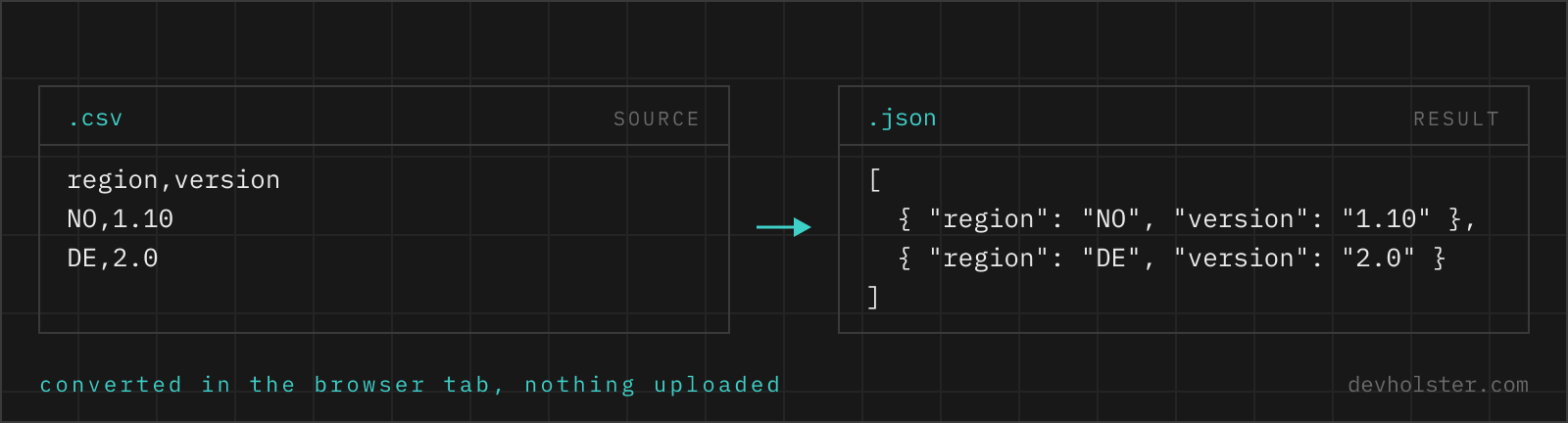
The mechanical part is simple, one row becomes one object. The annoying parts are everything around it: delimiters that differ by locale, quotes around cells that contain commas, numbers that are not really numbers, and empty cells that could mean zero, empty or unknown. Those details are where hand-rolled line.split(',') scripts fail, usually silently, and they are what this page is careful about.
How to use this converter
Paste CSV into the left pane, or drop a .csv file on it, and the JSON appears on the right while you type. The delimiter is detected from the first line, so comma, semicolon, tab and pipe files all work without settings.
- Paste or drop your CSV. An Excel export, a database dump, three lines you typed by hand; anything tabular works.
- Check the numbers. The strip under the panes shows input and output size, line count and the number of rows converted. If the row count is off by one, your header assumption is wrong; toggle
--no-header. - Copy or download. The result goes to your clipboard or saves as a
.jsonfile.
--no-header
Treats the first row as data instead of column names. The output switches from an array of objects to an array of arrays, which is the right shape for matrix-like data (measurements, grids, coordinates) where naming columns adds nothing.
--keep-strings
Turns off all type casting. Every cell stays exactly the text it was, including empty cells as "" and the words true and null as words. Use it when the consuming system does its own parsing or when text fields legitimately contain values that look like something else.
--nested
Reads a dot in a header cell as a level of nesting, so the columns contact.email and contact.city produce "contact": { "email": …, "city": … } instead of two flat keys with dots in their names. On by default, and it does nothing to headers that contain no dots.
This is the exact inverse of the --flatten option in our JSON to CSV converter, which is where dotted headers come from in the first place. With both on, a nested API response survives the round trip JSON → CSV → JSON unchanged, which is the point: a spreadsheet is a fine place to edit records, and getting the original structure back afterwards should not be a scripting job. Switch it off if your column names legitimately contain dots, v1.2.total for instance, which would otherwise be split into three levels.
--pretty
Indents the JSON with two spaces, on by default. Turn it off for a single-line result when the JSON goes straight into a request body or an environment variable.
What shape the JSON takes
With a header row, each data row becomes one object and the header cells become its keys:
| CSV | JSON |
|---|---|
id,name,active1,Ada,true2,Grace,false | [{"id": 1, "name": "Ada", "active": true}, {"id": 2, "name": "Grace", "active": false}] |
Same file with --no-header | [["id", "name", "active"], [1, "Ada", true], [2, "Grace", false]] |
Every row gets every header key, even where the row is shorter than the header; missing cells are filled with null. A header cell that is empty produces a placeholder key (column_3 for the third column), because JSON objects cannot have nameless members. Rows that are entirely empty are skipped rather than emitted as useless empty objects, and a trailing newline at the end of the file does not create a phantom row.
The output is always a JSON array at the top level. That is the shape import endpoints, JSON.parse consumers and data frames expect, and it means a one-row CSV still produces an array with one element rather than a bare object that behaves differently downstream.
Type casting without surprises
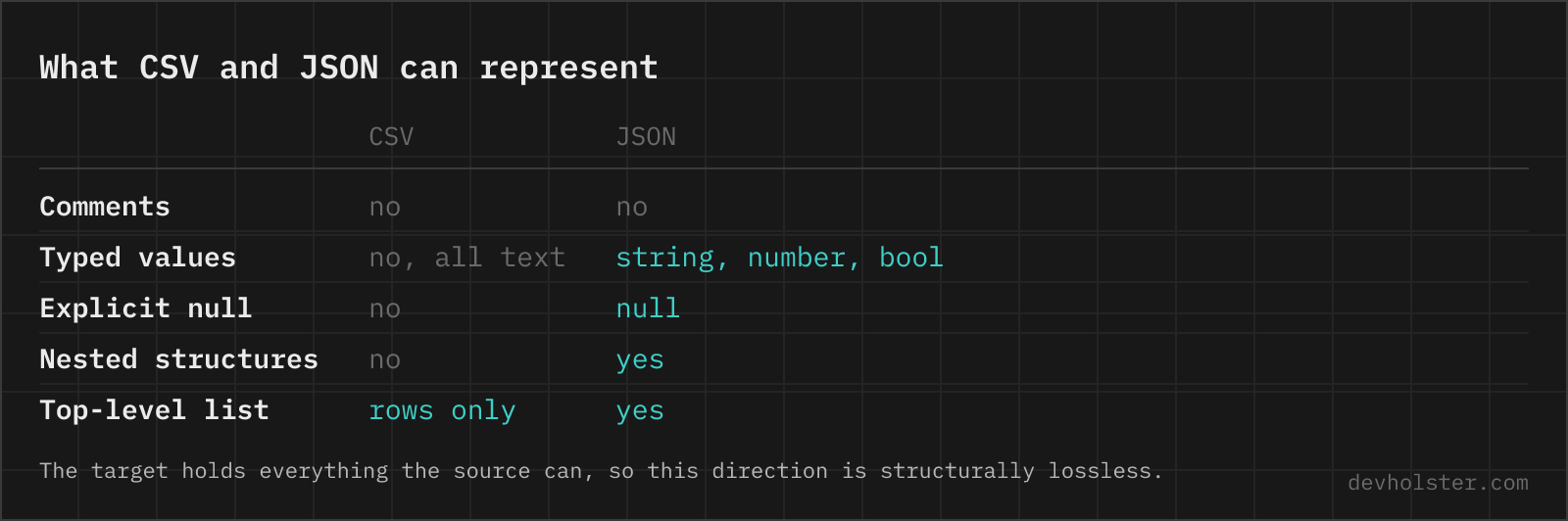
CSV has exactly one data type, text. JSON has six. Deciding which cells become numbers, booleans and null is where most converters quietly damage data, so this one follows a strict rule: a cell is only cast when the cast is lossless. Concretely, a cell becomes a number only if converting it to a number and back yields the identical text.
| Cell text | Converted value | Why |
|---|---|---|
42 | 42 (number) | Round trip is exact |
91.5 | 91.5 (number) | Round trip is exact |
007 | "007" (string) | Leading zeros would vanish |
1.10 | "1.10" (string) | Would collapse to 1.1; version numbers survive |
9007199254740993 | string | Above 2^53, JavaScript numbers lose precision |
true / false | boolean | Literal match only |
empty cell / null | null | Honest "no value" |
The practical payoff: phone numbers, ZIP codes with leading zeros, article numbers like 0043 and long database IDs come through as the strings they really are. Our experience with blind-casting converters is that exactly these columns get mangled, and nobody notices until a customer with ZIP code 01067 complains. If you want no casting at all, --keep-strings switches the whole mechanism off.
Delimiters, quotes and line breaks
The converter reads the first line and picks whichever of comma, semicolon, tab or pipe occurs most often as the delimiter. That covers the real-world spread: US-locale Excel and most programming output use commas, European Excel uses semicolons, database dumps and clipboard copies from spreadsheets use tabs, and Unix tooling occasionally uses pipes.
id,name,city
7,"Hopper, Grace",NYC

→ 4 fields, one row broken
id,name,city
7,"Hopper, Grace",NYC

→ 3 fields, name = Hopper, Grace
Inside the rows, the parser follows RFC 4180, the closest thing CSV has to a standard:
- Quoted cells.
"Hopper, Grace"is one cell, comma and all. The quotes are syntax, not content, and are removed. - Escaped quotes. Inside a quoted cell,
""means one literal quote character:"5\" display"reads as5" display. - Line breaks in cells. A quoted cell can span lines. Address fields and comment columns from spreadsheet exports rely on this, and a parser that splits on newlines first (the classic quick script) shreds them.
- CRLF and LF. Windows and Unix line endings are both accepted, mixed files included.
What the parser deliberately does not do is guess beyond that. A file that mixes delimiters per row, or uses a quoting style no spec describes, produces exactly what it says; the row count in the stats strip is your first check that the structure came through as expected.
CSV from Excel and Google Sheets
The most common source of CSV is a spreadsheet, and each exporter has quirks worth knowing. Excel offers two relevant formats in "Save as": CSV UTF-8 (comma separated), which is the one you want, and the legacy CSV (comma separated), which on Windows still writes the system's ANSI code page and turns umlauts into garbage on the way through. If you see ä where ä should be, the file was saved with the wrong one of the two; re-export, the converter itself works on whatever text it receives.
On German, Austrian and most European systems, Excel writes semicolons instead of commas, because the comma is the decimal separator there. This page detects that automatically. What it cannot repair is a decimal-comma number in an unquoted comma-delimited file, since 3,14 in that context is genuinely two cells; that damage happens at export time, not here.
Google Sheets (File → Download → CSV) is more predictable: always UTF-8, always commas, quotes where needed. It exports only the current sheet, as does Excel, so multi-sheet workbooks need one export per sheet.
Pitfalls to check after converting
- The header assumption. If the first data row went missing, the converter used it as headers. Toggle
--no-headerand it comes back. The row count in the stats strip makes this obvious. - Duplicate header names. Two columns both named
emailcollapse into one key per JSON object, and the second value wins. Rename columns before exporting if both matter. - Whitespace in headers. Header cells are trimmed, but a key like
"First Name"keeps its inner space. That is valid JSON, just awkward to access asrow["First Name"]; rename at the source, or convert the header row to snake_case or camelCase, if it bothers you. - Numbers that were codes. The lossless-cast rule protects leading zeros, but a plain
4711that is semantically an ID still becomes a number. If the consuming system compares IDs as strings, use--keep-strings. - Encoding damage from the source. Mangled umlauts like
ämean the CSV was exported with the wrong encoding; that is only fixable at the source. The UTF-8 byte order mark that Excel puts in front of the first header is handled here, the converter strips it before parsing.
CSV to JSON, the questions that follow
Is it safe to convert customer data or internal exports with an online CSV converter?
Only with a converter that parses in your browser. Spreadsheet exports are where names, email addresses, order values and salary columns live, and uploading one to an unknown server is a data transfer your privacy policy almost certainly does not cover, GDPR included. Parsing runs here as JavaScript inside your tab, with no upload and no logging, and the page works offline. For any other tool, watch the Network tab in devtools while converting, and if a request goes out, treat that export as disclosed.
How do I convert a CSV file to JSON?
Pick the route that matches where the file already is. For a one-off file or a snippet in your clipboard, a browser converter is fastest: drop the .csv in, take the JSON out. For a file you convert repeatedly, script it, with pandas or the csv module in Python, csvtojson or Papa Parse in Node.js, or the miller command mlr --icsv --ojson cat data.csv on the shell. For data that already lives in a database, exporting JSON directly usually beats the CSV detour. The decisions are the same in all of them: which row holds the headers, which delimiter the file uses, and whether numbers should stay text.
How do I convert CSV to JSON in Python?
Two lines with the standard library: import csv, json; json.dump(list(csv.DictReader(open("data.csv", newline="", encoding="utf-8-sig"))), out). DictReader takes the first row as keys and gives you one dict per row, which is the array-of-objects shape APIs expect. Use encoding="utf-8-sig", because Excel writes a byte order mark that otherwise ends up glued to your first column name. With pandas it is pd.read_csv("data.csv").to_json("data.json", orient="records"), where orient decides the shape and dtype=str keeps IDs and leading zeros intact. Both read the whole file into memory; for very large exports iterate over DictReader and write one JSON line per row.
How are commas inside values handled?
Through quoting, as RFC 4180 defines it. A cell like "Hopper, Grace" keeps its comma because it is wrapped in double quotes, a doubled quote ("") inside a quoted cell becomes a literal quote, and quoted cells may even contain line breaks. This parser implements all three rules, so an Excel export with messy text cells comes through intact.
Why do some numbers stay strings in the JSON output?
Because casting them would change the data. This converter casts a cell to a number only when the round trip is lossless: "42" becomes 42, but "007" stays a string (the leading zeros would vanish), "1.10" stays a string (it would collapse to 1.1) and a 17-digit ID stays a string because JavaScript numbers lose precision above 2^53. Most converters cast blindly; this check is the difference between a file you can trust and one you have to audit.
Can I convert a CSV that uses semicolons instead of commas?
Yes, automatically. Excel in German, French and most other European locales exports with semicolons, so the converter looks at the first line and picks the delimiter that actually occurs there: comma, semicolon, tab or pipe. You do not have to declare anything; paste the file and the right delimiter is used.
How do I convert CSV to JSON in JavaScript or Node.js?
Use a parser, not split(","), because a naive split breaks on the first quoted comma or line break inside a cell. In the browser and in Node, Papa Parse handles quoting, delimiters and streaming: Papa.parse(text, { header: true, skipEmptyLines: true }).data gives you the array of objects. csv-parse and csvtojson are the common Node alternatives, both with stream APIs so a large file never has to fit in memory. For a file the user picks in a browser, read it with file.text() and hand that to the parser; for an upload endpoint, pipe the request stream straight into the parser instead of buffering it.
Can I convert an Excel file (XLSX) to JSON here?
Not directly; this tool reads CSV text, and .xlsx is a zipped binary format. The two-step route works fine: open the file in Excel or Google Sheets, save or download it as CSV, then drop that CSV here. Only the active sheet survives that export, so repeat it per sheet if you need more than one.
What is the difference between CSV and JSON?
CSV is a flat table: rows and columns, every value plain text, no nesting and no types. JSON is a tree: objects, arrays, strings, numbers, booleans and null, nested as deep as needed. That is why CSV to JSON is easy (each row becomes a flat object) while the reverse direction needs decisions about flattening. CSV wins for spreadsheets and bulk data, JSON wins for APIs and anything structured.
How do I get nested JSON out of a flat CSV?
Through a convention, because a CSV carries no nesting information of its own: a dot in a header name is read as a level of nesting, so the columns contact.email and contact.city produce "contact": { "email": …, "city": … }. That is what the --nested option here does, and it is the exact inverse of the dot-path flattening in the JSON to CSV direction, which is where such headers usually come from in the first place. The convention is not universal, so switch the option off when your column names legitimately contain dots, a header like v1.2.total for instance, which would otherwise be split into three levels. For anything more structured than that, arrays of objects inside a cell for example, convert to flat objects and reshape in your own code, where the intent is explicit.
Which JSON structure do APIs usually expect, an array of objects?
Almost always yes: [{"id": 1, "name": "Ada"}, ...] is the shape REST endpoints, import scripts and libraries like pandas (via read_json) or JavaScript’s Array.map expect. That is exactly what this converter produces in its default mode. The array-of-arrays form from --no-header is for matrix-like data where column names carry no meaning.
Why does my CSV import produce empty rows or a column with no name?
Because the file has a trailing delimiter or trailing blank lines that the producing program considered harmless. A header line ending in a comma declares one more column than it names, so every parser invents a placeholder key for it, and a file ending with several newlines yields rows where every field is empty. Excel is the usual source: deleting the contents of a row leaves the row itself in the sheet, and the export dutifully writes it out. Open the file in a text editor rather than a spreadsheet to see it, strip the trailing delimiter and the blank lines, and re-run the conversion. Most parsers have a skip-empty-lines option, which hides the symptom without fixing the export.