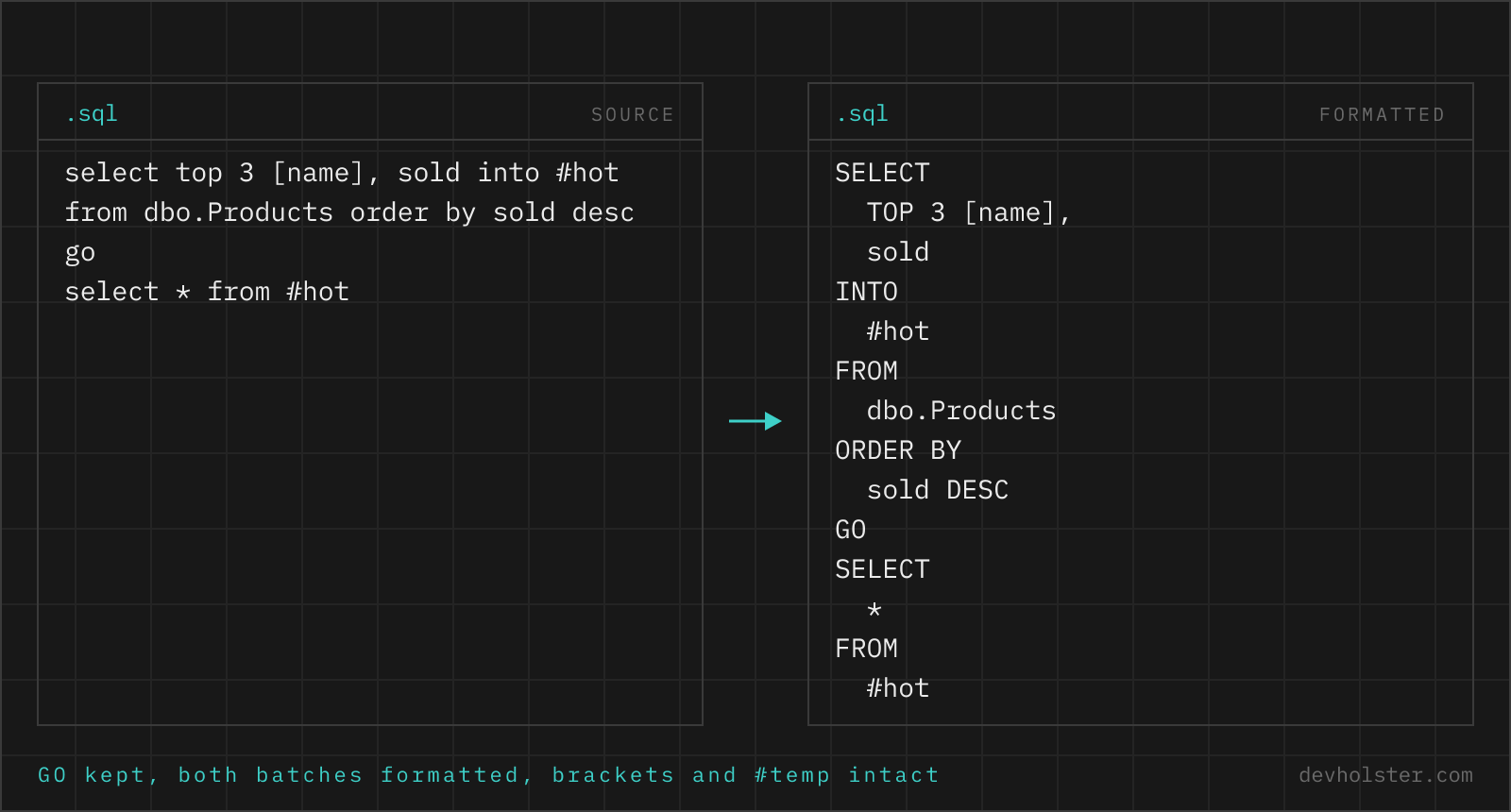
T-SQL looks close enough to standard SQL that generic tools keep tripping over it. Brackets around identifiers, TOP where other engines put LIMIT, a # in front of table names and GO between batches are all legal Transact-SQL, and every one of them is a tokeniser trap. This page runs with the dialect pinned, so none of them need detecting.
Why T-SQL gets its own page
The SQL formatter on this site reads the dialect off the query. Backticks mean MySQL, a :: cast means Postgres, QUALIFY means BigQuery, and brackets, TOP, a GO line, @@ROWCOUNT or NOLOCK mean SQL Server. That covers the typical SSMS script. It does not cover the T-SQL that carries none of those markers. A SELECT against dbo.Customers with a single @region in the WHERE is first read as standard SQL, fails on the @, and only then reaches T-SQL through the fallback. The result is right, the route is a guess.
We know what a wrong tokeniser does to T-SQL because we measured it before the markers were added. select top 5 * from [Order Details] failed as standard SQL, the fallback landed on Postgres, and Postgres read the word inside the brackets as the ORDER BY keyword, so with uppercasing on the table came back as [ORDER Details]. The layout was fine and the name was changed. A pinned dialect makes that class of accident impossible, and it costs nothing when you already know the query came out of SSMS.
Pinning costs something too, and it is worth naming. This page will happily format a Postgres query, because the T-SQL tokeniser does not object to a :: cast, and nothing will warn you. When you do not know where a query came from, the generic page is the right one. When it came out of SSMS, this one is.
Using it takes no explaining. Paste T-SQL on the left or drop a .sql file, switch --uppercase, --tabular or --gap for two blank lines between batches, pick 2, 4 or tabs, then copy or download when it reads right.
What the T-SQL tokeniser gets right
Everything in this table is measured output of sql-formatter 15.8.2, not a feature list copied from a README.
| T-SQL construct | What comes out |
|---|---|
[Order Details].[Unit Price] | Kept as brackets, never rewritten to quotes. |
SELECT TOP 20 … | TOP stays on the line with the first column. |
SELECT … INTO #results | The # name survives, INTO becomes its own clause line. |
@@ROWCOUNT, @cutoff | Variables keep their case, keyword casing skips them. |
GETDATE(), DATEADD() | Function names keep the case you typed. |
CROSS APPLY ( … ) | The correlated subquery is indented like a derived table. |
MERGE … WHEN MATCHED | Each WHEN branch starts its own line. |
OFFSET … FETCH NEXT | Laid out as clause lines, T-SQL's paging since SQL Server 2012. |
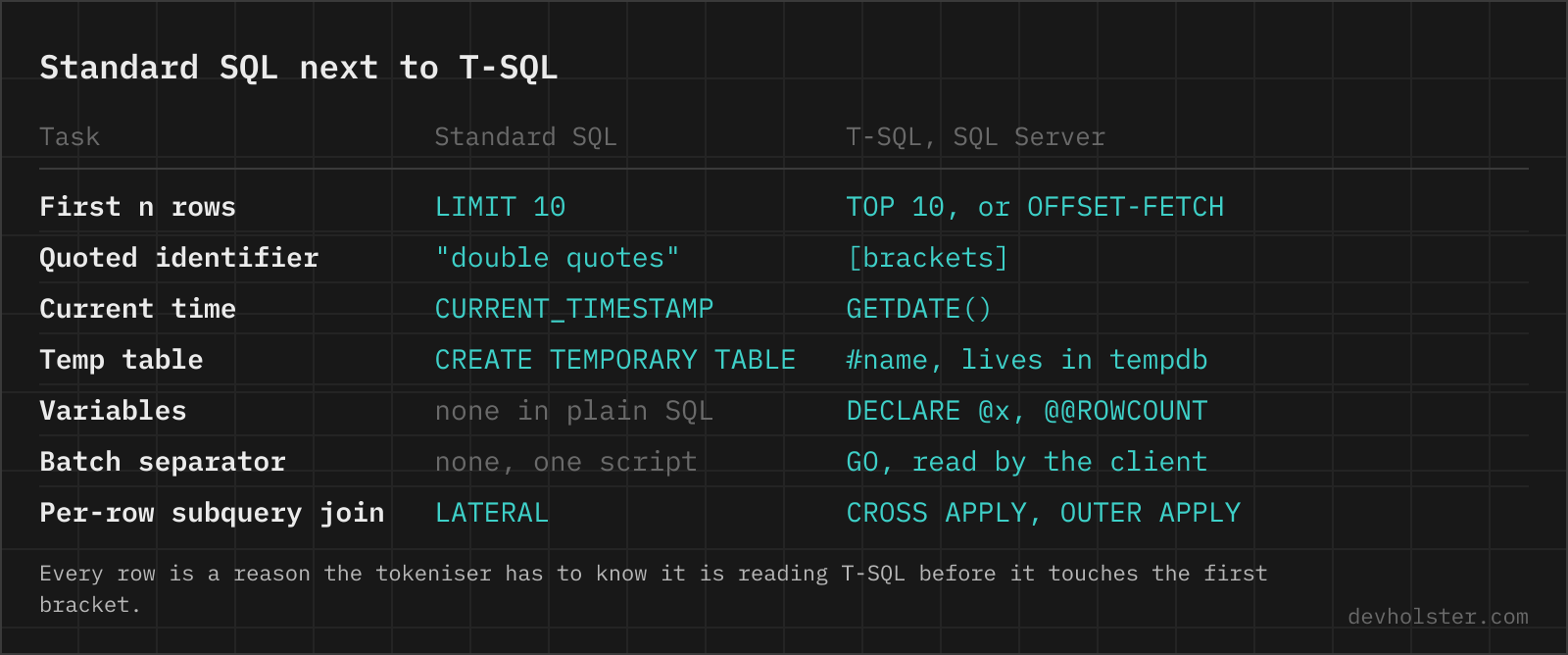
CROSS APPLY and OUTER APPLY deserve a sentence, because they are the construct most likely to be missing from a generic tokeniser. APPLY is the per-row join that Postgres spells LATERAL, and the usual pattern, a TOP 3 subquery applied to each row of the outer table, nests a TOP inside a join. Here the applied subquery is indented one level and the closing parenthesis returns to join depth, where your eye expects it.
GO and multi-batch scripts
GO is not T-SQL. The server never sees it. SSMS and sqlcmd read it client-side and send everything since the previous GO as one batch, which is why CREATE PROCEDURE has to sit alone in its batch and why a variable declared before a GO does not exist after it.
That makes GO awkward for a formatter, because a separator is not a statement and does not parse as one. Run a GO script through a tokeniser that lacks it and the separator gets glued to the end of the previous statement, SELECT 1 go on one line, and since the client tools only recognise GO at the start of a line, the reformatted script silently stops splitting into batches. That is not a cosmetic bug, it is a script that now runs differently.
Measured here: GO keeps its own line, a lowercase go is uppercased when --uppercase is on, a repeat count like GO 2 survives, and the batches on either side are formatted independently. A table scripted out of SSMS, typically a dozen batches of CREATE and ALTER, goes through in one paste.
Formatting T-SQL in SSMS
SSMS has no built-in T-SQL formatter.
It never shipped one, which is why the gap has been filled from outside for years. Poor Man's T-SQL Formatter is free and open source and plugs into SSMS, Visual Studio and Notepad++. Redgate SQL Prompt is the commercial route, with formatting as one feature among snippets and completion, and it is what most SQL Server shops end up evaluating. Azure Data Studio is off the list, retired by Microsoft on February 28, 2026. Its named successor is VS Code with the MSSQL extension, which now ships a SQL Formatter of its own, still in preview as of September 2026.
A browser formatter covers the case none of the add-ins reach: the query in a ticket, a Slack thread or a deadlock report that is not sitting in your editor yet. And when a query has to leave the machine anyway, for a forum post or an AI prompt, the SQL anonymizer swaps table and column names for placeholders first and restores them from a key that stays in your browser.
Brackets, double quotes and QUOTED_IDENTIFIER
T-SQL quotes identifiers two ways. [Brackets] always work. "Double quotes" only delimit identifiers while QUOTED_IDENTIFIER is ON, and with the setting OFF they delimit strings instead, so the same characters change meaning with a connection option. ON is what SSMS and the Microsoft client drivers set by default, and indexed views and indexes on computed columns require it, so new code has little reason to ever turn it OFF.
The formatter keeps both styles exactly as written and never converts one into the other. That is the correct behaviour precisely because the meaning of double quotes is not decidable from the query text alone.
What this page cannot tell you
This tool tokenises text and prints text. It has no connection, no schema and no execution path, so a misspelled column formats perfectly, a table that does not exist formats perfectly, and PARSED under the tool means the text could be read as T-SQL tokens, nothing more. It shows no execution plan either. For that, the actual plan in SSMS or SET STATISTICS IO remains the tool, once the query is readable enough that you can tell which join you are looking at.
One layout limit is worth knowing before you paste a whole stored procedure. The body comes out as a flat sequence of statements, BEGIN and END do not open an indent level, and SET NOCOUNT ON breaks after the SET. The result is valid and consistent, just flatter than hand-formatted procedure code. For a 40-line procedure that trade is fine, for a 400-line one it is not.
SQL Server questions, answered short
What is the difference between SQL and T-SQL?
SQL is the standard query language, T-SQL is Microsoft's implementation of it in SQL Server and Azure SQL. T-SQL adds procedural constructs the standard leaves out, so variables, IF and WHILE, TRY and CATCH error handling, and functions like GETDATE() and DATEADD(). Plain standard SQL runs on SQL Server, but any script using @variables, TOP or [brackets] is T-SQL and will not run unchanged on Postgres or MySQL.
What do square brackets mean in SQL Server?
They quote an identifier, so [Order Details] is a table whose name contains a space and [order] is a column named after a reserved word. Brackets are the T-SQL counterpart of the double quotes standard SQL uses, and they are only required when a name breaks the normal identifier rules. Many tools bracket every name defensively, which is why scripts generated by SSMS are full of them.
What does GO do in a SQL Server script?
GO ends a batch. It is not a T-SQL statement, the client tools read it and send everything since the last GO to the server as one batch, which is why CREATE PROCEDURE must sit alone in its batch and why a local variable is gone after the next GO. GO 5 runs the batch five times.
Why does LIMIT not work in SQL Server?
T-SQL has no LIMIT keyword. Use SELECT TOP 10 for the simple case, or ORDER BY with OFFSET 20 ROWS FETCH NEXT 10 ROWS ONLY for paging, available since SQL Server 2012.
What is a #temp table in SQL Server?
A table created in tempdb that lives for the current session and is dropped automatically when the connection closes. One # makes it private to your connection, ## makes it visible to every session. Temp tables carry real statistics, which is the practical difference to table variables and the reason they usually win for larger intermediate results.
Is there a free formatter for SSMS?
Yes. Poor Man's T-SQL Formatter is free, open source and installs as an SSMS add-in. SSMS itself ships without a formatter.
Does WITH (NOLOCK) make a query faster?
Rarely, and it changes the results. NOLOCK reads uncommitted rows, so it can return data that is rolled back a moment later.
How do I format T-SQL in Visual Studio Code?
Install Microsoft's MSSQL extension, which ships a SQL Formatter that formats on demand or on save, still marked preview as of September 2026. Azure Data Studio, the earlier free answer, was retired on February 28, 2026, and VS Code with that extension is the replacement Microsoft names.