What a JWT contains
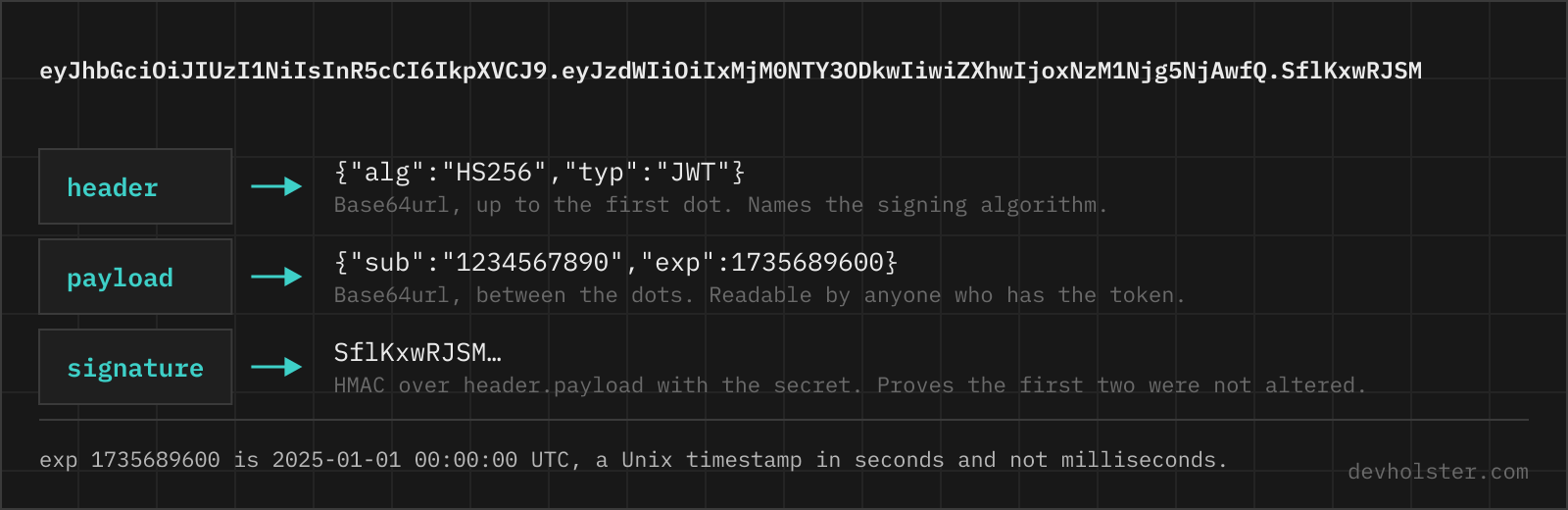
A JWT is three Base64URL-encoded strings joined by dots. Split them and the mystery is gone: the first is a JSON header, the second a JSON payload, the third a signature over the first two. Nothing is encrypted. The encoding exists so the token can travel in an Authorization header or a URL without needing escapes, and that is its whole purpose.
The header names the signing algorithm and, usually, the key that was used. The payload carries claims: statements the issuer makes about the subject, some standardised, most application-specific. The signature is what makes the other two trustworthy, and it is also the part no decoder can check for you, because checking it needs a key you have and this page does not.
| Part | Example | What it is for |
|---|---|---|
| header | {"alg":"HS256","typ":"JWT","kid":"key-2024-05"} | Which algorithm signed the token, and which key |
| payload | {"sub":"1234567890","exp":1715683600} | The claims, readable by anyone holding the token |
| signature | 7bLQ8Zx3mVvKpN1sJcRfYtHwUeAgD0oXlB2nSiM4qTc | Proof the first two parts were not altered |
How to use this decoder
Paste the token on the left and the decoded parts appear on the right while you type. A leading Bearer is stripped, so a header copied straight out of devtools or a curl command works as-is.
- Paste the token. All three parts, with or without the
Bearerprefix. - Read the header and payload. Both are pretty-printed as JSON, in the order the issuer wrote them.
- Check the claims block. The registered claims are listed with their meaning, and the three time claims are converted to UTC with a readable offset.
- Copy or download the decoded output as a text file.
--claims
On by default. Adds a block under the payload listing the seven claims that RFC 7519 defines, with what each one means and, for exp, nbf and iat, the timestamp translated into a UTC time plus how long ago or how far ahead that is. Turn it off when you want the raw JSON and nothing else.
The one thing this tool deliberately does not do is verify the signature. Doing so would mean asking you for the secret, and pasting a signing secret into a web page is a worse habit than any convenience it buys. What you get instead is a plain note saying the signature was not checked, so nobody walks away thinking a green tick was implied.
The registered claims, and everything else
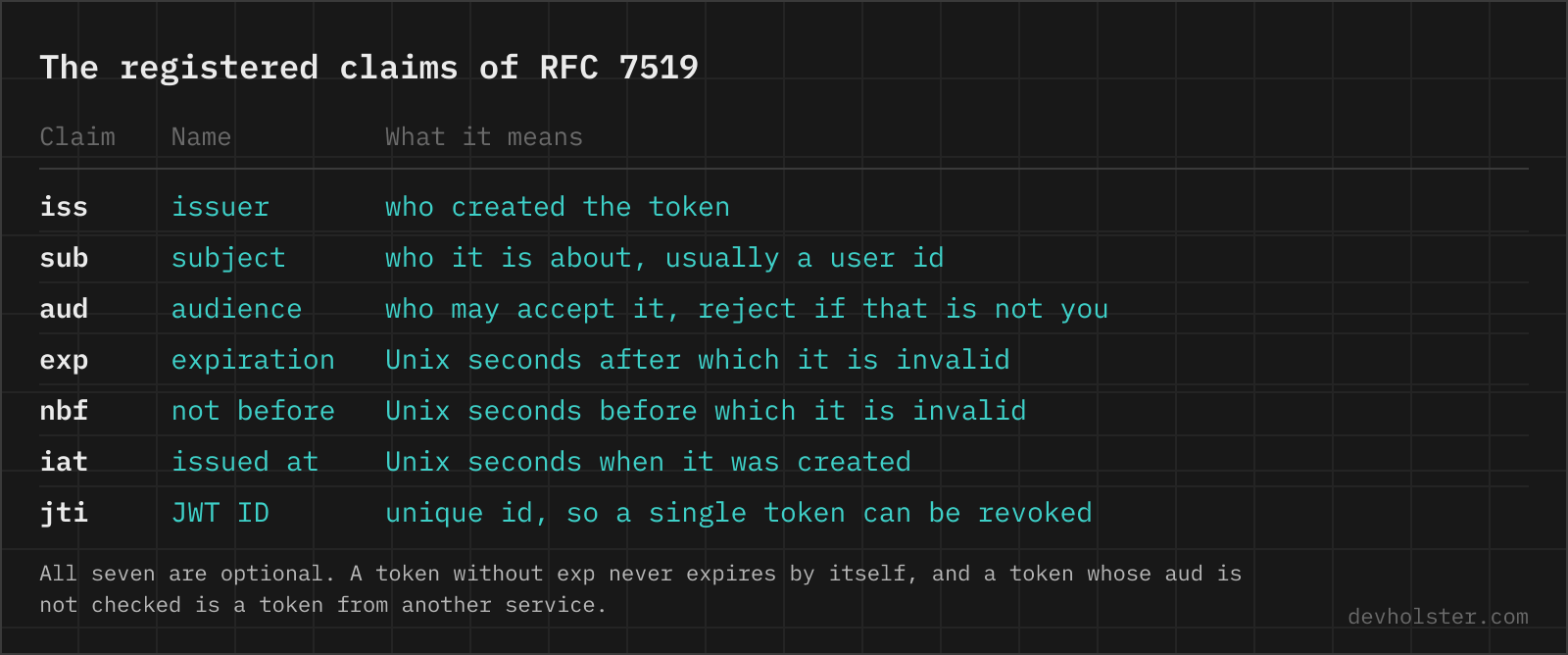
Seven claim names are reserved by RFC 7519. Everything else in a payload was invented by whoever issued the token, which means role, email and tenant_id mean exactly what that issuer decided and nothing more.
| Claim | Name | What it holds |
|---|---|---|
iss | issuer | Who created the token, usually a URL. Check it: a valid signature from the wrong issuer is still the wrong token. |
sub | subject | Who the token is about, typically a stable user ID rather than an email. |
aud | audience | Which service is meant to accept it. A token for the billing API should be rejected by the admin API. |
exp | expiration time | Unix seconds after which the token must be rejected. |
nbf | not before | Unix seconds before which the token is not yet valid. |
iat | issued at | Unix seconds when the token was created. Useful for "re-authenticate if older than". |
jti | JWT ID | A unique identifier, so a single-use token can be recorded as spent. |
All seven are optional in the spec, which is a footgun rather than a feature. A token without exp never expires, and a token without aud is accepted by every service that shares the signing key. If you are issuing tokens, treat iss, aud and exp as mandatory and verify all three on the way in.
Algorithms, and the two attacks in the header
The alg value tells you which family you are dealing with. HS256 and its siblings are HMAC: one shared secret both signs and verifies, which is fine inside one system and unworkable the moment a third party has to verify. RS256 and ES256 are asymmetric: the issuer signs with a private key, everyone else verifies with a public one, which is why every identity provider uses them and publishes a JWKS document.
| alg | Type | Where you see it |
|---|---|---|
HS256 | HMAC with SHA-256, shared secret | Single-service apps, internal APIs |
RS256 | RSA signature, key pair | Auth0, Azure AD, Keycloak, most OIDC providers |
ES256 | ECDSA on P-256, key pair | Apple Sign In, newer providers; much shorter signatures |
EdDSA | Ed25519 | Modern stacks that want ES256 without the curve footguns |
none | Unsigned | Nowhere legitimate. See below. |
Both classic JWT attacks live in this field, and both work only against a verifier that takes the token's word for it. The alg: none attack strips the signature and sets the algorithm to none; a library that honours it accepts anything. Algorithm confusion swaps RS256 for HS256 and signs with the RSA public key treated as an HMAC secret, which a naive verifier accepts because the public key is published on purpose.
One line fixes both, in every language: name the algorithm you expect at the verify call rather than reading it from the token. jwt.verify(token, key, { algorithms: ['RS256'] }) in Node, jwt.decode(token, key, algorithms=['RS256']) in PyJWT. Modern libraries make this mandatory; older ones and hand-rolled verifiers are where the bugs still are.
Expiry, clock skew and why refresh tokens exist
A JWT cannot be taken back. There is no central record to delete, which is the property that makes it scale and the property that makes revocation impossible. Everything about JWT lifetimes follows from that.
Hence short expiry. Five to fifteen minutes for an access token is the common range, backed by a refresh token that lives server-side, can be revoked, and buys a new access token when the old one runs out. A user who is banned keeps working for at most those fifteen minutes, which most teams can live with; a user who is banned and holds a 24-hour token is a different conversation.
Two practical notes. Verifiers usually allow a small clock skew, 30 to 60 seconds either way, because server clocks drift and a token issued by a machine one second ahead would otherwise fail its own nbf check. And exp is in seconds, not milliseconds; passing Date.now() straight into it produces a token that expires in the year 56000, which no verifier will flag because it is technically valid. If a token here shows an expiry far in the future, that is usually why.
When a token will not decode
- Wrong number of parts. Two dots and three segments is a JWS, the ordinary JWT. Four dots and five segments is a JWE, which is encrypted and cannot be read without the key. One dot is usually a signed cookie from Express or Flask, not a JWT at all.
- Truncated token. Terminals and log viewers wrap long lines, and the paste loses the tail. The signature part is the one that usually goes missing, which still decodes here but will never verify.
- Whitespace inside the token. Copying out of a wrapped JSON response inserts spaces or newlines. Any whitespace inside a segment breaks the Base64URL decode.
- Plus signs turned into spaces. A sign the token travelled through a form-encoded field. JWTs use the URL-safe alphabet and should contain no
+at all, so if you see one, something re-encoded the token on the way. - An opaque token that looks like a JWT. Some providers issue random reference tokens of similar length. If the first segment does not decode to JSON starting with
{"alg", it is not a JWT and no decoder will help; you need the provider's introspection endpoint.
Decoding in code and on the command line
For anything scripted, decode in code rather than by hand. In Node, Buffer.from(token.split('.')[1], 'base64url').toString() gives you the payload; in Python, jwt.decode(token, options={"verify_signature": False}) with PyJWT. On the command line the one-liner is cut -d. -f2 <<< "$TOKEN" | base64 -d 2>/dev/null | jq ., and the 2>/dev/null is there because base64 -d complains about the missing padding that JWTs strip by design. If you use it often, jq -R 'split(".") | .[1] | @base64d | fromjson' handles the whole token in one pass.
Where a browser page still wins: a token that arrived in a chat message or a bug report, a machine where you would rather not install anything, and the moment you want to see exp as a date rather than as ten digits. Where it loses: anything you need to repeat, and anything where the real question is whether the signature holds, which needs a library and a key.
Reading tokens, and trusting them
Is it safe to paste a JWT into an online decoder?
Only into one that decodes in your browser, and most do not. A JWT is a bearer credential: whoever holds it can act as the user until it expires, so a token in a stranger's server log is a token you have to treat as stolen. Decoding runs here as JavaScript in your tab, nothing is uploaded or logged, and the page keeps working with the network switched off, which is the easiest way to check. The habit worth keeping regardless of tool: decode tokens from staging, and rotate anything from production that you pasted into a site you do not control.
Can a JWT be decoded without the secret key?
Yes, completely, and that surprises people more than it should. The header and the payload are Base64URL-encoded JSON, not encrypted, so anyone holding the token can read every claim in it with no key at all. The secret is only needed to check the signature, which proves the token has not been altered since the issuer created it. So the rule is: never put anything in a payload that the token holder should not see, and never trust a decoded claim without verifying the signature first.
What is the difference between decoding and verifying a JWT?
Decoding reads the token; verifying decides whether to believe it. Decoding is Base64URL plus JSON.parse and needs nothing. Verifying recomputes the signature over header and payload with the secret (HMAC) or the issuer's public key (RSA/ECDSA), compares it, and then checks exp, nbf, iss and aud against what your application expects. A library such as jsonwebtoken, jose or PyJWT does both in one call; no decoder, this one included, can do the second half without keys.
How do I check if a JWT is expired?
Read exp in the payload: it is a Unix timestamp in seconds, so the token is expired when exp is less than the current time in seconds, Math.floor(Date.now() / 1000) in JavaScript or time.time() in Python. Two related claims matter as much: iat is when the token was issued, nbf marks a start time before which it must be rejected. This decoder prints all three as UTC timestamps with a plain-language "42 minutes ago" next to each, because converting epoch seconds in your head is where mistakes happen. Remember that servers usually allow 30 to 60 seconds of clock skew, so a token that looks marginally expired may still be accepted, and a token that looks valid is still worthless if the signature does not check out.
Why is my JWT invalid signature error happening?
Five causes cover almost all of it. The secret differs between the signing and the verifying service, usually a missing environment variable that fell back to a default. The algorithm does not match, HS256 signed but RS256 expected. The token was copied with a trailing space or a line break from a terminal. A proxy or logging layer re-encoded the token, most often turning + into a space. Or the payload was modified after signing, which is the case the check exists for. Decode the token here first: if the header and payload look exactly as you expect, the problem is the key or the algorithm, not the token.
What does the kid header mean in a JWT?
kid is a key ID: a hint telling the verifier which key to use when the issuer has more than one. The verifier looks it up in a JWKS document, usually served at /.well-known/jwks.json, and picks the matching entry. It exists so keys can be rotated without downtime, the issuer starts signing with a new kid while the old key stays published long enough for tokens already in circulation to expire. Treat kid as untrusted input: it names a key, it does not authorise one, and a verifier that fetches whatever URL a kid points at is a well-known vulnerability.
Is JWT encryption or just encoding?
A normal JWT (a JWS, three parts) is signed and encoded, never encrypted. Base64URL is not a security measure; it exists so the token survives HTTP headers and URLs. If you need the contents hidden, the standard is JWE, which has five dot-separated parts and does encrypt the payload, at the cost of every consumer needing the decryption key. In practice most systems keep the JWT readable and simply put nothing sensitive in it, an internal user ID rather than an email address, a role rather than a permissions dump.
How long should a JWT be valid?
Short, because a JWT cannot be revoked once issued. The common pattern is an access token valid for 5 to 15 minutes plus a long-lived refresh token that is stored server-side and can be revoked. Sessions of hours or days made of pure JWTs are the design that hurts: a leaked token stays usable for its whole lifetime, and "log out everywhere" becomes impossible without the deny-list you were trying to avoid. If you find yourself building that deny-list, a plain session ID in a database was probably the better fit.
What are the alg none and algorithm confusion attacks?
Both abuse a verifier that trusts the header. "alg": "none" is a legal value meaning unsigned; a verifier that reads alg from the token and honours none accepts any token an attacker writes. Algorithm confusion is the RS256-to-HS256 swap: the attacker changes alg to HS256 and signs with the RSA public key as if it were an HMAC secret, and a naive library validates it because the public key is, well, public. The fix in both cases is the same and it is not subtle: pass the expected algorithm explicitly to the verify call, jwt.verify(token, key, { algorithms: ["RS256"] }), and never let the token choose.
Where should a JWT be stored in the browser?
The short answer is an httpOnly, Secure, SameSite cookie rather than localStorage, because anything in localStorage is readable by any script that ends up on your page, and one compromised dependency is enough. Cookies bring their own homework, CSRF protection via SameSite=Lax or a token, and they do not fit a cross-domain API without CORS credentials. The trade-off is worth a longer read than a FAQ answer, and we wrote one: see our guide on where to store a JWT.
Can I edit a JWT payload and use it?
Not against any verifier that works. Changing a single character of the payload invalidates the signature, which is the entire point of signing. You can edit a token freely for testing against a system that does not verify, and that is the useful case here: decode, see what a claim looks like, then have your issuer mint a real token with the value you want. If an edited token is accepted somewhere, that system has a security bug and the finding is worth more than the workaround.