Why a MySQL formatter is not just an SQL formatter
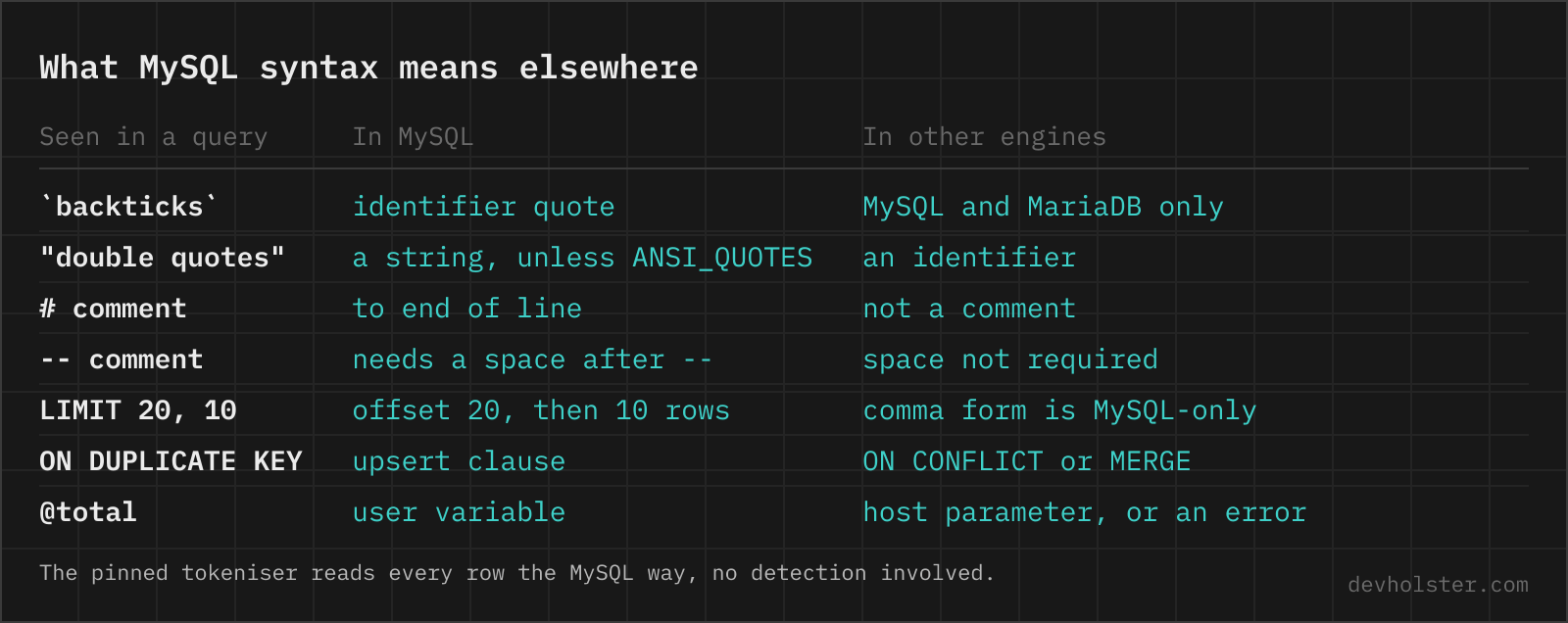
A formatter has to tokenise a query before it can lay it out, and MySQL tokenises differently from every other engine. Backticks quote identifiers where standard SQL uses double quotes. A # starts a comment, which no other major engine accepts. LIMIT 20, 10 puts the offset before the row count. @total is a user variable, ON DUPLICATE KEY UPDATE is a clause of its own, and GROUP_CONCAT(… SEPARATOR ', ') smuggles a keyword into a function call. Feed any of that to a tokeniser built for another dialect and you get odd line breaks or a parse error on a query that runs fine in production.
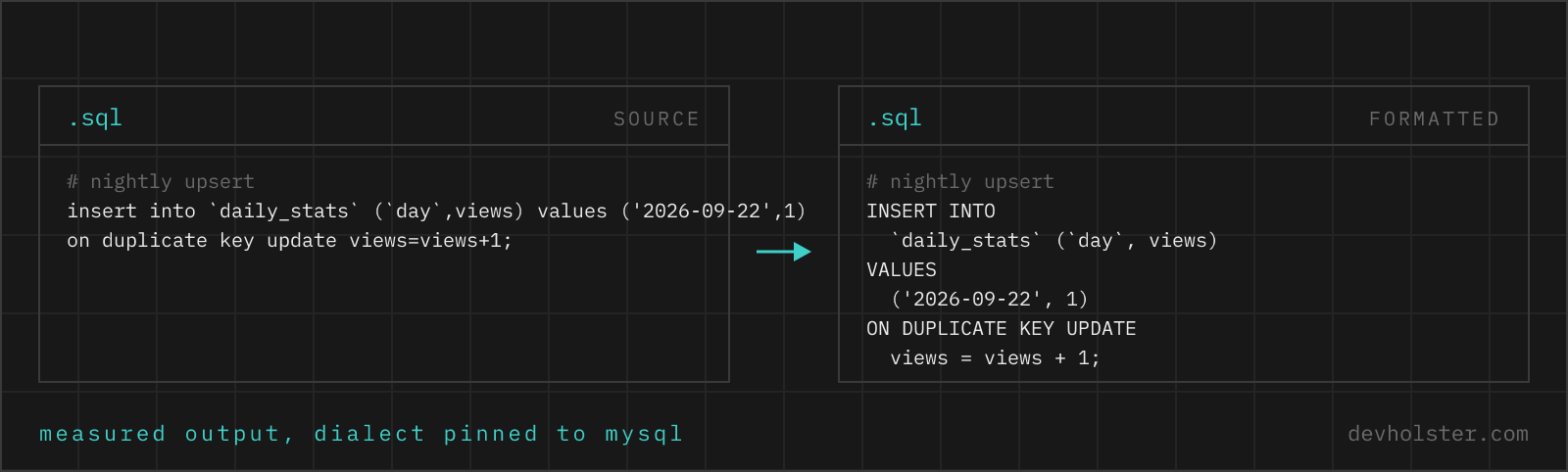
This page pins the tokeniser to MySQL. Our generic SQL formatter reads the dialect off the query, which works well when markers like backticks are present, but a plain SELECT id, name FROM users carries no markers at all. Here there is nothing to detect and nothing to get wrong. Every query is read with MySQL rules, every time.
The formatting itself is measured, not assumed. ON DUPLICATE KEY UPDATE comes out as its own clause with the assignments indented under it, LIMIT 20, 10 stays in comma form instead of being rewritten, # comments keep their place next to the line they annotate, and @rank := @rank + 1 passes through untouched. A long GROUP_CONCAT gets broken over lines with its inner ORDER BY indented inside the call and the SEPARATOR kept on the value it belongs to. A script with several statements is split with a blank line between them, so a SET followed by the SELECT that uses the variable stays readable as a pair.
The pin is strict about reading, not about rejecting. If a pasted query turns out not to be MySQL at all, say it carries a PostgreSQL :: cast, the MySQL parse fails and the formatter retries the other dialects instead of stopping at an error, then prints a line naming the dialect it ended up using. You get formatted output either way, plus the information that the query was not what the page name promised.
How to use this formatter
Paste a query into the left pane, or drop a .sql file on it, and the formatted version appears on the right while you type. Nothing runs against a database and nothing is uploaded, the formatter is JavaScript in this tab.
Two options change the output. --uppercase uppercases keywords and leaves identifiers and function names alone, so select becomes SELECT while group_concat and your column names keep their case. --tabular right-aligns keywords in a fixed column, the river layout some teams use for queries in documents. --gap puts two blank lines between statements instead of one, which helps in a long migration script. Indentation is two spaces, four spaces or tabs.
The queries this page sees most are the ones that arrive unformatted by nature. A slow-query-log entry on one line, the SQL an ORM logged, a query pasted into a chat. For the reverse situation, where you have a spreadsheet export and need statements instead of a query, the CSV to SQL INSERT converter builds the INSERTs for you.
Backticks, double quotes and the ANSI_QUOTES trap
MySQL is the only major engine that quotes identifiers with backticks by default. That single character is behind most cross-engine copy-paste failures in both directions. A query written for PostgreSQL arrives with "customer id" in double quotes, and default MySQL reads that as the string customer id, not the column. The query often still parses, it just compares a column against a constant now, which is worse than an error because it returns rows.
The escape hatch is the ANSI_QUOTES sql_mode. With it enabled, double quotes become identifier quotes the way the standard intends, backticks keep working, and double-quoted strings stop being strings. Turning it on makes foreign queries run and can break existing ones that used "…" for text, which is why the mode is off on most installations and why the same query can behave differently on two servers of the same version.
This formatter does not rewrite quoting, deliberately. Backticks stay backticks and double quotes stay double quotes, because swapping them changes what the query means depending on a server setting the formatter cannot see.
Whether Users and users are the same table
Depends on the operating system under the server. MySQL stores each table in files named after it, so table and database name comparison follows the file system. The MySQL Reference Manual documents the controlling variable, lower_case_table_names, and its defaults: 0 on Linux, where Users and users are two different tables, 1 on Windows, where names are lowercased on storage and lookup, and 2 on macOS, where names keep their case on disk but compare case-insensitively.
The bug this produces is reliable enough to schedule. A query developed against MySQL on macOS or Windows runs fine with any casing, gets deployed against a Linux server, and dies with a table-not-found error on a table that plainly exists. Since MySQL 8.0 the variable can only be set when the server is initialised, so the fix is not a config change on the production box. The fix is consistent casing in the queries, and the usual convention is all-lowercase names with underscores.
Column names sit outside all of this, they are never case-sensitive on any platform.
Does this work for MariaDB queries?
Mostly yes, with one measured caveat. MariaDB kept MySQL's tokenising rules, so backticks, # comments, LIMIT 20, 10 and user variables all format correctly here. The underlying library does ship a separate MariaDB grammar, and this page pins the MySQL one, so syntax that only MariaDB has is where the seams show. We measured the most common divergence. INSERT … RETURNING does not error, but RETURNING id ends up appended to the VALUES line in lowercase instead of standing as its own clause. The query survives unchanged, the layout around the MariaDB-only part is just less pretty.
If your daily driver is MariaDB and that bothers you, tell us via the feedback box and a pinned MariaDB page moves up the list.
The MySQL errors a formatter helps you read
Formatting does not fix a broken query, it shows you where the break is. These are the messages this page gets pasted next to, in the exact wording the server prints.
ERROR 1064 (42000): You have an error in your SQL syntax; check the manual that corresponds to your MySQL server version for the right syntax to use near '' at line 1 The parser names the token where it gave up, and the real mistake sits just before the quoted fragment. Format the query first, then read the clause above the reported spot. A trailing comma before FROM and an unclosed quote are the two usual suspects.
ERROR 1054 (42S22): Unknown column 'anna' in 'where clause' When the unknown column is obviously a value, not a column, you wrote a string in double quotes on a server with ANSI_QUOTES enabled. Change "anna" to 'anna' and it runs.
ERROR 1146 (42S02): Table 'shop.Orders' doesn't exist On Linux this often means the table exists as orders and the query says Orders. Table names follow file system case sensitivity there, see the section above. Check SHOW TABLES for the exact spelling.
ERROR 1052 (23000): Column 'id' in field list is ambiguous Two joined tables both have the column and the query does not say which one it means. Qualify it with the table or alias, o.id instead of id. Formatting the join stack makes it easy to see which tables are in play.
Online tool vs. MySQL Workbench, phpMyAdmin and DBeaver
If the query is already open in a MySQL client, format it there. Workbench has Beautify Query on Ctrl+B in the SQL editor, phpMyAdmin has a Format button above the query box in the SQL tab, and DBeaver ships a formatter too. All three know your schema, which a browser tool never will.
This page covers the query that is not in any of those. The one an ORM wrote into a log, the one a colleague pasted into Slack, the one from a five-year-old ticket, the one on a locked-down machine where Workbench is not installed. Production queries carry table names, schema structure and sometimes literal customer values, so we would rather format them in a tab that provably sends nothing than in a random formatter site with an open network panel. When a query has to leave the machine anyway, for a forum post or an AI prompt, the SQL anonymizer replaces the names with placeholders first and can reverse the mapping later, the price being that the restore only works in a browser that still holds the key.
What this tool does not do
It has no schema, no server and no execution, so a typo in a column name formats perfectly. It cannot handle DELIMITER blocks, which are a client feature rather than SQL, so stored procedure bodies with custom delimiters come out mangled. PARSED means tokenised, not correct.
MySQL questions people actually search
What do backticks mean in MySQL?
Backticks quote identifiers, so a table or column may be named after a reserved word or contain spaces. `order` is a column called order, while 'order' in single quotes is a string value. Standard SQL uses double quotes for the same job, which is why queries copied between engines break on exactly this character.
Why does my query fail with double quotes in MySQL?
By default MySQL reads double quotes as string quotes, so SELECT "name" FROM users returns the text name for every row instead of the column. With the ANSI_QUOTES sql_mode enabled the same quotes become identifier quotes and double-quoted strings raise Unknown column errors instead. That mode difference between two servers is the usual culprit. Single quotes for strings and backticks for identifiers run everywhere.
Are MySQL table names case-sensitive?
On Linux usually yes, on Windows and macOS no. MySQL stores tables as files, so comparisons follow the file system unless lower_case_table_names overrides it. The documented defaults are 0 on Linux, 1 on Windows and 2 on macOS, and in MySQL 8.0 and later the value can only be set when the server is initialised. Column names are never case-sensitive.
Is MariaDB SQL the same as MySQL?
For everyday queries yes, at the edges no. MariaDB forked from MySQL in 2009 and the two have drifted since. MariaDB added INSERT ... RETURNING and CREATE SEQUENCE, MySQL stores JSON in a binary format MariaDB does not share, and the version numbers stopped lining up at MariaDB 10. A query written in the shared core runs on both, anything engine-specific needs the manual of the engine you actually deploy on.
What does ON DUPLICATE KEY UPDATE do?
It turns an INSERT that would collide with a unique key into an UPDATE of the existing row, in one atomic statement.
How do I format a query in MySQL Workbench?
Press Ctrl+B, or Cmd+B on macOS. Workbench calls it Beautify Query and it works on the statement in the SQL editor.
What is the difference between # and -- comments in MySQL?
A # comments out the rest of the line anywhere, -- does the same only when followed by a space or control character, and /* */ spans lines. The whitespace rule after -- is MySQL-specific, so select 1--2 is subtraction in MySQL and the start of a comment in most other engines. Formatters follow the other engines. This one reads every -- as a comment and warns under the output when it meets a --2, so write the space when you mean a comment.
How do I write a multi-line comment in MySQL?
With /* and */. The block can span lines and sit inside a statement, and /*! ... */ marks MySQL-only syntax other engines skip.
Does MySQL support LIMIT with OFFSET?
Yes, in two spellings. LIMIT 10 OFFSET 20 and LIMIT 20, 10 return the same rows, and in the comma form the offset comes first, a classic source of off-by-a-page bugs. Only the OFFSET keyword form also runs on PostgreSQL.
How do I format a query in phpMyAdmin?
Open the SQL tab and click Format above the query box. It reformats the whole editor content in place.