Why minify CSS at all
CSS is render-blocking. The browser will not paint until it has fetched and parsed every stylesheet in the head, so a stylesheet's size sits directly between the user and the first thing they see. That is a different situation from JavaScript, which you can defer, and it is why CSS size still gets attention even though stylesheets are usually the smaller half of a page's payload.
The second reason is less about performance. A stylesheet you are about to paste into a CMS field, an email template, or a widget that gets embedded on someone else's page should not carry your build comments and your team's indentation preferences. Minifying is the cheapest way to hand over exactly the rules and nothing else.
How to use this minifier
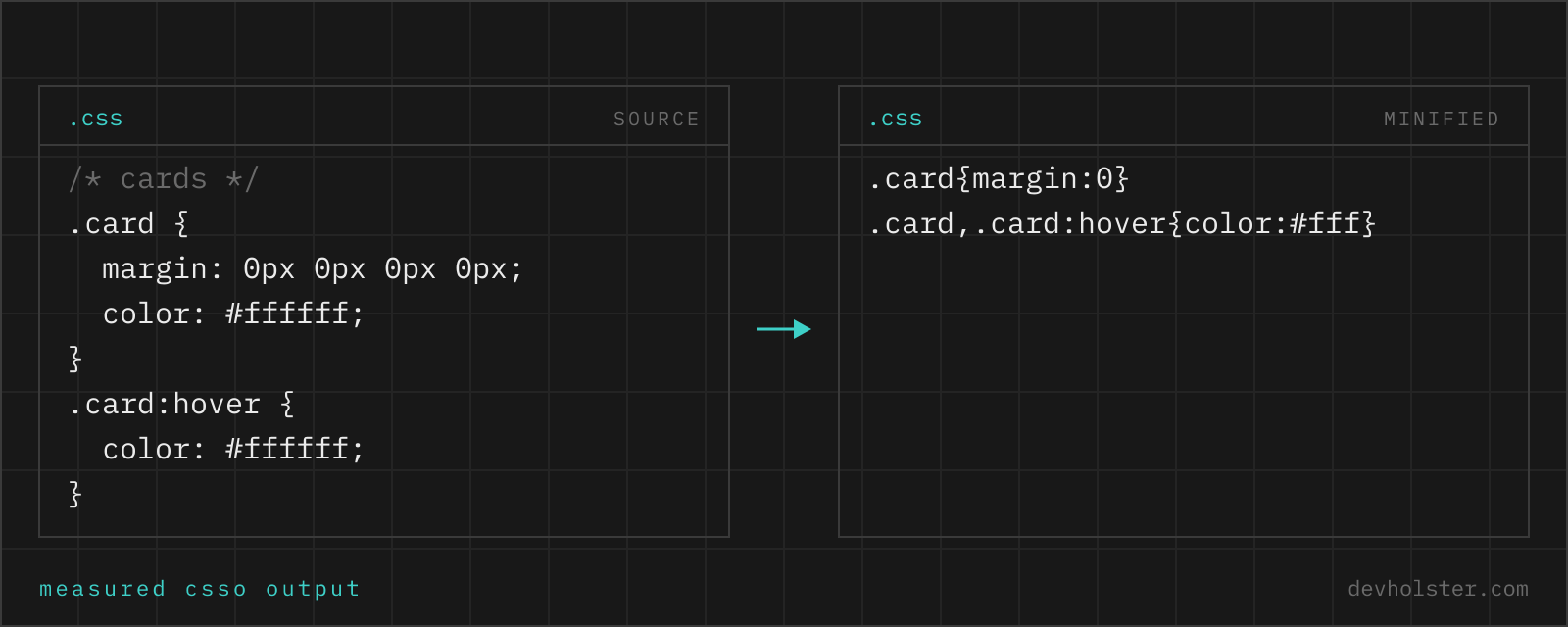
Paste CSS into the left pane, or drop a .css file on it, and the minified stylesheet appears on the right while you type. The engine is csso, which parses into a real syntax tree rather than running regexes over the text, so the output is CSS the browser reads identically to your source.
- Paste or drop your CSS. A component stylesheet, a whole framework build, a fragment out of devtools.
- Read the numbers. The strip under the panes shows the original size, the minified size, the percentage saved and the gzipped size of the result, which is the number your users actually download.
- Copy or download as a
.min.cssfile.
--restructure
On by default. This is what separates a minifier from a whitespace stripper: rules with the same selector get merged, selectors with identical declaration blocks get combined, and declarations that a later rule overrides unconditionally get dropped. Details in the next section. Switch it off when you want byte-level shortening only and the rule order exactly as you wrote it, which is occasionally what you want when diffing two builds.
--keep-license
Off by default. When on, comments starting with /*! survive; every other comment goes. That is the convention build tools use for licence banners, and it is what MIT and Apache headers need if you redistribute a stylesheet you did not write.
What structural optimisation actually does
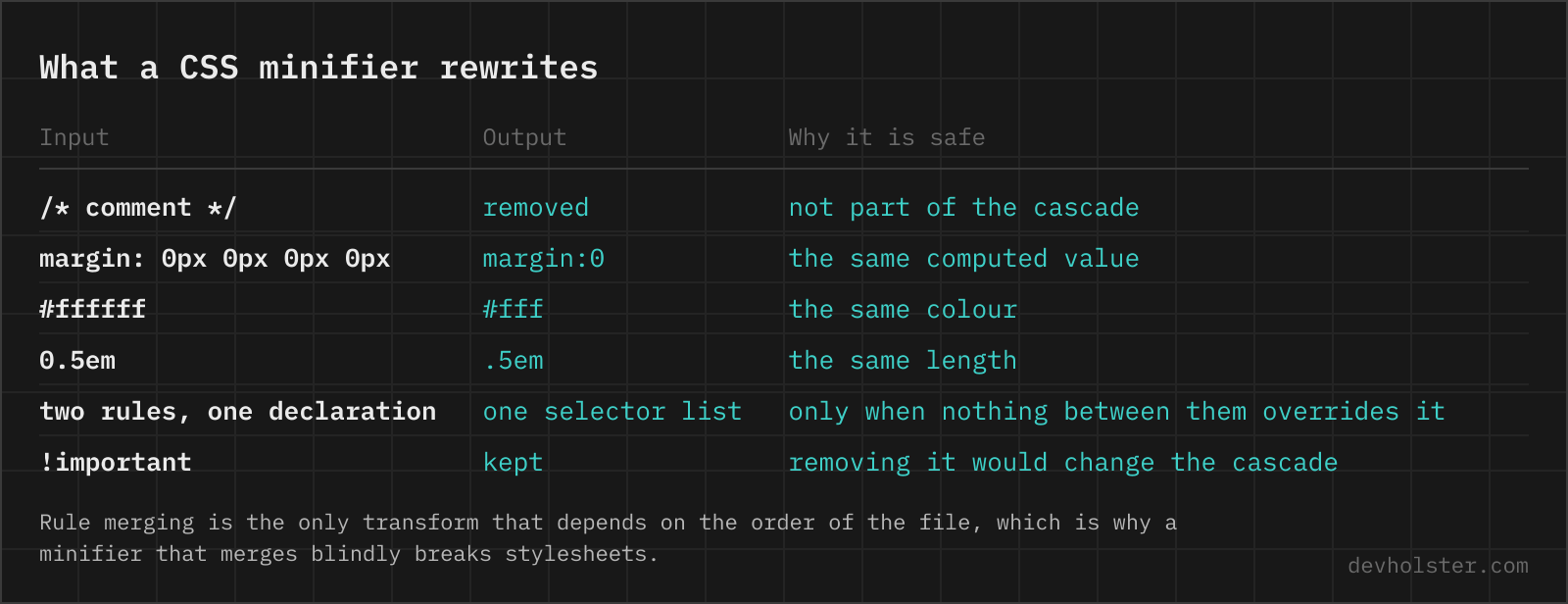
The obvious savings are mechanical: whitespace and comments removed, #ffffff shortened to #fff, 0px to 0, margin: 0 0 0 0 to margin: 0, the last semicolon in a block dropped. Those are worth roughly two thirds of the total and every tool does them.
The interesting part is what happens above the declaration level.
| Source | After restructuring |
|---|---|
.card { padding: 16px }.card { border-radius: 4px } | .card{padding:16px;border-radius:4px} |
.a { color: red }.b { color: red } | .a,.b{color:red} |
.x { padding: 16px; padding: 24px } | .x{padding:24px} |
Every one of those requires proof rather than pattern matching. Merging two .card rules is only valid if nothing between them sets a property that either rule also sets on an element both match, otherwise the cascade changes and so does the page. Combining .a and .b into a selector list changes the order in which the browser considers them, which matters when another rule sits between the two with equal specificity. csso does this analysis and declines the merge when it cannot prove safety, which is why its output is a few bytes larger than a naive tool's and correct where the naive tool is not.
What it deliberately will not touch
- Fallback declarations.
display: flexafterdisplay: -webkit-boxis the documented way to support an old engine. The pair is kept when the values differ, because the later one is not an unconditional override for every browser. - Custom properties.
var()cannot be resolved at build time, so any declaration referencing one is left as written. A variable-heavy stylesheet therefore minifies less than a literal one. - Specificity. No selector is ever simplified in a way that changes its weight, even where a shorter equivalent exists.
- The content of strings and urls. Including data URIs, which is why an inlined image dominates the size of a small stylesheet and no minifier can help.
- Unknown at-rules and modern syntax. Nesting,
@layer,@containerand@supportspass through with their structure intact.
Minifying is not removing unused CSS
This is the single most common misunderstanding about CSS size, and it is worth being blunt: a minifier cannot delete a rule you do not use, because it has no idea which pages exist. It sees one file. Deciding that .alert--warning is dead requires scanning every template, every component and every place a class name gets assembled in JavaScript.
That job belongs to PurgeCSS, to the Tailwind compiler, or to whatever your framework calls its equivalent, and it is where the big numbers live. An unpurged utility framework can be 3 MB and come out under 30 KB once the unused rules are gone. Minification then takes another 20 percent off that. Purge first, minify second; doing only the second and wondering why the file is still large is a common and avoidable disappointment.
How much you actually save
Rough figures from stylesheets we run through this regularly, and the pattern holds well: minification takes 20 to 30 percent off a hand-written stylesheet, more when the source is generously commented, less when it is already terse or full of data URIs. Then gzip flattens the difference, because whitespace was the most compressible thing in the file to begin with.
| Stylesheet | Source | Minified | Minified + gzip |
|---|---|---|---|
| Bootstrap 5.3 | ~281 KB | ~232 KB | ~31 KB |
| Typical component stylesheet | ~40 KB | ~29 KB | ~7 KB |
The lesson we take from that table: read the gzip column. A tool that only shows you the minified size is reporting a number no user experiences, which is why the strip under this one shows both. And if the gzipped difference between two approaches is under a kilobyte, the decision should be made on maintainability instead.
Online minifier vs. a build step
For a project, minification belongs in the build and nowhere else. Vite, webpack, Parcel and Next all do it for production output without configuration, so a stylesheet you minified by hand and committed is a file that will drift out of sync with its source. Our own rule: if a .min.css is in version control next to its source, something is wrong with the setup.
Where a browser page earns its place is everything outside a project. A snippet going into a CMS field or an email template. A stylesheet from a client you want to size up before agreeing to maintain it. A quick check of what a rule costs before adding it. A machine where installing Node is not an option. And the case that made us build it this way: seeing the gzipped number for a fragment, right now, without setting up a build to answer a two-minute question.
CSS minification questions
Does minifying CSS actually make a site faster?
Measurably, but less than the raw percentage suggests, because your server already gzips or brotlis the response. Minification typically removes 20 to 30 percent of a stylesheet's bytes; after compression the remaining difference is usually 5 to 15 percent, since gzip was already good at repeated whitespace. The bigger win is indirect: CSS is render-blocking, so every kilobyte sits between the user and the first paint. Worth doing, and not worth agonising over once it is in your build.
What is the difference between minifying and compressing CSS?
Minifying rewrites the source into a smaller but equivalent form, and the result is still CSS a browser parses directly. Compressing (gzip, brotli) encodes the bytes for transfer and the browser decompresses them before parsing. They stack: minify at build time, compress at the server. Doing only one leaves bytes on the table, and the order matters, minified CSS compresses better than the original because there is less noise for the compressor to model.
Can minified CSS break a website?
Rarely, and when it does the cause is almost always source that was already invalid. A missing closing brace or a stray semicolon that browsers silently recovered from can be reinterpreted by a minifier that parses properly. The other classic is a hack that depends on whitespace or on a property being repeated, an IE filter, a star hack, a duplicated declaration used as a fallback for an old browser. Modern fallbacks written as two declarations of the same property survive here; anything relying on invalid syntax may not.
How do I minify CSS in VS Code or on the command line?
In VS Code the usual route is an extension such as Minify or Live Sass Compiler, both of which write a .min.css next to the source on save. On the command line, npx csso input.css -o output.min.css, npx lightningcss --minify, or npx esbuild input.css --minify=true --outfile=out.css; esbuild is the fastest and lightningcss the most aggressive on modern syntax. Any real project should do this in the build rather than by hand, which is what Vite, webpack and Parcel already do for production output.
Does minification remove unused CSS?
No, and the two get confused constantly. A minifier rewrites what you give it and cannot know which selectors your pages actually use; it would have to see every template, every component and every class name your JavaScript builds at runtime. Removing unused rules is a separate job for PurgeCSS, the Tailwind compiler or an equivalent, and it is where the large savings live: a framework stylesheet often drops 90 percent when purged, against 25 percent from minification. Purge first, minify second.
Is it safe to minify CSS with custom properties and modern syntax?
Yes for custom properties, nesting, container queries and cascade layers, which are parsed as ordinary syntax and passed through. One thing to know about var(): a minifier cannot resolve it, so declarations that reference custom properties cannot be merged or shortened the way literal values can, and a stylesheet built heavily on variables minifies a little less than one with hard-coded values. That is a trade you make for maintainability, not a bug.
What does minified CSS do to source maps and debugging?
It makes the shipped file unreadable, which is the point, and a source map is how you get the readable version back in devtools. Build tools generate one automatically; a browser tool like this one does not, because there is no build to map from. In practice: keep the unminified source in version control, let the build produce the minified file plus its map, and never edit a .min.css by hand. If you have inherited a minified file with no source, run it through a CSS formatter to get the structure back, though the comments are gone for good.
Should I minify CSS if I use HTTP/2 or a CDN?
Yes. HTTP/2 removed the penalty for many requests, which changed how you bundle, not how much each file weighs. A CDN moves bytes closer to the user and usually compresses them, which again is orthogonal to minification. The one thing that genuinely changed the calculus is that concatenating every stylesheet into one file is no longer the automatic win it was under HTTP/1.1, so splitting CSS per route and minifying each part is now a reasonable shape.
Why is my minified CSS larger than expected?
Three usual reasons. Base64 data URIs in the file, which minifiers cannot shrink and which often make up most of the size; move those to real image files unless they are tiny. Vendor prefixes added by Autoprefixer for browsers you no longer support, which is a browserslist question rather than a minifier one. And long custom-property names repeated hundreds of times, which minify poorly on their own but compress extremely well, so check the gzip number before optimising them.
Does the order of CSS rules change during minification?
It can, and only where the change is provably safe. Merging two rules with the same selector, or two selectors with identical declarations, requires proving that nothing between them targets the same elements with conflicting properties. A correct minifier does that analysis and leaves the pair alone when it cannot prove it. If you distrust the result in a specific stylesheet, switch off the restructure option here and you get whitespace and value-level shortening only, with the rule order exactly as you wrote it.