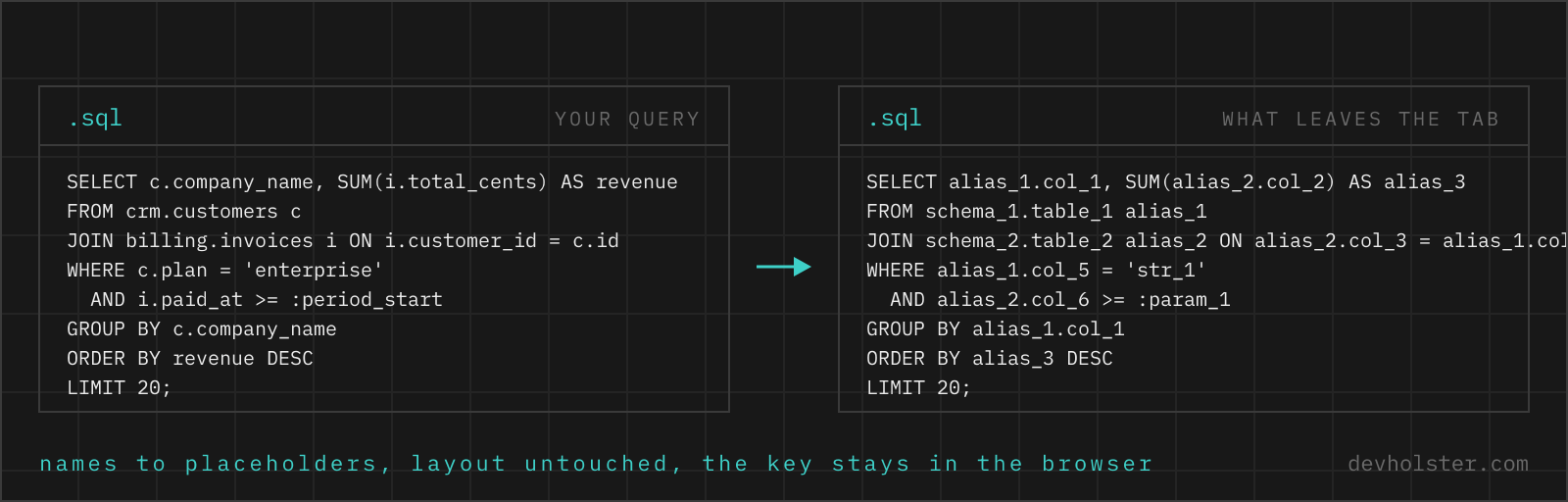
Nobody leaks a schema on purpose. It leaks one pasted query at a time, a SELECT in a ChatGPT tab, a JOIN in a Stack Overflow question, a WHERE clause in a vendor ticket, each carrying table names, column names and a literal or two of real data.
A query is documentation
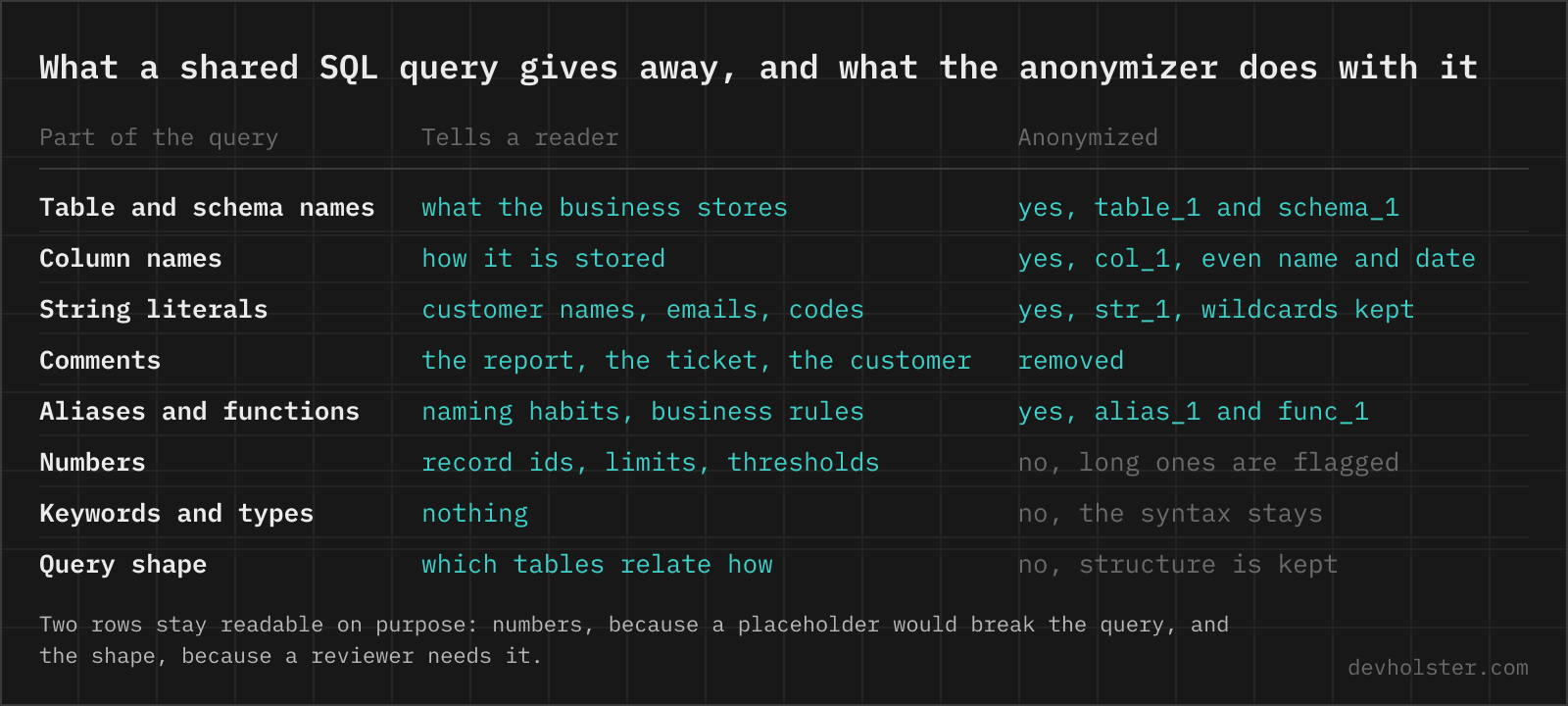
Read someone else's query and you learn what their business stores, how the tables relate, which columns exist and what the data looks like. That is precisely why queries are so useful to share, and why sharing them raw is a problem. The names are the sensitive part. The structure, the part a reviewer or a model actually needs, is not tied to them at all.
Anonymize, ask, restore
The tool above runs a round trip with three steps and one key.
- Paste the query, or drop a
.sqlfile. Names become placeholders labelled by role.crm.customersturns intoschema_1.table_1,company_nameintocol_4, a user-definedfn_churn_risk(intofunc_1(, and'Acme GmbH'into'str_2'. Whitespace, line breaks and keywords are untouched, so the result reads like your query with the names filed off. - Send the result wherever the question lives. ChatGPT, Claude, a forum post, a Slack thread with an external consultant. The recipient sees a working query shape and zero vocabulary from your database.
- When the answer comes back, switch the tool to restore names and paste it, edits and all. Every placeholder in the key becomes the real name again, including placeholders in lines the reviewer wrote from scratch.
The key panel between input and stats shows each replacement with its role and how often it occurs in the current input. New names are only written into the stored key once the input settles, otherwise typing customers character by character would leave cus and custo behind as entries.
The replacement rules
| In the query | Example | Comes out as |
|---|---|---|
| Schema, table, CTE | crm.customers, WITH paid AS | schema_1.table_1, cte_1 |
| Column | company_name, "Account Manager" | col_4, "col_5" with quotes kept |
| Alias | invoices inv, AS revenue | table_1 alias_1, AS alias_2 |
| Own function | fn_churn_risk(c.id) | func_1(alias_3.col_2) |
| Named parameter | :period_start, @tenant | :param_1, @param_2 |
| String literal | '%acme%' | '%str_3%', wildcards outside |
| Keyword, type, built-in | SELECT, varchar(20), COALESCE( | unchanged |
| Keyword-shaped column | name, date, type | col_7, decided by position |
| Number | LIMIT 20, id = 48213 | unchanged, long ones flagged |
| Comment | -- Q3 board deck | removed unless --comments is on |
The keyword-shaped row is the hard one. A column named date, value, count or key looks exactly like syntax, and a tool built on word lists must leave it alone. Position resolves it here. After a dot, after FROM, or between two expression tokens the word is a name and gets a placeholder, while in CAST(x AS date) or COUNT(*) it is syntax and stays. Only hard reserved words like SELECT and WHERE can never be a bare name.
There is deliberately no whitelist of harmless names, and every alias goes too, down to the single letter. The reasoning sits in the FAQ below.
Numbers are the one thing left in place, because no placeholder keeps a query valid. LIMIT n1 is a syntax error and LIMIT 1 lies about the query. Anything with five or more digits, the shape of a record id or an account number, is flagged under the output for a manual decision.
String literals are masked by default because they are where actual data lives. The exceptions are literals that work as syntax rather than data. The unit in DATE_TRUNC('month', ...), the pattern in TO_CHAR(d, 'YYYY-MM') and a bare ', ' separator inside CONCAT stay readable, and the tool reports them as kept.
Why replace-all backfires
The obvious approach is the editor's find and replace, or sed in a shell. Both operate on characters, and names are not characters.
sed 's/user/t1/g'

SELECT t1_id, t1name
FROM t1s u
WHERE u.email = 'sam@t1s.io'
  -- t1 export
SELECT col_1, col_2
FROM table_1 alias_1
WHERE alias_1.col_3 = 'str_1'
Five things go wrong at once, all silently. The pattern matches inside user_id and username. It rewrites the email inside the string literal into a new, equally real-looking address instead of masking it. It treats "Users", Users and users as three different words when the engine treats them as one table. It never touches the comment, which names the report and the quarter. And after twenty replacements nothing records which name became what, so the answer you get back cannot be mapped onto your schema.
A tokenizer has none of these problems because it knows where a name starts, where it ends, and whether it currently sits inside a string, a comment or a keyword position.
The key stays here
The key is the list of placeholder, original name and role. It lives in this browser's localStorage and nowhere else. There is no account, no sync, no server copy. It survives page reloads, which is what makes multi-query sessions work. customers is table_1 in today's query and still table_1 in next week's migration, so an answer that touches both restores cleanly.
Because the key contains your real names, the exported JSON deserves the same handling as the schema itself. Sending it to a colleague is the intended way to let them restore your queries. Importing a key adds entries you are missing, unless it comes from a different browser and reuses your placeholder numbers for other names, in which case merging would be dishonest and the import replaces the key instead, with a notice.
The reset button forgets everything and therefore asks for a second click.
What it cannot promise
The tool tokenizes rather than parses. A dialect keyword missing from its lists gets a placeholder it did not need, which reads oddly but round-trips fine. The opposite, a name mistaken for syntax, is rarer and confined to unusual DDL positions. Check the key panel before sharing anything that matters, it lists exactly what was and was not replaced.
The larger limit is structural. Five joins around a table with a paid_at column look like invoicing to anyone who has built invoicing, placeholders or not. We paste anonymized queries into language models ourselves and accept that trade, and it costs us the occasional answer that misses because the model could not tell col_3 was a timestamp. A query whose structure is itself the secret should not be shared in any form.
For pipelines there is sqlglot
This page is built for the query that is about to leave your machine right now. The same job inside a CI step or a data pipeline wants a real parser instead: sqlglot parses into a typed tree per dialect, renaming exp.Table and exp.Column nodes is exact rather than heuristic, and the cost is a Python dependency plus output printed sqlglot's way. Your IDE's rename refactoring is the one tool to avoid here. It renames the schema itself, the opposite of what sharing a copy needs.
Asked before the query leaves the database
What can someone learn from a SQL query posted online?
More than most people expect. The table names describe what the business stores, the joins describe how it fits together, and the literals in the WHERE clause are often actual customer data, an email address or a company name. Whoever operates the chat service or forum can read all of it, and public posts get indexed.
How do you anonymize a SQL query before sending it to ChatGPT?
Swap every identifier that is not a keyword for a placeholder, mask the string literals, drop the comments, and write the mapping down so the answer can be translated back. By hand that takes minutes and breaks on the second occurrence of a name. The tool on this page does the whole pass in the browser and keeps the mapping as a key you can reverse.
Can an anonymized query be de-anonymized without the key?
No. table_1 carries no trace of the name it replaced.
Does swapping the names change what a query does?
No. Each name maps to exactly one placeholder, so joins, filters and grouping keep their structure.
Is formatting or minifying SQL enough to hide anything?
It hides nothing. A formatter rearranges whitespace and a minifier removes it, but every table name, column name and literal is still there word for word. Anonymizing is a different operation, it replaces the names themselves and keeps a private mapping for the way back.
Why replace harmless column names like id or created_at?
Because a rule with exceptions has to be right about every single name, and the kept ones betray the replaced ones. A user_id sitting next to table_1 tells any reader what table_1 is. Replacing everything is the only rule that never needs judgement, and a reader who needs to know that col_3 is a timestamp can be told so in the message next to the query.
What happens when the AI invents its own placeholder in the answer?
Restore mode swaps back every placeholder the key knows and lists the ones it never issued, so an invented col_99 stays visible instead of silently pretending to be restored. A placeholder that got wrapped into a longer name, like table_1_idx in a suggested index, is left alone on purpose.
How do I anonymize SQL programmatically in Python?
With sqlglot: parse_one(query) gives you a syntax tree, find_all(exp.Table) and find_all(exp.Column) give you the identifier nodes, and you rename each one from a dict you keep for the reverse step, then print with .sql(). You get an exact parse for one dialect at a time. You also get a dependency, dialect quirks to handle, and output formatted the way sqlglot prints it rather than the way the query was written.
Where does the mapping between placeholders and real names live?
In your own browser, in localStorage of this site. It is never transmitted. Download it as a JSON file if you want a copy or need it on another machine.
Can a colleague restore a query I anonymized?
Yes, if you send them the key file along with it. They import the JSON on the same page, paste the anonymized query into restore mode, and get your real names. Without the file the placeholders stay placeholders, which is exactly the point.
Are the values in a WHERE clause personal data?
Often yes. A clause like email = 'anna@firma.at' or name LIKE '%maier%' contains information about an identifiable person, which is what data protection law cares about. Masking literals turns the value into str_1 while the comparison stays readable, so the question can be asked without the person travelling along.