Why format SQL at all
Queries reach you in bad shape more often than any other code. An ORM logs one on a single line, a colleague pastes one from a BI tool, a slow-query log dumps 400 characters without a break, an old report has been edited by six people with three different indentation habits. The query works. You just cannot see what it does.
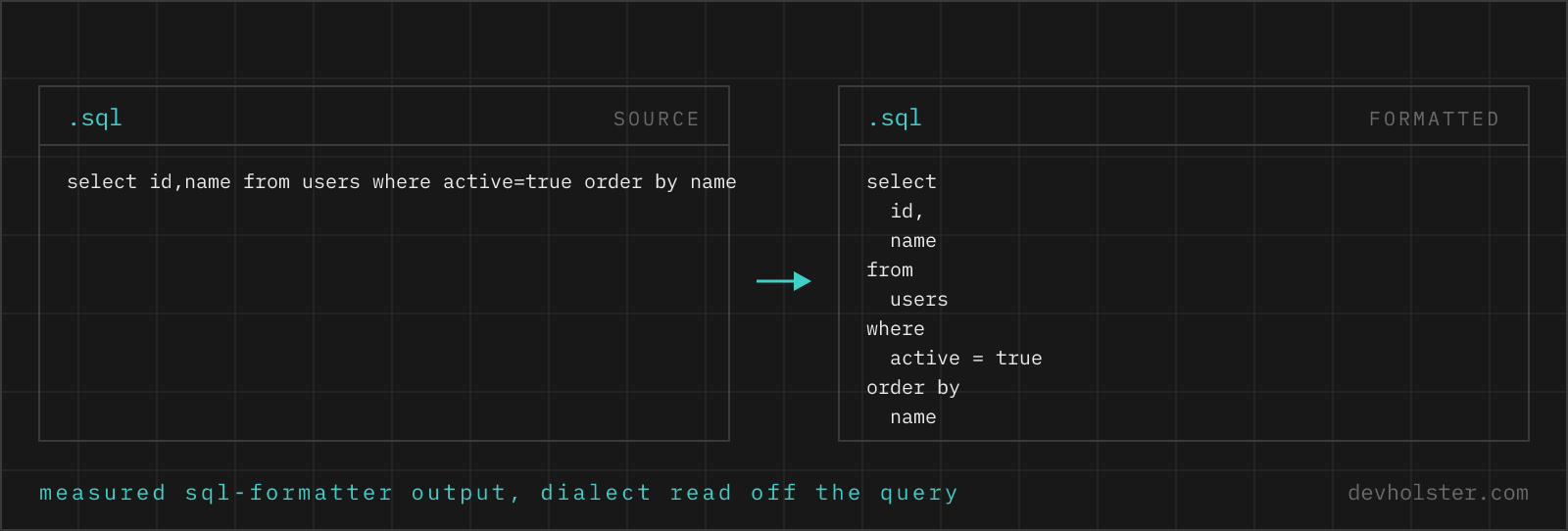
Formatting is the cheapest step toward answering the actual question. Once the clauses sit on their own lines and the joins are stacked, the shape of the query becomes visible: how many tables, where the filter lives, which subquery is doing the expensive part. This matters most when you are reading someone else's SQL under time pressure, which is to say, during an incident.
The second reason is diff hygiene. Queries in a repository that are formatted differently by each author produce pull requests where every line looks changed. Agreeing on a layout and applying it mechanically makes the review show the actual change.
How to use this formatter
Paste SQL into the left pane, or drop a .sql file on it, and the formatted query appears on the right while you type. Nothing is executed, this tool has no database connection of any kind. It reads text and writes text.
- Paste or drop your SQL. A single SELECT, a migration file, a stored procedure body, a whole script with several statements.
- Set the style. Indent width, uppercase keywords, and
--tabularfor river-style alignment. - Copy or download. The result goes to your clipboard or saves as a
.sqlfile.
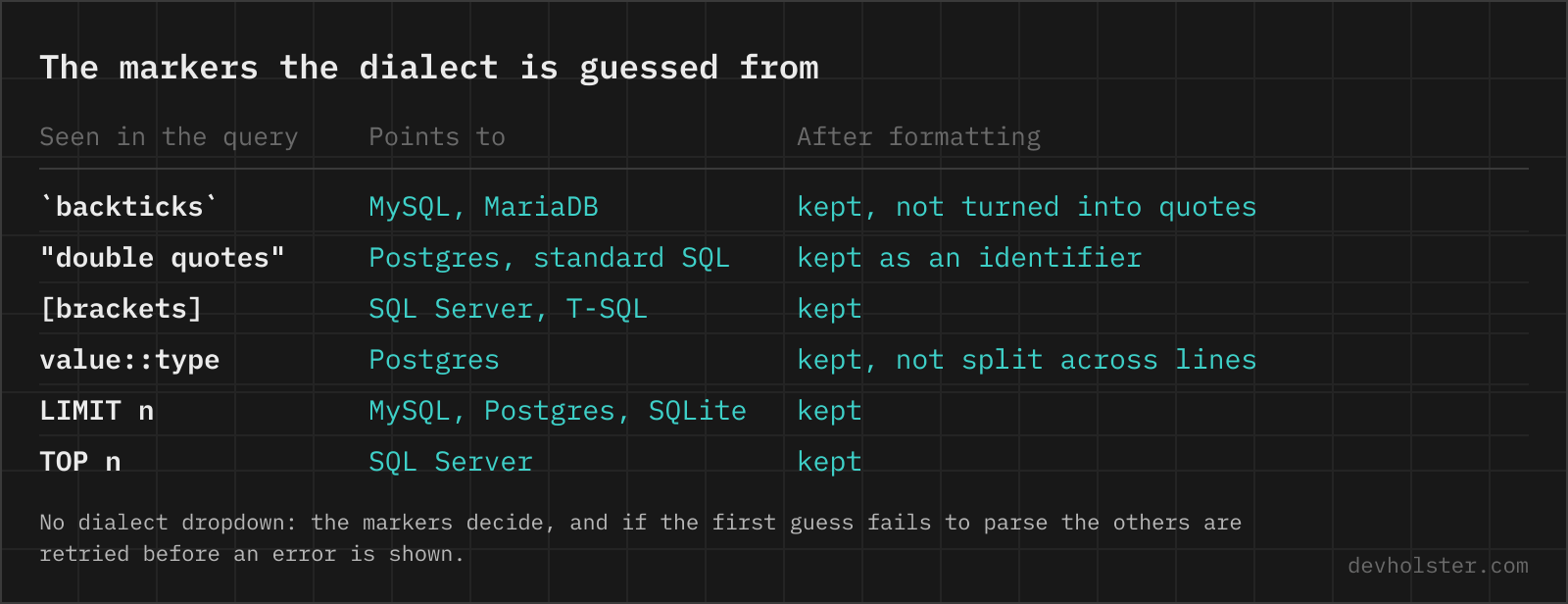
There is no dialect to choose. The formatter reads the engine off the query and says which one it used when the answer is not plain standard SQL.
--uppercase
Uppercases keywords and leaves identifiers alone, so select id from users becomes SELECT id FROM users. On by default. Switch it off if your team writes lowercase SQL, or if the query is already cased the way you want it.
--tabular
Right-aligns keywords in a fixed column, producing the river layout from Simon Holywell's SQL style guide:
| Standard | --tabular |
|---|---|
SELECT id, nameFROM customersWHERE country = 'AT' | SELECT id, name FROM customers WHERE country = 'AT' |
People either love this or find it unreadable, and both camps are large. We use it for queries we paste into tickets and the standard layout for queries that live in a repository, because it reads beautifully in a document and adds noise to a git diff.
How the dialect is detected, and why you no longer pick one
A formatter has to tokenise the query before it can lay it out, and the token rules differ per engine. Feed SELECT id::text to a tokeniser that has never heard of :: and you get strange line breaks or a chunk of query treated as one opaque blob, usually without an error message to explain it.
Every online SQL formatter we looked at solves this by putting five radio buttons above the input. We had those too, and dropped them: the dialect is written into the query in characters no other engine uses, so asking the person who pasted it is asking them to repeat themselves.
| Dialect | Detected from |
|---|---|
| postgres | :: casts, $$ function bodies, ILIKE, RETURNING, the JSON operator ->>. |
| transactsql | [bracket] identifiers, TOP n, GO on its own line, @@ROWCOUNT and friends, NOLOCK. |
| mysql | Backtick identifiers, # comments with a space after the hash, ON DUPLICATE KEY UPDATE. |
| bigquery | QUALIFY, STRUCT<…> literals, UNNEST(. |
| sqlite | INSERT OR REPLACE, INSERT OR IGNORE, AUTOINCREMENT. |
| standard | Nothing engine-specific found. SQL-92 core: double-quoted identifiers, -- and /* */ comments. |
The detection is a first guess, not a verdict. If the guessed tokeniser chokes, the query is retried against the remaining five before anything is reported as an error, so a construct our regexes never saw still formats. When the result came from anything other than standard SQL, a line under the output names the dialect that was used, because a silent guess is worse than no guess.
Two honest caveats. A query that carries no engine markers at all is formatted as standard SQL, which is correct for it by definition. And backticks alone read as MySQL even in a BigQuery query, which is harmless: both tokenise backtick-quoted names the same way.
When you already know the engine and want it pinned instead of guessed, each major dialect has its own page: the PostgreSQL formatter, the MySQL formatter and the T-SQL formatter for SQL Server. Same engine, no detection step, and the tokeniser never has to guess.
The layout styles teams actually argue about
SQL formatting has no equivalent of gofmt, so several conventions coexist. Knowing which one your codebase follows saves a pull request discussion.
- Keyword case. Uppercase keywords are the traditional default. The lowercase camp has grown with dbt and analytics engineering, where SQL is written all day and the shouting gets tiring.
- Leading vs. trailing commas. Trailing commas (
id,at the end of the line) are conventional. Leading commas (, idat the start) make it obvious when a comma is missing and let you comment out a column without breaking the list. This formatter writes trailing commas. - River alignment. The
--tabularoption above. Elegant, and noisy in diffs. - One condition per line. Nearly universal for WHERE clauses with more than two conditions, with the AND or OR starting the line so the operator is visible at the left margin.
- Explicit join syntax. Not layout in the strict sense, but the biggest readability lever:
JOIN … ON …rather than comma joins with conditions buried in WHERE. A formatter will not convert the old style for you.
What a formatter cannot do for you
It is worth being clear about the boundaries, because "SQL validator" is a common search and the honest answer is a partial one. This tool tokenises and lays out. It does not connect to a database, does not know your schema, and does not judge performance.
So a query referring to a table that does not exist formats perfectly. A column name with a typo formats perfectly. A join missing its condition, producing a cross product of two million rows, formats perfectly and looks tidy doing it. The PARSED indicator under the tool means the text could be read as SQL tokens, nothing more. For real verification the tools are EXPLAIN against the actual database, a linter like SQLFluff for style and anti-patterns, and the database's own dry-run facilities for DDL.
Online formatter vs. pgFormatter, SQLFluff and IDEs
Use this page for queries that arrive outside your development setup: a slow-query log entry, SQL in a chat message, a snippet from a dashboard, or a query on a machine where installing anything is not an option. The privacy point is the deciding one for us, production SQL carries table names and sometimes literal customer values, and it should not travel to a stranger's server just to gain some line breaks. When the query has to leave the machine anyway, for a forum post or a ChatGPT prompt, the SQL anonymizer swaps the names for placeholders first and restores them from a key that stays in your browser.
Use pgFormatter when you are deep in PostgreSQL and want the most dialect-aware output available. Use SQLFluff in CI when you want formatting enforced together with linting rules across a repository, which is the norm in dbt projects. Use your IDE (DataGrip, pgAdmin, DBeaver) while writing queries, since it formats with schema knowledge and can complete table names as a bonus. None of those help with the query someone just pasted into Slack, which is what this page is for.
Formatting questions
Is it safe to paste production queries into an online SQL formatter?
Only into a formatter that works in your browser, and most do not. A query carries your table and column names, your schema design and often literal values from customer rows, which together are enough to map a database you would never expose otherwise. Formatting runs here as JavaScript in your tab, nothing is uploaded or logged, and no query is ever executed anywhere. With any other tool, watch the Network tab in devtools while you format: if a request goes out, treat the query as published and check whether your employer would agree with that.
Should SQL keywords be uppercase?
It is convention rather than requirement; SQL is case-insensitive for keywords. Uppercase keywords against lowercase identifiers make the structure of a long query scannable, which is why most style guides ask for it and why this tool has it on by default. Some teams have moved to all-lowercase, arguing that shouty keywords add noise and modern editors colour syntax anyway. Either is defensible, consistency inside a repository is what counts.
How do I make a long SQL query readable?
Put every major clause on its own line (SELECT, FROM, JOIN, WHERE, GROUP BY, ORDER BY), one column or condition per line, and indent subqueries one level. That is what this formatter does automatically. For queries that stay unreadable afterwards, the problem is structure rather than layout: break them into CTEs with WITH, name each step after what it produces, and the query starts to read like a sequence of steps.
Does formatting a query change what it does?
No. SQL ignores whitespace, so the formatted query returns the same rows with the same plan. Only keyword case changes, when --uppercase is on.
Why does the same query format differently in MySQL and PostgreSQL mode?
Because the dialect changes how the tokeniser reads the query. MySQL quotes identifiers with backticks and treats # as a comment. PostgreSQL uses :: for casts and $$ for function bodies. SQL Server wraps identifiers in [brackets] and puts TOP where the others put LIMIT. BigQuery uses dotted project.dataset.table names, arrays and structs. Feed a query to the wrong tokeniser and unusual syntax gets misread, which shows up as odd line breaks rather than an error. Most online formatters make you pick; this one reads the markers out of the query text instead, and if the guess fails to tokenise it retries the other dialects before reporting an error.
Can an online formatter validate my SQL?
Only in a limited sense. This tool reports whether the query could be parsed into tokens, which catches gross syntax damage like unbalanced parentheses, but it has no database, no catalogue and no schema. A misspelled column, a table that does not exist or a type mismatch parses fine and fails at execution. To check a query properly, run EXPLAIN against the actual database.
What is the tabular or river style of SQL formatting?
A layout where keywords are right-aligned in a fixed column so the values line up in a vertical "river" down the page. It comes from the SQL style guide by Simon Holywell and has a devoted following, because at a glance you see clause boundaries and column lists as separate columns of text. The --tabular option here produces it. Fair warning: it makes diffs noisier, since adding a longer keyword can shift the alignment of a block.
Do SQL comments survive formatting?
Yes, both line comments (--) and block comments (/* */) are kept and moved with the code they annotate. MySQL hash comments (#) need the MySQL tokeniser, which is one of the concrete things the dialect detection is for. Comments are the first thing to check when evaluating any formatter, some tools drop them silently.
How do I format SQL inside application code?
Extract the query first. A formatter sees only SQL, so a string with PHP interpolation, Python f-string braces or JavaScript template placeholders confuses the tokeniser. Format the plain query, then paste it back. If your queries are long enough that this is a regular chore, that is usually an argument for moving them into .sql files or a query builder rather than for a better formatter.
What is a CTE and when should I use one?
A Common Table Expression is a named subquery introduced with WITH, referenced later like a table. Use one when a subquery appears twice, when nesting has gone two levels deep, or when a step deserves a name that explains it. Modern PostgreSQL inlines CTEs into the plan, so the readability is usually free. In older versions (before 12) a CTE was an optimisation fence, which is where the folklore about CTEs being slow comes from.
Why does my formatted query still look messy?
Usually because it contains one enormous expression a formatter cannot break sensibly: a CASE with fifteen branches, a WHERE with a dozen ORs, or a nested subquery three levels down. Layout can only reflect structure that is already there. When the formatted output is still hard to read, take it as a signal to split the query into CTEs rather than to look for a better formatter.
How do I fix a syntax error near a keyword in SQL?
Read the error backwards, because the engine names the token where parsing failed, and the mistake is almost always just before it. MySQL reports "You have an error in your SQL syntax near '…'" and PostgreSQL "syntax error at or near '…'". In both cases the quoted fragment is the first thing that no longer fit. The recurring causes: a trailing comma before FROM, a missing comma between columns, an unquoted reserved word used as a column name (order, group, user, key, rank), a stray quote that swallowed the rest of the statement, and a missing closing parenthesis. Formatting the query first makes all five visible, because the broken clause is the one whose indentation looks wrong.
How do I format SQL in DBeaver or DataGrip?
DBeaver formats the current statement with Ctrl+Shift+F, DataGrip and the other JetBrains IDEs use Ctrl+Alt+L (Cmd+Option+L on macOS). The layout each one produces is configurable and differs between machines, so a team that cares about diffs settles on one formatter and its settings file rather than on personal shortcuts. A browser formatter fits the case neither covers well, a query that arrived in a chat message or a log line and is not in your editor yet.
Does formatting SQL make a query faster?
No. The parser drops whitespace before the planner sees the statement. Formatting only helps you spot the slow join, EXPLAIN ANALYZE does the rest.