Every encoding bug is two sides disagreeing about bytes
Text doesn’t exist on disk or on the wire. Bytes do. An encoding is the agreement about which byte sequences mean which characters, and mojibake (the Japanese word for it, 文字化け, roughly “character transformation”) is what you see when the writer and the reader used different agreements. That’s the whole bug. Not corruption, not data loss, just a wrong lens.
Which is the encouraging part: in the classic ä case, the bytes are perfectly fine. Somebody wrote valid UTF-8 and somebody else read it as Latin-1. Swap the lens back and the original text reappears, unchanged. The cases where data actually died look different, and we’ll get to them (that’s the � section).
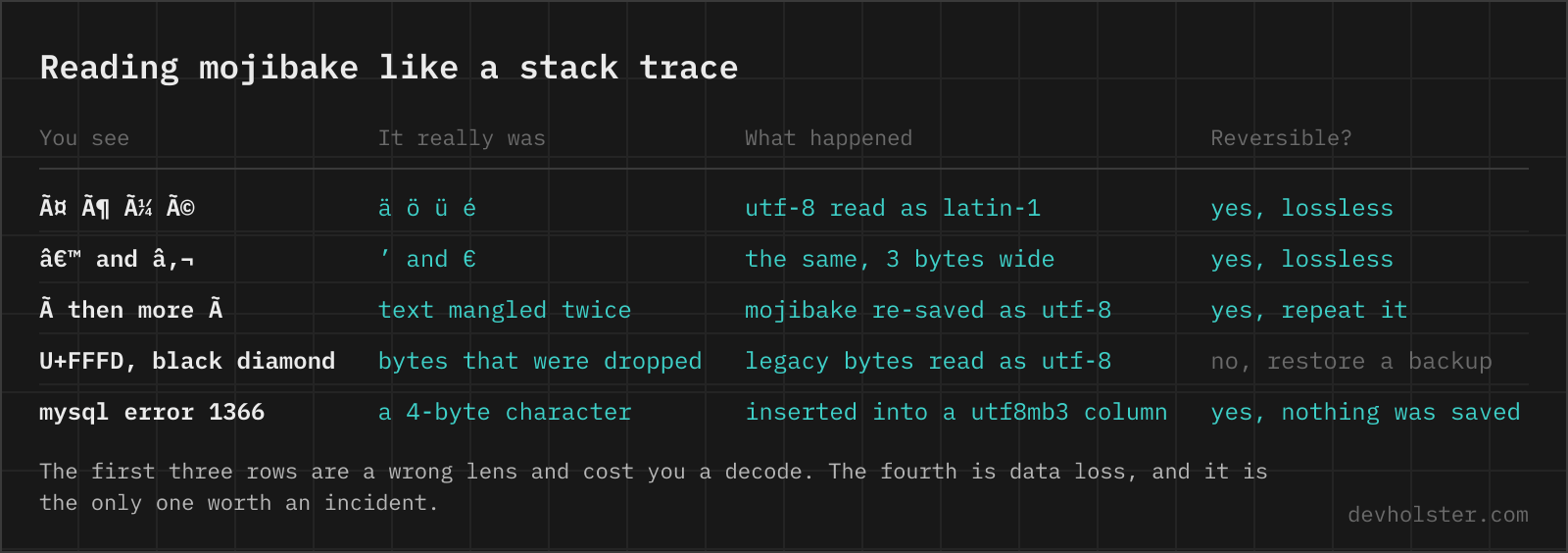
The useful skill is reading the garbage like a stack trace. Each mangling has a signature, and à followed by junk is the most common one on the web by a wide margin.
The byte math behind ä
Take ä, code point U+00E4. In UTF-8 every code point above 127 becomes multiple bytes. A two-byte sequence has the shape 110xxxxx 10xxxxxx, with 11 payload bits. E4 is 000 11100100 in binary; split into 5 + 6 bits and slot into the template:
| Step | Value |
|---|---|
| Code point | U+00E4 = 00011 100100 |
Byte 1: 110 + 00011 | 11000011 = 0xC3 |
Byte 2: 10 + 100100 | 10100100 = 0xA4 |
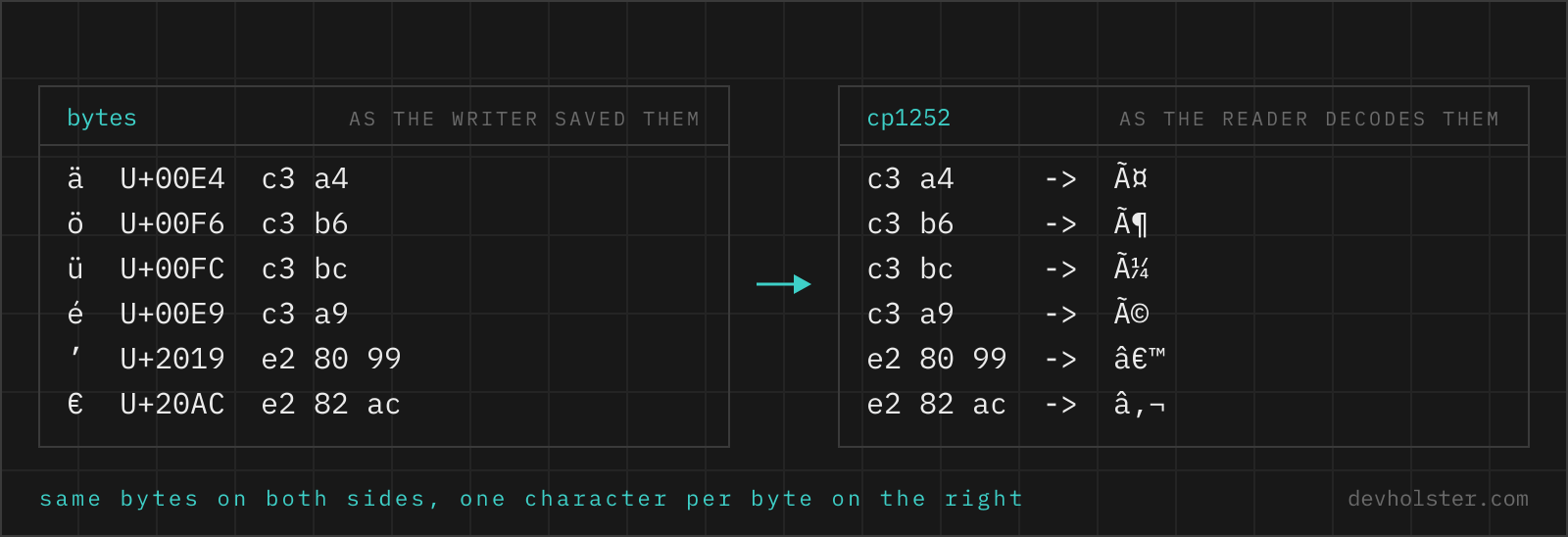
So ä on disk is C3 A4. Now read those two bytes with a decoder that thinks one byte equals one character. In Latin-1, 0xC3 is à and 0xA4 is ¤. Result: ä. Two characters where one was meant, and the first one is almost always Ã, because every German umlaut and most Western European accents live in the U+00C0 to U+00FF range, whose UTF-8 encoding starts with 0xC3.
That makes the pattern instantly recognizable: ö becomes ö, ü becomes ü, ß becomes ß, é becomes é. Three-byte characters mangle into three glyphs, which is why the curly apostrophe ’ (U+2019, bytes E2 80 99) turns into the famous ’. If you see à or †in output, you can state with confidence: UTF-8 bytes were decoded as Latin-1 or Windows-1252. No guessing needed.
Double encoding: when it happens twice
Sometimes you don’t see ä but ä. That’s the same accident applied twice. First round: C3 A4 misread as the two characters ä. Second round: some layer helpfully saves those two characters as UTF-8, so à (U+00C3) becomes C3 83 and ¤ (U+00A4) becomes C2 A4. Read those four bytes as Windows-1252 and you get Ã, ƒ, Â, ¤: four glyphs for one umlaut. Each round of this roughly doubles the length, and yes, we’ve seen triple-encoded text in a real customer database. It looked like modem line noise.
The good news holds: double encoding is still lossless. Reverse it mechanically, encode the garbage as Latin-1, decode as UTF-8, repeat until it stops changing. In Python that’s s.encode('latin-1').decode('utf-8') per round, and the ftfy library ("fixes text for you", by Robyn Speer) does the detection and unwinding automatically, including mixed cases where only half a file is mangled.
$ python3 -c "print('Müller'.encode('cp1252').decode('utf-8'))"
Müller
Fix the data and find the layer that lied about its encoding, or the table refills with garbage within a week. It’s usually a database connection charset or an HTTP header, not application code.
A placemat in New Jersey
UTF-8 is younger than you’d guess and was designed in one evening. In September 1992, Ken Thompson and Rob Pike were working on Plan 9 at Bell Labs when X/Open circulated a proposal for a Unicode byte encoding. Thompson sketched a better one on a placemat in a New Jersey diner; by Pike’s own account (a 2003 email he published, still online at Cambridge’s site), the design happened “in front of my eyes, on a placemat”, they were coding it that night, and the entire Plan 9 operating system ran on it by the end of the week. He also wrote that he wished they’d kept the placemat.
What Thompson’s bit-packing got right still carries the modern web:
- ASCII is valid UTF-8, byte for byte. Every ASCII file already was UTF-8. That single property is most of why UTF-8 won.
- It self-synchronizes. Continuation bytes always start with
10, lead bytes never do, so a parser dropped into the middle of a stream finds the next character boundary within one byte. ASCII bytes like/or"can never appear inside a multibyte sequence, so byte-oriented tools (grep, path parsing, C string handling) keep working. - The lead byte announces the length.
110means two bytes,1110three,11110four. Originally the scheme went up to six bytes; RFC 3629 capped it at four in 2003 to match Unicode’s U+10FFFF limit.
Adoption followed the design: W3Techs measures UTF-8 at 99.0% of all websites as of July 2026. The encoding wars are over. Mojibake survives only at the seams, wherever legacy defaults still lurk.
Windows-1252 vs ISO-8859-1: the 32 bytes that differ
The two legacy encodings you’ll actually meet get confused with each other constantly, and the entire difference sits in the range 0x80 to 0x9F. ISO-8859-1 puts control characters there (the C1 block, useless for text). Windows-1252 fills the same 32 slots with printable characters people actually type: the € sign at 0x80, curly quotes at 0x91 through 0x94, the dashes at 0x96 and 0x97, ™ at 0x99. Everywhere else the two are identical.
Browsers settled the argument by ignoring it: the WHATWG Encoding Standard requires that the labels iso-8859-1, latin1 and even us-ascii all decode as Windows-1252. Declare ISO-8859-1 on a web page and you get Windows-1252, period. That’s also why the ’ mangling shows a visible € and ™: bytes 0x80 and 0x99 have glyphs in Windows-1252 that plain ISO-8859-1 never had.
Practical takeaway for debugging: when mangled text contains €, ™ or curly quotes in weird places, the reader side was Windows-1252. When those positions come out blank or invisible, something decoded strict ISO-8859-1, which today usually means a programming language library rather than a browser.
The MySQL utf8 trap
MySQL has a charset named utf8 that is not UTF-8. It’s an alias for utf8mb3, capped at three bytes per character, a shortcut from the early 2000s that never got removed. Three bytes covers the Basic Multilingual Plane and nothing beyond it, and everything beyond it is exactly what modern input contains: every emoji (😀 is U+1F600, four UTF-8 bytes F0 9F 98 80), rare CJK characters, mathematical alphanumerics.
The failure is loud, at least. Insert an emoji into a utf8mb3 column and MySQL throws error 1366, Incorrect string value: '\xF0\x9F\x98\x80...'. If you’ve ever had a signup form die on a user whose name field contained an emoji, this was probably the layer that killed it.
The real four-byte charset is utf8mb4, shipped with MySQL 5.5.3 back in 2010 and finally the server default in MySQL 8.0 (2018), which also deprecates utf8mb3. Two migration notes from experience: convert the connection charset too, not just the columns, because a utf8mb3 connection will mangle four-byte characters on the way in even when the table is fine. And on old InnoDB setups the 767-byte index limit is why tutorials cap VARCHAR keys at 191 characters; MySQL 5.7’s larger prefix default made that folklore obsolete, but the 191s still haunt legacy schemas.
What � is telling you
The question mark in a black diamond is a real character: U+FFFD, REPLACEMENT CHARACTER, and it means something specific. A decoder hit a byte sequence that was invalid in the expected encoding and substituted � rather than aborting. So while ä says “valid bytes, wrong lens”, � says “the decoder already gave up here”.
The distinction decides whether you can recover. If � only appears at render time, the underlying bytes may still be intact, and fixing the declared encoding fixes the display. But if some process decoded with errors, replaced the bad bytes with U+FFFD and wrote the result back, the original bytes are gone. No amount of re-decoding brings them back; that’s a restore-from-backup situation. Seeing literal � stored inside a database column is one of the few encoding symptoms that should genuinely worry you.
A typical source: reading a Latin-1 file as UTF-8 (the reverse of the classic direction). Bytes like 0xE4 alone are invalid UTF-8, so instead of mojibake you get replacement characters. Ã-garbage means UTF-8 read as legacy; �-garbage usually means legacy read as UTF-8.
The BOM: useless on the web, required by Excel
The byte order mark is U+FEFF at the start of a file, which in UTF-8 encodes to EF BB BF. For UTF-16 it answers a real question (which of the two byte orders follows), but UTF-8 has no byte order, so the UTF-8 BOM answers nothing. On the web it’s pure liability: three invisible bytes that have broken PHP’s “headers already sent”, shebang lines in shell scripts, and JSON parsers that predate RFC 8259’s advice. The BOM is also the most common invisible character you’ll meet in the wild; we cover its zero-width relatives in our guide to invisible Unicode characters.
The one honest use case: CSV files for Excel. Excel does not trust a CSV to be UTF-8 unless it starts with exactly those three bytes, and without them it decodes the file with the machine’s legacy ANSI code page, turning every ä in your export into garbage on the recipient’s screen. Prepending EF BB BF is the documented workaround, one of several Excel-and-CSV landmines we walk through in why Excel ruins CSV files. If you’re generating CSV from JSON data anyway, our JSON to CSV converter runs entirely in your browser, so nothing you paste leaves your machine. And when the file’s only destination is Excel, you can skip the BOM dance entirely: the CSV to Excel converter writes a real .xlsx, a format that carries its encoding internally and gives Excel nothing to guess.
Rule of thumb we stand by: emit UTF-8 without BOM everywhere, add the BOM only when the file’s next stop is Excel.
Repairing broken characters
What is mojibake?
Mojibake is garbled text that appears when bytes written in one character encoding are read with another, turning ä into ä or ’ into ’. The word is Japanese (文字化け, roughly “character transformation”), because Japanese users hit the problem constantly in the era of competing encodings. The bytes themselves are usually intact; only the interpretation is wrong, which is why most mojibake is fully reversible.
How do I fix ä appearing instead of ä?
Find the point where UTF-8 bytes are being decoded as Latin-1 or Windows-1252 and correct the declared encoding there, not in the text. Typical culprits: a missing charset in the HTTP Content-Type header, a database connection without an explicit encoding, or a file opened with a default legacy encoding. If mangled text has already been saved, reverse it by encoding the garbage as Latin-1 and decoding the result as UTF-8; Python’s ftfy library automates exactly this.
What is the difference between Unicode and UTF-8?
Unicode is the catalog that assigns every character a number (a code point, like U+00E4 for ä), and UTF-8 is one way of turning those numbers into bytes. UTF-16 and UTF-32 encode the same catalog differently. So a file is never “encoded in Unicode”; it is encoded in a specific transformation format, and on the web that is almost always UTF-8, used by 99.0% of websites according to W3Techs.
Why does MySQL utf8 not support emoji?
Because MySQL’s charset called utf8 is an alias for utf8mb3, which stores at most 3 bytes per character, and every emoji needs 4 bytes in real UTF-8. Inserting one fails with error 1366, “Incorrect string value”. The fix is the utf8mb4 charset, available since MySQL 5.5.3 in 2010 and the default since MySQL 8.0. Columns, connection and tables all have to be converted; a single leftover utf8mb3 layer reintroduces the error.
What does the � replacement character mean?
The � (U+FFFD) means a decoder hit bytes that were invalid in the expected encoding and substituted a placeholder. Unlike ä-style mojibake, which is a wrong-but-lossless reinterpretation, � usually marks the point where the original bytes were thrown away. If � has been written back into a file or database, that character data is gone and has to be restored from a backup or the original source.
Should I use a BOM with UTF-8?
On the web, no. UTF-8 has no byte order, so the BOM carries no information there, and stray BOMs are a classic source of “headers already sent” errors in PHP and broken shebang lines in scripts. The one place a UTF-8 BOM genuinely helps is CSV files destined for Excel, which uses the three bytes EF BB BF as its signal to decode the file as UTF-8 instead of a legacy ANSI code page.
Is ISO-8859-1 the same as Windows-1252?
No, they differ in the range 0x80 to 0x9F: ISO-8859-1 has control characters there, while Windows-1252 has printable ones including the € sign, curly quotes and the trademark sign. In practice browsers ignore the difference, because the WHATWG Encoding Standard requires the labels iso-8859-1, latin1 and even us-ascii to be decoded as Windows-1252. Declaring ISO-8859-1 on the web gets you Windows-1252 whether you wanted it or not.
Why do I see ’ instead of an apostrophe?
Because the typographic apostrophe ’ (U+2019) is three bytes in UTF-8 (E2 80 99), and those three bytes decoded as Windows-1252 are â, € and ™. It is the same failure mode as ä for ä, just with a three-byte character, which is why curly quotes and dashes from word processors produce the messiest-looking mojibake. Fix the decoding step and all of them snap back at once.