A practical guide to converting YAML into JSON: how the type rules work, what gets resolved or dropped along the way, how multi-document files and anchors behave, and the syntax errors that stop a YAML file from parsing at all.
Why convert YAML to JSON
The conversion usually runs in this direction for one of three reasons. First, an API wants JSON: you maintain a config or spec as YAML because it is pleasant to edit, but the endpoint, the database seed script or the curl call needs a JSON body. Second, debugging: when a YAML file misbehaves, looking at the parsed JSON shows you what the parser actually understood, which is regularly not what the author meant. Third, tooling: jq and most query-and-transform utilities speak JSON, so converting once buys you their whole ecosystem.
There is also a quiet fourth reason. JSON has no implicit typing, no anchors and no eight ways to write a boolean, so converting to JSON and back is a way of flattening YAML cleverness out of a file before it causes an incident.
How to use this converter
Paste YAML on the left or drop a .yaml or .yml file onto the pane; the JSON output updates while you type. A parse error shows up inline in the output pane with the line it happened on, and the page keeps working.
- Paste or drop the YAML. Single documents, multi-document files and files using anchors or merge keys all work.
- Read the stats. Input and output size, output lines and the number of keys, useful as a completeness check.
- Copy or download. The output saves as a
.jsonfile.
--pretty
On by default, indents the JSON with two spaces. Turn it off for compact single-line output destined for a request body, an env var or a place where bytes matter.
--sort-keys
Sorts all object keys alphabetically. Handy for diffing two configs; leave it off when the original key order documents intent.
How YAML types map to JSON
YAML types values by how they are spelled, and that is where all the surprises live. This converter parses with the YAML 1.2 core schema, which is what modern parsers use:
| YAML source | JSON result | Note |
|---|---|---|
count: 42 | "count": 42 | number |
ratio: 3.14 | "ratio": 3.14 | number |
debug: true | "debug": true | boolean |
answer: yes | "answer": "yes" | string in 1.2; boolean in 1.1 parsers |
country: NO | "country": "NO" | the Norway problem does not apply in 1.2 |
version: 1.10 | "version": 1.1 | unquoted, so it is a float; quote it in the source |
empty: | "empty": null | missing value is null |
date: 2024-01-05 | "date": "2024-01-05" | string; JSON has no date type |
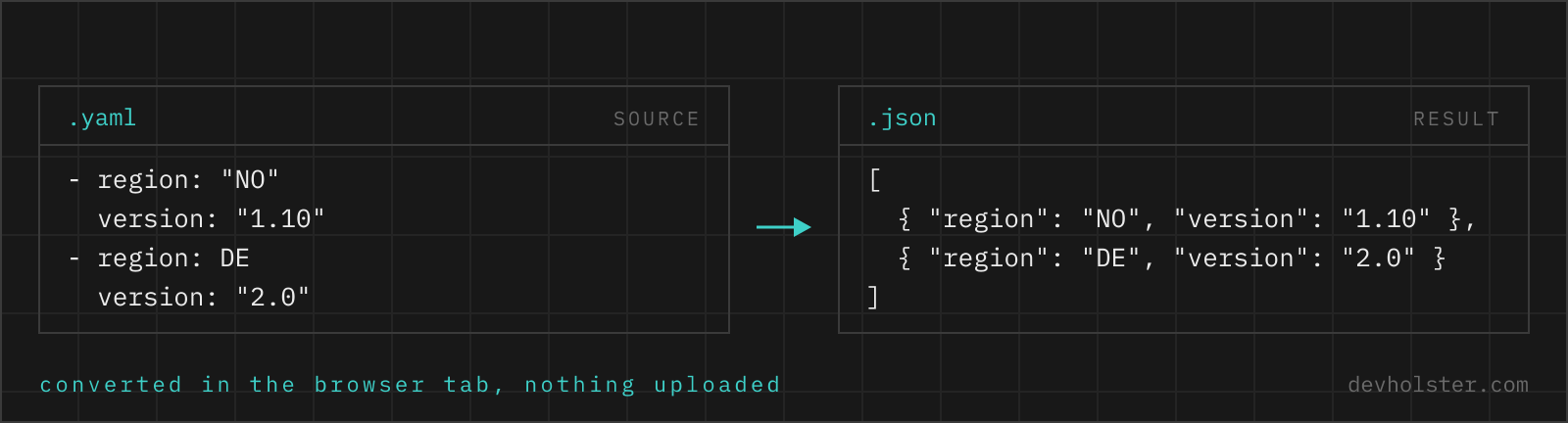
The version: 1.10 row deserves a second look because it is the mistake that survives conversion: the trailing zero is gone before the converter ever sees a string, since the YAML parser already read the scalar as a float. If a value must stay text, it must be quoted in the YAML source. No converter in either direction can restore information the parser never had.
What JSON cannot keep
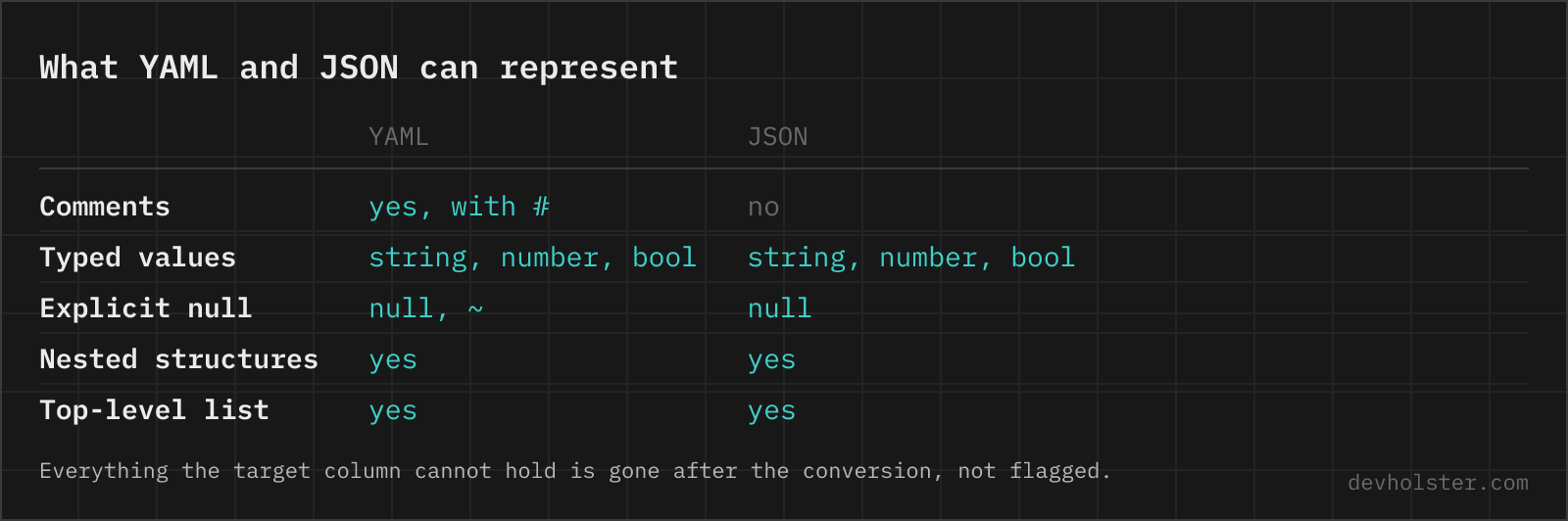
JSON is the smaller language, so a few YAML features have nowhere to go:
- Comments. Dropped entirely. If the YAML file is the documented source of truth, keep it; generate JSON from it rather than replacing it.
- Anchors and aliases. Resolved and expanded, see below.
- Quoting styles and block scalars. A folded scalar, a literal block and a double-quoted string that spell the same text all become one identical JSON string.
- Custom tags. A value tagged
!!binaryor with an application-specific tag loses the tag; the underlying scalar or collection is what comes through. - Key order is kept, uniqueness enforced. Key order survives conversion, but a mapping with duplicate keys is rejected with an error, because silently keeping one of the two values is how config bugs are born.
Multi-document files become an array
A single YAML file may hold any number of documents separated by ---, and Kubernetes turned that feature into everyday practice: a Deployment, a Service and an Ingress routinely travel in one manifest file. JSON has no equivalent concept, so this converter makes the obvious call, one JSON array with one element per document. A file with a single document converts to that document directly, no wrapper.
Most online converters stop at the first --- or error out on multi-document input, which in practice means "does not work with Kubernetes manifests". Handling them automatically is one of the reasons this tool exists.
Anchors, aliases and merge keys are resolved
Anchors are YAML's way of writing a value once and reusing it. The classic example is a database config where &defaults marks a base mapping and <<: *defaults merges it into each environment (the sample button loads exactly this file). The converter resolves all of it: each alias is replaced with the anchored value, each merge key folds the referenced mapping into its parent, and the JSON shows the complete effective config for every environment.
That expansion is usually the most useful thing about the conversion, because it answers the question "what does this environment actually get?" without mentally following references. The trade-off is size: a value used five times exists five times in the output. If two expanded environments differ where they should not, the bug is in the YAML overrides, and the JSON just made it visible.
The YAML errors you will actually hit
YAML syntax errors cluster around a handful of causes, and the parser messages are not always helpful, so here is the translation table we wish we had earlier:
- Tab characters in indentation. Forbidden by the spec. The fix is always the same: convert tabs to spaces.
- Inconsistent indentation. A key indented three spaces under a sibling indented two starts a new (unexpected) nesting level. Pick one width and stay with it.
- Missing space after the colon.
port:8080is one scalar string, not a key and a value. YAML needsport: 8080. - Unquoted special characters. A value beginning with
{,[,*,&,#or@collides with syntax. Quote the value. - A lone colon inside a value.
time: 12:30parses (as a string in 1.2), buturl: http://x.dev: 8080confuses the parser into seeing a nested mapping. Quote URLs.
The error pane of this tool reports the first problem with its line number. Fix it, and the next problem (if any) appears; YAML parsers stop at the first hard error, so cleanup is sequential by nature.
YAML to JSON questions
Is it safe to paste production YAML configs into an online converter?
Only into one that converts in your browser. YAML configs routinely carry database URLs, API tokens, registry credentials and internal hostnames, and a server-side converter keeps a copy of all of it. Parsing happens here as JavaScript inside your tab, nothing is uploaded or logged, and the page works offline. With any other tool, check the Network tab in devtools before pasting, and treat a config that triggered a request as a set of credentials due for rotation.
How do I convert a YAML file to JSON?
On the command line, yq is the standard answer: yq -o=json eval . config.yaml, or yq . config.yaml in the Python implementation. In Python it is two calls, json.dump(yaml.safe_load(open("config.yaml")), out), where safe_load rather than load is the part that matters, because load can instantiate arbitrary objects from a crafted file. Node.js: JSON.parse(JSON.stringify(YAML.parse(text))) with the yaml package, or js-yaml. A browser converter is the better fit when the YAML is in your clipboard rather than in a file, for example a manifest someone pasted into a ticket. The conversion itself is lossless for data and lossy for comments in every one of them.
Does converting YAML to JSON lose information?
The data survives completely; the annotations do not. Comments have no JSON representation and are dropped. Anchors and aliases are resolved, so shared nodes are duplicated in the output. Custom tags and the distinction between quoting styles disappear as well. If you need the file back later, keep the YAML as the source of truth and treat the JSON as a build artifact.
Why does "no" stay a string but true becomes a boolean?
This converter follows YAML 1.2 core schema rules: only true and false (plus their case variants) are booleans, and yes, no, on and off are ordinary strings. Older YAML 1.1 parsers treat all eight words as booleans, which is where the Norway problem comes from. If your file was written for a 1.1-era tool and relies on yes meaning true, check those values after converting.
What happens to YAML dates and timestamps in JSON?
They come through as strings, since JSON has no date type. A value like 2024-01-05 stays the text "2024-01-05". That is usually what APIs expect anyway; parse it into a real date in the consuming code, not in the transport format.
How are YAML anchors and aliases converted?
They are expanded. An anchor defines a node once, aliases reference it, and merge keys (<<) fold a referenced mapping into the current one. JSON has none of these, so the converter resolves every reference and writes the full value at each place it was used. The output can therefore be larger than the input, which is expected.
Can I convert a Kubernetes manifest with multiple documents?
Yes, and this is one of the reasons to use this converter: a file with several --- separated documents, the normal shape for Kubernetes manifests, converts into a JSON array with one element per document. A single-document file converts to that document directly, without the array wrapper.
Why does my YAML file fail with "could not determine a constructor for the tag"?
The document uses a tag that your parser has no mapping for, such as !Ref or !GetAtt in a CloudFormation template, !vault in an Ansible file, or a language-specific tag like !!python/object. Those tags are private extensions: the tool that owns the format understands them, a generic YAML parser does not. For CloudFormation, use the AWS tooling or cfn-lint rather than a plain parser, or replace the short form !Ref X with the long form Ref: X, which is ordinary YAML. For Python, yaml.safe_load refuses unknown tags by design, and switching to yaml.load to make the error go away is how a config file turns into remote code execution.
Why do I get an error about tabs?
YAML forbids tab characters in indentation; only spaces carry structure. The error usually appears after editing a YAML file in an editor configured for tabs. Convert the offending tabs to spaces (every editor has a command for it) and the document parses. This is by far the most common YAML syntax error we see.
What does a "duplicate key" warning mean?
The same key appears twice in one mapping, like port: defined at line 3 and again at line 12. The YAML spec says keys must be unique; parsers differ between erroring and silently keeping the last value, which makes duplicates dangerous in configs. Fix the duplicate in the source rather than trusting whichever value happens to win.
Is JSON faster to parse than YAML?
Substantially, and it is not close. JSON grammar fits on a postcard and parsers are heavily optimised C in every runtime; YAML is a large spec with context-dependent rules, and its parsers are easily ten times slower on big files. That is one reason tooling pipelines convert YAML to JSON once and cache the result instead of re-parsing YAML on every run.
Is every YAML file convertible to JSON?
Almost every real-world one. The exceptions are exotic: mappings with non-string keys (JSON keys must be strings, so numbers and composites get stringified), custom local tags carrying semantics JSON cannot express, and recursive alias structures that would need infinite output. CI configs, Kubernetes manifests, OpenAPI specs and docker-compose files all convert cleanly.