What uglifying JavaScript actually does
To uglify JavaScript is to rewrite it into the smallest source text that behaves identically: whitespace and comments deleted, expressions rewritten into shorter forms, unreachable code removed, and, the signature move, every name the outside world cannot see mangled down to one or two letters. The verb comes from UglifyJS, the tool that made the transformation a standard build step, and it describes the result honestly. The output is miserable to read and exactly as correct as the input.
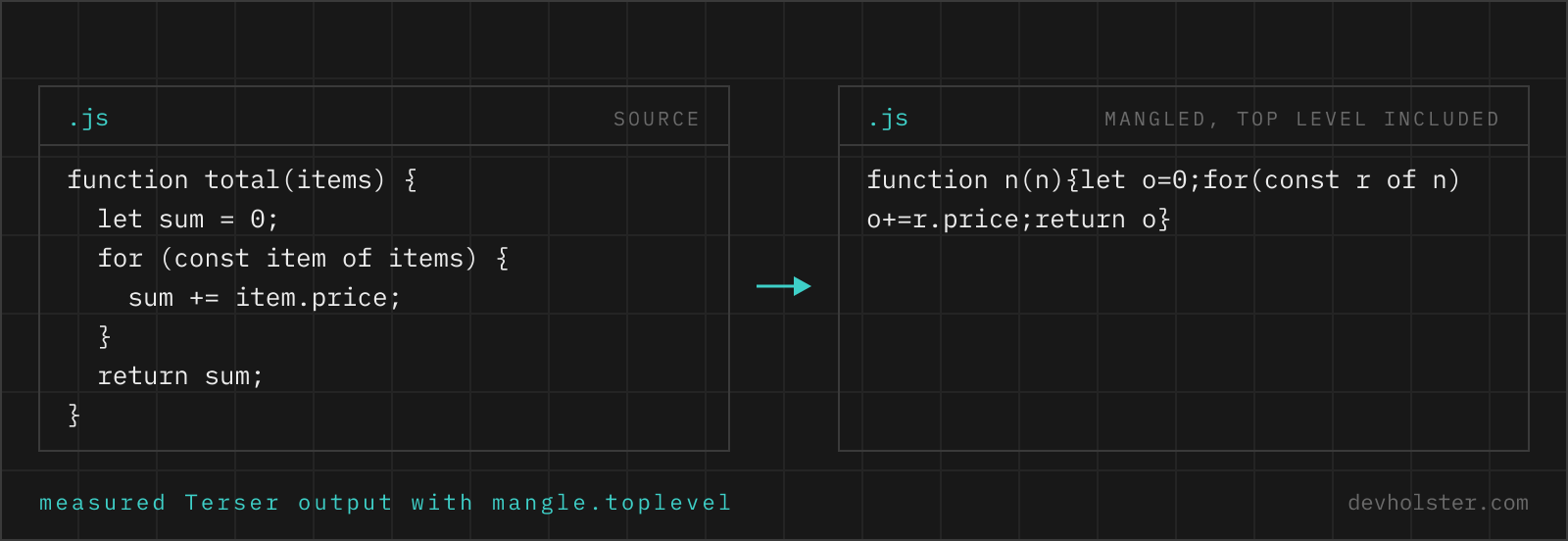
A concrete example, uglified with the settings this page uses:
| Code | |
|---|---|
| Before | function applyDiscount(subtotal, discountRate) { const discount = subtotal > 100 ? subtotal * discountRate : 0; return subtotal - discount; } |
| After | function n(n,r){return n-(n>100?n*r:0)} |
Note what happened beyond the whitespace: the local discount variable was inlined out of existence, the parameters became n and r, and because uglify mode mangles the top level too, even the function name itself shrank. 141 characters became 39. Multiply that across a real file and you get the 50 to 70 percent reductions that make the step worth automating.
How to uglify JavaScript with this tool
Paste your code into the left pane, or drop a .js file onto it, and the uglified result appears on the right as you type. There is nothing to run and nothing to upload; the engine is Terser, compiled into this page, working entirely inside your browser tab. The strip under the panes shows the original, uglified and gzipped sizes, so you can see what a visitor would actually download.
The toolbar gives you one mode switch and three flags:
uglify / minify mode
Uglify mode enables Terser's toplevel mangling: names at the outermost scope of the file get shortened too, instead of being treated as untouchable. Minify mode is the conservative sibling that keeps top-level names reachable; the JS Minifier page is the same tool with that mode preselected. If your script is loaded standalone and nothing else calls into it, uglify mode gives the smaller file.
--mangle
Controls name shortening as a whole. Turning it off keeps every identifier readable while still removing whitespace, comments and dead code, useful when you want output you can diff against the original.
--drop-console
Removes console.* calls, on by default. Switch it off when a log line is deliberate, for example a version banner your support team asks users about.
--keep-license
Preserves comments starting with /*!. MIT, BSD and Apache licences require the copyright notice to stay with the code, so turn this on whenever the file contains third-party work.
Uglify vs. minify: one switch, two philosophies
Both modes on this page run the same engine with the same compressor. The difference is a single question: may the tool touch the top level of your file?
A minifier has to be paranoid about top-level names. When a file declares function initMap() {…}, the tool cannot know whether some other script, or an onclick attribute in the HTML, calls initMap. So by default it renames only what is provably private, everything inside function bodies, and leaves every top-level name exactly as written.
Uglify mode drops that caution and treats the file as self-contained: top-level functions and variables get mangled like any others. How much that buys depends entirely on the file's shape. A single big IIFE gains almost nothing, because everything already lives inside a function body; a module with dozens of small top-level helpers, each name repeated at every call site, gains several percent on top of the minify result. Bundlers make the same assumption safely, since a module's scope really is private, which is why bundled production code is always uglified in this sense.
One deliberate deviation from Terser's full toplevel option: in a build pipeline it also deletes unused top-level declarations as dead code. This page mangles but never deletes at the top level, because a function pasted into an online tool has no visible callers and would otherwise disappear without a word. What you paste stays in the output, just shorter.
The rule of thumb: standalone script that nothing external calls into, uglify. Script that exposes globals to inline handlers or other scripts, minify, or assign your entry points to window explicitly and uglify anyway.
UglifyJS, Terser, and why everyone still says "uglify"
UglifyJS, written by Mihai Bazon, became the default JavaScript compressor of the Grunt and Gulp era; by the mid-2010s nearly every build pipeline ended in it, and the project name quietly turned into a verb. Then the language moved. UglifyJS parses ES5 only, and the ES2015 wave of arrow functions, classes and template literals produced the parse error an entire generation of developers remembers from their bundler logs.
The attempt to fix this in a branch called uglify-es stalled, and in 2018 it was forked and renamed Terser. Terser kept the architecture and the option names, added support for each new syntax year, and took over the ecosystem: webpack 5 ships terser-webpack-plugin as its default, Rollup and Vite reach for Terser or the Go-based esbuild, and Next.js uses SWC, a Rust implementation of the same idea.
So today "uglify" names the operation and Terser does the work, which is also the arrangement on this page. If you search for an uglifier and land on a tool running actual UglifyJS, check that your code is ES5 before pasting, or it will not parse.
What uglified code looks like, and how to read it
Uglified output has a recognisable dialect. Everything sits on one line. true and false become !0 and !1, because two characters beat four. if/else chains collapse into nested ternaries, undefined becomes void 0, and sequences of statements get joined with commas so the compressor can drop braces. Names run through the alphabet: n, t, e, r, then two-letter pairs once single letters run out.
None of this is obfuscation for its own sake; each pattern is just the shortest legal spelling of the same behaviour. That matters when you need to read such code, usually while debugging a stack trace that points into a vendor file. Pretty-print it (devtools does this with one click) and the structure comes back immediately, even though the names stay short. With a little practice you learn to follow the shapes: a (0,n.t)(…) call is a bundler preserving a this-free import call, and a long comma chain is just a statement list wearing a trench coat.
Uglified code is not protected code
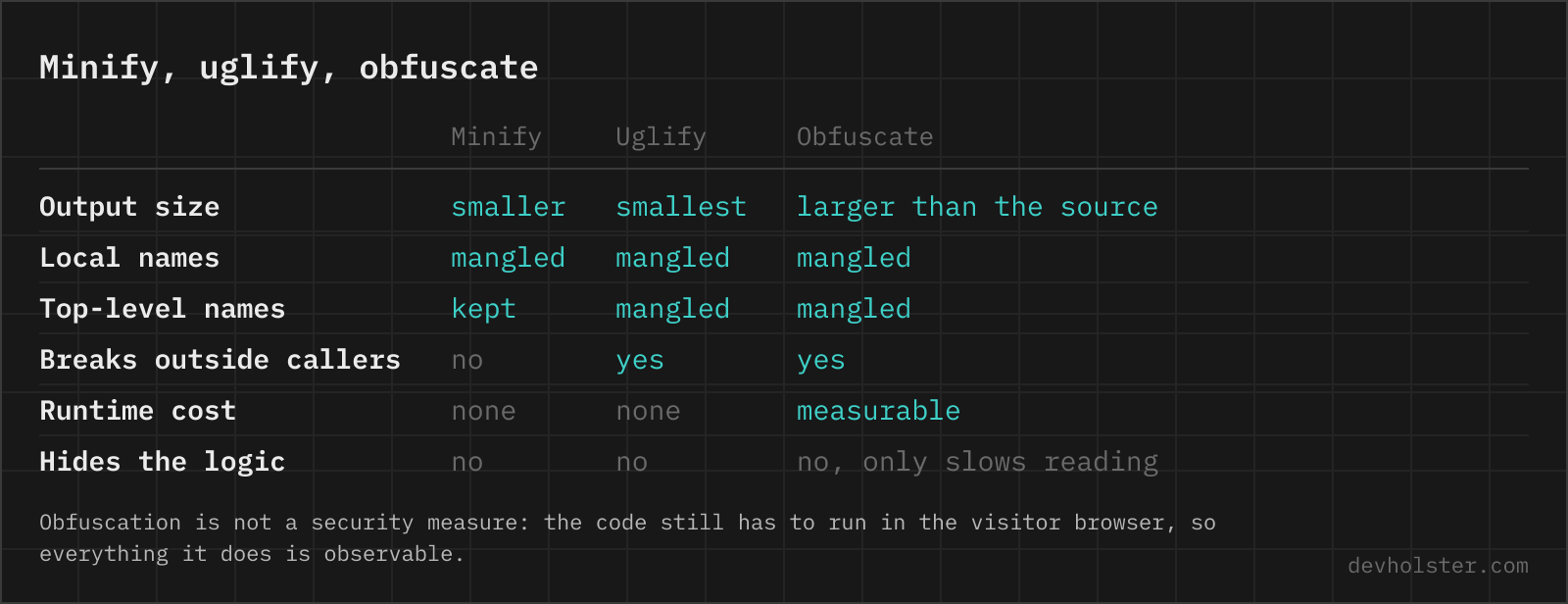
The name invites the misunderstanding, so it is worth being blunt: uglifying hides nothing. The browser receives the full program, and anyone can pretty-print it, set breakpoints, watch every value flow and rename variables in their head or with a tool. Single-letter names cost a reader minutes, not days. If the goal is to show code to someone without giving away what it is about, that is a different tool. The JavaScript anonymizer keeps the formatting, replaces your names with numbered placeholders and holds the key to put them back.
This question comes up often enough that the answer deserves to be blunt: treat everything you ship to a browser as published. API keys, pricing logic, licence checks and anything else you would not paste into a public repo belongs behind a server endpoint. Dedicated obfuscators exist for the rare case where slowing a reader down has real value, think anti-cheat or DRM-adjacent code, but they trade file size, speed and debuggability for a delay, not a wall. For everyone else, uglify for the size win and assume the code is readable, because it is.
When uglifying breaks code
The engine itself is conservative and battle-tested; when uglified code misbehaves, it is nearly always one of these patterns, and the first one accounts for most of the reports:
- Renamed globals. Top-level mangling renames
function init(), and theonclick="init()"in your HTML, or a neighbouring script, now calls a name that no longer exists. Fix: expose entry points explicitly withwindow.init = init(property names are never mangled), or use minify mode for files that share globals. - Dead code dropped by build pipelines. Full
toplevelin a bundler also deletes top-level functions nothing in the file references, so a function only inline handlers call can vanish entirely. This page never deletes at the top level, but your build step will. - Name introspection. Code reading
fn.nameorconstructor.name, common in logging and registry patterns, sees mangled letters. - eval and Function constructors. A string passed to
evalthat references surrounding variables breaks once those variables are renamed. Terser detects directevaland backs off locally, but indirect uses slip through. - Concatenation fragments. A file designed to share top-level variables with files concatenated after it must not be uglified alone. Uglify the concatenated result instead.
The cheap insurance: after uglifying, open the page and exercise the paths that touch the file you changed. Every failure on this list surfaces as a loud ReferenceError or TypeError within seconds.
Un-uglifying and debugging uglified files
Reversing the transformation splits into two honest halves. Formatting is fully recoverable: any beautifier, Prettier, or the devtools pretty-print button turns the single line back into indented, braced, readable structure. Names and comments are not recoverable by any tool, because mangling erases them rather than encoding them; calculateTotal and t contain the same program but not the same information.
For your own code the answer is source maps. Generate them in your build, upload them to your error tracker (Sentry and friends all support this), and production stack traces resolve back to original files, lines and names without the map ever being public. For third-party code you are inspecting, beautify and rely on the structure; for anything beyond casual reading, several AI-assisted renamers now make a decent first pass at guessing meaningful names from context, though the result is a reconstruction, not the source.
And if you are staring at an uglified file you own without a map: the original is in your version control. The uglified copy is a build artifact, never the thing you edit.
Uglify questions
What does it mean to uglify JavaScript?
Uglifying JavaScript means rewriting it into the smallest equivalent source: whitespace and comments removed, variable and function names mangled down to single letters, dead code deleted. The name comes from UglifyJS, the tool that made this transformation standard practice around 2012, and it stuck because the output looks ugly to humans while behaving identically for the machine. Functionally it is minification; in everyday usage "uglify" tends to emphasise the name-mangling part.
Is uglifying the same as minifying?
Almost. Both terms describe the same size-reducing rewrite, and most people use them interchangeably. Where a distinction exists, "minify" is the umbrella term for making code smaller, while "uglify" implies the mangling step that turns calculateTotal into t. In this tool the two modes differ in exactly one switch: uglify mode also renames top-level functions and variables (Terser's toplevel mangling), while minify mode leaves top-level names untouched so other scripts can still reach them.
Is UglifyJS deprecated? Should I use Terser instead?
UglifyJS still receives maintenance, but it only understands ES5 syntax: feed it an arrow function or a class and it stops with a parse error. The uglify-es branch that was meant to handle modern syntax was abandoned in 2018, and Terser was forked from it. Terser is what webpack 5, Vite and Rollup use today, so for any code written this decade the practical answer is Terser, which is also the engine running on this page.
Can I uglify ES6 and newer JavaScript online?
Yes, this tool handles anything current browsers parse: modules, classes, arrow functions, async/await, optional chaining, nullish coalescing, private class fields, top-level await. That works because it runs Terser rather than the original UglifyJS, which is limited to ES5. Note that uglifying keeps the syntax level of the input; it does not transpile for older browsers.
Can uglified JavaScript be reversed or un-uglified?
Only partially. A beautifier can restore indentation and line breaks, which makes the control flow readable again, and browser devtools do this with the {} "pretty print" button. What no tool can restore are the original names and comments, because mangling deletes that information rather than encoding it. The one real path back is a source map generated at build time, which maps every position in the uglified file to the original source.
Does uglifying JavaScript protect my source code?
No. Uglified code is still plain JavaScript that anyone can open, reformat and step through in devtools. Single-letter names slow a human reader down, and that is the entire extent of the protection. If a competitor wants your algorithm, an afternoon with a debugger gets them there. Logic and secrets that genuinely must stay private belong on a server behind an API, not in any bundle you ship to browsers.
Why does my build fail with "Unexpected token" when uglifying?
Because the plugin in your pipeline wraps the old UglifyJS, which cannot parse ES6+ syntax. The error typically points at the first arrow function, class or template literal in the bundle. The fix is to swap the plugin for a Terser-based one: terser-webpack-plugin (the default since webpack 5), gulp-terser, or rollup-plugin-terser. The alternative, transpiling everything to ES5 first, works but ships larger and slower code to browsers that no longer need it.
Does uglified code load or run faster?
It loads faster and starts faster; it does not execute faster. Shorter names and stripped whitespace shrink the file, so download, parse and compile all finish sooner, which is visible in metrics like Largest Contentful Paint on script-heavy pages. Once the engine has compiled the code, identifier length is irrelevant: a mangled function runs at exactly the speed of the original.
Is it safe to paste proprietary code into an online uglifier?
In most of them, no: they POST your source to a server that can log and retain it, which is exactly what an NDA or a client contract forbids. Here the Terser engine is bundled into the page and runs inside your browser tab, so nothing is transmitted, logged or stored, and the page works with the network off. The test that settles it for any tool: open the Network tab in devtools and watch what leaves the page while you use it.
What does the --toplevel option in Terser and UglifyJS do?
It extends mangling and dead code elimination to the top level of the file. Without it, a function declared at the outermost scope keeps its name, because the tool must assume some other script on the page calls it. With full toplevel, those names get mangled and unused top-level declarations are deleted outright. The uglify mode on this page enables the mangling half only; the deleting half is left off on purpose, because a standalone function pasted into an online tool has no callers yet and would silently vanish as "unused".
Why did my page break after uglifying a script?
The most common cause with uglify mode is a renamed global: if your HTML has onclick="init()" or a second script calls a function your file defines, top-level mangling renames the definition and the caller now hits a ReferenceError. Either assign shared entry points explicitly, as in window.init = init, since property names are not mangled, or switch to minify mode, which leaves top-level names alone. The rarer causes are code reading fn.name or relying on eval, which break under any mangler.
Should I uglify or obfuscate my JavaScript?
Uglify, unless you have a specific threat model that demands more. Uglifying shrinks the file and loses nothing. Obfuscation, meaning control-flow flattening, string encryption and self-defending wrappers, makes files two to five times bigger, measurably slower, and occasionally triggers antivirus heuristics, in exchange for delaying a determined reader by hours rather than stopping them. For ordinary applications the size cost is real and the protection mostly is not.