Your browser can already talk. Every operating system ships voices, the Web Speech API hands them to a page, and most of them sound like a satnav. This page starts with those, because they cost nothing and speak fifty languages, and keeps Kokoro on the GPU for the moment the text deserves a real voice.
Paste, pick a voice, press play
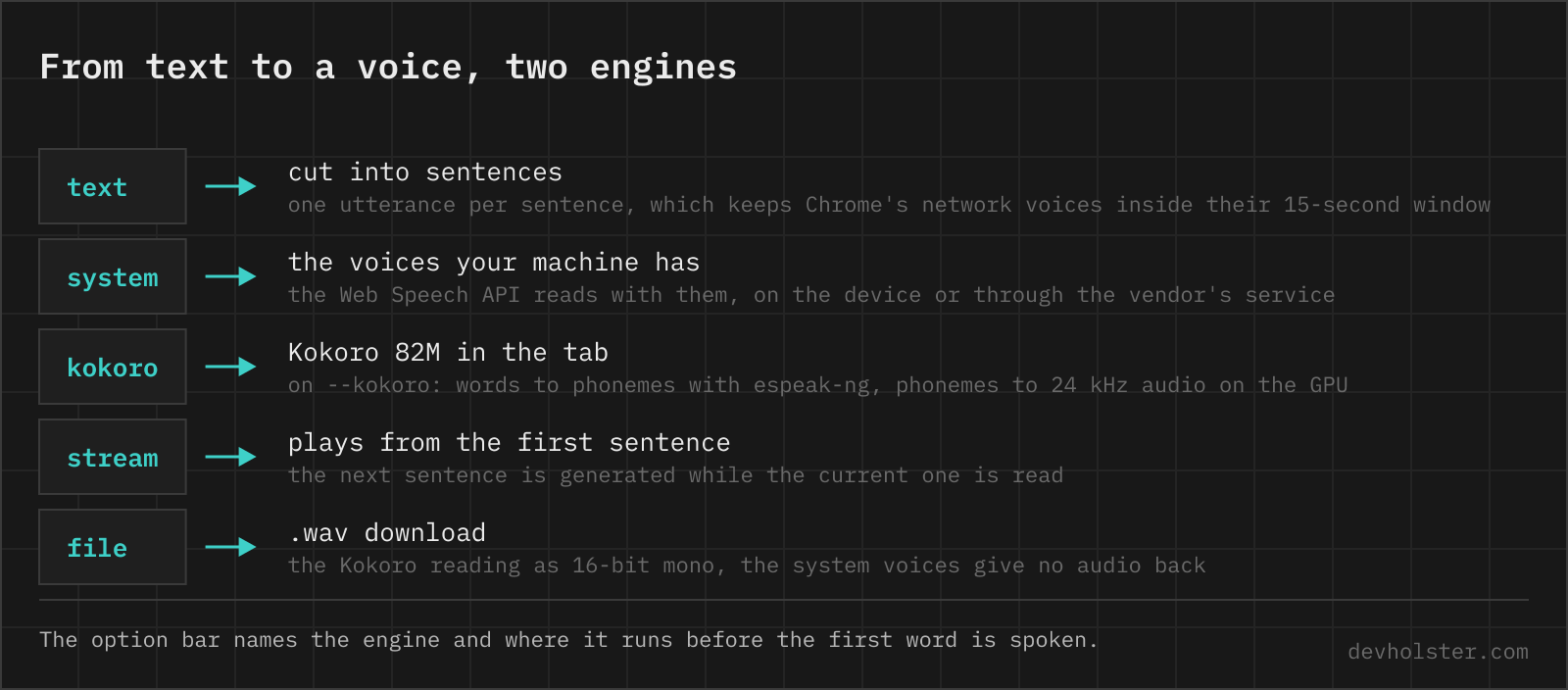
Type or drop the text, choose a voice from the list, press play. The text is read sentence by sentence, the status line shows which one, and the bar under the button fills as it goes. Press again to stop. With Kokoro a pause button appears in the header of the block, system voices cannot pause reliably in any browser.
- The voice list is your machine's. It is grouped by language, your own language first, and inside a group the voices that speak on the device come before the ones marked
network. What is in it depends on the operating system and the browser, not on us. --rateis the reading speed as a multiple, 0.7× to 2×. Both engines take it, and 1.15× is what most people settle on for articles.--kokoroswaps the system voice for Kokoro in the tab. One download, then it reads English at podcast quality and hands the audio back as a.wav. The setting is remembered.
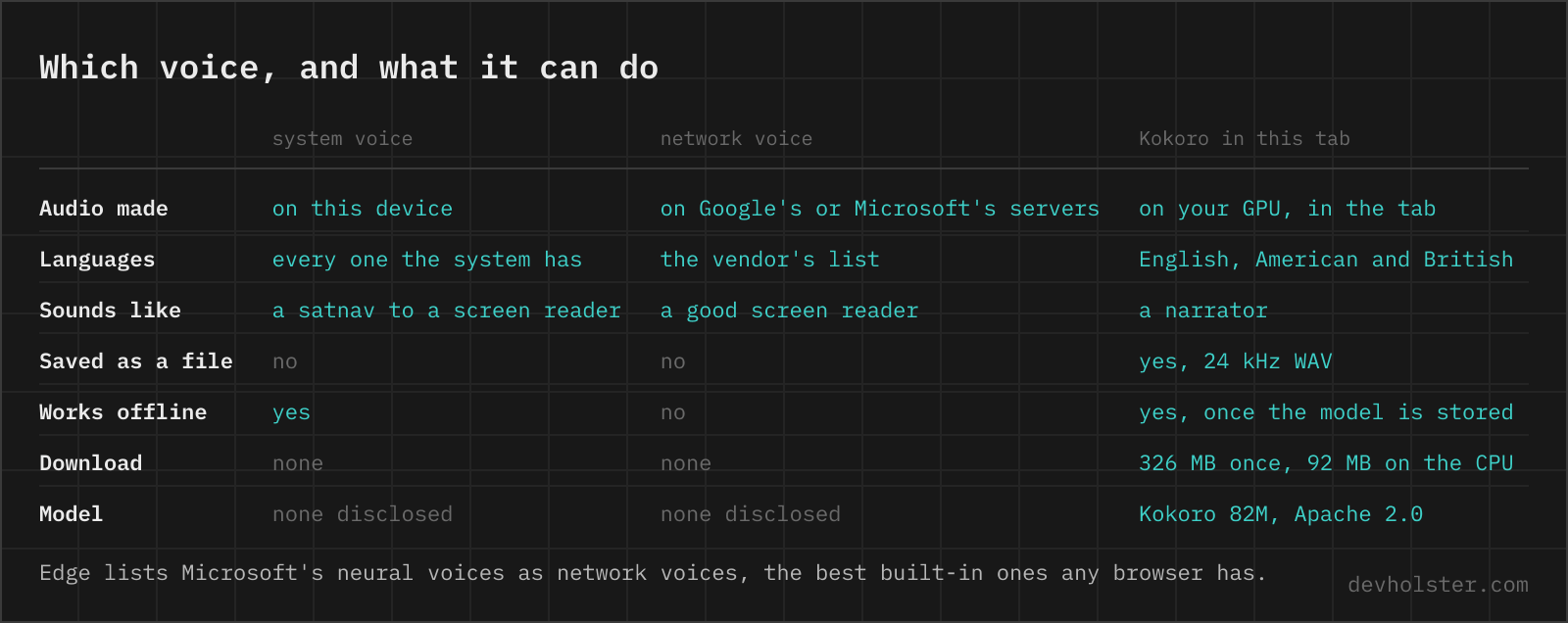
The chip at the right end of the option bar names the engine and where it runs. A system voice runs on this device. A network voice is synthesised by Google's or Microsoft's service, and the text goes there.
Where the voice comes from
The Web Speech API has two halves, and this is the other one. Recognition, the page next door, needs a model the browser rarely ships. Synthesis needs only what the operating system already has for its screen reader, so every browser on every desktop and phone lists something. What it lists is the whole difference.
Safari exposes the macOS and iOS voices, including the enhanced and premium ones once they are downloaded in System Settings under Spoken Content, and not the Siri voices, which Apple keeps to itself. Chrome on a Mac or on Windows adds its own Google voices to the system list, marked network here because the audio is synthesised on Google's servers and streamed back. Edge does the same with Microsoft's neural voices, which are the best built-in voices any browser offers. Firefox lists the system voices and nothing else. Chrome on Linux lists nothing unless speech-dispatcher is installed, and Chrome on Android uses Google's on-device text to speech.
The reading is chunked into sentences on purpose. Chrome's network voices go silent after roughly 15 seconds of a single utterance and never report that they stopped, a bug that has been open for years. One utterance per sentence keeps every voice inside that window.
const u = new SpeechSynthesisUtterance(article);
u.voice = voice;
speechSynthesis.speak(u);
for (const sentence of split(article)) {
  const u = new SpeechSynthesisUtterance(sentence);
  u.voice = voice;
  utterances.push(u); // Chrome drops unreferenced ones
  speechSynthesis.speak(u);
} 
Kokoro, when it should sound like a podcast
Kokoro is an open text to speech model with 82 million parameters, released under Apache 2.0 by hexgrad on Hugging Face, and it is the natural voice on this page. It is built on StyleTTS 2, produces 24 kHz audio, and at that size it runs on a laptop GPU inside a browser tab at several times real time. Its voices are not the compact system voices with a better waveform. They breathe, pause at commas, and stress the right word, and the two voices graded A by the authors, Heart and Bella, are what people mean when they say a machine sounds like a podcast host.
Switch on --kokoro and the play button becomes a download button. On a browser with WebGPU the full-precision model is fetched, 326 MB, and stored in the browser for the next visit. Without WebGPU the 8-bit model runs on the CPU, 92 MB and a few seconds per sentence. The first sentence after a download is slower, the GPU compiles its shaders on first use.
Kokoro does not read letters. The text is first rewritten into words the way a narrator would say it, so that 3:15 becomes three fifteen, $12.50 twelve dollars and fifty cents and Dr. Doctor, then espeak-ng turns the words into phonemes, and the model turns phonemes into sound. espeak-ng is free software under the GPL, the page loads it as a file of its own, and the open source page says where its code lives. That middle step is the reason this page's Kokoro speaks English only. The espeak-ng build that fits in a tab ships the English rules and no others, and German, French or Japanese text put through it comes out as an English speaker sounding out foreign words. For those languages the system voices stay in charge.
The SPEED stat shows how much faster than real time your machine generates. On an Apple GPU we measured 0:12 of speech in 3.0 s, about 4×, so a ten-minute reading is ready in two and a half minutes, and playback starts after the first sentence anyway. Press play a second time with the same text, voice and rate and nothing is generated, the stored audio plays again.
Saving the audio as a file
Only with Kokoro. The system voices play through the operating system, and the Web Speech API gives a page no audio stream to record, so there is no file to offer for them. Kokoro's audio exists as samples in the tab, and the .wav button writes them out as 24 kHz, 16-bit mono, about 2.9 MB per minute of speech. It opens in every player and editor without conversion.
The file is the whole last reading, in the voice and at the rate it was generated with. Change either and press play again for a new one.
What it will not do
No word highlighting in the text, the status line names the sentence instead. No SSML, browsers do not honour it and Kokoro does not know it. No voice cloning, no emotion control. No Kokoro for anything but English, see above. And where a system voice mangles a name or a product term, the only fix is to spell it the way it sounds.
Questions about reading text aloud
Why does speechSynthesis stop after 15 seconds in Chrome?
A long-standing Chrome bug with its network voices (the ones named Google …): one utterance longer than roughly 15 seconds falls silent and the end event never fires. Two fixes are known. Split the text into utterances of a sentence each and queue them, which is what this page does, or call speechSynthesis.pause() followed by resume() every ten seconds while speaking. The local voices of the operating system are not affected.
Why does speechSynthesis.getVoices() return an empty array?
In Chrome the list arrives asynchronously. The first call returns nothing and the voiceschanged event fires once the voices are in, so call getVoices() again from that handler. Safari and Firefox fill the list on the first call. If it stays empty after that, the system has no voices, which is the normal state of Chrome on Linux without speech-dispatcher.
Why does text to speech in the browser only start after a click?
Autoplay policy. Speech counts as audio, so speak() needs a user gesture on the page first. Called from a timer or on page load, Chrome fires the utterance's error event with error "not-allowed", and Safari drops the call without a word.
Can I download the audio from the Web Speech API?
No. speechSynthesis exposes no audio stream, so there is nothing to record. Kokoro in the tab or a server API gives you a file.
Which browser has the best built-in text to speech voices?
Edge, by a distance, because it lists Microsoft's neural online voices (the ones marked Natural) next to the system ones. Safari on a Mac comes second once the enhanced or premium voices are downloaded in System Settings, Accessibility, Spoken Content, which makes them available to every page. Chrome's own Google voices are the network ones, a step above the compact system voices and a step below Edge. Kokoro in the tab beats all three on English narration.
How do I read text aloud in Python?
pip install pyttsx3 uses the system voices offline, with engine.say("text") and engine.runAndWait(). For podcast quality, pip install kokoro soundfile, then from kokoro import KPipeline, pipeline = KPipeline(lang_code="a"), and for each chunk in pipeline("text", voice="af_heart") write the audio at 24000 Hz with soundfile. The first run downloads the 330 MB of weights from Hugging Face.
How do I convert text to speech from the command line?
macOS ships say: say -v Samantha -o out.aiff "Hello", and say -v "?" lists the voices. Linux has espeak-ng, robotic but scriptable, or piper for neural voices. On Windows, PowerShell needs Add-Type -AssemblyName System.Speech first, then $s = New-Object System.Speech.Synthesis.SpeechSynthesizer, $s.SetOutputToWaveFile("out.wav") and $s.Speak("text").
Is Kokoro free for commercial use?
Yes. Weights, ONNX export and kokoro-js are all Apache 2.0. Only espeak-ng, the phonemizer, is GPL 3 and needs a source notice.
What languages does Kokoro support?
American and British English in every build. The Python package adds Japanese, Mandarin, Spanish, French, Hindi, Italian and Brazilian Portuguese through misaki, its own grapheme-to-phoneme layer. The browser build phonemizes with espeak-ng in WebAssembly, which only ships English, so on this page Kokoro reads English and every other language goes to the system voices. German is not in Kokoro at all, in any build.
How does Kokoro compare with ElevenLabs?
On plain narration in English they are closer than the size difference suggests. Kokoro has 82 million parameters and runs on a laptop GPU, ElevenLabs runs in the cloud and is priced per character. What ElevenLabs has and Kokoro does not: voice cloning, 30 or so languages, emotion and style control, and a streaming API. What Kokoro has: no account, no per-character bill, and the text never leaves the machine. For an audiobook of your own writing Kokoro is enough. For a product voice in five languages it is not.
How do I add pauses to text to speech?
Punctuation. A comma is a short pause, a full stop a longer one, and a blank line adds about 400 ms on top, with both engines on this page. SSML break tags are not honoured by any browser's speechSynthesis, Chrome reads them out as text, and Kokoro does not know them either.
Why does the voice read numbers, times and abbreviations wrong?
A system voice reads "3:15" as it likes and "Dr." as dee-arr on a bad day. Kokoro takes phonemes, so this page rewrites times, prices, years and titles into words before they reach it, the same rules kokoro-js uses. Write out what matters ("twelve fifty") and the guessing stops.
How much does a text to speech API cost per million characters?
About $4 for the standard voices at Google Cloud and Amazon Polly, $16 for the neural tier, and $30 to $160 for their newest generative or studio voices, all per million characters. An average novel is around 500,000 characters, so the neural tier reads it for $8. Kokoro reads it for the electricity.