Why convert CSV to YAML at all
The data that ends up as YAML usually starts somewhere flatter: a spreadsheet a product owner maintains, a database export, the CSV attachment from the last migration ticket. When that data needs to become test fixtures, an Ansible inventory, seed data for a CMS or the services: block of some config, the format at the destination is YAML and someone has to get the rows there without retyping them.
Hand-porting a table into YAML is the kind of work where errors hide: one wrong indent, one unquoted no, one boolean that stays a string, and the consuming tool fails somewhere far from the actual mistake. A converter does the mechanical part deterministically; your job shrinks to wrapping the list under the right key and reviewing the diff.
How to use this converter
- Paste or drop your CSV. The delimiter is detected automatically, comma, semicolon, tab or pipe, so a German-locale Excel export works unchanged. The first row is read as headers.
- Check the ROWS number under the tool against what you expect; a mismatch usually means broken quoting in the source.
- Copy or download the
.yaml, then wrap it under a top-level key if your consumer wants one.
--nested
On by default: dotted headers rebuild structure, an image.repo column becomes image: with repo: under it. This is the exact inverse of the flatten our YAML to CSV converter does, so a round trip reproduces the original shape.
--keep-strings
Switches all typing off: every cell stays a string, quoted where YAML needs it. Use it when the data is identifiers that only look numeric, phone numbers, versions, article codes.
--indent-4
Four spaces instead of two, for codebases whose YAML style says so.
The YAML shape you get
Each CSV row becomes one mapping in a sequence, keys in header order:
| CSV | YAML |
|---|---|
service,replicascheckout,3 | - service: checkout replicas: 3 |
| empty cell | key: null, or key: "" with --keep-strings |
| missing header cell | named column_3 by position |
| cell with line break | quoted scalar with \n escape |
Key order is preserved exactly as the headers had it, because a reviewer comparing the YAML against the sheet reads left to right. Nothing is sorted behind your back.
Typing: what becomes a number, what stays text
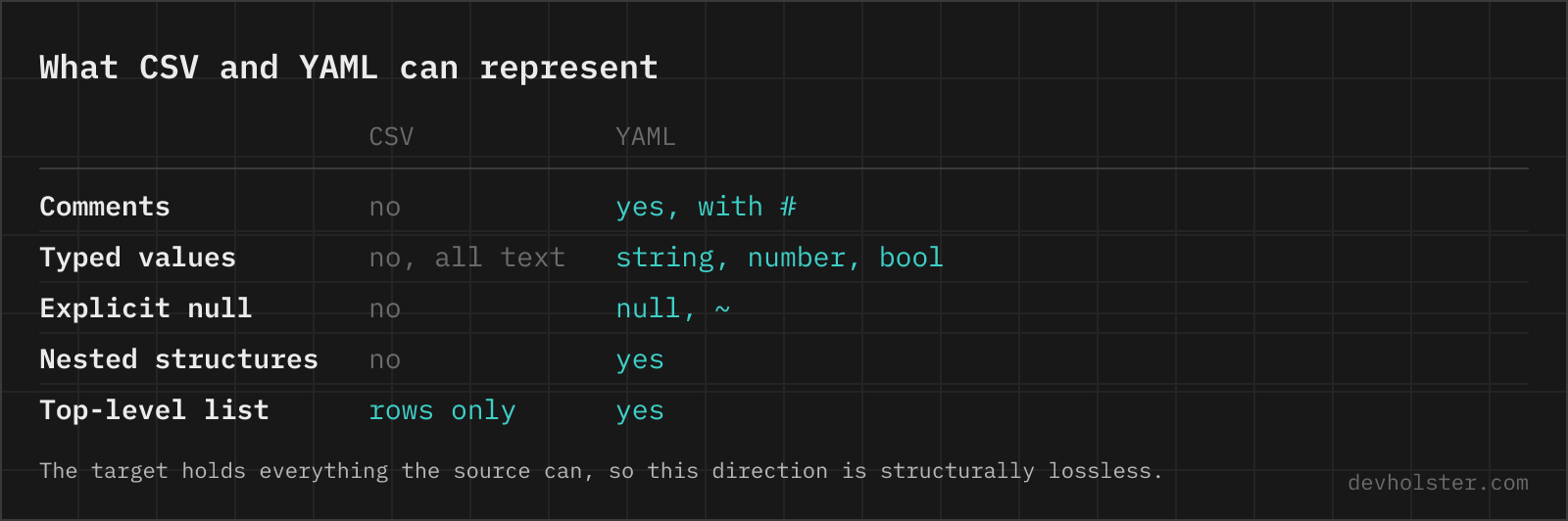
CSV has one type, text. YAML has scalars with real types, and the whole value of this conversion direction is getting that typing right. The rule here is lossless casting: a cell becomes a number or boolean only when converting it back to text reproduces the cell character for character. 3 becomes the number 3; 007 stays "007" because the number 7 cannot restore the zeros; 79.250 stays a string because it would come back as 79.25; a 17-digit ID stays a string because it exceeds what a float holds exactly. true and false become booleans, empty cells become null.
That default is deliberately conservative, and --keep-strings makes it absolute. What no converter can know is intent: whether 1.10 in your sheet was a version string or a price. When it matters, check the handful of ambiguous columns in the output pane; they are the ones wearing quotes.
Quoting and the Norway problem
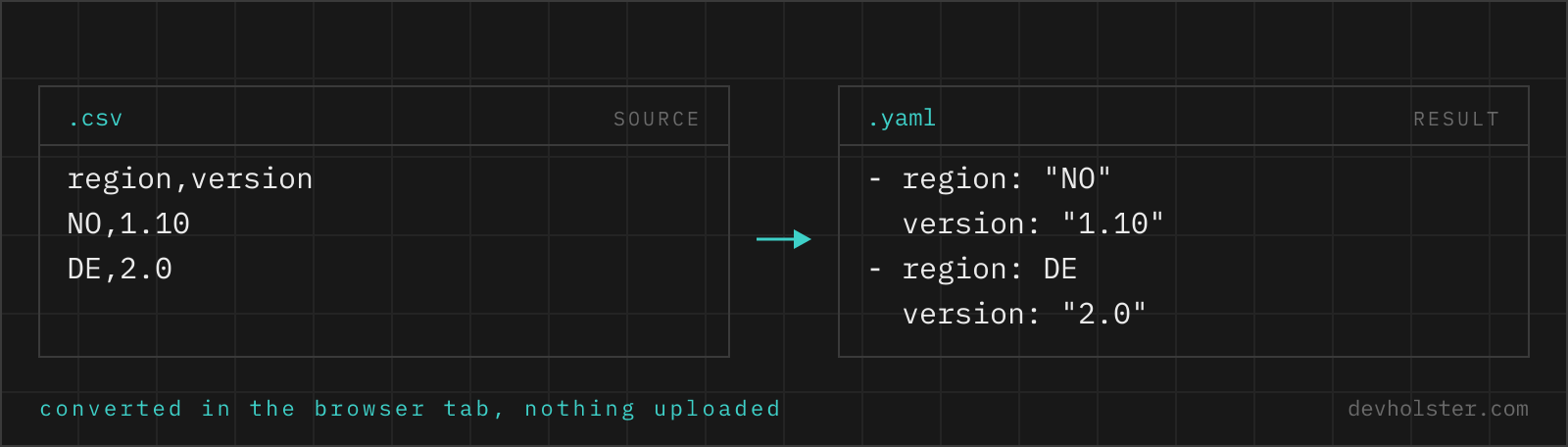
Some strings cannot be written into YAML bare, because a YAML parser would read them as something else. no reads as false in every YAML 1.1 parser, which is most of them; that is the Norway problem, named after the country code that vanished from a config. 1.10 would come back as the number 1.1, 2024-05-14 as a timestamp, 0x1A as 26. The output therefore quotes every string whose bare form is ambiguous under YAML 1.1 or 1.2, and leaves the rest plain for readability.
So when the output shows country: "NO" next to an unquoted city: Oslo, both are correct: the quotes appear exactly where they carry meaning. A file that quotes nothing is the one to distrust.
Nested mappings from dotted headers
Flat tables often encode structure in their column names: image.repo, image.tag, resources.limits.cpu. With --nested on, those dots rebuild the tree, so one row with the headers above becomes a record holding an image: mapping and a resources: mapping with limits: inside. Columns without dots are unaffected, and the convention matches what pandas.json_normalize and our own CSV-to-JSON tool produce, so sheets that came out of a flattening step round-trip cleanly.
The corner case worth knowing: if both image and image.repo exist as headers, the flat value loses and the mapping wins, because a key cannot be a scalar and a mapping at once. Rename one of the columns before converting.
Online tool vs. scripting it
Recurring conversions belong in a script: yq -p=csv -o=yaml in CI, or the Python route when casting rules need to be custom. Scripts scale to big files and never get bored.
For the one-off, the browser is faster than either: delimiter detection instead of a flag, lossless typing instead of a surprise, quoting decided by parser rules instead of hope, and the result visible while you fix the source. The conversion runs entirely in this tab, so a sheet with internal hostnames or customer emails in it stays on your machine.
YAML output questions
How do I convert CSV to YAML in Python?
csv.DictReader plus yaml.safe_dump, four lines: yaml.safe_dump(list(csv.DictReader(open("data.csv"))), open("out.yaml", "w"), sort_keys=False, allow_unicode=True). Two caveats: DictReader leaves every value a string, so numbers and booleans arrive quoted unless you cast them yourself, and safe_dump defaults to sorting keys alphabetically and escaping non-ASCII, hence the two extra arguments. For a single file, a browser converter that does the casting for you is quicker than getting those details right.
How do I convert CSV to YAML on the command line?
With the Go yq (v4.24+): yq -p=csv -o=yaml data.csv reads the CSV, header row included, and prints a YAML sequence of mappings. It auto-types numbers and booleans, which is usually what you want and occasionally what breaks article numbers with leading zeros. The Python yq ecosystem route is csvjson data.csv | yq -y . (csvkit plus the jq-wrapper yq), useful when you are already in that toolchain, otherwise the single Go binary is less setup.
How do I create Ansible inventory or test fixtures from a spreadsheet?
Keep the spreadsheet as the source of truth and generate the YAML from it, rather than hand-porting once and letting the two drift. Export the sheet as CSV, convert to a YAML list, then wrap it under the top-level key the consumer expects: hosts under a group for an Ansible inventory, the model name for Rails or Django-style fixtures. The wrap is a one-minute edit in the output pane. For a recurring pipeline, script the same steps with yq or Python in CI so regenerating is one command.
Should config data live in CSV or YAML?
Records that machines consume in bulk belong in CSV or a database; configuration that humans read, diff and comment belongs in YAML. The practical tiebreakers: if you need comments, hierarchy or per-entry structure, CSV cannot hold them; if you need ten thousand rows, YAML tooling gets slow and diffs get useless. A common middle path is maintaining reference data in a sheet (where non-developers can edit it) and generating the YAML consumed by the application, which is exactly the conversion this page does.
Why did my zip codes lose their leading zeros after converting?
Because something typed them as numbers: 01067 as a number is 1067, and the zero cannot come back. The damage happens wherever text that looks numeric is cast without checking, in Excel on opening the CSV, or in a converter that types by regex. This tool casts a cell to a number only when the cast is lossless, meaning String(Number(cell)) reproduces the cell exactly, so 01067 stays the string "01067" and survives. If the file already shows 1067, the zeros were gone before the conversion.
Can a YAML file hold tabular data efficiently?
It holds tables fine and efficiently is relative: a YAML sequence of mappings repeats every key name on every record, so a 10-column, 5000-row table that is 400 KB as CSV lands around 1 MB as YAML, and parsing loads it all into memory. Up to a few thousand records that is irrelevant and the readability wins. Beyond that, keep the data in CSV and convert the slice you need, or question why row data is in a config format at all.
How do I add a top-level key above the converted list?
Indent the list two spaces and put the key on the first line; a bare sequence becomes the value of that key. Most consumers want this form: users: with the records under it rather than a top-level list, because it leaves room for siblings like version: 2 later. Doing it in an editor is a select-all, indent, type-one-line operation. The reason converters output the bare list is that they cannot know your key name, not that the wrapped form is wrong.
Why does my converted YAML fail to parse in the consuming tool?
The three usual causes, in order of frequency: a tab character snuck into the indentation (YAML forbids tabs, and error messages point at the line after the tab), the list ended up at the wrong level after a manual wrap-under-a-key edit, or a value that needed quotes lost them in later hand-editing, at which point no becomes false and 08:00 stops being a string. Paste the failing file into a YAML validator and fix the first reported line; downstream errors are usually cascades of the first one.