Why convert JSON to YAML at all
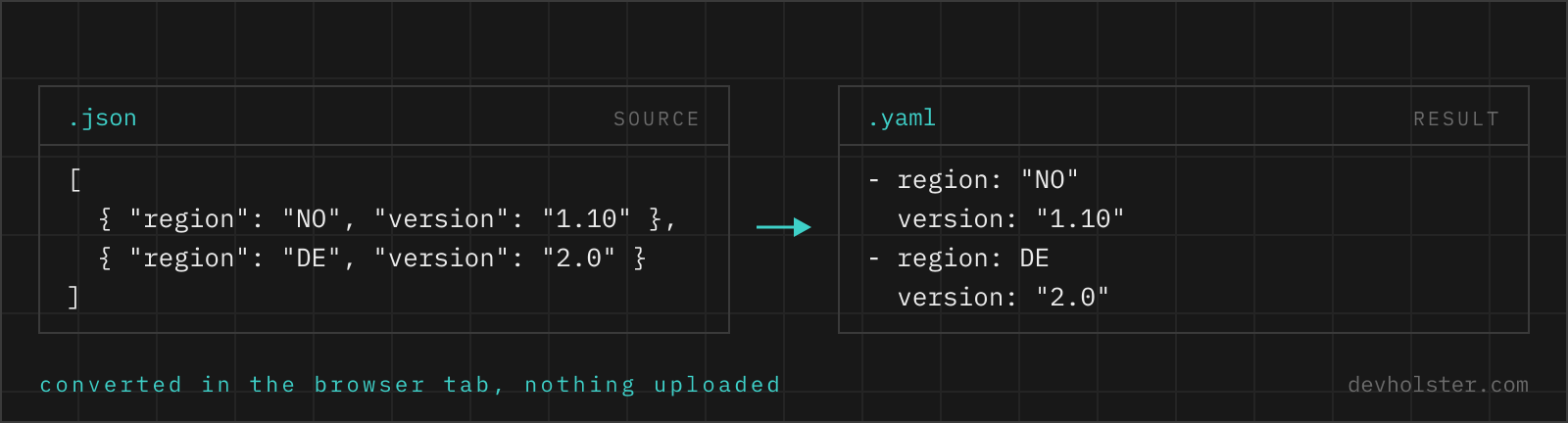
JSON is what machines exchange; YAML is what humans are asked to maintain. The tools that took over infrastructure in the last decade, Kubernetes, docker-compose, GitHub Actions, GitLab CI, Ansible, OpenAPI, all standardised on YAML for their config files, mostly because it supports comments and reads without brace-counting. So the conversion usually happens at a very specific moment: you have JSON in hand (an API response, an exported config, a generated OpenAPI spec) and the tool in front of you wants YAML.
The other common reason is plain readability. A 300-line JSON config is a wall of braces, quotes and commas. The same data as YAML is roughly a third shorter in characters and scans top to bottom like an outline. For a file that people review in pull requests, that difference is worth the one-time conversion.
How JSON constructs map to YAML
The two formats share one data model, so the mapping is mechanical. What changes is the notation:
| JSON | YAML (block style) |
|---|---|
{"name": "api"} | name: api |
{"env": {"tier": "prod"}} | env: tier: prod |
["a", "b"] | - a- b |
true, false, null | true, false, null |
3.14, 42 | 3.14, 42 |
"line1\nline2" | |- line1 line2 |
"yes" (string) | "yes" (kept quoted) |
{}, [] | {}, [] (flow style) |
Empty objects and arrays stay in flow style because block style has no way to write them. Everything else comes out in block notation, which is what people mean when they say a file "looks like YAML".
JSON is already valid YAML, so why convert?
YAML 1.2 is a strict superset of JSON: you can feed {"a": [1, 2]} to any compliant YAML parser and get the expected mapping. That fact is occasionally useful, for example when a tool wants a .yaml file and you are in a hurry, renaming the JSON file works.
It also explains what conversion actually is: a change of style, not of data. The converter parses your JSON into plain data and re-serialises it in block notation. Nothing is interpreted, inferred or restructured along the way, which is why the conversion is round-trip safe. Convert to YAML, convert back to JSON, and you hold an equivalent document.
Quoting, types and the Norway problem
The one genuinely tricky part of writing YAML is that unquoted scalars are typed by their spelling. The word no is a boolean to a YAML 1.1 parser, 3.14 is a float, 2024-01-05 is a date in some implementations, and 08 was an octal-looking trap in old parsers. The famous casualty is the country-code list [DE, NO, SE] that loads as [DE, false, SE], known as the Norway problem.
This converter deals with that for you. A JSON string keeps being a string: if its content would parse as something else unquoted, it gets quotes. "yes" stays "yes", the version string "1.10" stays "1.10" instead of collapsing into the float 1.1, and a string starting with * or & is quoted so it cannot be mistaken for an alias or anchor. Numbers and booleans that were real numbers and booleans in the JSON stay bare.
Where you have to stay alert is later, when the file is edited by hand. Someone adding country: NO to your converted file reintroduces the problem, and no converter can prevent that. Keep quotes on anything that is data rather than config vocabulary, and let a YAML linter run in CI.
Pitfalls to check after converting
- Tabs. YAML forbids tabs in indentation. This tool never emits them, but if you paste converted YAML into an editor configured for tab indentation and keep typing, the next save can produce a file that no parser accepts.
- Duplicate keys. JSON tolerates duplicate keys in practice (the last one wins in most parsers), and JavaScript objects cannot even represent them. If your source had duplicates, they are already collapsed before conversion starts.
- Long lines. The converter does not fold long strings; a 500-character URL stays on one line. That is deliberate, because folding changes how some parsers whitespace-normalise the value.
- Schema, not syntax. Valid YAML is not the same as a valid Kubernetes manifest or CI workflow. Field names, allowed values and required sections are the consuming tool's business; run its own validation after converting.
- Comments do not appear from nowhere. JSON has no comments, so the converted YAML has none either. If the point of moving to YAML was documentation, the comments still have to be written.
When to keep JSON
Not every file benefits from conversion. JSON is the better format when a machine is the only reader: API payloads, lockfiles, cache files, anything generated and consumed without a human in between. It parses faster, every language ships a parser in the standard library, and its lack of implicit typing means fewer surprises.
JSON is also the safer interchange format precisely because it is dumb. A YAML document can contain anchors, merge keys and tagged values that behave differently across parser versions; a JSON document cannot. Humans maintain YAML, machines exchange JSON, and this page is for the moments data crosses from the second world into the first.
The converter and its three flags
Paste JSON into the left pane, or drop a .json file on it, and the YAML appears on the right while you type. Invalid JSON shows the parser error inline in the output pane instead of a result, so you can fix the input without losing your place, and a file with several errors is faster to repair in the JSON validator first. The strip under the panes counts bytes, lines and keys, which is the quickest way to confirm that nothing was dropped on the way.
--sort-keys re-orders every mapping alphabetically. It is off by default, because key order often carries meaning for the human reader (name before metadata before spec). Turn it on when you diff two configs or when the JSON source emits keys in unstable order.
--indent-4 switches from two-space to four-space indentation. Two spaces is the ecosystem default, four is easier on the eyes in deeply nested documents. --quote-strings wraps every string value in double quotes instead of only the ones that need it, a style some teams mandate because it removes a whole class of type surprises when files get edited by hand later.
After the conversion
Is it safe to paste internal config files into an online converter?
Only into a converter that runs in your browser, because config files are exactly where API keys, connection strings and internal hostnames live. An upload-based tool receives all of it, and a secret in someone else's log file has to be rotated, not apologised for. The conversion happens here as JavaScript inside your tab, with no upload and no logging, and the page keeps working offline. For any other tool the check takes ten seconds: open the Network tab in devtools and convert a harmless snippet first.
Is JSON valid YAML?
Yes. YAML 1.2 is a superset of JSON, so every JSON document already parses as YAML. Converting only makes it look like YAML.
Does converting JSON to YAML lose any data?
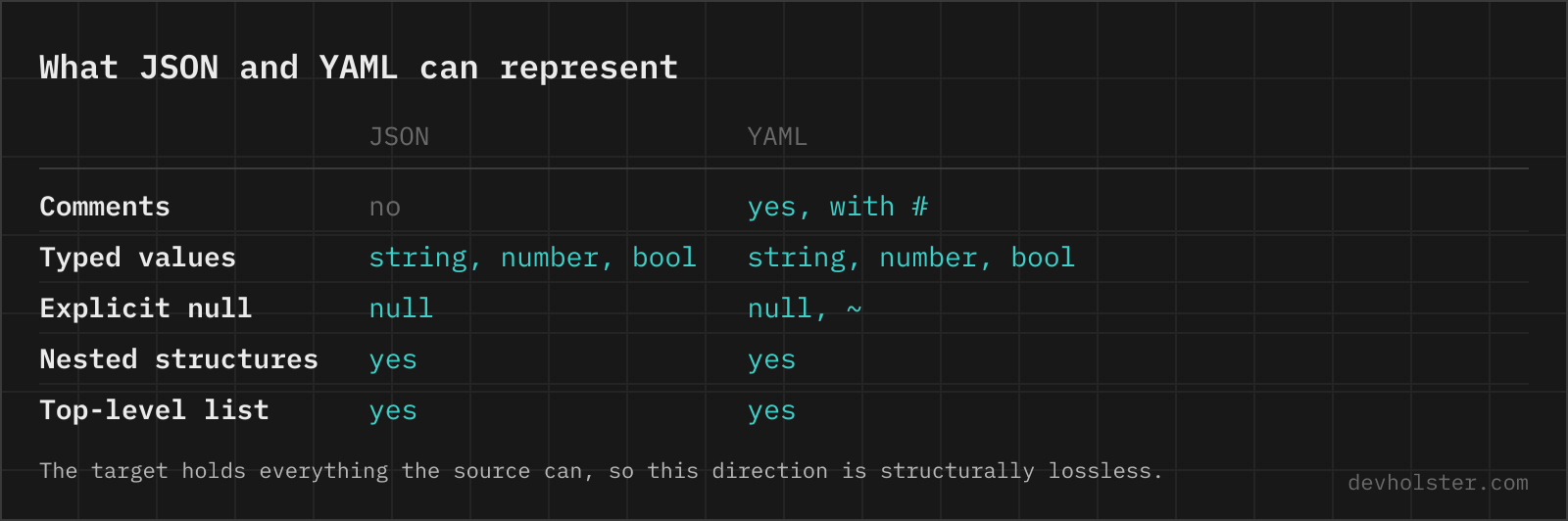
No. JSON and YAML share the same data model for everything JSON can express: mappings, sequences, strings, numbers, booleans and null. Every key and value comes through unchanged, and you can convert the result back to JSON and get an equivalent document. The reverse direction is the lossy one, since YAML comments and anchors have no JSON representation.
How are nested JSON objects converted?
Nesting becomes indentation. A JSON object inside an object turns into a mapping indented one level deeper (two spaces by default, four with the --indent-4 option), and arrays become block sequences with a leading dash per item. There is no depth limit beyond your machine’s memory; deeply nested API responses convert the same way flat ones do.
How do I convert a JSON file to a YAML file?
On the command line, yq -P . data.json writes block-style YAML, and yq -o=yaml eval . data.json does the same in the Go implementation. In Python: yaml.safe_dump(json.load(open("data.json")), sort_keys=False, allow_unicode=True), where sort_keys=False keeps your key order and allow_unicode keeps umlauts and emoji as characters instead of escapes. In Node.js, the yaml package's YAML.stringify(obj) produces the same shape. A browser converter is the quicker route for a snippet you already have in the clipboard, which is most of the time when someone hands you a JSON blob to turn into a manifest.
Why did my long string get wrapped across several lines in the YAML?
Because most YAML writers fold lines at a default width, usually 80 characters. PyYAML does it unless you pass width=float("inf"), and several other libraries behave the same way. For prose that is harmless, since folded lines rejoin with a space when parsed. For a base64 blob, a certificate, a URL or a token it is not: the value survives the round trip through a compliant parser, but anything that reads the file with a regex, a shell script or a naive line-based tool now sees a broken string, and a folded line with trailing whitespace can change the value outright. Set the width to infinity when you write, or use a literal block scalar with | so the line breaks are explicit and preserved.
When do values need quotes in YAML?
Whenever the unquoted text would be read as something other than a string. That covers more than people expect: yes, no, on, off, y and n (booleans in YAML 1.1 parsers), version numbers like 1.10 (a float that loses its trailing zero), 2024-01-05 (a date object), 08 (an invalid octal in older parsers), anything with a leading zero you need to keep, and values starting with *, &, !, %, @ or a backtick, which collide with YAML syntax. A value containing a colon followed by a space, or a hash preceded by a space, needs quotes too, because both start something else. Single quotes are literal apart from doubled quotes; double quotes process backslash escapes. Converted output here is already quoted where it matters, so the trap is what you type afterwards.
Why does my converted YAML fail in Kubernetes or GitHub Actions?
Because the syntax was never the problem, the schema is. A converter produces valid YAML from valid JSON, and both kubectl and Actions then reject it for reasons no converter can see: a field name that does not exist in the API version you declared, a value that has to be a string but arrives as a number (Kubernetes port names and node selectors are the classic ones), a missing apiVersion or kind, or an Actions step that lacks uses and run. Check the result against the real schema, with kubectl apply --dry-run=server, kubeconform for CI, or actionlint for workflows. A YAML linter will not catch any of these, because the document is perfectly well-formed.
Can I convert a package.json or composer.json to YAML?
The content converts fine, but npm only ever reads package.json. ESLint, Prettier and most CI systems do take the YAML form.
Does the order of keys matter in YAML?
Not to the data model, and very much to everything else. A YAML mapping is unordered by spec, so two files with the same keys in a different sequence describe the same configuration, and no parser will complain. In practice every mainstream parser preserves the order it read, and that is what your diffs, your code reviews and your merge conflicts are made of. The trap is on the writing side: PyYAML's safe_dump sorts keys alphabetically unless you pass sort_keys=False, which is how a one-line change turns into a 200-line diff that hides it. Keep the source order when converting, and sort deliberately only when you are comparing two documents.
How do multiline strings come out in YAML?
A JSON string containing \n line breaks is emitted as a block scalar with a | indicator where possible, which is the readable YAML form: each line of the text on its own line, indentation carrying the structure. Strings where a literal block would be ambiguous fall back to a quoted scalar with escaped line breaks. Both parse back to the identical string.