Why convert CSV to TOML at all
TOML files are where modern tools keep both settings and small datasets: the members list of a Hugo site, endpoint definitions next to their options, fixtures in a Rust workspace, benchmark cases for a CLI. When that data currently lives in a spreadsheet, someone has to move rows into [[sections]], and hand-typing them means hand-typing the quoting rules, TOML quotes every string, which is precisely the part people coming from YAML get wrong.
The conversion also serves the config-plus-data pattern: a file that starts with a few scalar settings and then carries a table of records. Generate the record part from the sheet, paste it under the settings, and the file stays consistent because the mechanical part was mechanical.
How to use this converter
- Paste or drop your CSV. Delimiter detection covers comma, semicolon, tab and pipe; the first row is read as headers.
- Name the table. The
tablefield sets the[[name]]each row is written under, so the output drops into its destination without a rename. - Copy or download the
.toml. The ROWS stat should match your sheet; a mismatch points at broken quoting in the source.
--nested
On by default: dotted headers become nested structure, an image.tag column turns into an image table inside each record.
--keep-strings
Off by default. On, every cell stays a quoted string, no numbers, no booleans, and empty cells become "" instead of disappearing. The right mode for identifier-heavy data.
--omit-null
On by default: empty cells are dropped from their record, because TOML has no null to hold them. Off, the converter refuses on the first empty cell and names its path, the strict mode for data where absence must be a decision.
Rows as arrays of tables
| CSV | TOML |
|---|---|
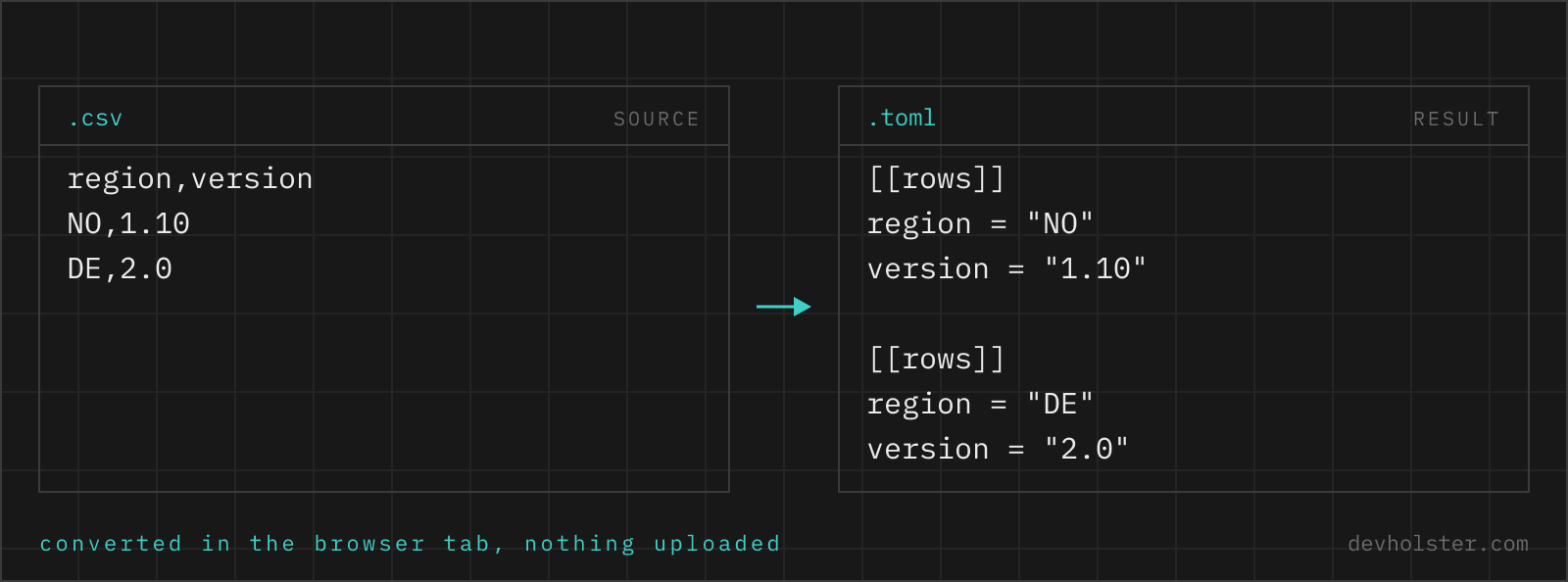
name,ipalpha,10.0.0.1 | [[rows]]name = "alpha"ip = "10.0.0.1" |
| second data row | another [[rows]] section, order kept |
ssl port header | "ssl port" = … quoted key |
image.tag header | nested image table with --nested |
| empty cell | key dropped, or an error with --omit-null off |
The wrapping key exists because a TOML document is a table, not a list; a bare top-level array is not writable. That is also why every command-line route needs the same wrap. Headers that are not bare-key material (spaces, umlauts, a leading digit) come out as quoted keys, which is valid TOML; rename the columns first if the consumer expects bare keys.
Empty cells in a format that refuses null
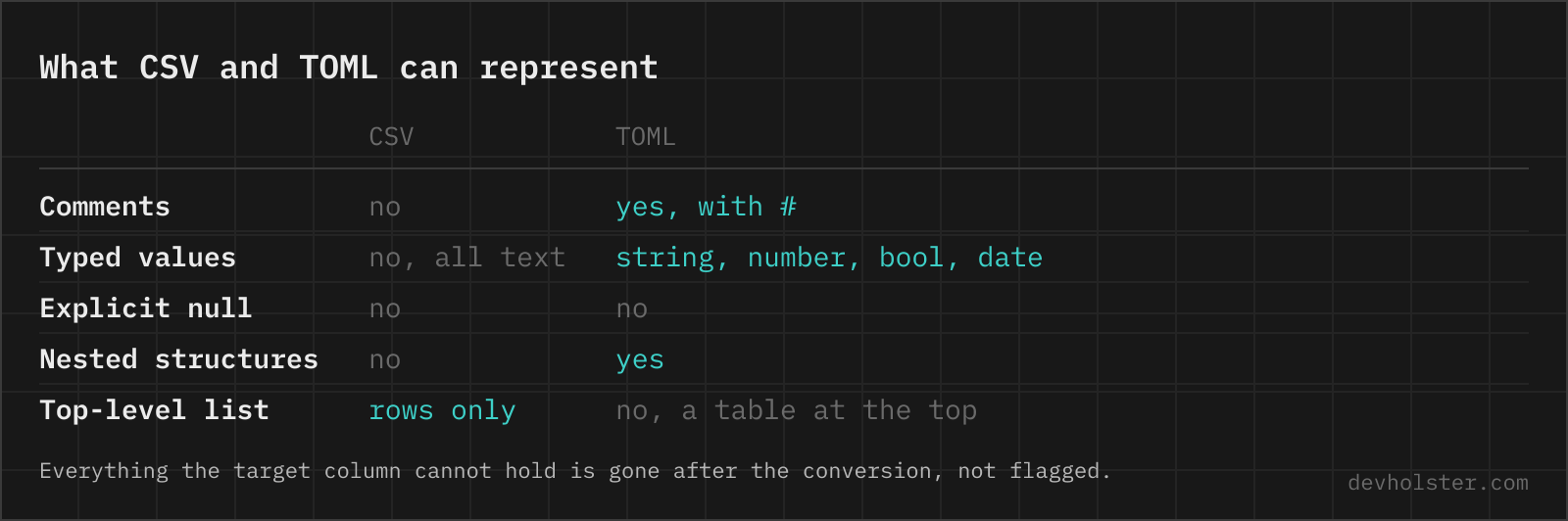
CSV files are full of empty cells; TOML deliberately has no null type, a key exists with a value or does not exist. Something has to give, and this converter gives you the choice explicitly instead of deciding silently. The default drops the key: a record whose note cell is empty simply has no note key, which is idiomatic TOML and reads correctly in every consumer that checks key in record.
The consequence is that records become uneven, some carry seven keys, some five, and that is information: the missing keys are the empty cells. When downstream code indexes fields unconditionally, uneven records break it, and then --keep-strings is the answer: every cell survives as a string, empty ones as "", and all records stay identical in shape. Strict mode (--omit-null off) is the third option, for imports where an empty cell means the source data is broken and the conversion should say so rather than paper over it.
Typing: which cells become numbers and booleans
TOML is typed and quoted strings are visually distinct from numbers, so the typing decision is on display in every line of the output. The default casts a cell only when the cast is lossless, meaning the value converts back to the identical text: 8443 becomes an integer, true a boolean, while 007, 1.10 and 17-digit IDs stay quoted strings because a number cannot reproduce them. This mirrors the behavior of our CSV to JSON converter, and it is deliberately more conservative than the auto-typing in most CLI tools.
What lossless casting cannot know is meaning: a postal code 8443 is textually a clean integer and semantically an identifier. When the data is identifier-heavy, flip --keep-strings on and type nothing; the consuming code can cast the two columns it computes with, which is a smaller risk than un-casting the eight it must not.
One asymmetry against the JSON direction is worth noting: this tool does not guess dates. A cell 2024-05-14 stays the string "2024-05-14", even though TOML has native dates, because in spreadsheet exports date-shaped strings are as often labels as they are dates. Removing the quotes by hand upgrades the ones you mean.
Online tool vs. scripting it
Recurring generation belongs next to the site or repo it feeds: the four-line Python recipe or the yq one-liner in a make target keeps the TOML regenerable from the sheet forever, and CI can diff for drift.
For the one-time seeding and the quick fixture, the browser wins on the details it gets right unattended: delimiter detected, keys quoted exactly where TOML requires it, empty cells handled by policy instead of crash, typing lossless instead of enthusiastic. The rows never leave this tab, which matters exactly as often as the sheet came from somewhere internal.
TOML output questions
How do I convert CSV to TOML in Python?
csv.DictReader for the rows, tomli_w for the output, wrapped under one key because a TOML document must be a table: tomli_w.dump({"rows": list(csv.DictReader(open("data.csv")))}, open("out.toml", "wb")). Note the binary mode on the output file, tomli_w requires it. DictReader keeps every value a string, so numbers arrive quoted; cast the columns you want typed before dumping. tomli_w raises on None, which DictReader produces for short rows, another reason to clean rows first.
How do I convert CSV to TOML on the command line?
The Go yq handles it since v4.44: yq -p=csv -o=toml data.csv, with the caveat that a bare CSV produces a top-level array, which is not valid as a standalone TOML document, so wrap it first: yq -p=csv -o=toml '{"rows": .}' data.csv. It auto-types numbers and booleans on the way. yj has no CSV input, and csvkit stops at JSON, so the yq route is the one-binary answer.
Can Hugo read data files in TOML?
Yes. Hugo's data directory accepts TOML, YAML, JSON and XML equally; a data/members.toml with [[members]] sections is iterated in templates as range .Site.Data.members.members. Whether TOML is the right pick for data files is a different question: for lists of records, YAML and JSON stay more compact, while TOML wins when the same file also carries scalar settings that humans edit. Front matter is a separate mechanism with its own delimiters (+++ for TOML) and takes all three formats too.
Should I store tabular data in TOML or keep it in CSV?
Keep bulk data in CSV and reach for TOML only when the table is small and rides along in a config. TOML repeats every key name in every [[section]], so a 5000-row table becomes megabytes of headers, and no TOML parser streams. The legitimate niche for [[arrays of tables]] is dozens of records that belong next to settings: a static site's team list, a service's endpoint definitions, fixtures for a Rust test. At a few hundred records, question the choice; at thousands, the answer is a database or CSV.
How do I write a list of records in a TOML file by hand?
One [[name]] section per record, fields as key = value lines under each: two records need two [[servers]] blocks. The double bracket appends to an array each time it appears, order is preserved, and the sections do not need to be adjacent, though scattering them is a readability crime. The compact alternative is an inline-table array, servers = [ { name = "alpha" }, { name = "beta" } ], which TOML 1.0 requires to stay on one line, so it only suits short records. Both parse to the identical structure.
Why does my TOML file fail to parse after I added rows by hand?
The three classic self-inflicted wounds: an unquoted string value (TOML has no bare strings, name = alpha is a syntax error, every string needs quotes), a [section] where a [[section]] was meant (the single-bracket form redefines the table and the parser reports a duplicate key), and a trailing comma in an inline table, which TOML 1.0 forbids. Parsers report line numbers precisely, so the fix is usually quick; the quoting rule alone explains most first-contact errors people have when coming from YAML.