Why convert YAML to CSV at all
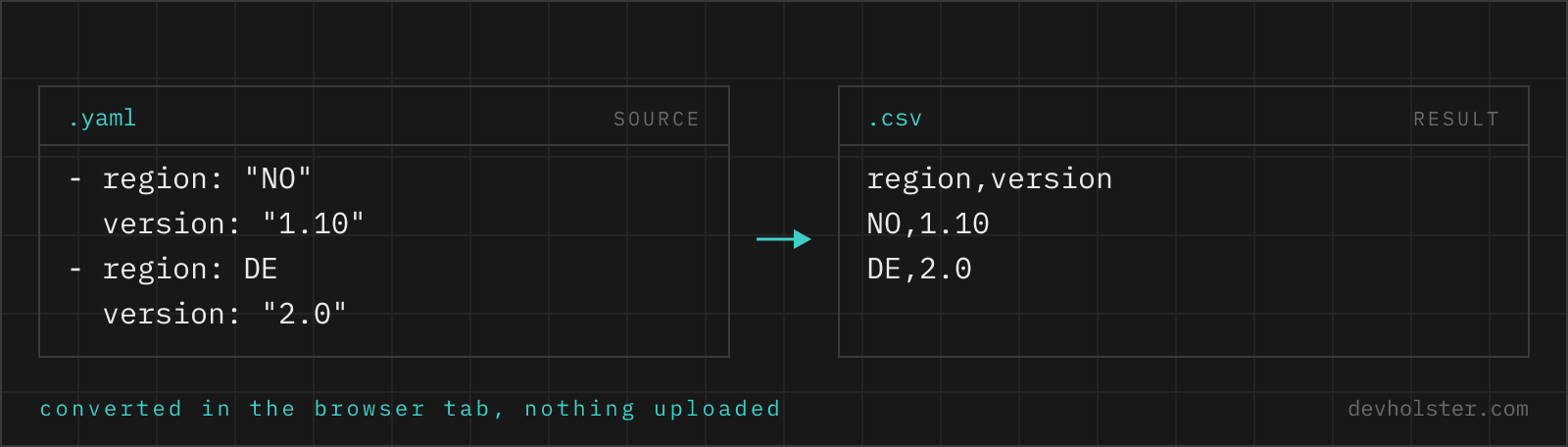
YAML is where structured records accumulate: Ansible inventories, CI job definitions, exported ticket dumps, fixture files, the members: list someone has been hand-maintaining for two years. Sooner or later somebody who lives in Excel needs that data, or it has to go into a database import, a mail-merge, a BI tool. All of those speak CSV and none of them speak YAML.
The conversion is also the honest way to review list-shaped YAML. Forty records with eight fields each are unreadable as an indented tree but trivially scannable as a table, and sorting a column takes one click in a spreadsheet against a rewrite in a text editor. Converting, checking, and throwing the CSV away is a legitimate workflow.
How to use this converter
- Paste or drop your YAML. A
.yamlor.ymlfile dropped on the left pane is read locally; nothing is uploaded. - Check the note under the output. It names the path where the converter found your records,
$.membersfor example. If that is the wrong list, restructure the input or extract the part you meant. - Copy or download. The download carries a UTF-8 BOM so Excel opens umlauts correctly on double-click; the copy button gives you the bare text.
--flatten
On by default: nested mappings become dot-path columns (contact.email), lists become indexed columns (tags.0). Off, nested values are serialized as JSON into a single cell, which keeps the column set stable when records vary a lot.
--header
Writes the column names as the first row. Turn it off when appending to an existing file that already has one.
--semicolon
Switches the delimiter to ;, which is what Excel expects on systems with a German, Austrian or French locale. The quoting is recalculated for the new delimiter, not just swapped in.
Where the rows come from
A CSV needs a list of records, and real YAML files rarely put that list at the top. An inventory keeps it under members:, an exported report under data.items, and above it sit metadata keys like team: and updated:. Most converters fail here in one of two ways: they demand that the document be a bare top-level sequence, or they silently convert the whole tree into one absurd row.
This tool walks the document and uses the largest sequence of mappings it finds, wherever it sits, then tells you which one it picked in a note under the output: Rows taken from the 3 records at $.members. The metadata keys above the list are ignored on purpose, because a team: platform line repeated into every row is noise, not data. If the document contains no sequence at all, the whole mapping becomes a single row rather than an error, which is occasionally exactly what you want for a flat key/value file.
Multi-document streams (--- separators) are parsed completely, and a stream of mapping documents is itself treated as the record list, one document per row.
Nested mappings, lists and the columns they become
| YAML | CSV columns |
|---|---|
name: Ada | name |
contact: with email: under it | contact.email |
tags: [a, b] | tags.0, tags.1 |
anchors and <<: merge keys | resolved into plain values first |
| a key missing from some records | column exists, cell stays empty |
The column set is the union over all records, in first-seen order. Records missing a key get an empty cell, which is why irregular data comes out sparse instead of broken. Anchors, aliases and merge keys are resolved before any of this happens, so two records sharing a <<: *defaults block both show the inherited values in their cells; the sharing is a YAML authoring device and has no CSV equivalent.
The dot-path convention is the same one our JSON to CSV converter uses and the same one pandas.json_normalize produces, so downstream code that splits on dots keeps working no matter which tool made the file.
Booleans, numbers and what needs quoting
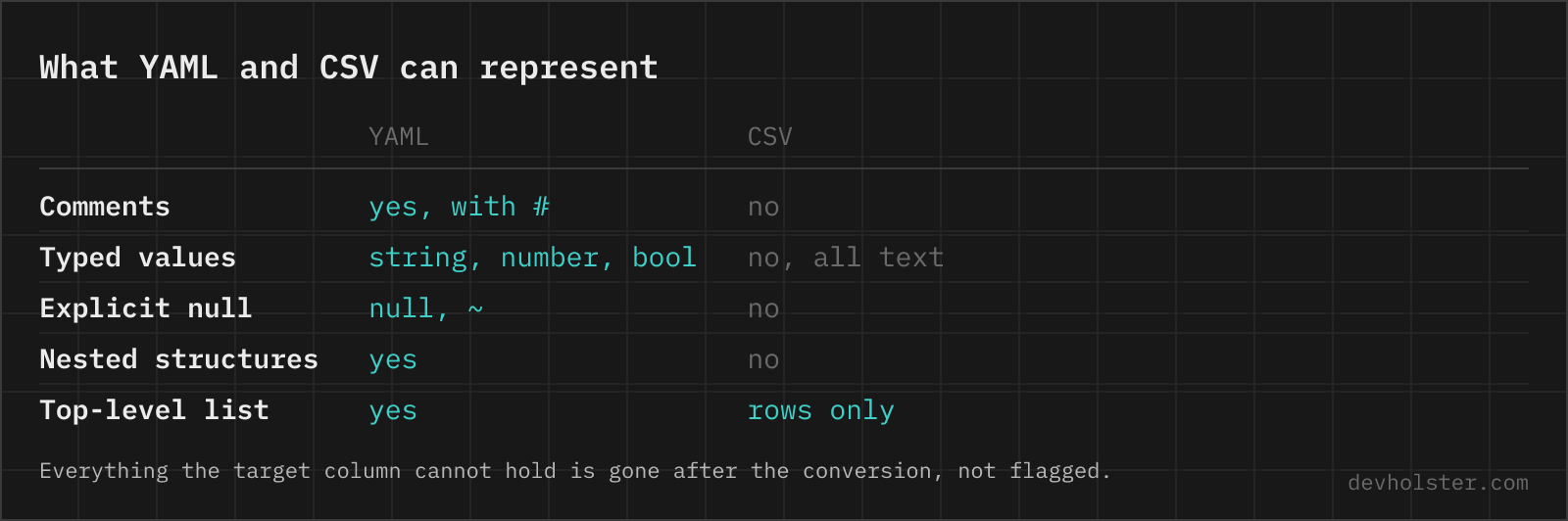
YAML values arrive typed: true is a boolean, 5432 a number, 07:32 famously a sexagesimal number in YAML 1.1 parsers. CSV throws all typing away, everything is text, and the interesting question is what the text looks like. Booleans become true/false, numbers keep their canonical form, empty values and nulls become empty cells.
Quoting follows RFC 4180 and is applied only where needed: a value containing the delimiter, a double quote or a line break gets wrapped, quotes inside are doubled. A name like Hopper, Grace therefore survives as one cell instead of splitting into two columns, and a multi-line YAML block scalar survives as one quoted cell with real line breaks in it. Spreadsheets handle that correctly; naive split-on-comma scripts do not, which is their bug, not the file's.
Opening the result in Excel without damage
Two locale problems hit YAML exports on the way into a spreadsheet. First the delimiter: Excel on a German or Austrian system expects semicolons and shows a comma file as one wide column, hence the --semicolon flag. Second the encoding: double-clicked CSVs without a UTF-8 BOM are read as Windows-1252 and umlauts turn into ä. The download here carries the BOM for exactly that reason.
Data damage is a separate risk that no converter can prevent, because Excel applies it on open: long numeric IDs get rounded past 15 digits, leading zeros vanish, and anything date-shaped is rewritten. If your records carry such values, import via Data → From Text/CSV and mark those columns as text, or convert straight to a typed workbook with our CSV to Excel converter, which keeps them as text on its own.
Online tool vs. yq and Python
For repeated conversions in a pipeline, script it: yq -o=csv '.members' data.yaml covers the flat case, and Python with json_normalize covers the nested one. A script is versionable and runs on files too big to paste.
The browser wins the one-off: no install, no remembering which of the two tools called yq you have, live output while you fix indentation, and the record list found for you instead of a path argument to get right. Everything runs in this tab, so the inventory with real hostnames in it never becomes someone else's server log.
YAML into rows
How do I convert YAML to CSV in Python?
Load the YAML, flatten it into records, and hand it to the csv module or pandas: pd.json_normalize(yaml.safe_load(open("data.yaml"))["items"]).to_csv("out.csv", index=False). json_normalize does the flattening (nested mappings become dot-path columns, the same convention this converter uses), and PyYAML's safe_load is the parser you want, since full load executes arbitrary Python tags. For a one-off file with no environment around, pasting into a browser converter is faster than writing the three lines.
How do I convert YAML to CSV with yq on the command line?
With Mike Farah's Go yq (v4): yq -o=csv '.items' data.yaml writes the array under items as CSV, header included. The array must sit at the path you give it and the records should be flat; nested mappings need a map() step first, which is where the one-liner stops being one line. Note that there are two unrelated tools called yq, and the Python one (kislyuk/yq) has different syntax: yq -r '.items' there pipes through jq filters instead.
Which YAML structures can become a CSV table?
A sequence of mappings with mostly matching keys, which is exactly what inventories, user lists and export dumps look like. Each mapping becomes a row, each key a column. A single top-level mapping produces a one-row CSV, and deeply irregular structures (every record shaped differently) technically convert but produce a sparse table with many empty cells. Config files with one-of-everything nesting are usually the wrong candidates; lists of similar things are the right ones.
How do I open a YAML file in Excel?
You cannot, directly: Excel has no YAML import, neither via double-click nor via Power Query, which reads JSON, XML and CSV but not YAML. The path is to convert the YAML to CSV or XLSX first and open that. Watch the encoding on the way: a plain UTF-8 CSV without a BOM shows umlauts as ä-style garbage when double-clicked, so use a converter that writes the BOM or import via Data → From Text/CSV where you can pick UTF-8 explicitly.
What happens to a YAML list inside a record when converting to CSV?
There is no native CSV answer, so converters choose between two conventions. Indexed columns: a tags list becomes tags.0, tags.1, tags.2, one column per element, which keeps every value addressable but makes the column set depend on the longest list. Or one serialized cell: the whole list as a JSON string in a single tags column, which keeps the table stable but needs re-parsing later. This tool does the first with --flatten on and the second with it off; for lists of wildly varying length the serialized cell is usually the saner spreadsheet.
Why does my YAML to CSV conversion produce only one row?
Because the converter did not find a list, so it treated the whole document as a single record. The usual cause is a mapping keyed by name instead of a sequence: users: { ada: {...}, grace: {...} } has no list in it, every user is its own column group in that one row. Restructure the YAML into a sequence (users: followed by - name: ada items), or in this tool check the note under the output: it names the path of the record list it used, so a wrong guess is visible instead of silent.
Can a multi-document YAML file (---) be converted to CSV?
Yes, and the sensible mapping is one document per row, since a multi-doc stream is usually a sequence of similar things (Kubernetes manifests being the big exception, where documents are different kinds). This converter parses all documents and treats the stream as the record list when the documents themselves are mappings. If each document contains its own list, convert them one at a time, otherwise the rows of different documents merge into one table.
How do I get a Kubernetes or Helm values file into a spreadsheet?
Flatten it into two columns, path and value, rather than forcing a tree into a wide table: yq -o=props values.yaml produces exactly that (a.b.c = value per line), and search-and-replace of " = " with a comma turns it into CSV. A values.yaml is a config tree, not a record list, so the one-row-per-record model of a normal YAML-to-CSV conversion fits it badly. The path/value form is also what reviewers actually want to scan and diff.
Is CSV or YAML better for storing data?
For flat, homogeneous records at any real volume, CSV: it streams line by line, every database and spreadsheet imports it, and a million rows are unremarkable. For nested or hand-maintained structures, YAML: it carries hierarchy and comments, which CSV cannot, but parsers hold the whole document in memory and typing is famously slippery (an unquoted no is a boolean). The pattern that works in practice is YAML for the config a human edits, CSV for the data a machine processes, and a converter like this at the boundary where one side needs to see the other.