Why convert JSON to TOML at all
TOML took over the config niche that INI files held for decades, and it did so through two flagship adoptions: Cargo.toml, the manifest of every Rust crate, and pyproject.toml, which modern Python packaging (pip, Poetry, uv, Ruff, mypy and most other tools) settled on. When one of these ecosystems asks for configuration and what you have is JSON, from an existing config, a generator, an API response, this conversion is the step in between.
The second reason is migration by preference. TOML reads like a config file: flat key/value lines, sections in brackets, comments with #. A team that maintains a hand-edited JSON config eventually gets tired of missing trailing commas and absent comments; converting the file once and switching the loader (every major language has a TOML parser, Python even ships tomllib in the standard library since 3.11) is usually an afternoon of work.
How to use this converter
Paste JSON into the left pane, or drop a .json file on it, and the TOML appears on the right while you type. Invalid JSON, a top-level array or a stray null (with --omit-null off) show an error inline in the output pane, with the path of the offending value where that helps.
- Paste or drop your JSON. The top level must be an object, because a TOML document is a table.
- Check the numbers. The strip under the panes shows sizes, line count and total keys. If the key count is lower than expected, dropped nulls are the usual reason.
- Copy or download. The result goes to your clipboard or saves as a
.tomlfile.
--omit-null
On by default: null values are dropped, because TOML cannot represent them and an absent key is what most consumers treat as equivalent. Turn it off to be strict; the converter then refuses to convert and names the path of the first null ($.database.password), so nothing disappears without you knowing.
--sort-keys
Re-orders every table alphabetically. Off by default, since key order in a config usually follows meaning, not the alphabet. Useful for diffing two configs or normalising machine-generated JSON.
How JSON constructs map to TOML
| JSON | TOML |
|---|---|
{"title": "Deploy"} | title = "Deploy" |
{"db": {"port": 5432}} | [db]port = 5432 |
"ports": [8001, 8002] | ports = [ 8001, 8002 ] |
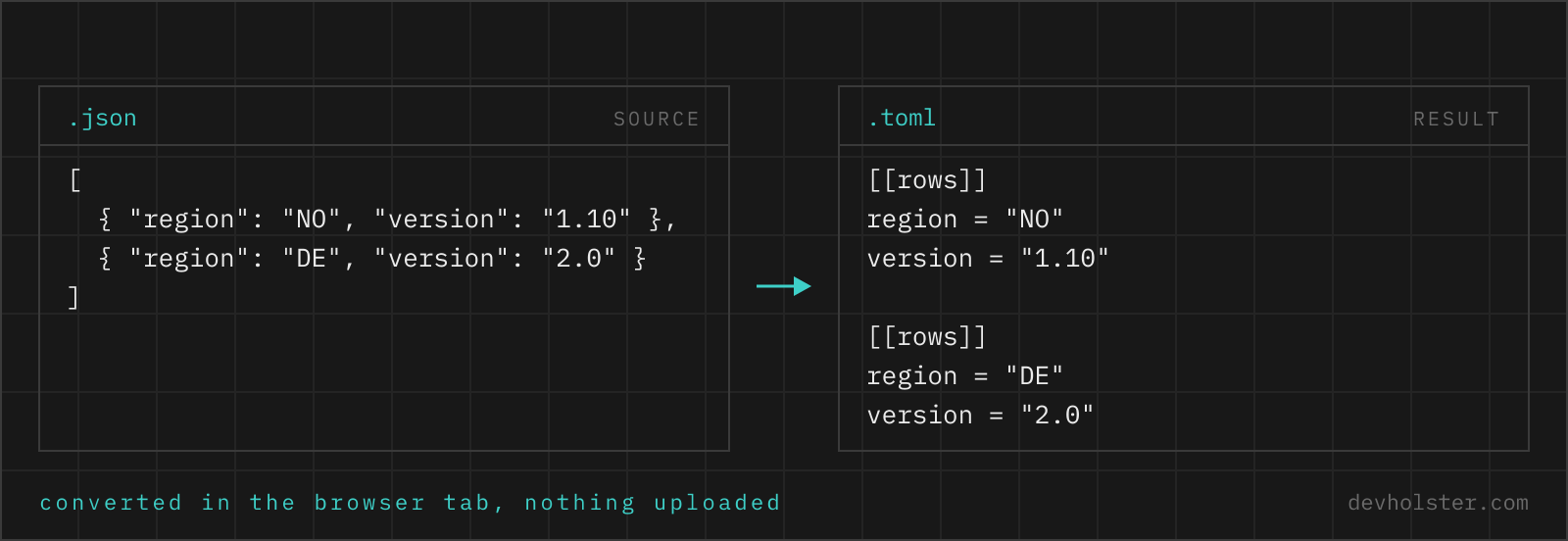
"servers": [{"name": "a"}] | [[servers]]name = "a" |
true, false | true, false |
3.14, 42 | 3.14, 42 |
"line1\nline2" | "line1\nline2" (escaped string) |
null | dropped, or an error with --omit-null off |
Strings are emitted in TOML's basic double-quoted form with standard escapes, keys that need it (spaces, unusual characters) are quoted, and numbers and booleans transfer one to one. Integer values beyond 64-bit range do not occur here because JSON already parsed them as floats before the converter sees them.
TOML has no null, and that is a feature
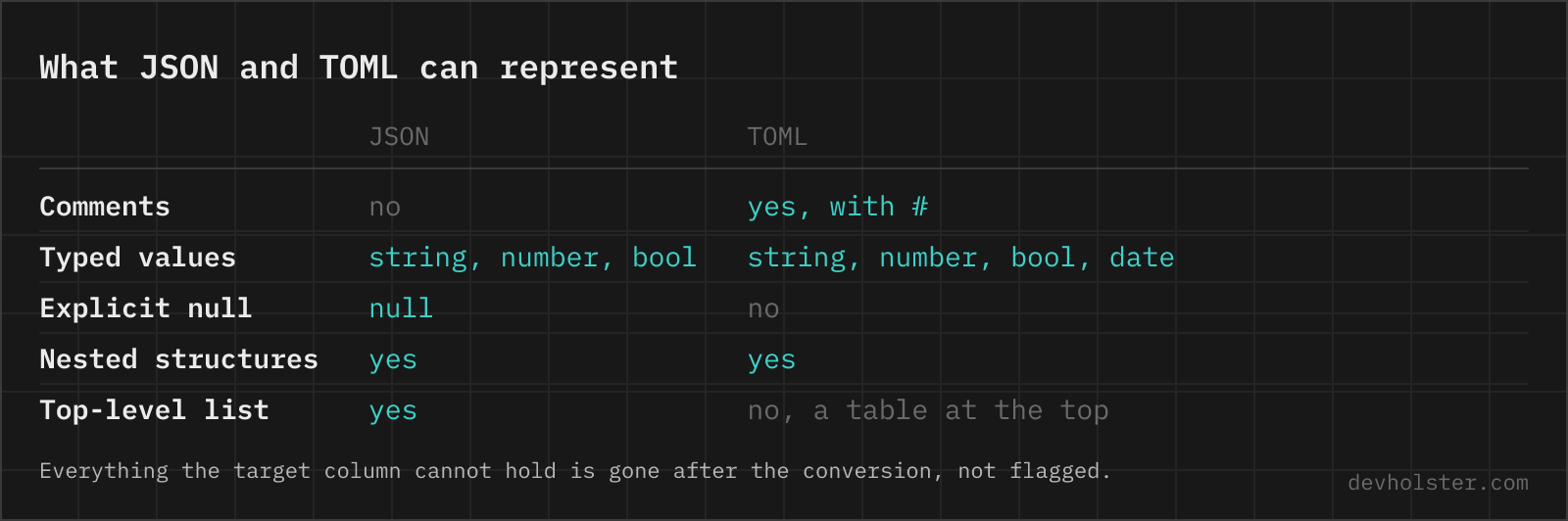
The TOML specification rejected null on purpose: a config key should either be set or absent, not set-to-nothing. That philosophy collides with real-world JSON, where "password": null is a common way of writing "not configured".
This converter gives you both behaviours. The default (--omit-null on) drops null-valued keys, which produces the TOML a human would have written; for consumers that check key in config, an omitted key and a null key read the same. The strict mode refuses to convert and points at the exact path, which is the right choice when a silently missing key could change behaviour, think of a null that was meant to override an inherited default. If your data uses null as a meaningful sentinel, replace it with an explicit marker string before converting; no TOML consumer can see the difference between "dropped" and "never existed".
Tables, dotted headers and arrays of tables
TOML expresses nesting through section headers rather than indentation, and two of its constructs regularly puzzle people seeing converted output for the first time.
First, a nested object chain like {"a": {"b": {"c": 1}}} can compress into a dotted header [a.b] with c = 1 under it. The intermediate tables exist implicitly; no [a] header is required. Second, an array of objects becomes repeated [[name]] sections, one per element, in order. Both are plain TOML syntax, not artifacts, and both read back into exactly the JSON structure you started with.
One layout rule is worth knowing because it looks like re-ordering: within a table, TOML requires the scalar keys to come before any sub-table headers. If your JSON has {"db": {...}, "title": "x"}, the converted file shows title first and [db] after it, since anything written below a [db] header would belong to that table. The data model is untouched; parse the TOML back and the structures match.
Pitfalls to check after converting
- Dropped nulls. The key-count stat under the tool includes only what survived. If it differs from what you expected, switch
--omit-nulloff once to get a list of what would be lost, then decide. - Date-looking strings.
"2024-05-14"arrives as a quoted string, not a TOML date. Consumers that require a real TOML datetime (rare, but they exist) need the quotes removed by hand. - Deep nesting. TOML handles arbitrary depth, but headers like
[a.b.c.d.e]are a readability dead end. If the converted file is full of them, the data may simply not want to be TOML; that is a hint, not a failure. - Schema, not syntax. Valid TOML is not automatically a valid Cargo.toml or pyproject.toml. Field names and required sections are the consuming tool's business:
cargo checkandpip install -e .will tell you, this converter cannot. - Comments still missing. JSON could not carry comments, so the TOML arrives without any. Adding them is now possible and worth the five minutes.
When to keep JSON
Convert to TOML when a human maintains the file or a tool demands the format. Keep JSON when machines exchange the data: APIs, lockfiles, generated artifacts, anything nested more than about three levels deep. TOML's table headers, which make flat configs so readable, become a liability on deeply nested structures where JSON's braces stay compact.
There is also an ecosystem argument. Every language parses JSON natively or near-natively; TOML support is universal in practice but always one dependency away (except in Python 3.11+ and Rust's cargo ecosystem, where it is effectively built in). For a file that only your build pipeline reads, that dependency buys you comments and sanity, a good trade. For a payload crossing service boundaries, it buys you nothing.
JSON to TOML, the awkward parts
Is it safe to paste config files with secrets into an online converter?
Only into one that converts in your browser, and config files are the worst thing to get this wrong with, because they hold database passwords and API tokens. A secret that reached someone else's server has to be rotated; there is no undo. The conversion runs here as JavaScript inside your tab, with nothing uploaded or logged, and the page works offline. For any other tool, open the Network tab in devtools and convert a dummy file first.
What is TOML actually used for?
Config files, almost exclusively. The two you meet most often are Cargo.toml (every Rust project) and pyproject.toml (modern Python packaging: pip, Poetry, uv, Ruff and friends all read it). Beyond those, Hugo, Netlify, GitLab pages tooling and a long tail of CLIs use TOML because it stays readable without significant whitespace. If a tool asks you for TOML, this converter gets your existing JSON there.
How do I write a null value in TOML?
You cannot, because TOML deliberately has no null type. A key in TOML either exists with a value or does not exist at all; there is no way to write "present but empty". By default this tool drops null values (the --omit-null flag), which matches the usual intent, a dropped key reads the same as a null one to most config consumers. Turn the flag off and the converter instead reports the exact path of the first null so you can decide yourself.
Can every JSON document be converted to TOML?
Almost, with two hard limits. The top level must be an object, because a TOML document is a table of key/value pairs; a top-level array or bare string has no TOML representation. And null values have no equivalent, so they are either dropped or reported as errors. Everything else, nested objects, arrays, mixed-type arrays, numbers, booleans and strings, converts cleanly.
How do nested JSON objects appear in TOML?
As tables with bracket headers. A JSON object {"database": {"host": "x", "port": 5432}} becomes a [database] section with host and port as keys under it, and deeper nesting produces dotted headers like [database.pool]. This is the biggest visual difference between the formats: JSON shows nesting with braces and indentation, TOML with section headers, the way INI files always did.
What do the double brackets [[servers]] in the output mean?
An array of tables. When your JSON has an array of objects, like "servers": [{"name": "alpha"}, {"name": "beta"}], TOML writes each element as its own [[servers]] section, in order. Reading it back yields the same array. Arrays of plain values (strings, numbers) stay inline instead: ports = [8001, 8002].
How do I convert JSON to TOML on the command line?
yj -jt < data.json is the shortest route and converts between JSON, YAML, TOML and HCL in either direction. In Python, tomli_w.dump(json.load(open("data.json")), open("out.toml", "wb")) does it with the standard packaging tools, noting that the file has to be opened in binary mode and that tomli_w refuses None outright, since TOML has no null. taplo and dasel cover the same ground with different flags. All of them produce valid TOML and none of them produce pretty TOML: expect to move a few scalars above their section headers and to group tables the way a human would read them, because the layout rules leave a lot of freedom that a serialiser does not use.
How are dates handled when converting JSON to TOML?
They stay strings. TOML has first-class date and datetime types (2024-05-14T09:00:00Z without quotes), but JSON has no date type, only strings that look like dates. This converter does not guess: a JSON string comes out as a quoted TOML string, even if it resembles a timestamp. If you want a native TOML datetime, remove the quotes in the output by hand, both spellings parse to the same moment for consumers that expect a datetime.
Why do Rust and Python projects use TOML?
Because it is the middle ground both ecosystems settled on after the alternatives disappointed them. Cargo used TOML from the start, and Python standardised pyproject.toml in PEP 518 in 2016, explicitly rejecting YAML as too complex to implement safely and JSON as unfriendly to hand-edit. The trade reads the same in both cases: comments and readability like YAML, but with none of YAML’s implicit typing traps (an unquoted "no" stays a string in TOML because unquoted strings do not exist there). Compared to JSON it adds comments and drops the brace noise. The honest downsides: nesting deeper than two or three levels gets clumsy, and fewer tools accept it. For a flat-ish config a human edits, TOML is the most mistake-proof of the three; for machine-to-machine payloads, stay with JSON.
Can I add comments to the converted TOML?
Yes, and doing so is half the reason to convert. JSON has no comment syntax, so your source arrives comment-free; TOML uses # to end of line, same as shell and Python. The converter cannot invent documentation, but once the file is TOML you can annotate every key without breaking any parser.