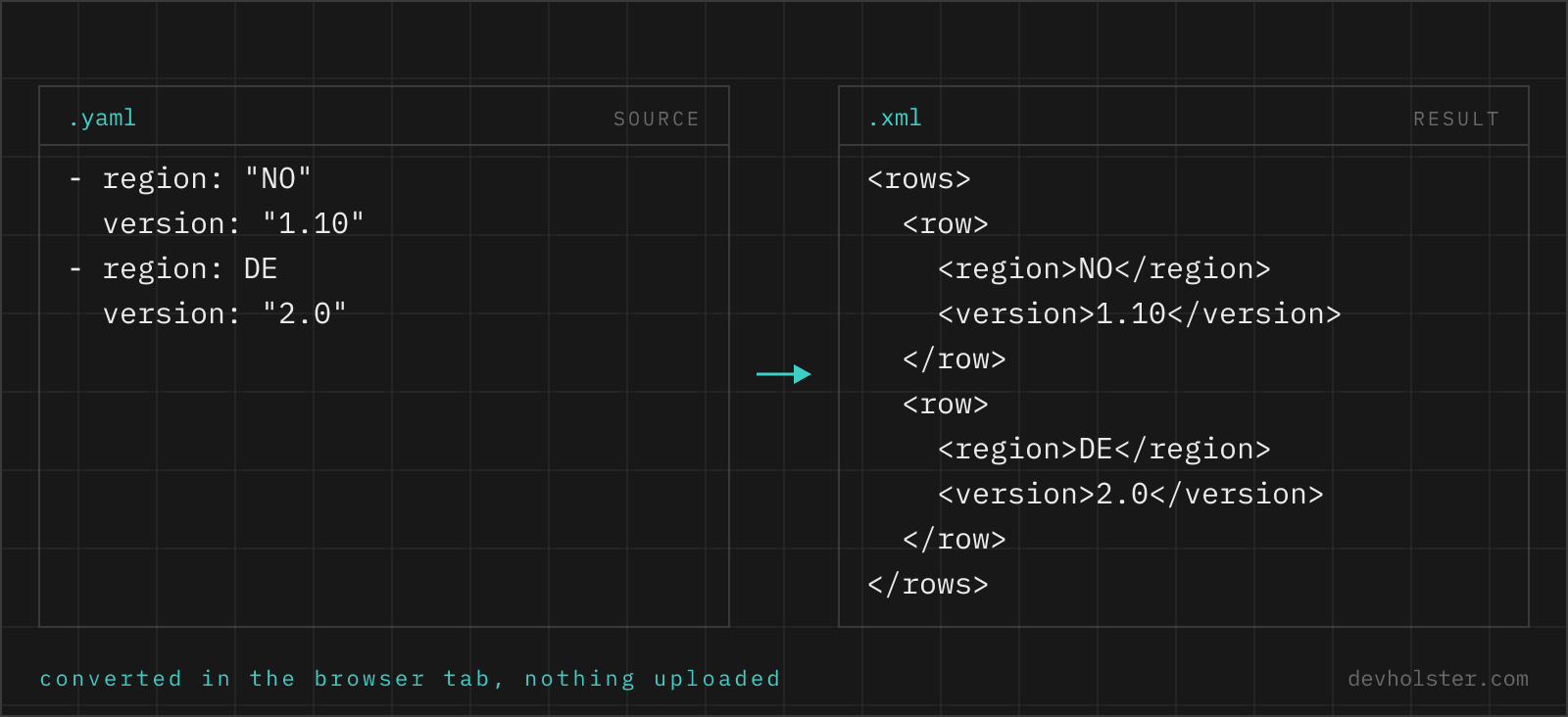
Why convert YAML to XML at all
This direction is rarer than its siblings, and the reason it exists is almost always a system boundary. YAML is where modern tooling keeps human-maintained data; XML is what a long list of older but very alive systems insist on: SOAP web services, Java software configured through XML files, RSS and Atom feeds, office document formats, import interfaces of ERP systems. When data maintained in YAML has to enter one of those, something has to produce XML, and writing it by hand invites escaping mistakes that a converter simply does not make.
The other case is comparison and inspection. If a legacy system's documentation shows its expected XML and your data lives in YAML, converting yours and diffing against the sample answers "what am I missing" faster than reading a schema ever does.
How to use this converter
Paste YAML into the left pane, or drop a .yaml file on it, and the XML appears on the right while you type. YAML syntax errors show inline in the output pane with the parser's message, so a stray tab or a bad indent is caught immediately.
- Paste or drop your YAML. Single documents, fragments or multi-document streams separated by
---all work. - Check the numbers. The strip under the panes shows sizes, line count and total keys; if the key count looks short, an indentation slip may have swallowed part of the structure.
- Copy or download. The result goes to your clipboard or saves as an
.xmlfile.
--pretty
Indents the XML with two spaces per level, on by default. Turn it off for a compact single-line document when the XML travels inside a request or gets stored where size matters; XML whitespace between elements is insignificant to parsers either way.
--declaration
Prepends <?xml version="1.0" encoding="UTF-8"?>, on by default. Keep it for standalone files; drop it when the output is a fragment destined for the inside of a larger document, where a declaration would be illegal.
How YAML constructs map to XML
| YAML | XML |
|---|---|
name: api | <name>api</name> |
env: tier: prod | <env><tier>prod</tier></env> |
tag: - a - b | <tag>a</tag><tag>b</tag> |
'@_id': A-1042 | id="A-1042" (attribute on the parent) |
'#text': hello | text content of the parent element |
price: 49.9, ssl: true | <price>49.9</price>, <ssl>true</ssl> |
note: null / note: | <note></note> |
<, & in values | <, & (escaped automatically) |
Characters that XML treats as syntax are escaped in element content and attribute values, which is the main thing hand-written XML regularly gets wrong. Anchors and aliases in the YAML are resolved before conversion, so an aliased block appears expanded at every place it was referenced; XML has no reference mechanism to preserve them.
The root element rule
An XML document must have exactly one root element; YAML has no such constraint. The converter resolves this with a simple rule: if the YAML has a single top-level key whose value is a mapping, that key becomes the root element. Otherwise, multiple top-level keys, a top-level list, or a bare scalar, everything is wrapped in a generated <root> element.
This means you control the root name by shaping the YAML. Want <catalog> as the document element? Put everything under one catalog: key. The sample file on this page does exactly that, which is worth copying as a pattern whenever the receiving system prescribes the root element's name.
Attributes and text nodes: the @_ convention
The trickiest part of mapping key/value data onto XML is that XML has two places to put a value: child elements and attributes. YAML has no attribute concept, so this converter uses a naming convention rather than guessing: keys prefixed with @_ become attributes of the enclosing element, and the special key #text becomes the element's text content. Everything else becomes child elements.
That makes mixed forms expressible without any schema:
| YAML | XML |
|---|---|
price: '@_currency': EUR '#text': '39.90' | <price currency="EUR">39.90</price> |
The same convention runs through our XML to JSON and XML to YAML converters in the opposite direction, so data can make the round trip without losing the element-versus-attribute distinction. When in doubt about which to use in fresh XML: attributes for identifiers and metadata about the element, child elements for the data itself; that matches how most schemas in the wild are designed.
Pitfalls to check after converting
- Sanitised names. XML element names allow letters, digits, underscores, hyphens and dots, and must not start with a digit. Keys that violate this are rewritten (
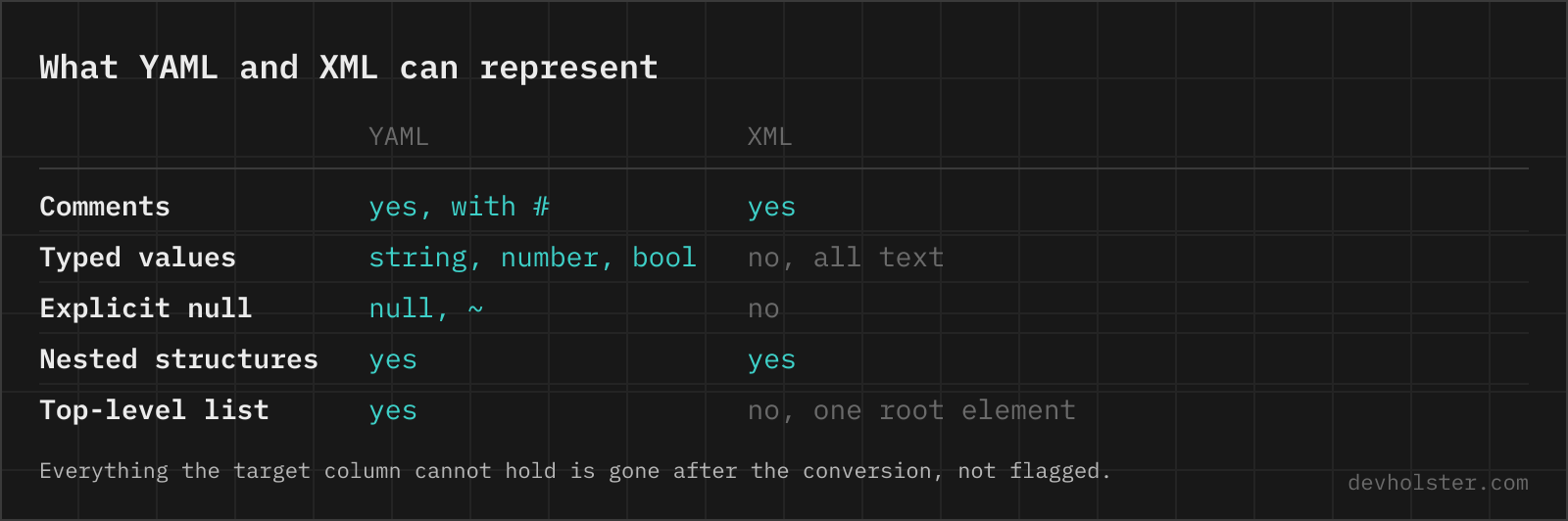
server name→server_name,2fa→_2fa). Scan the output once if your keys are unusual. - Types are gone. Every scalar is text now. A consumer with an XSD schema may require
truerather thanTrue, or a decimal format your YAML did not use; the converter emits values as YAML parsed them. - Lists of mappings need a wrapper. A top-level list converts, but each item lands in a generated element. For controlled output, wrap lists in a named key as shown in the sample; the singular-inside-plural pattern (
productundercatalog) produces the XML most schemas expect. - Comments do not survive. YAML comments have no place in the converted document; the builder emits data only. If the receiving side needs annotations, they have to be added to the XML afterwards.
- Schema, not syntax. The output is well-formed XML, but well-formed is not valid-against-a-schema. If the consumer publishes an XSD or DTD, validate against it after converting; a misspelled element sails through syntax checks.
YAML to XML questions
Is it safe to convert a config file with credentials in an online tool?
Only in a tool that converts in your browser. Config files carry hostnames, credentials and a fair amount of your internal structure, and an upload-based converter stores all of it on a server you know nothing about. The conversion runs here as JavaScript inside your tab, with nothing uploaded, logged or stored, and it works offline. For any other tool, open the Network tab in devtools while converting a dummy file and watch whether a request goes out.
How do I convert YAML to XML in Python?
Go through a dict, because no library does it in one step. Load with yaml.safe_load(open("config.yaml")), then serialise with xmltodict.unparse({"root": data}, pretty=True) or dicttoxml.dicttoxml(data). The explicit root wrapper is not optional: YAML happily has several top-level keys and XML allows exactly one root element. Watch two details afterwards. Keys that are not valid XML names (spaces, leading digits, colons) have to be renamed rather than escaped, and None becomes an empty element, which a schema may or may not accept where it expected a value.
How does a YAML mapping become XML elements?
Each key becomes an element named after the key, and its value becomes the element content: name: api turns into <name>api</name>, and a nested mapping nests the elements. XML requires exactly one root element, so if your YAML has multiple top-level keys, everything is wrapped in a <root> element; a single top-level key becomes the root itself.
How do I get XML attributes instead of child elements from YAML?
Prefix the key with @_ in your YAML. A mapping like {order: {"@_id": "A-1042", total: 118}} converts to <order id="A-1042"><total>118</total></order>. This mirrors the convention our XML to JSON and XML to YAML tools use in the other direction, so a document can round-trip through them without losing which values were attributes.
What happens to YAML lists when converting to XML?
Each list item becomes one element repeated under the same name. XML has no native list syntax; repetition is the list. For that reason the idiomatic input names the list key in singular inside a wrapper, like product: [ ... ] under catalog, which yields several <product> elements. A list of plain strings produces one element per string with the string as its text.
Can I convert a YAML file with multiple documents (---) to XML?
Yes. A multi-document stream is treated as a list of documents and wrapped in a single <root> element with one <item> per document, because an XML file cannot have more than one root. If you want each document as its own XML file, split the YAML first (each --- section is one document) and convert them separately.
Why did some element names change from my YAML keys?
Because XML names are stricter than YAML keys. An XML element name cannot contain spaces or most punctuation and cannot start with a digit, so a key like "server name" becomes server_name and "2fa" becomes _2fa. The values are untouched; only names get sanitised. If exact names matter downstream, rename the keys in the YAML before converting.
Do I need the <?xml version="1.0"?> declaration at the top?
Usually yes, keep it. The declaration announces the encoding, and several strict consumers (SOAP endpoints, older Java parsers, some feed readers) expect it. It is on by default here; the --declaration flag removes it for cases where the XML gets embedded inside a larger document, since the declaration is only legal at the very start of a file.
What about null values, booleans and numbers from the YAML?
XML is text all the way down, so everything becomes text content: true becomes the text true, 49.9 becomes 49.9, and null becomes an empty element like <note></note>. The type information exists only in the eyes of whatever reads the XML later; if a schema (XSD) governs the consumer, check that empty elements are acceptable where your YAML had nulls.
Can I convert a Kubernetes manifest or docker-compose file to XML?
Syntactically yes, any valid YAML converts. Practically, no tool on the receiving end expects Kubernetes or compose data as XML, so the useful cases are different: feeding YAML-maintained data into an XML-only system (SOAP services, XML-configured Java software, RSS/Atom generation, legacy import interfaces), where XML is the required interchange format and YAML is just where you keep the data.