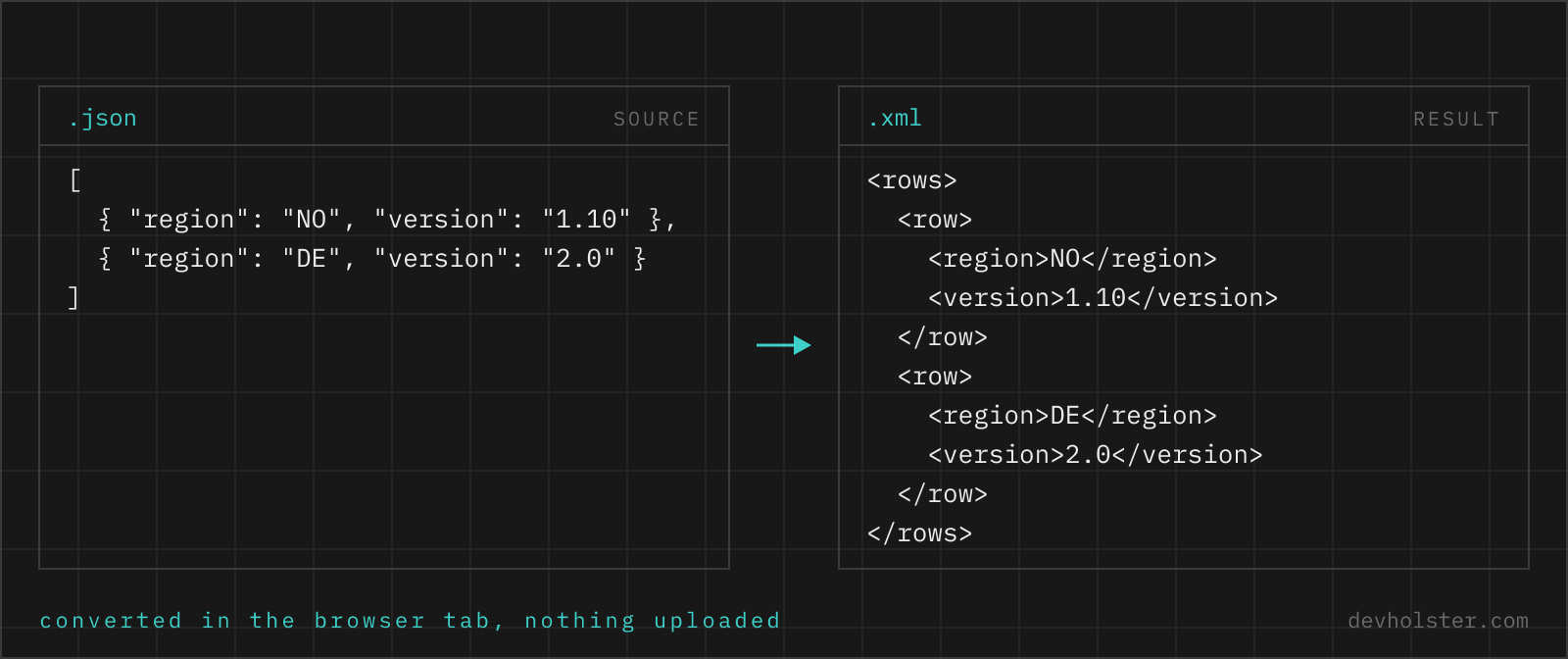
How JSON structures translate into XML elements and attributes, why every document needs a single root, what type information gets lost on the way, and how this converter handles JSON keys that would be illegal tag names.
Why convert JSON to XML in 2026
Because the systems that want XML are precisely the ones you cannot change. SOAP services in banking and insurance, government submission interfaces, SEPA payment files, RSS readers, sitemap crawlers, Android resource files, JasperReports templates: the list of XML-only consumers is long, stable and not going anywhere. Meanwhile the data you have is JSON, because that is what every modern API returns.
So the realistic job is not "migrate to XML", it is "this one endpoint needs an XML body and I have a JSON object". That job is mechanical, and mechanical jobs belong in a tool rather than in hand-editing angle brackets.
How to use this converter
Paste JSON on the left or drop a .json file onto the pane. The XML output tracks your typing; errors in the JSON appear inline in the output pane with the parser's message.
- Paste or drop the JSON. Objects, arrays and primitives all convert; the root handling below explains what wraps what.
- Shape attributes if you need them. Keys starting with
@_turn into attributes on their parent element; everything else becomes child elements. - Copy or download. The result saves as an
.xmlfile.
--pretty
On by default: each element on its own line, two-space indentation. Off produces the whole document on one line, the right shape for embedding in a request body.
--declaration
Prepends <?xml version="1.0" encoding="UTF-8"?>. Leave it on for standalone files; switch it off when the output will be pasted into an existing document, which may contain only one declaration at the very top.
How JSON constructs map to XML
| JSON | XML |
|---|---|
{"name": "Ada"} | <name>Ada</name> |
{"customer": {"city": "London"}} | <customer><city>London</city></customer> |
{"tag": ["a", "b"]} | <tag>a</tag><tag>b</tag> |
{"@_id": "7", "qty": 2} | <… id="7"><qty>2</qty></…> |
{"note": null} | <note></note> |
true, 42, 3.14 | text content: true, 42, 3.14 |
"5 < 6 & 7" | 5 < 6 & 7 (escaped) |
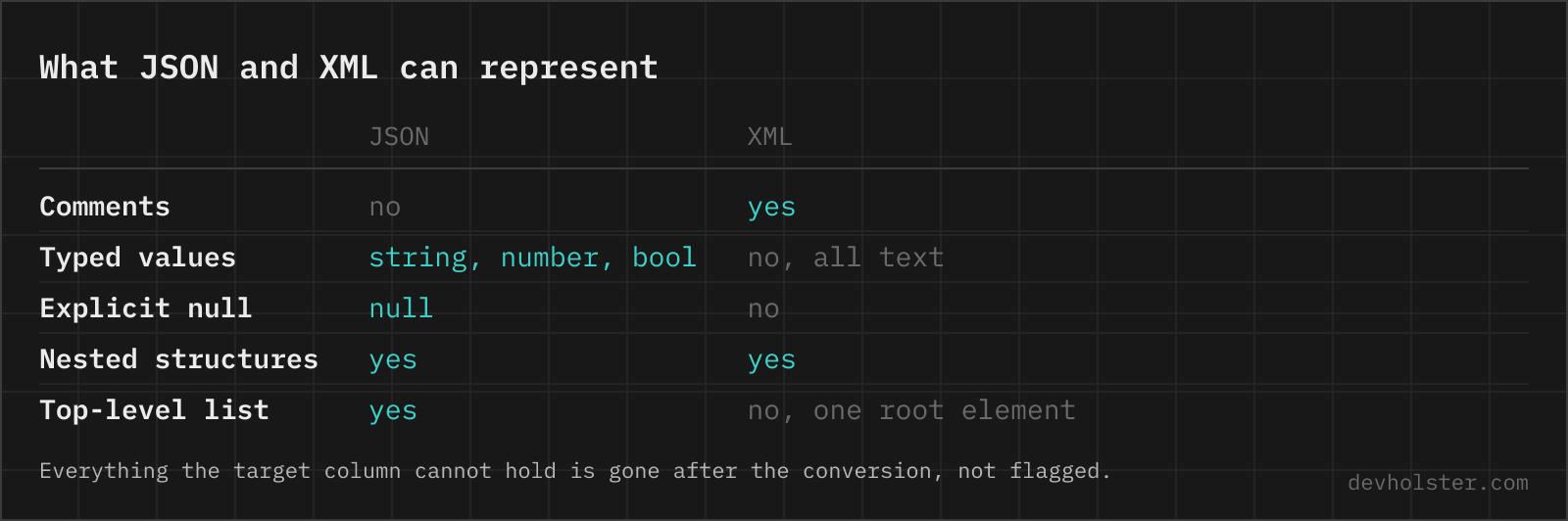
Two of these rows carry the important lessons. Arrays become repeated elements, which is idiomatic XML but forgets "this was a list" when the list has one entry. And primitives become text, which means all type information rides on the consumer's expectations from here on.
The single-root rule
A well-formed XML document has exactly one top-level element. JSON has no such rule: a document can be an object with twelve keys, a bare array, even a lone number. The converter bridges the gap with a simple policy. If your JSON is an object with a single key whose value is an object, that key becomes the root element, so {"order": {…}} gives you <order>. Anything else is wrapped in a generated <root> element.
In practice that means you control the root name by shaping the input, and the sample file shows the pattern: wrap your payload in one meaningfully named key before converting. It costs one line in the JSON and saves a find-and-replace in the XML.
Elements or attributes, and how to get attributes
XML offers two places to put a value: child elements and attributes. JSON only has key-value pairs, so a converter has to pick, and the safe default is elements, which can nest, repeat and hold any content. Attributes are the right choice for metadata about an element, identifiers, units, language codes, and many fixed schemas (SEPA, RSS, SVG) require specific values to be attributes.
This converter uses the @_ prefix convention: "@_currency": "EUR" on an object becomes currency="EUR" on that object's element. The same convention is what our XML to JSON converter emits, so the two tools are inverse operations and a document survives the round trip with its attributes in place. If a target schema dictates attribute placement, add the @_ keys in the JSON first and convert second; it is far less error-prone than editing the XML afterwards.
What XML cannot express, and what that costs
- Types. XML content is text.
<qty>2</qty>could have been the number 2 or the string "2"; only a schema (XSD) or the consumer's code decides. Converting JSON to XML and back without a schema turns every number and boolean into a string. - Arrays as such. Repeated sibling elements express lists, but one-item lists are indistinguishable from single values. Fixed schemas solve this by decree; generic conversions cannot.
- null vs. empty string. Both come out as an empty element. Schemas that care use
xsi:nil="true", which is a convention you add for a specific consumer, not something a generic converter should invent. - Key order inside objects. Technically XML preserves element order, and this converter keeps yours; just be aware that some XML consumers validate order strictly (SEPA again), so the order of keys in your JSON may suddenly matter in a way it never did before.
None of this makes the conversion unreliable; it makes it directional. Structure survives perfectly, typing does not, and the receiving system's schema is what restores it.
JSON keys that make bad XML names
Any string can be a JSON key: "unit price", "2024", "a/b", even "". XML names are stricter, they must start with a letter or underscore and may contain only letters, digits, hyphens, underscores and dots. Rather than emit a document that no parser will accept, this converter sanitises offending keys: illegal characters become underscores and a leading digit gets an underscore prefix, so "unit price" becomes <unit_price> and "2024" becomes <_2024>.
The renames are deterministic, but they are still renames. If the consuming system expects specific element names, or your keys are user-generated data rather than field names, restructure the JSON so the volatile strings are values ({"year": "2024"}) instead of keys ({"2024": …}). That pattern converts cleanly in every format, XML included.
JSON to XML questions
Is it safe to convert confidential JSON data to XML in an online tool?
Only in a tool that converts in your browser. Payloads that need converting are usually orders, customer records or integration messages, and an upload-based converter logs every one of them on a machine you do not control. This converter is JavaScript running in your tab, so nothing is uploaded and nothing is logged, and the page works offline. For any other tool, open the devtools Network tab and convert a dummy payload first, because the request either fires or it does not, and that answers the question better than a privacy page.
How do I convert a JSON file to XML?
In Python, xmltodict.unparse(data, pretty=True) is the direct route and expects the same @attribute and #text conventions its parser produces; dicttoxml is the alternative when you want tags generated from plain dicts. In C#, JsonConvert.DeserializeXmlNode from Json.NET does it in one line, and PowerShell has ConvertTo-Xml for objects it already parsed. In Node.js, fast-xml-parser's XMLBuilder is what runs on this page. Every one of them has to answer the same three questions: what the single root element is called, which keys become attributes rather than child elements, and what an empty or null value looks like. Read those conventions once, because the receiving system will care about all three.
Why does my XML output have a <root> element?
Because XML requires exactly one top-level element and your JSON did not provide an unambiguous one. A JSON document that is an array, a primitive, or an object with several top-level keys has no single root, so the converter wraps the content in <root>; a top-level array additionally gets one <item> element per entry, because repeating <root> itself would not be well-formed. If you want a specific element name, make your JSON an object with one key: {"order": {…}} produces <order>…</order>.
How do JSON arrays convert to XML?
Each array item becomes one element repeated under the same tag name. {"item": [1, 2]} turns into <item>1</item><item>2</item>. That convention (repetition instead of an array marker) is exactly how XML data has always modelled lists, but note that it makes the reverse conversion ambiguous when a list happens to contain one item.
Can I create XML attributes from JSON?
Yes. Keys prefixed with @_ become attributes on the parent element: {"order": {"@_id": "A-1042", "total": 118.3}} produces <order id="A-1042"><total>118.3</total></order>. The prefix convention matches our XML to JSON converter, so a document round-trips between the two tools with attributes intact.
What happens to null values in XML?
They become empty elements: {"note": null} converts to <note></note>. XML has no null literal; an empty element is the closest portable representation. Consumers that need to distinguish "empty string" from "absent" usually use the xsi:nil attribute, which is a schema-level convention this generic converter does not impose.
Which characters have to be escaped in XML?
Five, and only two of them always: & must be written as & and < as < wherever they appear in text, because both start something. The other three are contextual, > for > (required only after ]] but conventionally always escaped), " for " and ' for ' inside attribute values delimited by that quote character. XML defines exactly these five names, unlike HTML with its 2,200, so in an XML document is an undefined entity and a parse error. A CDATA section is the alternative for longer embedded markup, and any serialiser worth using escapes automatically, which is why a JSON string containing HTML arrives as inert text rather than nested elements.
Are JSON numbers and booleans preserved in XML?
They are written as text, because XML element content is always text. <qty>2</qty> carries no type information; whether 2 is a number again on the other side depends on the consumer or its schema. This is the main reason a JSON to XML round trip needs care: types have to be re-established when converting back.
Can this produce an RSS feed or a sitemap from JSON?
It produces the XML structure your JSON describes, so if your JSON mirrors the RSS or sitemap element layout (with @_ keys for attributes like version), the output is a valid feed skeleton. What the tool does not do is validate against the RSS or sitemap spec, so required elements and correct namespaces remain your responsibility.
What is the <?xml … ?> line and do I need it?
It is the XML declaration, stating the version and encoding of the document. Strictly optional for well-formed XML (UTF-8 is the default anyway), but many older consumers, validators and SOAP stacks expect it as the first line of a file. The --declaration option is on by default; turn it off when the output is embedded inside a larger document, where a second declaration would be illegal.
Why did my JSON keys change in the XML output?
Because they would have been illegal tag names. XML names must start with a letter or underscore and cannot contain spaces or most punctuation, so a key like "unit price" becomes unit_price and "2024" becomes _2024. JSON allows any string as a key; XML does not. If exact key fidelity matters, restructure the JSON so those strings are values, not keys.
Why does my XML fail with "invalid character" after converting from JSON?
Because JSON permits control characters that XML 1.0 forbids outright. A JSON string can carry \u0000 to \u001F as escapes, and of those XML allows only tab, line feed and carriage return, so a stray form feed or a NUL that came out of a database column makes the document unparseable no matter how it is escaped. Numeric references do not help: � is illegal too. Strip or replace the control characters before serialising, which is what most XML libraries do only if you ask them to. The same class of failure shows up with unpaired surrogates from badly encoded text and with the U+FFFE and U+FFFF noncharacters.