Why convert XML to YAML at all
XML is what the older half of the industry speaks: SOAP services, RSS and Atom feeds, Maven and Ant builds, Java application servers, ERP exports, sitemaps. YAML is what you would rather read. Converting is mostly about that gap: a payload arrives as XML and you want to understand it, extract from it, or carry its data into a YAML-configured world (CI pipelines, Kubernetes tooling, Ansible inventories) without retyping it.
Reading is the underrated use case. A SOAP response with four levels of namespaced wrapper elements is genuinely hard to scan; the same data as YAML is an indented outline where the one field you care about is findable in seconds. We reach for this converter most often not to produce a file at all, but to see what an XML blob actually contains.
How to use this converter
Paste XML into the left pane, or drop an .xml file on it, and the YAML appears on the right while you type. Input that is not well-formed shows the parser error with its line number inline in the output pane, and the conversion resumes the moment the input parses.
- Paste or drop your XML. A whole document or a well-formed fragment with a single top-level element; SOAP, RSS, exports, all of it works.
- Check the numbers. The strip under the panes shows sizes, line count and total keys, a quick check that the structure came through complete.
- Copy or download. The result goes to your clipboard or saves as a
.yamlfile.
--keep-attributes
On by default: attributes appear as @_-prefixed keys alongside the element content. Turn it off to drop attributes when only the element data matters, which flattens documents whose attributes are pure metadata noise.
--parse-numbers
On by default: numeric text becomes numbers, so <price>39.90</price> converts to 39.9. Turn it off when exact text must survive, IDs with leading zeros and version strings being the classic cases; everything then stays a string.
--indent-4
Switches from two-space to four-space indentation. Two spaces is the YAML ecosystem default; four reads more clearly in deeply nested documents, which converted XML often is.
How XML constructs map to YAML
| XML | YAML |
|---|---|
<name>api</name> | name: api |
<env><tier>prod</tier></env> | env: tier: prod |
<tag>a</tag><tag>b</tag> | tag: - a - b |
<price currency="EUR">39.90</price> | price: "@_currency": EUR "#text": 39.9 |
<note/>, <note></note> | note: "" |
<![CDATA[a < b]]> | the text a < b, unescaped |
<!-- comment --> | dropped |
The document element itself becomes the single top-level key of the YAML, so the overall shape mirrors the XML tree one to one. Whitespace between elements is discarded, as every XML data parser does; whitespace inside text content is kept.
The single-item list problem
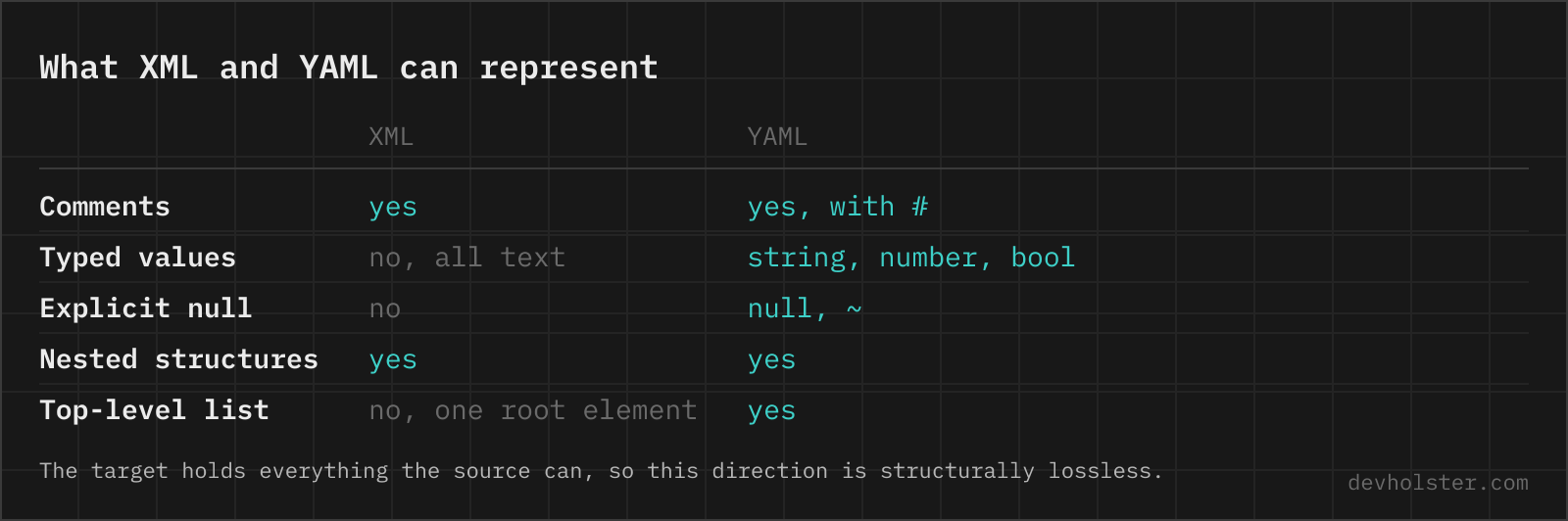
XML has no list syntax; a list is just the same tag repeated. That works until the repetition does not happen: a <channel> with three <item> children converts to a YAML list, but a channel with one item converts to a plain mapping, because nothing in the XML says "this was meant to repeat".
Every generic XML converter has this property, and no flag can fix it, only a schema could, and generic tools have none. What helps is knowing where it bites: code that iterates over the converted list works in testing (many items) and fails in production (one item, suddenly a mapping). Feed processing is where this caught us, and the fix is one line: normalise at the point of consumption, treating a lone mapping under a known-repeating key as a one-element list. One guard clause removes the whole class of bug.
Why some values get quoted, and why that is correct
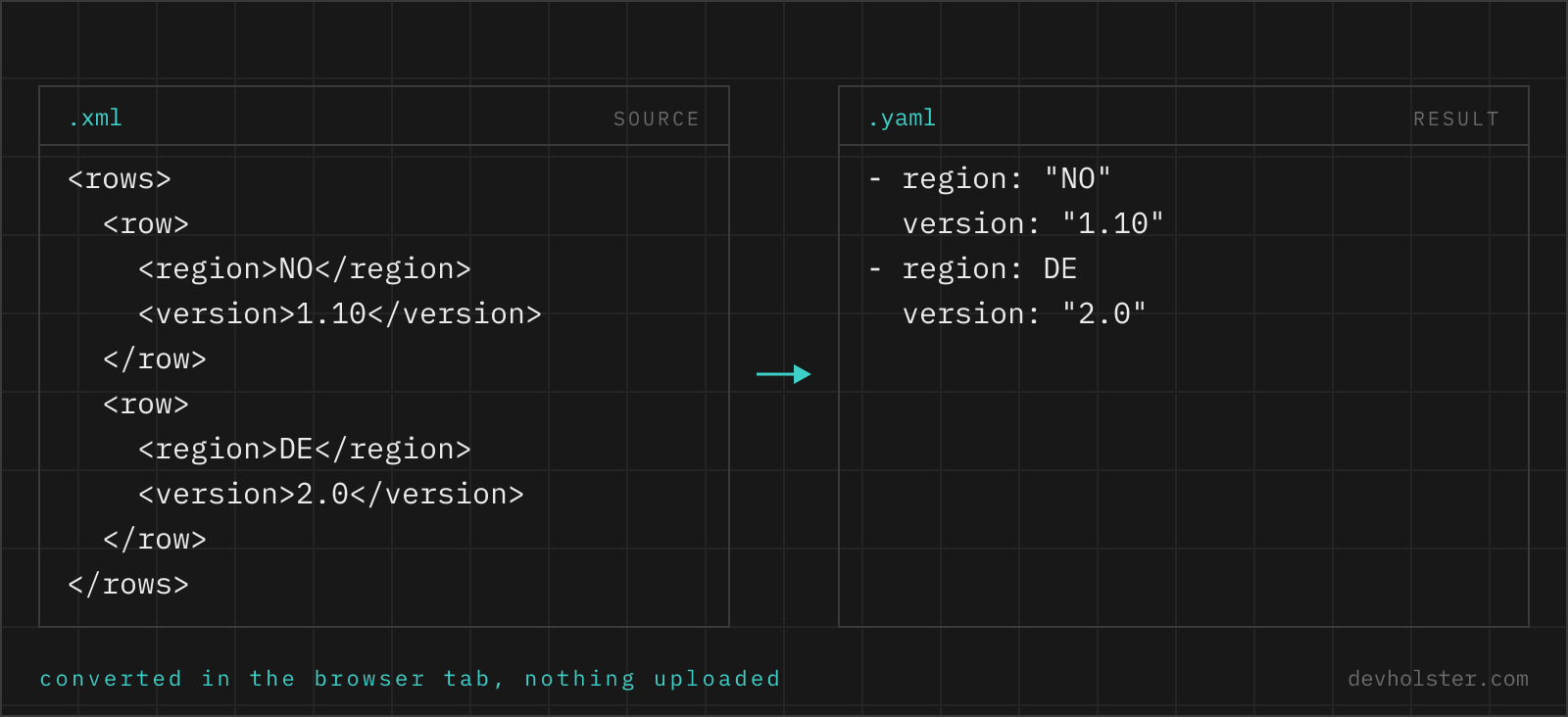
YAML types unquoted scalars by their spelling, which turns careless conversion into silent data corruption: the text no loads as false in YAML 1.1 parsers (the Norway problem), 1.10 collapses to the float 1.1, and 2024-01-05 becomes a date object in some implementations.
This converter quotes exactly the values that need protection and leaves the rest bare for readability. A <country>NO</country> element comes out as country: "NO", still a string in every parser, while <city>Oslo</city> stays the unquoted city: Oslo. Values that --parse-numbers turned into real numbers appear bare as numbers, which is what they now are. The output parses back to identical data in YAML 1.1 and 1.2 parsers alike, and that guarantee is the point: quoting here is meaning-preservation, not decoration.
Pitfalls to check after converting
- Single-item lists. Described above, and worth repeating: any key that can repeat in the source XML may arrive as either a mapping or a list. Normalise where you consume.
- Number parsing versus identifiers. With
--parse-numberson, an order number0042becomes42. If the document mixes measurements (want numbers) and identifiers (want strings), convert with the flag off and cast the few numeric fields in code. - Namespaces ride along. Keys like
soap:Envelopekeep their prefix, and a colon in a key means the YAML key gets quoted. That is correct but surprising if you expected clean names; strip namespaces at the source if they carry no meaning for you. - Comments and processing instructions are gone. The conversion carries data, not document decoration. If the XML's comments matter, the XML stays the source of truth.
- Mixed content loses shape. Document-style XML like
<p>see <b>this</b> note</p>is built for interleaved text and markup, which key/value YAML cannot express in order. Data-style XML converts faithfully; prose-style XML should stay XML.
XML to YAML questions
Is it safe to paste internal XML exports into an online converter?
Only into one that parses in your browser. SOAP payloads and system exports regularly carry account data, internal identifiers and endpoint URLs, all of which an upload-based converter writes to its own disk. Parsing runs here as JavaScript inside your tab, nothing is uploaded or logged, and the page works offline. With any other tool, watch the Network tab in devtools while converting something harmless before you paste the real document.
How do I convert XML to YAML on the command line?
yq does it in one call: yq -p=xml -o=yaml file.xml in the Go implementation (v4), which reads XML and writes YAML with attributes prefixed by a plus sign by default. In Python, xmltodict.parse(open("file.xml").read()) followed by yaml.safe_dump(data, sort_keys=False, allow_unicode=True) gives you more control over how attributes and text nodes are named. Both hit the same ambiguity: a single repeated element cannot be told apart from a scalar, so a document that usually has many entries produces a different shape when it happens to have one. Pin that down in the consuming code rather than in the converter.
How are XML attributes represented in the YAML output?
As keys prefixed with @_, kept right next to the element content. <price currency="EUR">39.90</price> becomes a mapping with "@_currency": EUR and "#text": "39.90". The prefix keeps attributes distinguishable from child elements, and our YAML to XML converter reads the same convention back, so documents can round-trip without losing which values were attributes. Turn off --keep-attributes to drop attributes entirely.
Why does one <item> element become a mapping but two become a list?
Because XML expresses lists through repetition, and repetition is only visible when it happens. One <item> is indistinguishable from a single value; two or more make the converter emit a YAML list. This is the classic structural ambiguity of XML-to-anything conversion, and it bites when a feed that usually has many entries arrives with exactly one. Code consuming the YAML should normalise that case (treat a lone mapping as a one-element list) rather than assume.
What happens to XML comments, CDATA and namespaces?
Comments are dropped; neither the data model nor YAML syntax has a place the parser puts them. CDATA content is kept, it arrives as the text value of its element with the wrapper removed. Namespace prefixes stay part of the element names, so <soap:Body> becomes the key soap:Body; the converter does not resolve or strip namespaces, which keeps SOAP structures recognisable.
Why are some values in the YAML output wrapped in quotes?
Because unquoted YAML scalars are typed by their spelling, and the converter quotes exactly the values that would change meaning bare. The text no would load as false in YAML 1.1 parsers (the Norway problem), 1.10 would collapse to the float 1.1, and 2024-01-05 can become a date object. Values that are safe stay unquoted for readability; values that are not get quotes. The result parses back to the same data everywhere.
Are numbers in the XML converted to real YAML numbers?
With --parse-numbers on (the default), numeric text like <price>39.90</price> becomes a number in the YAML, matching what a human would intend. Turn the flag off and every value stays a string, which is the safer choice when the document contains IDs, ZIP codes or version numbers whose leading zeros and trailing zeros must survive exactly.
Can I convert the YAML back to the original XML?
Structurally yes: the @_ attribute convention and #text keys carry enough information for our YAML to XML converter to rebuild elements, attributes and text content. What does not round-trip is everything the first parse already discarded: comments, the exact attribute order, insignificant whitespace, and whether a one-element list was written once or wrapped. For data payloads that is normally irrelevant; for document-style XML with mixed content, keep the original.
Can I convert an RSS feed or a SOAP response to YAML?
Yes, both are just XML and convert cleanly; the sample on this page is a small feed for exactly that reason. The practical use is inspection and extraction: a SOAP envelope or RSS channel as YAML reads far better than angle brackets when you are hunting for one field. For automated processing, convert to JSON instead (our XML to JSON tool), since more tooling consumes JSON than YAML.
Why did my XML fail to convert with an error about tags?
The input is not well-formed, which XML parsers treat as fatal by spec. The usual causes: an unclosed tag, mismatched opening and closing names (case matters in XML), a bare & that should be &, or multiple top-level elements because a fragment was pasted. The error message names the line; fix that spot and the conversion continues live.