Why migrate a config from YAML to TOML
Usually because a tool demands it. Python packaging settled on pyproject.toml, Rust has Cargo.toml, Hugo, Ruff, uv, mypy and a long list of linters read TOML first. When the settings you already maintain live in YAML, this conversion is the bridge.
The second reason is self-defense. YAML's convenience features are exactly where config incidents come from: an unquoted no that becomes false, an indentation slip that silently moves a key into the wrong block, a tab character that kills the parse. TOML removes those failure modes structurally, there is nothing to indent and unquoted strings do not exist. Teams that migrate rarely migrate back.
How to use this converter
- Paste or drop your YAML. Syntax errors show inline with line and column; anchors and merge keys are resolved before conversion.
- Compare the KEYS stat against your expectation. A lower number than the source usually means dropped nulls, see below.
- Copy or download the
.tomland point the consuming tool at it.
--omit-null
On by default: keys with null values are dropped, since TOML cannot hold them and an absent key reads the same to most consumers. Turn it off to be strict; the converter then refuses and names the exact path of the first null ($.database.password), so nothing disappears silently.
--sort-keys
Alphabetical order within every table, useful for diffing two configs. Off by default, key order usually follows meaning.
How YAML constructs map to TOML
| YAML | TOML |
|---|---|
host: db.internal | host = "db.internal" |
database: mapping | [database] table |
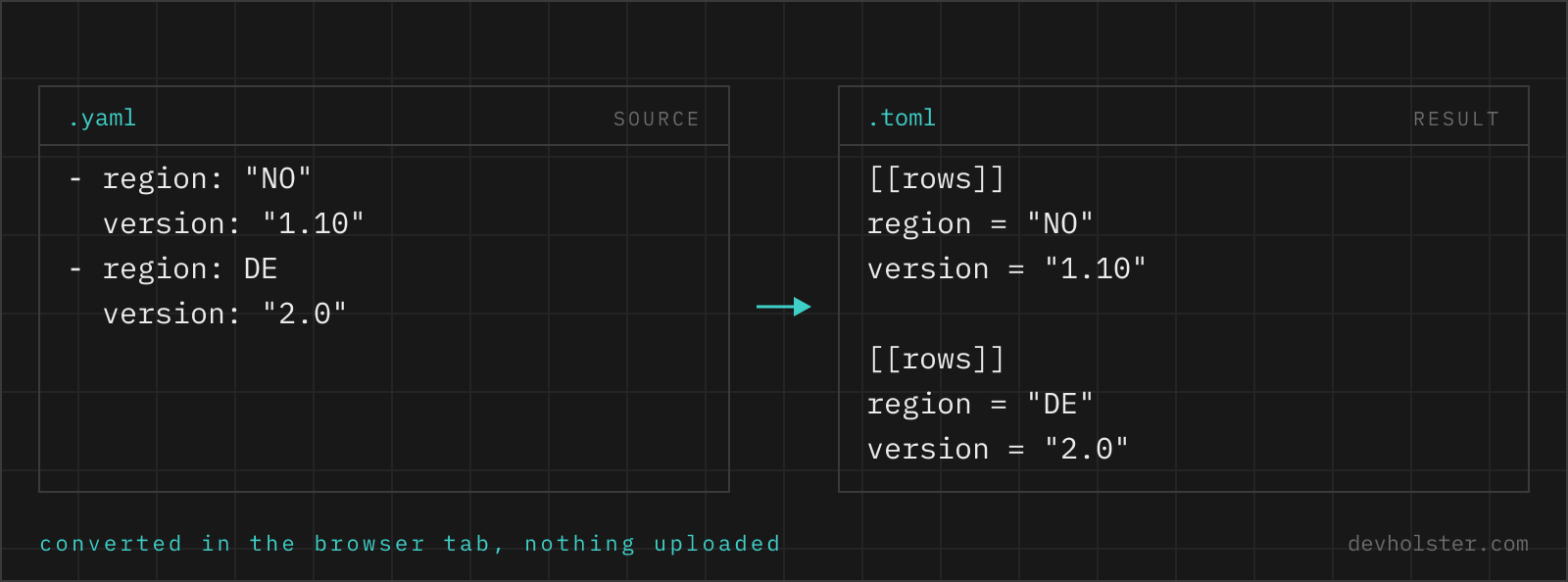
servers: list of mappings | [[servers]] per entry |
ports: [8001, 8002] | ports = [ 8001, 8002 ] |
block scalar (|) | multi-line string |
&anchor / *alias / <<: | resolved into copies |
~ / null | dropped, or an error with --omit-null off |
bare no, on, yes | the boolean they parsed as |
One layout rule surprises people: within a table, scalar keys must come before any sub-table header, so a YAML mapping that listed database: first and title: last shows title first in the TOML. The data is identical; anything written below a [database] header would belong to that table, so the serializer has no choice.
Anchors, merge keys and comments
YAML lets one block inherit another: define &defaults once, pull it in with <<: *defaults everywhere. TOML has no reference mechanism, deliberately, so this converter resolves every anchor and merge before serializing. Each consumer of the defaults gets its own full copy, and overridden keys keep their overriding values. The output is correct and self-contained; what it loses is the single-point-of-edit, and if that mattered in your file, the repetition in the TOML is the honest cost of the migration.
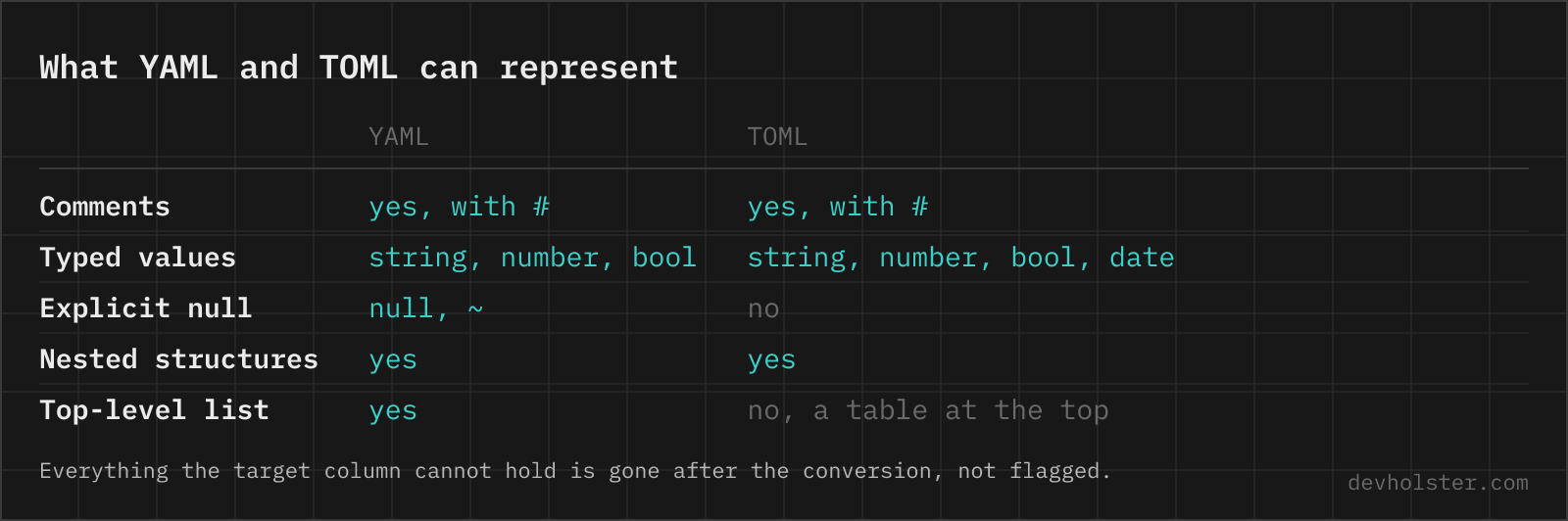
Comments do not survive either, in either direction of any converter, because comments live in the source text and this conversion goes through the parsed data. TOML comments use # exactly like YAML, so re-adding the important ones is mechanical, and worth the minutes: config comments are usually the only documentation the file has.
Null values and top-level lists, the two hard walls
TOML's specification has no null on purpose: a config key should be set or absent, not set-to-nothing. YAML files use key: with nothing after it all the time, often meaning "not configured". The default here drops such keys, which produces the TOML a human would have written. The strict mode (--omit-null off) refuses with the exact path instead, the right choice when an absent key changes behavior, for example a null that was meant to override an inherited default. A dropped key and a never-present key are indistinguishable to every TOML consumer.
The other wall is the document root: a TOML file is a table, so a YAML file that is a bare sequence cannot convert as-is. Wrap it under a key (items:) and the list becomes [[items]] sections. There is no flag for this because no automatic key name would be right.
Pitfalls to check after converting
- Booleans you did not intend. A bare
nooronin the YAML was already a boolean before conversion, and it arrives in TOML asfalseortrue. If it was meant as a string, quote it in the YAML source and convert again; the TOML side is faithful either way. - Dropped nulls. Flip
--omit-nulloff once and read the reported paths before trusting the default. - Duplicated defaults. Resolved anchors mean the same block appears in multiple tables. Future edits must touch every copy, or restructure the config so the sharing lives in the consuming code.
- Schema is not syntax. Valid TOML is not automatically a valid
pyproject.toml; required fields and section names are the consuming tool's rules. Runpip install -e .,cargo checkor the tool's own validator once. - Comments gone. Re-add the ones that explained why a value is what it is.
Migrating a config file
How do I convert YAML to TOML on the command line?
yj -yt < config.yaml > config.toml is the shortest route; yj is a single binary that converts between YAML, TOML, JSON and HCL in any direction. In Python, tomli_w.dump(yaml.safe_load(open("in.yaml")), open("out.toml", "wb")) does it, remembering the binary file mode and that tomli_w refuses None values outright. Both produce valid but chronologically dumped TOML; expect to re-group tables by hand if humans will read the file.
Can every YAML file be converted to TOML?
No, three things have no TOML representation. Null values: TOML has no null, so a key is either present with a value or absent, and every conversion has to drop or reject nulls. Top-level sequences: a TOML document is a table, so a YAML file that is a bare list needs a wrapping key first. And non-string keys: YAML allows integers or even mappings as keys, TOML only strings. Everything else, including deep nesting, mixed-type arrays and multi-line strings, converts cleanly.
Does TOML have anchors and references like YAML?
No. TOML has no anchors, no aliases and no merge keys, so a block repeated in three places has to be written three times. That is a deliberate omission rather than a gap: anchors are the feature behind YAML billion-laughs expansion, and TOML aims at a file a person reads top to bottom. In practice it means a YAML file that leans on &defaults and <<: * expands on the way over, and the converted TOML is longer than the source. If the repetition is the point, generate the file instead of hand-maintaining it.
Does TOML support multi-line strings?
Yes, two kinds: """triple double quotes""" process escape sequences and '''triple single quotes''' are literal, no escaping at all. A backslash at the end of a line inside a basic multi-line string strips the newline and following whitespace, which is how you wrap long values without embedding line breaks. YAML block scalars (| and >) convert into these directly; the content is preserved, only the syntax changes.
What happens to YAML timestamps when converting to TOML?
Genuine YAML timestamps become genuine TOML datetimes, and quoted date-looking strings stay strings. TOML is the rare config format with first-class date types (offset datetime, local datetime, local date, local time written without quotes), so 2024-05-14 as a bare YAML scalar can survive as a real date. The subtlety sits on the YAML side: whether a bare 2024-05-14 was parsed as a date or a string depends on the parser's schema, so check dates in the output once, especially if the source mixed quoted and unquoted forms.
Why does my YAML list fail to convert to TOML?
A TOML document is a table of key/value pairs, so a top-level YAML sequence (a file starting with dashes) has nothing to become; the error is structural, not a syntax bug. Wrap the list under a key first: put items: on line one and indent the list under it, and it converts to [[items]] sections. This constraint is also why TOML never took over data-dump duty from YAML and JSON: it is designed for configs, which are tables by nature.
How do I convert between YAML and TOML in a pre-commit hook or CI?
Pin one converter and diff its output against the committed file, failing the build on drift: yj -yt < config.yaml | diff - config.toml exits non-zero when the generated TOML is stale. That pattern keeps a tool-required TOML file (say pyproject.toml fragments) generated from a YAML source of truth without trusting anyone to re-run the conversion manually. Avoid converting in both directions in automation; pick one canonical source, or key order and formatting will ping-pong forever.