Why convert TOML to JSON at all
TOML lives in config files that humans write: Cargo.toml in every Rust project, pyproject.toml in modern Python, plus Hugo sites, Netlify setups and a steady tail of CLI tools. JSON lives everywhere else. The conversion happens when those worlds touch: a script needs the version number out of a manifest, a jq pipeline should filter dependency lists, a web dashboard wants to display build settings, or you simply want to see the data structure a TOML file actually describes, stripped of its section-header syntax.
There is also the debugging case. TOML's dotted keys, implicit tables and array-of-tables sections make it genuinely unclear at a glance what nested structure a complex file produces. Converting to JSON answers that question definitively, because JSON shows the tree exactly as a parser sees it. When a tool complains that a key is missing from your pyproject.toml, the JSON view settles whether the key exists where you think it does.
How to use this converter
Paste TOML into the left pane, or drop a .toml file on it, and the JSON appears on the right while you type. Syntax errors show inline in the output pane with the line they occur on, so fixing a file is an edit-and-watch loop rather than repeated submitting.
- Paste or drop your TOML. A whole manifest or a fragment; any valid TOML document works.
- Check the numbers. The strip under the panes shows sizes, line count and total keys, a quick sanity check that every section made it through.
- Copy or download. The result goes to your clipboard or saves as a
.jsonfile.
--pretty
Indents the JSON with two spaces, on by default. Turn it off for a single-line result, useful when the JSON becomes a request body, an environment variable or a line in a log.
--sort-keys
Re-orders all object keys alphabetically. Off by default, since TOML authors usually ordered their sections deliberately. Turn it on to diff two configs or normalise output for comparison.
How TOML constructs map to JSON
| TOML | JSON |
|---|---|
title = "Deploy" | {"title": "Deploy"} |
[database]port = 5432 | {"database": {"port": 5432}} |
[a.b]c = 1 | {"a": {"b": {"c": 1}}} |
[[servers]] (twice) | "servers": [{…}, {…}] |
ports = [8001, 8002] | "ports": [8001, 8002] |
point = { x = 1, y = 2 } | "point": {"x": 1, "y": 2} |
date = 2023-04-01 | "date": "2023-04-01" |
# comment | dropped (JSON has no comments) |
Notice what disappears: the distinction between a [table] header, a dotted header [a.b], an inline table and dotted keys on one line. All four are just alternative spellings for nested objects, and the JSON shows the one structure they all describe. That flattening of syntax into structure is precisely what makes the JSON view useful for debugging.
Dates and times: the one typed thing JSON cannot hold
TOML is unusual among config formats in having first-class date and time types: offset datetimes (1979-05-27T07:32:00Z), local datetimes, local dates (2023-04-01) and local times (07:32:00), all written without quotes. JSON has none of these, so every one of them becomes a string.
The converter keeps the local date's original shape (2023-04-01 stays "2023-04-01") and renders full datetimes in ISO 8601 form with millisecond precision, so 07:32:00Z becomes "07:32:00.000Z" at the end of the timestamp. Every mainstream date parser, Date.parse, Python's datetime.fromisoformat, Java's Instant.parse, reads these strings directly. What is genuinely lost is the type information itself: consuming code has to know the field is a date, it can no longer ask the parser.
Common TOML syntax errors, decoded
Hand-written TOML fails in predictable ways, and the parser errors name the line but not always the habit behind the mistake. The ones we see most:
- Unquoted strings.
name = alphais invalid; TOML strings always need quotes. Bare words are only booleans, numbers or dates. This is the number-one error for people coming from YAML. - Duplicate definitions. Defining
titletwice, or writing the header[database]in two places, is a spec-level error, not a merge. Consolidate the sections. - Values after a table header. Everything below
[server]belongs to that table until the next header. A key meant for the top level has to move above the first header; there is no way to "close" a table. - Mixing table kinds. Using
[servers]once and[[servers]]later collides: a name is either a table or an array of tables, never both. - Windows paths in basic strings.
path = "C:\tools"reads\tas a tab. Use a literal string with single quotes ('C:\tools') or escape the backslash.
Pitfalls to check after converting
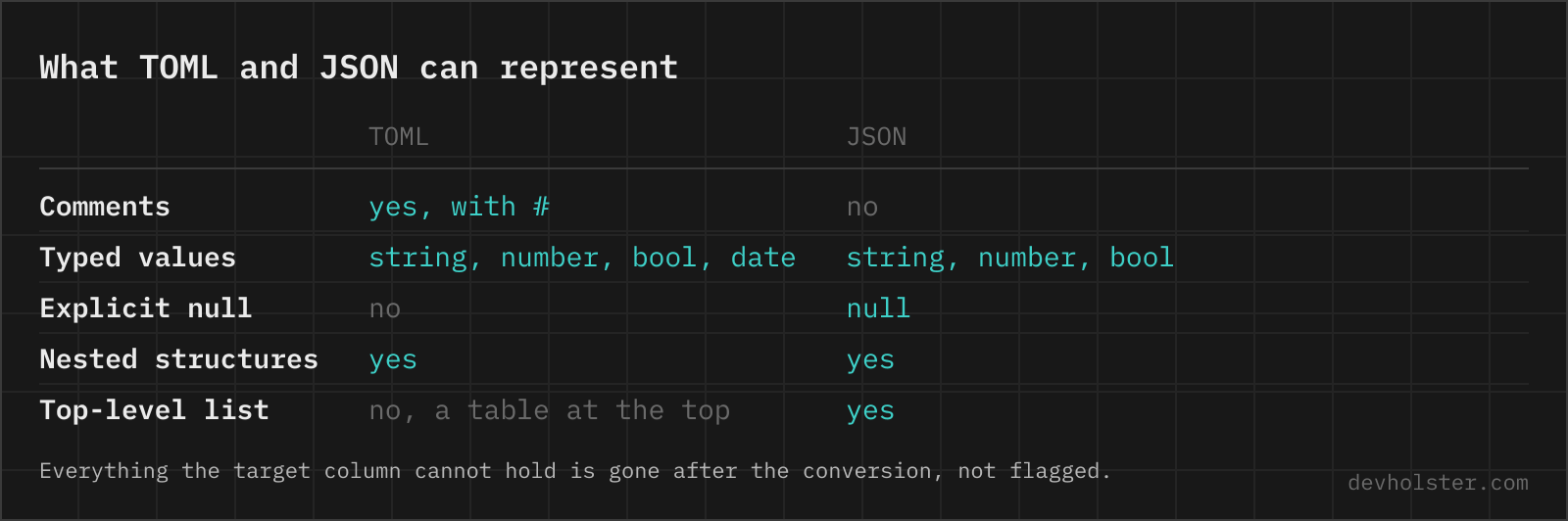
- Comments are gone. Whatever documentation the TOML carried is not in the JSON. Keep the TOML as the maintained original if the comments have value.
- Dates are strings now. Code consuming the JSON must parse date fields itself; nothing marks them as dates anymore.
- Big integers. TOML allows full 64-bit integers, JavaScript numbers are exact only to 2^53. IDs and hashes stored as huge integers can silently round; store them as strings at the source if you control it.
- Always an object at the top. The JSON output is an object, never an array, because TOML documents are tables. Downstream code expecting an array should read the relevant key, not the document root.
- Key order. The JSON keeps the order keys appear in the TOML, but JSON consumers are entitled to ignore object order entirely. Any logic that depends on it is fragile regardless of format.
TOML questions
Is it safe to paste a Cargo.toml or pyproject.toml into an online converter?
Only into one that parses in your browser. These files routinely carry private registry URLs, index tokens and the full dependency list of an unreleased product, which is more than most teams want on a stranger's server. The parsing runs here as JavaScript inside your tab, with nothing uploaded, logged or stored, and it works offline. For any other tool, watch the Network tab in devtools while converting a throwaway file first.
How do I read values from a Cargo.toml or pyproject.toml in my code?
Convert the file to JSON here and consume that, or use a TOML parser directly: Python ships tomllib in the standard library since 3.11 (import tomllib, note it only reads), Rust has the toml crate, JavaScript has smol-toml and @iarna/toml. Converting to JSON is the pragmatic route when the consuming side already speaks JSON, for example jq pipelines, JavaScript without extra dependencies, or a quick look at the structure.
What happens to TOML dates when converting to JSON?
They become strings, because JSON has no date type. A date without time like 2023-04-01 stays exactly that string, a full datetime like 1979-05-27T07:32:00Z comes out as an ISO 8601 string with milliseconds (1979-05-27T07:32:00.000Z), and a local time becomes 07:32:00.000. The information survives; the type does not, which is the standard trade every TOML-to-JSON conversion makes.
Does converting TOML to JSON lose the comments?
Yes, necessarily. JSON has no comment syntax, so every # comment in the TOML is dropped, and there is no flag that could change that. If the comments matter, keep the TOML as the source of truth and treat the JSON as a generated view of it, not as a replacement.
Are duplicate keys allowed in TOML?
No, defining the same key twice is a hard error in the TOML spec, and this converter reports it instead of letting the last value win. That is a real difference from JSON, where most parsers silently keep the last duplicate. If the error surprises you, look for a key defined once at the top of a table and again further down, or a [table] header repeated twice.
Why do I get a parse error on a value without quotes?
Because TOML has no unquoted strings. In YAML you can write name: alpha, but TOML requires name = "alpha"; a bare word on the right side of = is only valid if it is a boolean, a number, or a date. This is the single most common error when writing TOML by hand after coming from YAML, and the error message points at the offending line.
What is the difference between [server] and [[server]] in TOML?
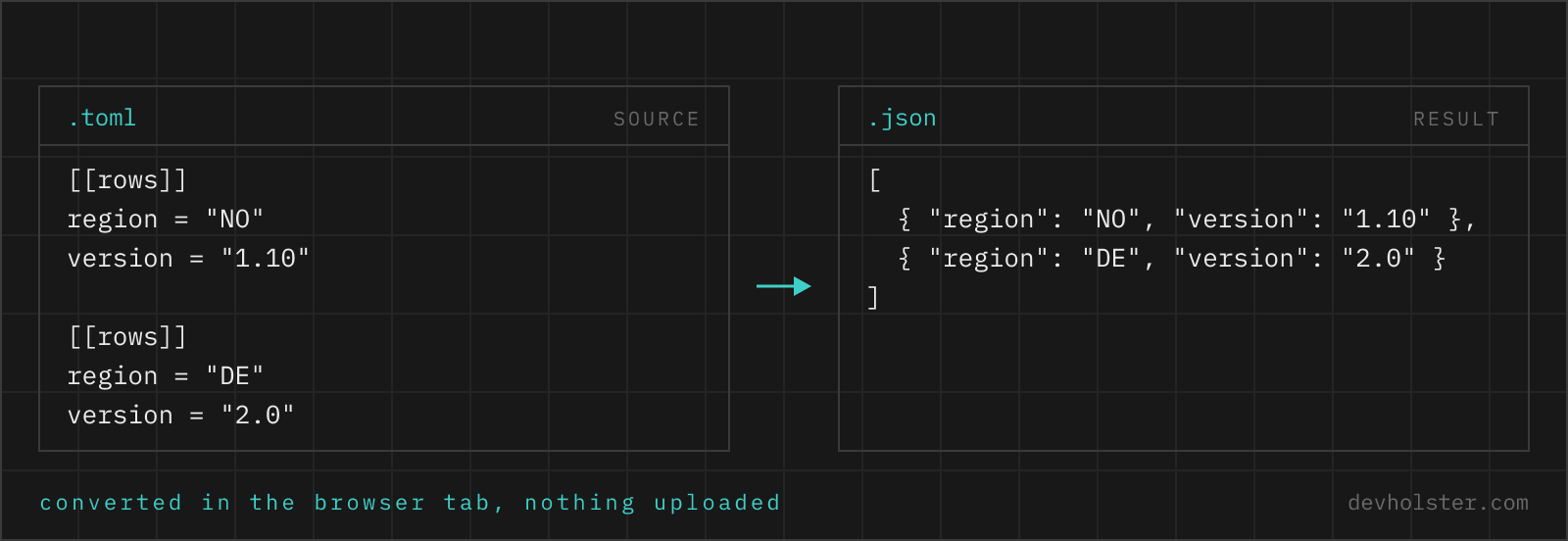
Single brackets define a table, which converts to one JSON object. Double brackets define one element of an array of tables, so several [[server]] sections convert to a JSON array of objects, in document order. Mixing them up is an error the parser catches: you cannot define [server] and later [[server]] for the same name.
Can a TOML file have a top-level array like JSON?
No. A TOML document is always a table at the top level, so the converted JSON is always an object, never an array or a bare value. If you need a list at the top, TOML forces a wrapper key, for example [[items]] sections that convert to {"items": [...]}. JSON documents that are top-level arrays therefore have no direct TOML round trip.
Are big integers from TOML safe in JSON?
Up to 2^53 minus 1, yes. TOML specifies 64-bit integers, but this converter produces JavaScript numbers, which hold integers exactly only up to 9007199254740991. A larger value, say a snowflake ID stored as a TOML integer, would lose precision silently. Values that big are safer written as strings in the TOML source; if you cannot change the source, treat the converted number as suspect.