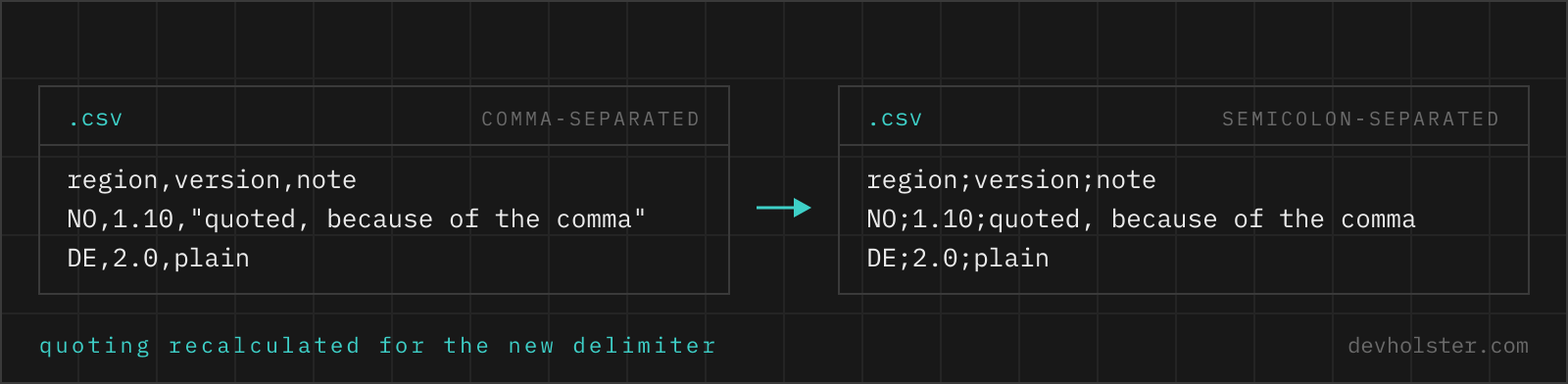
Why two CSV files disagree about the separator
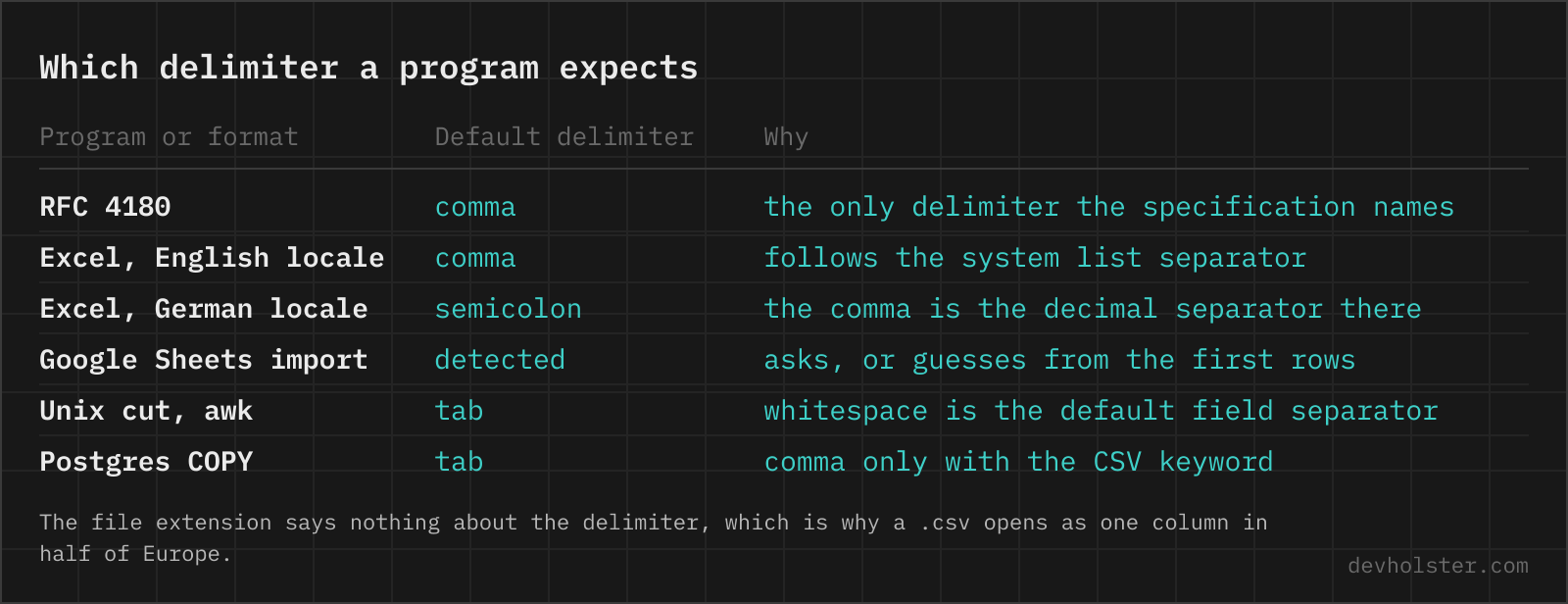
The C in CSV stands for comma, and RFC 4180 knows no other delimiter. In practice the comma lost, and the reason is arithmetic rather than taste: in German, French, Spanish, Italian and most other European locales the comma is the decimal mark, so 1.249,90 is a price and a comma-separated file full of prices needs a quote on every second cell. Those locales therefore use the semicolon as the list separator, and every Office application on such a machine writes and expects semicolons.
The setting lives on the machine, not in the file. Nothing inside a CSV says which delimiter it uses, so the same file genuinely means different things in two offices, and "the export is broken" turns out to be "the export is fine, the reader guessed differently". Tab and pipe show up for a third reason: the data itself contains commas and semicolons, and a delimiter that never appears in the values removes the quoting problem entirely.
How to use this converter
Paste your CSV on the left or drop a .csv file on it. The result appears while you type, and the line under the output names the delimiter that was read, so you can see what the tool decided before you trust the output.
- Paste or drop the file. The input delimiter is detected; the
fromfield only exists for the files where detection has nothing to go on, like a single-column export. - Set
to. Type the character (;) or its name (semicolon,tab,pipe). Names exist because a text input cannot receive a typed tab. - Check the column count. The stats strip shows how many fields the first row has, and the note warns when later rows disagree, which means the source quoting was already broken.
--quote-all
Wraps every field in double quotes instead of only the ones that need it. Some older importers and a few database loaders insist on it, and it makes an empty field distinguishable from a missing one.
--trim
Strips leading and trailing spaces from every field. Exports that pad columns for readability are the reason a lookup on "Vienna " quietly fails.
--lf
Switches line endings from CRLF, which RFC 4180 and Excel want, to bare LF for git-tracked files and Unix pipelines.
Why replacing the character in an editor breaks the file
The obvious move is search and replace: every ; becomes a ,. It works on clean data and destroys everything else, because a CSV has two kinds of delimiter characters and they look identical.
| Source line (semicolon) | Search and replace | Parsed and rewritten |
|---|---|---|
1;"Lovelace, Ada";1249,90 | 1,"Lovelace, Ada",1249,90 | 1,"Lovelace, Ada","1249,90" |
| Fields after parsing | 4, and the price is split | 3, and the price is intact |
The replaced version has four fields where the original had three: the decimal comma in 1249,90 is now a delimiter. Proper conversion parses the file into rows and cells first, then writes them back with the new delimiter and the quoting that delimiter needs. That is why the price gains quotes it did not have and, in the other direction, why "Lovelace, Ada" loses them.
The same trap catches sed, tr and awk -F, none of which know what a quoted field is. It also catches the fastest failure mode of all: a file where the replace worked for 400 rows and broke on row 401, so the error surfaces three days later in whatever system imported it.
Which delimiter to pick
| Delimiter | Use it when | Watch out for |
|---|---|---|
, comma | The file crosses company or country borders | Opens in one column on a European Excel |
; semicolon | The file is for Excel in a European locale | Meaningless to most non-Office parsers |
| tab | Database loaders, pipelines, clipboard paste into a sheet | Invisible, and web forms turn it into spaces |
| pipe | Data full of commas and semicolons | Appears in free-text fields more often than you think |
Comma when you do not know who opens it, semicolon when you know it is a European Excel, tab when a machine reads it. If none of those work because the data contains all of them, the delimiter is not the problem any more, the format is; a typed format like JSON Lines or a real spreadsheet file will hurt less than the fifth round of quoting bugs.
How the input delimiter is detected
Counting characters in the first line, which is what most tools do, is wrong often enough to matter: a header like name;address;notes is unambiguous, but a first data row of 1;"Wien, 1010";3 has two commas and two semicolons.
So the file is parsed once with each candidate, comma, semicolon, tab and pipe, over up to the first 20 rows, and the winner is the one that produces more than one field and the same field count on every row. A delimiter that splits rows unevenly is not the delimiter. If none of them is consistent, the one producing the most fields wins, which is the old heuristic as a fallback. The result is printed under the output, and from overrides it when you know better.
The same job in Python, on the command line and in Excel
In Python the two-line pandas version and the dependency-free csv module version are both in the FAQ. On the command line, csvformat -d ";" -D "," from csvkit and mlr --icsv --ifs ";" --ocsv --ofs "," from Miller both parse properly and stream, so they handle files far larger than a browser tab should ever see.
In Excel there is no "change the delimiter" command, which is why this page gets searched for. What Excel offers instead is a full re-import: open the file through Data, Get Data, From Text/CSV, set the delimiter there, then save as CSV in whatever the machine's list separator happens to be. Six clicks and a locale-dependent outcome, which is a fair description of most CSV work in Excel.
What to check once it is converted
- The field count. One number, under the panes. If the source had 12 columns and the output says 12, the quoting survived.
- The rows that disagree. The note names how many rows have a different field count. In a healthy file that number is zero.
- Decimal numbers. Converting to comma-separated, a European price column should now be quoted. If it is not, those values were not what you thought they were.
- Line endings. CRLF for Excel and Windows, LF for git and Unix. Mixed consumers, take CRLF, more parsers tolerate it.
- The encoding. Unchanged by design. The download carries a UTF-8 BOM so Excel reads it correctly; if you copy the text out instead, that BOM is not there.
Delimiter questions
Is it safe to run an internal export through an online CSV tool?
Only through one that never sends the file anywhere. A delimiter swap sounds harmless, but the files people swap delimiters on are order lists, member exports and billing tables, and a server-side converter has all of it. This page parses and rewrites the text in your tab with JavaScript, so the data stays on your machine and the tool keeps working with the network switched off. That last part is the test worth running on any tool that claims to be local.
How do I change a CSV delimiter with sed or awk?
You can, and you should not, unless you have checked that no value contains a quote or the delimiter. sed "s/;/,/g" file.csv replaces every semicolon, including the ones inside "Musterstadt; Bezirk 3", which silently adds a column to that row. awk -F";" -v OFS="," "{$1=$1; print}" has exactly the same blind spot, because awk has no concept of quoted fields either. The safe command-line answers are csvformat -d ";" -D "," file.csv from csvkit, mlr --icsv --ifs ";" --ocsv --ofs "," cat file.csv with Miller, or a five-line Python script with the csv module.
How do I read a semicolon CSV and write a comma CSV in Python?
With pandas: pd.read_csv("in.csv", sep=";", dtype=str).to_csv("out.csv", index=False). dtype=str keeps article numbers with leading zeros intact, which the default type inference destroys. With the standard library and no dependencies: open both files, csv.reader(src, delimiter=";") into csv.writer(dst, delimiter=","), and pass newline="" to both open() calls, otherwise Windows turns every line ending into a blank row. Both routes handle quoting correctly, which is the entire reason to use them over a text replace.
Can I make Excel open a semicolon file without changing my Windows settings?
Three ways. Put the line sep=; at the very top of the file, which Excel reads as an instruction and most other parsers read as a data row, so only do it for files meant for Excel. Or import instead of double-clicking: Data, Get Data, From Text/CSV lets you pick the delimiter and the encoding before anything is loaded. Or convert the file here so its delimiter matches whatever your Excel expects, which is the option that also works for the colleague you send it to.
Which delimiter should I use when my data contains commas and semicolons?
Tab, then pipe. A tab almost never occurs inside real values and needs no quoting, which is why database loaders default to it; the downside is that it is invisible in an editor and a copy-paste through a web form can turn it into spaces. A pipe is visible and nearly as safe, though it does show up in free-text fields. If the data is genuinely wild, the honest answer is to stop fighting the delimiter and use a format with a type system: JSON Lines, Parquet, or a spreadsheet file.
Does changing the delimiter change the quoting in the file?
Yes, and it has to. Quoting exists to protect values that contain the delimiter, so the set of cells needing quotes changes the moment the delimiter does. Going from semicolon to comma, a German price column of 1249,90 suddenly needs quotes it never had. Going the other way, "Hopper, Grace" loses its quotes because the comma is now ordinary text. A converter that keeps the original quoting is producing a broken file, which is what a plain search and replace does.
Why do my rows have different numbers of fields after converting?
Almost always because the source file was already broken, and the conversion made it visible. The usual cause is an export that wrote a quote character into a value without doubling it, so the parser reads the rest of the line as one quoted field. The row counter under the panes warns when rows disagree on their field count. To find the culprit, look for lines with an odd number of double quotes; a single stray quote is enough to swallow everything after it, sometimes for several lines.
How do I convert a pipe-delimited or tab-delimited file to comma-separated?
Set from to pipe or tab and to to comma, or leave from empty and let the detection handle it. Both fields accept the character itself or its name, so typing tab is the same as pasting a real tab, which a text input otherwise swallows as a focus change. Everything else works the same: values containing the new delimiter get quoted, values that no longer need protection lose their quotes.
Can a CSV delimiter be more than one character?
Not in any format worth calling CSV. RFC 4180 knows exactly one delimiter character, and Excel, the csv module in Python, Go, Java and every database loader assume a single character. Multi-character separators exist in the wild, mostly ~ and || in exports from older ERP systems, and they need a parser that supports them: pandas does with sep="\\|\\|" and engine="python", and awk with a regex FS. If you are choosing a format rather than reading one, pick tab and move on.
Does changing the delimiter change the encoding of my file?
No. Delimiter and encoding are independent, and a converter that touches both is doing something you did not ask for. The text you paste in comes back with exactly the same characters. What the download adds is a UTF-8 BOM, the three bytes that tell Excel to read the file as UTF-8 instead of guessing a code page. If your umlauts were already broken when you pasted, they will still be broken afterwards, because the original bytes are lost long before the file reaches this page.
How do I find out which delimiter a CSV uses?
Open the first two or three lines in a plain text editor and look, which answers it in five seconds for a file you can open. Programmatically, Python has csv.Sniffer().sniff(sample).delimiter, and it is right most of the time and confidently wrong on files where one field contains many commas. The approach here is to parse the file once with each candidate and keep the one that yields the same number of fields on every line, which handles that case; the detected delimiter is printed under the output so you can see what it decided.