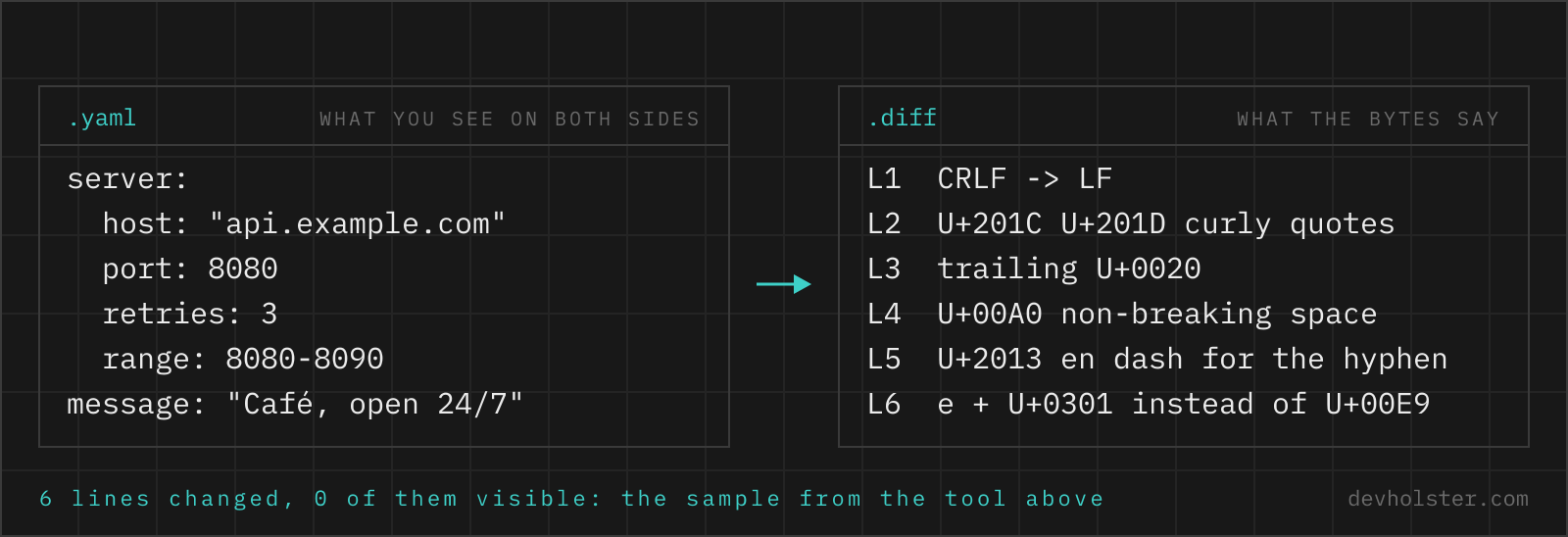
Two texts go in. What comes out is which lines changed, and which of the changed lines do not look changed at all. CRLF against LF, a non-breaking space, a curly quote, an accented letter stored as two code points. Every diff tool shows those lines as modified and none of them says why. This one does.
The lines look identical, the diff disagrees
The symptom is familiar. A diff marks a line as changed, red on one side and green on the other, and you stare at both sides and they are the same. A colleague's editor changed the file, a config came back from Word, a snippet was pasted out of Slack, and now the review contains 40 changed lines and one actual change.
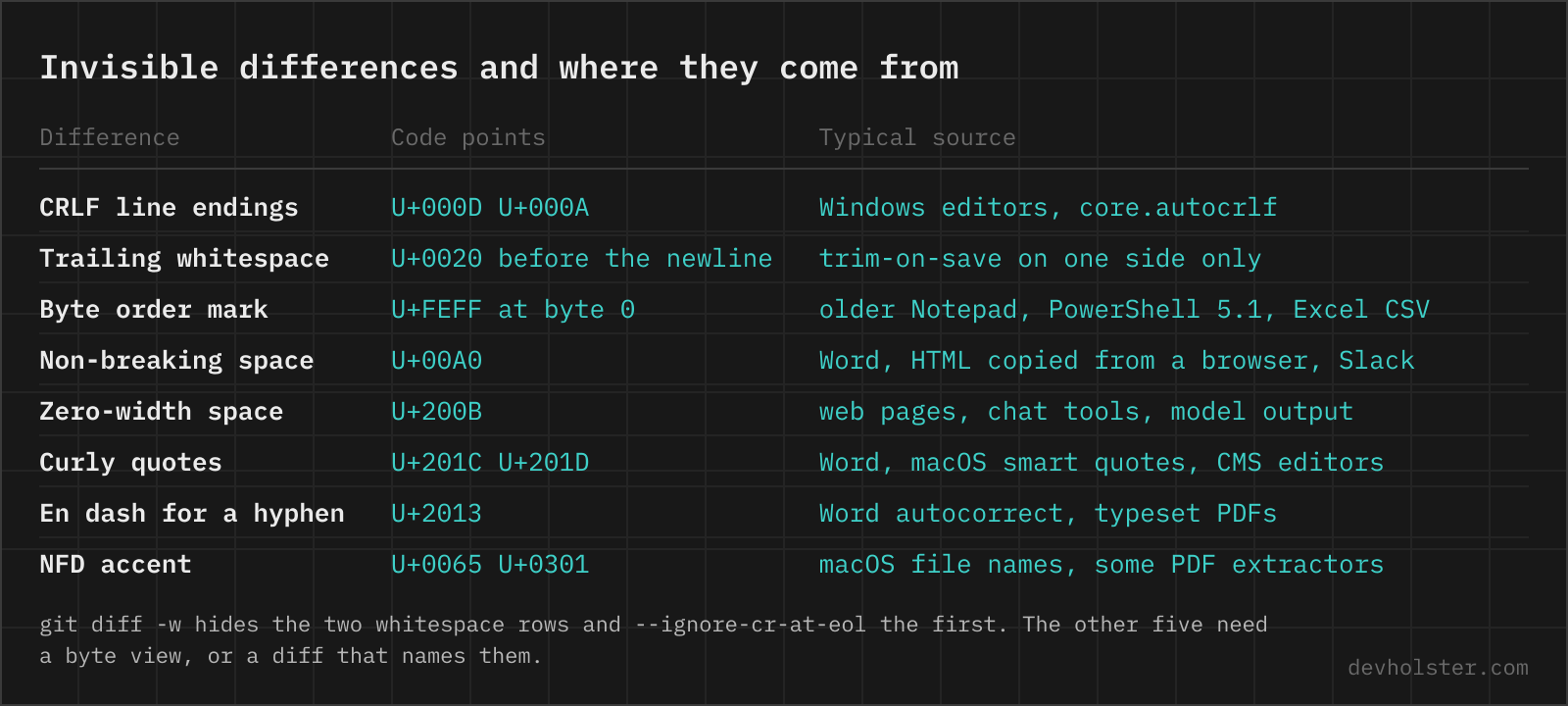
The cause is always a byte that no font renders differently. The list below is the one the findings panel above checks for, in the order you are likely to meet them.
| What differs | Code points | Where it comes from |
|---|---|---|
| CRLF against LF line endings | U+000D U+000A against U+000A | Windows editors, Notepad, core.autocrlf, files edited on two operating systems |
| Trailing whitespace | U+0020 or U+0009 before the newline | Editors with trim-on-save on one side only |
| Tabs against spaces | U+0009 against U+0020 | Two editors with different indent settings, an auto-formatter run once |
| Missing newline at end of file | U+000A absent after the last line | Editors that do not add it, heredocs, strings written without a final \n |
| Byte order mark | U+FEFF at position 0 | Older Notepad, Windows PowerShell 5.1 with -Encoding utf8, Excel "CSV UTF-8" export |
| Non-breaking space | U+00A0 against U+0020 | Word, text copied out of a browser, Slack, some keyboard layouts on Option+Space |
| Zero-width characters | U+200B, U+200C, U+200D, U+2060, U+00AD | Web pages, chat tools, generated text, some PDF extractors |
| Curly against straight quotes | U+2018 U+2019 U+201C U+201D against U+0027 U+0022 | Word, macOS smart quotes, CMS editors, some Markdown renderers |
| Dash characters | U+2013, U+2014, U+2212 against U+002D | Word autocorrect, typeset PDFs, text copied from web pages |
| NFC against NFD normalization | U+00E9 against U+0065 U+0301 | macOS file names from HFS+ volumes, some PDF extractors |
The tool above runs every changed line pair through those normalizations and reports which one makes the two sides equal. For a single text rather than a pair, the invisible character detector lists every hidden code point with its position.
When every changed line falls into that list, the summary line says so outright instead of leaving you to compare glyphs.
How to read the result
Paste or drop the original into 01 and the changed text into 02. The diff under it updates while you type. Side by side puts the original left and the changed text right with both sets of line numbers, and a changed line shows the words that differ highlighted inside the line, so a one-word edit in a 200-character line is found without reading the line. Unified is the single-column form with - and +, the one git prints, and it shows the @@ hunk headers once --context is set.
The options are the ones people reach for on the command line, named after the flags they mirror:
--ignore-whitespacecompares lines with every whitespace difference removed, thegit diff -wreading: indentation, trailing spaces, tabs against spaces, doubled spaces and line endings all stop counting. In words mode it switches to a word diff that ignores whitespace between words.--ignore-casetreatsFooandfooas equal.--ignore-eoltreats CRLF and LF as the same line ending and forgives a missing newline after the last line. The CRLF half isgit diff --ignore-cr-at-eol, without touching any other whitespace. Only a dropped file keeps its CRLF. A browser text field reports every pasted line break as LF.--context Nshows only the changed hunks with N lines around each, the-U Nof diff and git. Empty shows every line, which is the better view for short texts.lines,words,charsset the unit. Lines for code and configs. Words for prose, where a reflowed paragraph would otherwise read as deleted and rewritten. Chars for keys, hashes and short strings. A reworded sentence stays a change in every unit, and whether it still says the same thing is a question for semantic similarity.
The findings panel works on the raw text regardless of the options, so switching --ignore-whitespace on hides the trailing spaces from the diff and the panel still tells you they are there. Copy patch puts a unified diff on the clipboard with a/ and b/ headers, which git apply and patch -p1 take as they are. If you dropped a file, its name stands in both headers, so git apply knows which file to patch. The patch carries the --context setting with a floor of one line, because git apply refuses zero-context hunks unless it is run with --unidiff-zero. We use that button mostly for the last metre of a review: fix the text in the browser, copy the patch, git apply it in the checkout. It costs a round trip through the clipboard, and for more than a handful of hunks an editor with git integration is the better tool.
Large inputs are fine. 30,000 lines on each side diff in well under a second. Word-level highlighting runs on the changed line pairs only, and the display stops at 4,000 rows unless --context narrows it. Two texts that have nothing in common are the one slow case, because the algorithm then has to prove there is no shared line, and the tool gives up after two seconds with a message rather than freezing the tab.
How a line diff works
A diff does not compare line 5 with line 5. It looks for the longest sequence of lines that appear in both texts in the same order, and everything that is not part of that sequence is a deletion or an insertion. The algorithm that finds it, Myers' 1986 shortest-edit-script algorithm, is what diff, git and the diff npm package behind this tool run. Its running time grows with the length of the files times the size of the change, which is why a one-line edit in a huge file is instant and two unrelated files of the same length are slow.
That model explains the two things people find odd about diffs. There is no such thing as a "changed" line in the output, only a removed line next to an added one, and it is the viewer that pairs them and highlights the words inside. And when a block of lines moves, it is shown as removed in one place and added in the other, because the algorithm has no concept of movement. git diff --color-moved paints such blocks in a different colour but does not change the output.
The unified format that carries the result is small enough to read in a minute:
--- a/config.toml
+++ b/config.toml
@@ -1,4 +1,5 @@
 [server]
-port = 8080
+port = 8443
 workers = 4
+tls = true
 timeout = 30
--- names the old file, +++ the new one. The hunk header says where the block sits: line 1 of the old file, four lines long, and line 1 of the new file, five lines long. Then context with a leading space, removals with -, additions with +. The context is not decoration. It is what lets patch find the right spot after the surrounding lines have moved, and three lines of it is the default everywhere because that is usually enough to be unambiguous and rarely enough to collide with a second change.
Why git shows the whole file as changed
You change one line, git diff lists every line of the file, and git diff --stat reports a rewrite. Nine times out of ten the editor saved the file with CRLF where the repository has LF, or the other way round. Each line now differs in its last byte, which is exactly the kind of change a diff reports and a screen does not render.
$ git diff --stat
 config.toml | 214 ++++++++++++++++--------------
 1 file changed, 107 insertions(+), 107 deletions(-)

$ git diff --ignore-cr-at-eol --stat
 config.toml | 2 +-
 1 file changed, 1 insertion(+), 1 deletion(-)
$ printf "* text=auto\n" > .gitattributes
$ git add --renormalize .
$ git diff --cached --stat
 config.toml | 2 +-
 1 file changed, 1 insertion(+), 1 deletion(-)
The diagnosis is one flag: git diff --ignore-cr-at-eol shows the real change if line endings were the cause, and git diff -w shows it if an auto-formatter reindented everything. file config.toml prints "with CRLF line terminators" when that is the state on disk. The fix that lasts is a .gitattributes with * text=auto, committed, followed by git add --renormalize . once, so that git stores LF in the repository and every checkout gets its platform's ending. core.autocrlf does a similar job per machine, and that is its weakness. It has to be set on every clone, and the one developer who did not set it reintroduces the problem with their next commit.
Two more flags worth knowing. git diff --word-diff shows changes inside lines as [-old-]{+new+} instead of whole lines, the better view for prose and Markdown. And git diff --no-index a.txt b.txt diffs two arbitrary files with git's engine, colours and flags, whether or not they are tracked or even inside a repository.
Comparing files in the terminal
For anything that already lives on disk, the command line is faster than any website, and the flags map one to one onto the options above.
| Task | Command |
|---|---|
| unified diff of two files | diff -u old.txt new.txt |
| side by side, 200 columns wide | diff -y -W 200 old.txt new.txt |
| ignore whitespace, case, blank lines | diff -u -w -i -B old.txt new.txt |
| ignore Windows line endings | diff -u --strip-trailing-cr old.txt new.txt |
| git's diff for untracked files | git diff --no-index old.txt new.txt |
| are they identical at all, and where not | cmp old.txt new.txt |
| compare as sets, order ignored | diff <(sort old.txt) <(sort new.txt) |
| which files differ between two directories | diff -rq dir-a dir-b |
| see the bytes that differ | diff <(xxd old.txt) <(xxd new.txt) |
cmp is the one people forget. It answers "are these two files the same" in a byte comparison and, with -l, lists every differing byte offset, which is the quickest route to a stray NBSP when the diff output itself looks identical on both sides. The process substitution in the sort and xxd rows is bash and zsh syntax. In plain sh, write the intermediate files out.
JSON and YAML: text diff or semantic diff
A text diff of two JSON files reports a reordered key as one deletion and one insertion, and a reindented file as changed from top to bottom, while neither changes the data. For configuration that is usually what you want to know anyway, because the file is what gets deployed. For an API response or an export, what you want is the semantic answer: which values differ.
The cheap route is to normalize first and diff second. jq -S . sorts keys recursively and pretty-prints with two spaces, so diff <(jq -S . a.json) <(jq -S . b.json) shows only real differences. The JSON formatter on this site does the same in the browser with its sort-keys option: format both files with it, paste the results into 01 and 02 above, and the key order stops being a difference. For YAML, yq -P 'sort_keys(..)' does the equivalent.
A semantic diff is not always the better one. Two YAML files that load to the same data can still behave differently, because one quotes NO and the other does not (the Norway problem), and a textual diff is the one that shows you that line.
diff, patch and merge
diff lists the changes between two versions. patch replays that list onto a file, using the context lines to find the right spot after line numbers have shifted. merge is the three-way case, two versions with a common ancestor, conflicting wherever both touched the same lines. git apply is patch, git merge is merge.
Diff and patch questions
How do I compare two text files on Windows, Mac or Linux?
On Mac and Linux the diff command is already installed: diff -u old.txt new.txt prints a unified diff, and diff -y old.txt new.txt prints the two files side by side. Windows has fc old.txt new.txt in cmd and Compare-Object (Get-Content old.txt) (Get-Content new.txt) in PowerShell, both less readable than diff, so most people on Windows use git diff --no-index old.txt new.txt from Git Bash or VS Code (select both files, right click, Compare Selected). An in-browser tool like the one above does the same without installing anything, and names the differences the terminal only shows as ^M.
How do I diff two files in the terminal?
diff -u a.txt b.txt. The -u gives you the unified format with three lines of context around every change, the format git and every code review tool use. Add -w to ignore whitespace, -i to ignore case, -B to ignore blank lines, and --strip-trailing-cr when one file comes from Windows. For two directories, diff -rq dir1 dir2 lists only the file names that differ.
What does @@ -1,4 +1,5 @@ mean in a diff?
It is a hunk header. The block that follows starts at line 1 of the old file and covers 4 lines there, and starts at line 1 of the new file and covers 5 lines there. The minus side is the original, the plus side the changed version. After the header, lines starting with a space are unchanged context, lines with - were removed, lines with + were added. A count of 0, as in @@ -10,0 +11,3 @@, means pure insertion, and the line number then points at the line before the insertion.
How do I make git diff ignore whitespace?
git diff -w (long form --ignore-all-space) ignores every whitespace difference, git diff -b ignores changes in the amount of whitespace but not its presence, and --ignore-blank-lines skips added or removed empty lines. --ignore-space-at-eol handles trailing whitespace, --ignore-cr-at-eol handles CRLF against LF. The same flags work on git log -p, git show and git blame -w. They only change what is shown, not what is committed.
Why does git show the whole file as changed when I only edited one line?
Almost always line endings. The file was saved with CRLF on one side and LF on the other, so every line differs in its last byte. Check with git diff --ignore-cr-at-eol, which will show only your real change, or with file yourfile, which prints "with CRLF line terminators". The fix is a .gitattributes with * text=auto so git normalizes to LF in the repository. Two other causes: a changed BOM at the top of the file, and a formatter that reindented everything, which git diff -w reveals.
How do I compare two Word documents?
Word has it built in: Review, Compare, pick the original and the revised document, and it produces a third document with tracked changes. For a plain text diff, save both as .txt (File, Save As, Plain Text with UTF-8) and diff those, but expect curly quotes, non-breaking spaces and en dashes that Word inserted on its own. The findings list above names exactly those, which is the fastest way to see whether a Word round trip changed bytes without changing words. For .docx in git, a textconv filter running pandoc gives readable diffs.
What is the difference between diff and patch?
diff produces the description of changes, patch applies it to a file.
How do I apply a .patch file?
git apply fix.patch inside the repository, or patch -p1 < fix.patch anywhere. The -p1 strips the a/ and b/ prefixes from the file names in the patch header, which is what git diff writes and what the copy button above produces. git apply --check fix.patch tells you beforehand whether it would apply cleanly. A patch made by plain diff -u without prefixes is applied with patch -p0.
What is a unified diff?
The diff format diff -u and git produce: - and + lines inside @@ hunks, with three lines of unchanged context around every change.
How do I compare two JSON files?
Normalize both first, then diff the text: jq -S . a.json > a.norm.json sorts keys recursively and reindents, so the diff shows only real changes in values and structure. Without that step, a textual diff reports every reordered key and every reindented line as a change, which is noise. For a semantic view on the command line there is jd or the diff mode of jq-based scripts, and in Python DeepDiff reports added, removed and changed paths. The JSON formatter on this site has a sort-keys option for the same purpose in the browser.
Why does diff say two files differ when they look the same?
Because bytes differ that no font renders: CRLF against LF, a BOM, trailing spaces, a non-breaking space, a zero-width space, or an accented letter stored as two code points instead of one. cmp -l a.txt b.txt prints the byte offsets, and diff <(xxd a.txt) <(xxd b.txt) shows the bytes around them. The findings above name the same things without the hex dump.
Is it safe to paste contracts or source code into an online diff tool?
Only if the comparison runs in your browser. Most online diff tools post both texts to a server, store them for the duration of the session or longer, and say so in their terms, which is a problem for code under NDA and for anything with personal data. A tool that computes the diff client-side never transmits the text, and you can verify that with the network tab of the developer tools. The diff on this page is computed in the tab, nothing is uploaded, and the page works with the network disconnected.
How do I diff two strings in Python or JavaScript?
Python: difflib.unified_diff(a.splitlines(), b.splitlines(), lineterm="") yields unified diff lines, and difflib.SequenceMatcher(None, a, b).ratio() gives a similarity between 0 and 1. JavaScript: the diff package (jsdiff) exports diffLines, diffWords and diffChars, and createTwoFilesPatch builds a unified patch. That is the library behind the tool above.