Why format XML at all
XML that machines exchange arrives compressed to one line: SOAP responses, RSS feeds, sitemaps, invoice formats like ZUGFeRD/XRechnung, Maven POMs fetched from a repository. The producing serialiser skips whitespace because it is payload, not information. The result is technically fine and practically unreadable; a 50 KB response on one line defeats both eyes and editors.
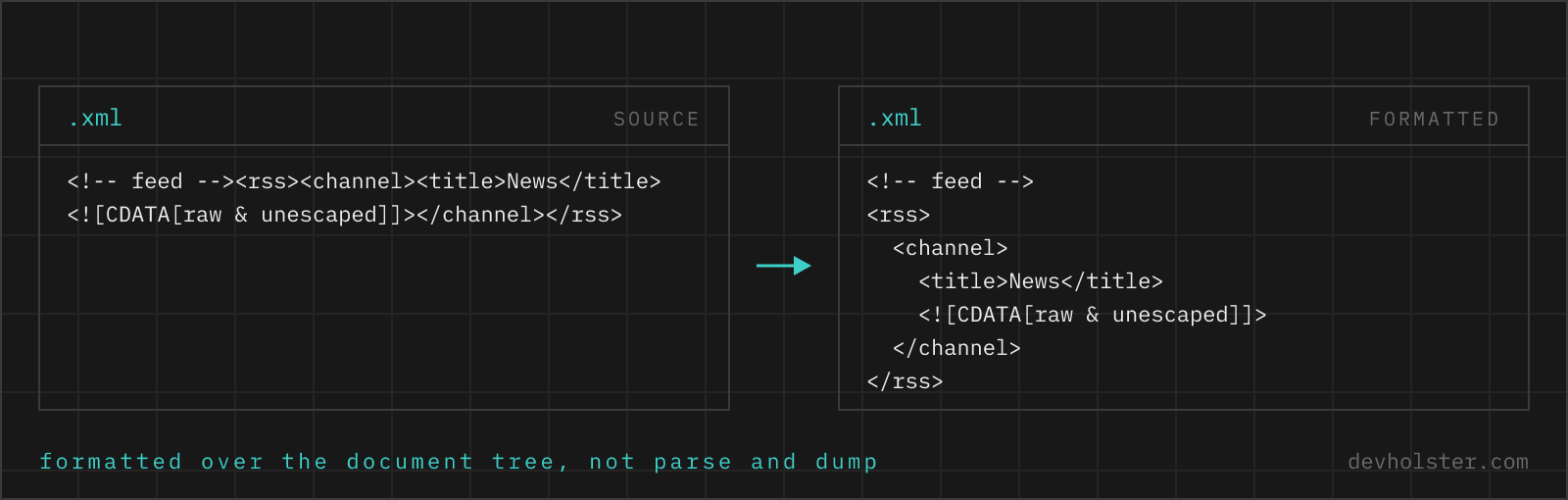
Formatting rebuilds the visual tree: one element per line, children indented under parents, attributes staying on their tag. Once the document is laid out, the questions that made you open it (is the namespace right, which element is missing, what does the error detail say) answer themselves by scanning. The validator half runs first: XML parsers are required to reject markup that is not well-formed, so before anything is printed, this tool tells you whether the document parses at all, and where it stops if not.
How to use this formatter
Paste XML into the left pane, or drop an .xml file on it, and the pretty-printed result appears on the right while you type. Markup that fails the well-formedness check shows the error inline in the output pane, with the line quoted and a caret under the position.
- Paste or drop your XML. A feed, a SOAP envelope, a config, a sitemap; broken markup you want diagnosed also works.
- Pick the indent. 2 spaces, 4 spaces, tabs, or
minto strip inter-tag whitespace for transfer. - Check the numbers. The strip under the panes shows size, line count, total element count and whether the document is well-formed.
- Copy or download. The result goes to your clipboard or saves as an
.xmlfile.
--self-close
Rewrites empty elements from <tag></tag> to <tag/>. Both forms mean the same to a parser; the short form reads better and shaves bytes. Off by default so the output stays as close to your input as possible.
--strip-comments
Removes every <!-- --> comment. Off by default, and worth knowing that it is a deliberate switch rather than the default behaviour: comments survive here unless you ask for them to go. Useful for trimming a vendor config down to the lines that matter, or before diffing two documents whose comments differ but whose data does not.
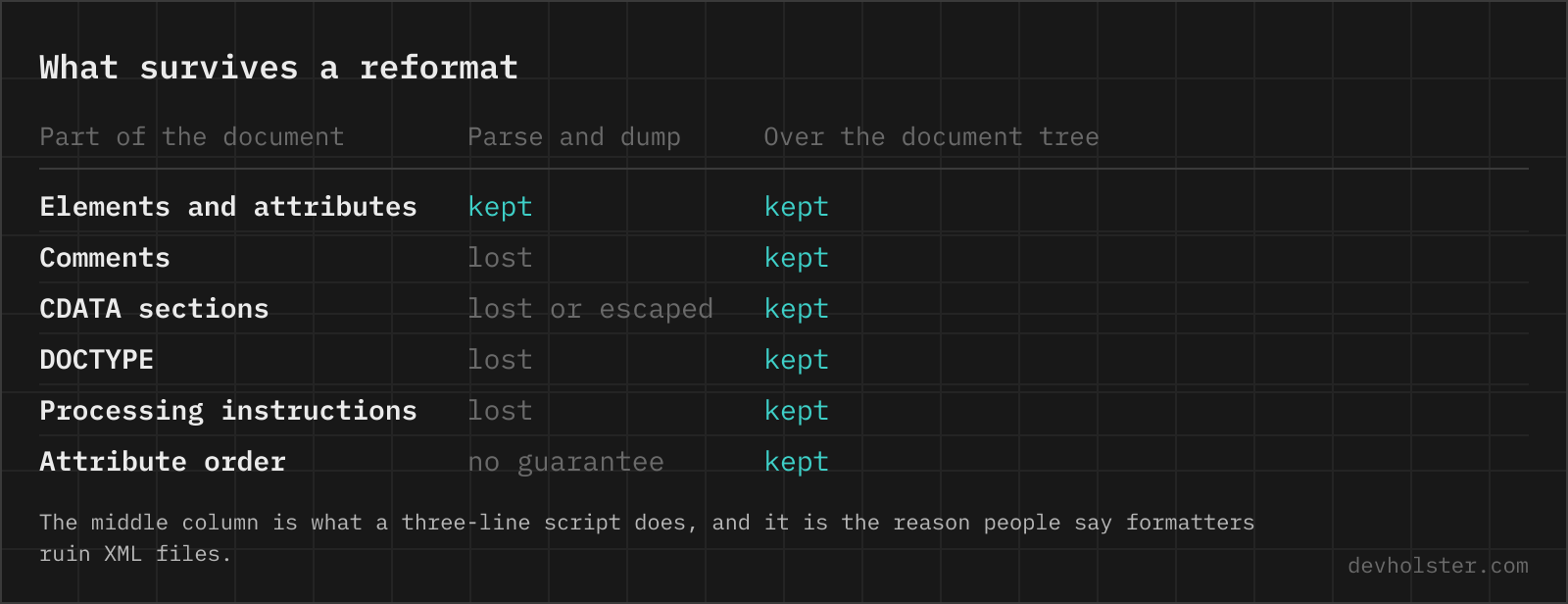
Three things this formatter deliberately keeps that many online tools lose: comments stay in place and in order, CDATA sections come through untouched instead of being unwrapped into escaped text, and the DOCTYPE plus any processing instruction (the <?xml-stylesheet?> line in a sitemap, for instance) survives instead of being dropped. If you have ever formatted a feed and watched the <!-- TODO --> markers vanish, that is the failure mode we mean.
Errors get the same treatment as in our other formatters: message, line and column, a code frame with a caret, and a button that drops your cursor on the offending character in the input.
Well-formed vs. valid: two different checks
XML has two levels of correctness, and the words are not interchangeable. Well-formed means the document obeys the syntax of the XML 1.0 specification itself: one root element, every tag closed, proper nesting, quoted attributes, escaped special characters. This is binary and universal; a document that is not well-formed is not XML, and every parser must refuse it.
Valid means the document additionally conforms to a schema (XSD, DTD, RELAX NG) that defines which elements may appear where, with which attributes and types. Validity only exists relative to a specific schema file. An invoice can be perfectly well-formed and still invalid against the XRechnung schema because a mandatory element is missing.
This tool checks well-formedness, which is the precondition for everything else. Schema validation needs the schema: xmllint --schema schema.xsd file.xml is the standard command-line route, and most ecosystems (JAXB, lxml, .NET) validate during parsing when handed the XSD.
The errors that actually occur
| Error | Cause and fix |
|---|---|
Raw & in text | URLs and company names ("R&D") pasted unescaped. Write &, or wrap the text in CDATA. |
| Unclosed tag | Usually a copy-paste that lost the closing line. The parser reports it where the mismatch surfaces, often at the next closing tag, so read upward from the caret. |
| Crossed nesting | <a><b></a></b>. Elements must close in reverse order of opening; the fix is structural, not syntactic. |
| Multiple roots | Two documents concatenated, or a fragment without its container. Wrap in one enclosing element. |
| Unquoted attribute | id=42 is HTML habit; XML requires id="42". |
Stray content before <?xml | The declaration, if present, must be the very first bytes. The usual culprit is an invisible UTF-8 BOM written by an editor, or a blank line. |
| Undefined entity | and friends are HTML entities. XML predefines only five: < > & ' ". Use numeric references like   for the rest. |
As with JSON, the parser stops at the first failure, so a badly mangled file takes several rounds. The live re-check keeps that loop short: fix, glance right, fix the next.
When whitespace is data: the honest limitation
Pretty-printing rewrites whitespace between tags, and in data-oriented XML (configs, feeds, API payloads) that whitespace carries nothing. But XML also serves as a document format, and in mixed content, text and elements interleaved as in <p>See the <b>red</b> button</p>, spaces between elements are part of the text. Reindenting such content can join or split words when the document is rendered.
This formatter also trims leading and trailing whitespace inside text values as part of laying out the tree, which is what you want for data XML and wrong for typeset documents. The spec even has an attribute for marking the difference, xml:space="preserve". Pretty-print data; leave documents (XHTML pages, DocBook, ODF internals) to tools that understand their vocabulary.
Online formatter vs. xmllint and the editor
Use this page when XML lands somewhere without your toolchain: a SOAP fault copied from a log, a feed you are debugging, an invoice file a customer sent, a machine where you cannot install anything. No setup, and because nothing is transmitted, pasting confidential business documents is not the leap of faith it is on upload-based formatters.
Use xmllint --format file.xml when the file is on your disk and in a pipeline; it also does schema validation, XPath queries and streaming for huge files. Editors format too: VS Code needs an XML extension (Red Hat's is the usual pick), IntelliJ formats XML out of the box. For files inside a repository, the formatter belongs in the toolchain so every commit agrees on the layout; this page is for the XML that reaches you outside of it.
When XML will not parse
Is it safe to paste internal XML files into an online formatter?
Only into a formatter that works in your browser. XML carries invoices, SOAP payloads, insurance and medical records and full ERP exports, which is exactly the material that must not land on an unknown server. Formatting runs here as JavaScript in your tab, with nothing uploaded, logged or stored, and it keeps working offline. For any other tool, open the Network tab in devtools and format a harmless document first: if a request goes out, so does everything you paste afterwards.
How do I make XML readable?
Pretty-print it, which means a line break after each tag and children indented one level deeper than their parent. Machine-generated XML arrives as one long line because whitespace costs bytes on the wire; the structure is intact, it is just not laid out for eyes. In an editor: VS Code formats with Shift+Alt+F once the XML extension is installed, Notepad++ needs the XML Tools plugin and its "Pretty print" entry, and on the command line xmllint --format file.xml does it without installing anything on macOS or Linux. Pasting into a browser tool is the quickest route when the XML is in your clipboard, for example a SOAP body copied out of a log.
How do I validate XML against an XSD schema?
With a validator that you feed both files, because well-formedness and schema validity are different checks. Well-formedness (every tag closed and nested, one root, attributes quoted, & escaped) is what a formatter can tell you and what the VALID stat above reports. Schema validation additionally checks that the elements are the ones the XSD allows, in the right order, with the right types, and it needs the .xsd file: xmllint --schema schema.xsd file.xml --noout on the command line, the XML Tools plugin in Notepad++, or the built-in validation in an IDE like IntelliJ or Visual Studio. A document can be perfectly well-formed and still be rejected by the receiving system, which is the distinction most "xml validator online" results skip over.
Why does my XML say "char & is not expected"?
A raw ampersand appears in text or an attribute, usually in a URL like ?page=2&size=10. In XML, & always starts an entity reference, so a bare one is a syntax error. Write & instead; the same goes for < in text, which must be <. This is the single most common well-formedness error in hand-edited XML.
Does formatting change the meaning of my XML?
For element structure, attributes, comments and CDATA: no, everything comes through unchanged and in order. What does change is whitespace between and around tags, that is what pretty-printing is. In documents where whitespace inside mixed content is significant (an XHTML paragraph, a document format), reindenting can alter rendering, so treat pretty-printing as a tool for data XML, not typeset documents.
What is the difference between XML and HTML?
HTML is a specific vocabulary with defined tags and forgiving parsers; XML is a generic syntax where you define the tags and parsers are strict by design. HTML browsers repair broken markup silently, an XML parser must stop at the first well-formedness error. HTML also allows unclosed tags like <br> and unquoted attributes; XML allows neither.
What is CDATA and when do I need it?
A CDATA section (<![CDATA[ ... ]]>) tells the parser to treat its content as literal text, so < > & lose their special meaning. It exists for embedding code, markup samples or scripts inside XML without escaping every character. You rarely need to write it yourself; where you meet it is feeds and legacy SOAP. This formatter passes CDATA sections through byte-identical, many online tools silently unwrap or mangle them.
Are comments allowed everywhere in XML?
Almost. <!-- comment --> can sit between elements anywhere in the document, including before or after the root element, but not inside a tag and not inside another comment, and the sequence -- is forbidden within comment text. This formatter keeps comments exactly where they are, which is worth checking in any formatter you use: tools built on parse-to-object-and-rebuild typically drop them.
Does XML need the <?xml version="1.0"?> declaration?
It is optional for XML 1.0 documents in UTF-8 or UTF-16, and required if the version is not 1.0 or the encoding is anything else. Leaving it in costs nothing and removes guesswork for consumers, so the common advice is to keep it. This tool preserves the declaration if your input has one and does not invent one if it does not.
Why must XML have exactly one root element?
The spec defines a document as one element containing everything else; two siblings at the top level make the document not well-formed. The practical reason is that a parser needs a single tree to hand back. If you have a series of fragments (log entries, records), wrap them in a container element or process them as separate documents.
Should empty elements be written <tag/> or <tag></tag>?
Both are equivalent to an XML parser, byte-for-byte different but semantically identical. <tag/> is shorter and signals "intentionally empty" at a glance; the long form sometimes survives because a serialiser wrote it. The --self-close option here rewrites empty elements to the short form. The one place to be careful is XHTML served as text/html, where browsers mistreat self-closed versions of tags like <script/>.
What does "XML parsing error: no element found" mean?
The parser reached the end of the document while still expecting markup, so the file is truncated, empty, or has a tag that was never closed. Three causes cover almost all of it: a download or export that stopped early, a response that was empty because the server returned an error body of zero length, and a stray character before the XML declaration, which must be the very first byte of the file. A UTF-8 byte order mark or a blank line ahead of it produces the equally common "XML declaration allowed only at the start of the document". Check the file size first, then the last line of the document, then the first byte.
How do I open a very large XML file?
Not with a normal editor, because loading a 500 MB document builds a tree several times its size in memory. Read it with a streaming parser instead: xmllint --stream validates without holding the file, xmlstarlet extracts specific paths, and SAX or iterparse in Python walks the records one at a time so memory stays flat. For a quick look at the structure, head -c 100000 file.xml piped into a formatter shows you the first records, which is usually all you need to write the extraction. A browser tool copes with a few dozen megabytes; beyond that the tab is doing exactly the work you should be avoiding.