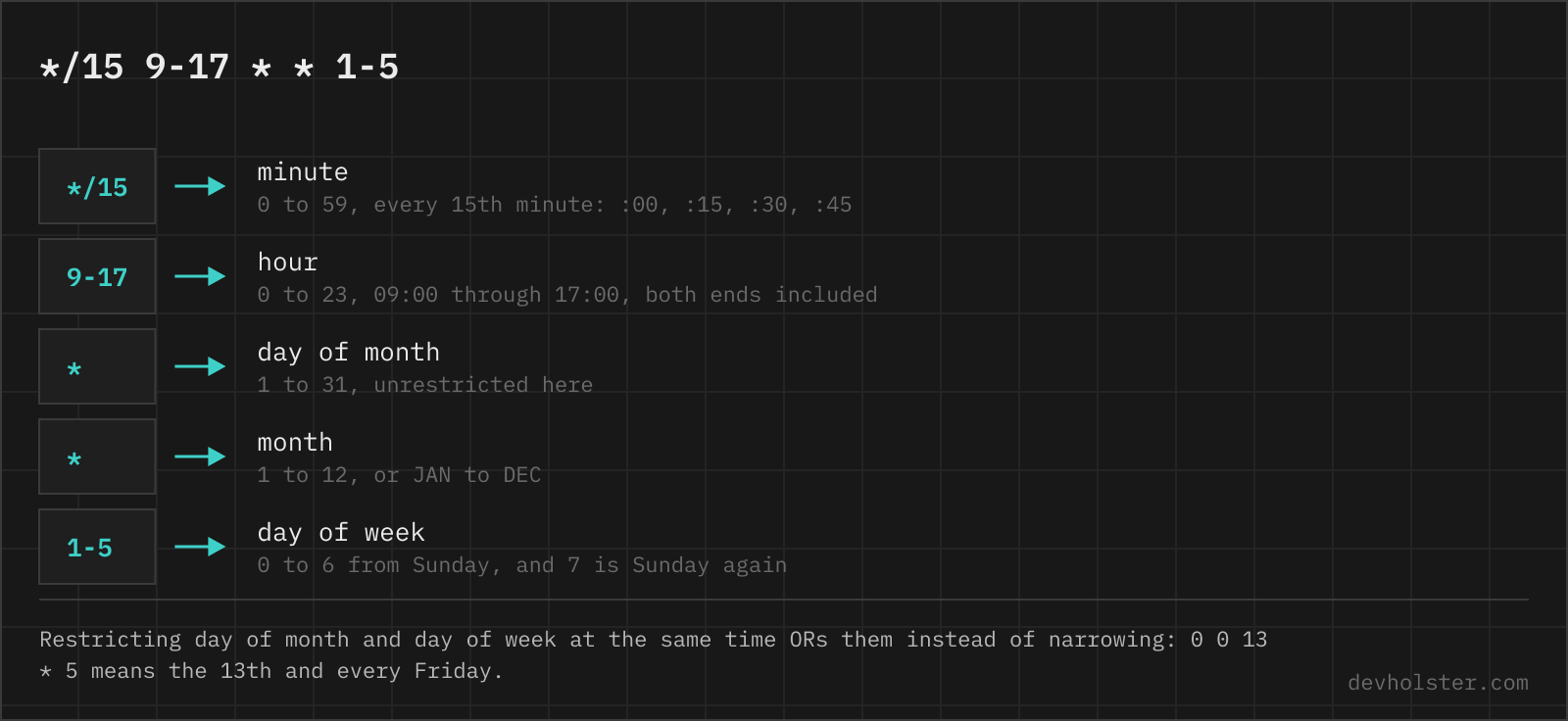
A cron expression is five fields nobody reads fluently, attached to a command that runs unsupervised at night. Or six fields, if it comes from Spring or Quartz, and then the weekday numbers mean something else. This page explains the syntax of all three dialects, then the parts that bite: the two day fields that OR in a crontab but AND in Spring, the DST window, the % that truncates commands, and the tokens (?, L, W, #) that only exist on the Java side.
The five fields, in order
Minute first. Getting the order wrong is the most common way to ship 30 2 as 2 30, which fails with "bad hour" if you are lucky and runs at 02:30 in the afternoon of nothing if you are not, because 30 is not a valid hour and cron refuses the line.
| Position | Field | Values | Names |
|---|---|---|---|
| 1 | minute | 0-59 | |
| 2 | hour | 0-23 | |
| 3 | day of month | 1-31 | |
| 4 | month | 1-12 | JAN-DEC |
| 5 | day of week | 0-7 | SUN-SAT, 0 and 7 are both Sunday |
Everything after the fifth field is the command, handed to /bin/sh. That boundary explains a class of confusing crontabs: in /etc/crontab and /etc/cron.d there is a sixth column naming the user to run as, and a line copied from there into crontab -e tries to execute root as a program. The parser above flags that pattern.
Six or seven fields mean the expression is not for a crontab at all but for a seconds-first dialect, Spring or Quartz; the comparison below covers where they differ. The parser detects the field count and switches dialects on its own.
How to read the report
Type into the big field and everything under it updates live: the schedule in plain English, one card per field with its resolved values (the card under your cursor lights up, so you always know which field you are editing), the next five run times with your local clock and UTC side by side, and the findings. Errors are things a scheduler rejects or that change the meaning of the line; warnings work but probably do not do what was intended.
Six fields switch the parser into the seconds-first dialects, read as Spring by default with a Spring/Quartz toggle in the corner, because the two disagree about weekday numbers. Pasting a whole crontab flips the panel into a per-line report; comments, MAILTO= lines and @daily macros are all understood. The address bar always carries the current expression, so a schedule can be shared as a link, and crontab.guru URLs with underscores open here too.
--lint
Checks the command part, not just the schedule: unescaped % signs (cron turns them into newlines and feeds the rest to stdin), a 2>&1 placed before the output redirect, both streams pointed at /dev/null, the user column pasted from a system crontab, and a crontab that does not end with a newline, which old vixie builds reject as "premature EOF".
--posix
A portability report. Steps, names and the @ macros are Vixie extensions that every mainstream Linux cron accepts but the POSIX spec does not define; this flag lists which ones a line relies on, which matters the day the schedule has to run on a minimal or embedded cron.
--utc
Reads the schedule in UTC instead of your local timezone. That is usually the honest view, because the machine running the crontab is a server or container, and those almost always run UTC. The daemon uses the system timezone of the machine it runs on; the details, and the CRON_TZ override, are in our cron pitfalls write-up.
Steps, ranges, lists and names
Each field takes the same little grammar, and the pieces combine:
| Syntax | Example | Meaning |
|---|---|---|
* | * | every value |
| value | 30 | exactly that value |
| list | 0,20,40 | each listed value |
| range | 9-17 | every value from 9 through 17, inclusive |
| step | */15 | every 15th value, counted from the start of the range |
| range with step | 10-40/10 | 10, 20, 30, 40 |
| names | MON, JAN | first three letters, case does not matter |
Three details worth knowing before they cost an evening. Steps count from the start of their range, not from zero: 5/15 in the minute field means 5, 20, 35, 50. Ranges do not wrap: 22-6 in the hour field is an error, not "night hours"; write 22-23,0-6. And a step wider than its range fires exactly once per cycle: */90 in the minute field runs at minute 0 only, because an interval cannot spill into the next field. Every 90 minutes genuinely needs two lines (0 0-21/3 and 30 1-22/3) or a different scheduler.
Names have a footnote of their own. crontab(5) documents ranges and lists of names as not allowed, and old vixie builds enforce that; current cronie and busybox accept MON-FRI without complaint. If a script generates the crontab, use numbers and never think about it again.
@reboot and the other macros
| Macro | Equivalent | Runs |
|---|---|---|
@hourly | 0 * * * * | on the hour, 24 times a day |
@daily, @midnight | 0 0 * * * | at 00:00 |
@weekly | 0 0 * * 0 | Sunday at 00:00 |
@monthly | 0 0 1 * * | the 1st at 00:00 |
@yearly, @annually | 0 0 1 1 * | January 1st at 00:00 |
@reboot | none | once, when the cron daemon starts |
The macros are readable, and that is their problem too: they all pile onto the same instants. @daily on a shared box means everything fires at 00:00:00 together with everyone else's @daily, which is where the mysterious midnight load spike comes from. Our habit is to use the macros in examples and write real minutes in production, spread across the hour.
@reboot deserves its own asterisk: it fires when the daemon starts, which is boot on a normal machine but also every restart of the cron service, and never inside a container where cron is not the entrypoint. It starts the process once and never supervises it; if the thing must stay alive, that is a systemd service, not a crontab line.
The two day fields do not AND
Every other pair of fields narrows the schedule. The two day fields are the exception: as soon as both are restricted, POSIX defines them as either-or. 0 0 13 * 5 is not Friday the 13th, it is every 13th plus every Friday, roughly 64 days a year instead of the one or two people expect. The parser above computes both counts for your actual expression, which makes the difference hard to miss.
Spring does the exact opposite. Its CronExpression applies every field as a filter, so 0 0 0 13 * FRI really is Friday the 13th and nothing else. Quartz refuses to decide and rejects a value in both fields outright, demanding a ? in one of them. Three schedulers, three different answers to the same five characters; this is the single best reason to run an expression through a parser before it ships.
There is no syntax for the AND. The working pattern keeps one field and moves the other condition into the command:
| Intent | Line |
|---|---|
| Friday the 13th | 0 0 13 * * [ "$(date +\%u)" = "5" ] && /opt/task.sh |
| First Monday of the month | 0 3 1-7 * * [ "$(date +\%u)" = "1" ] && /opt/report.sh |
Both examples escape the percent sign, and that is not decoration: in a crontab, an unescaped % ends the command and everything behind it becomes stdin. The full story of that trap, the DST window and the near-empty environment cron gives your command is in the pitfalls article; the parser flags all three so the crontab you paste gets checked against them either way.
crontab vs Spring vs Quartz (and the rest)
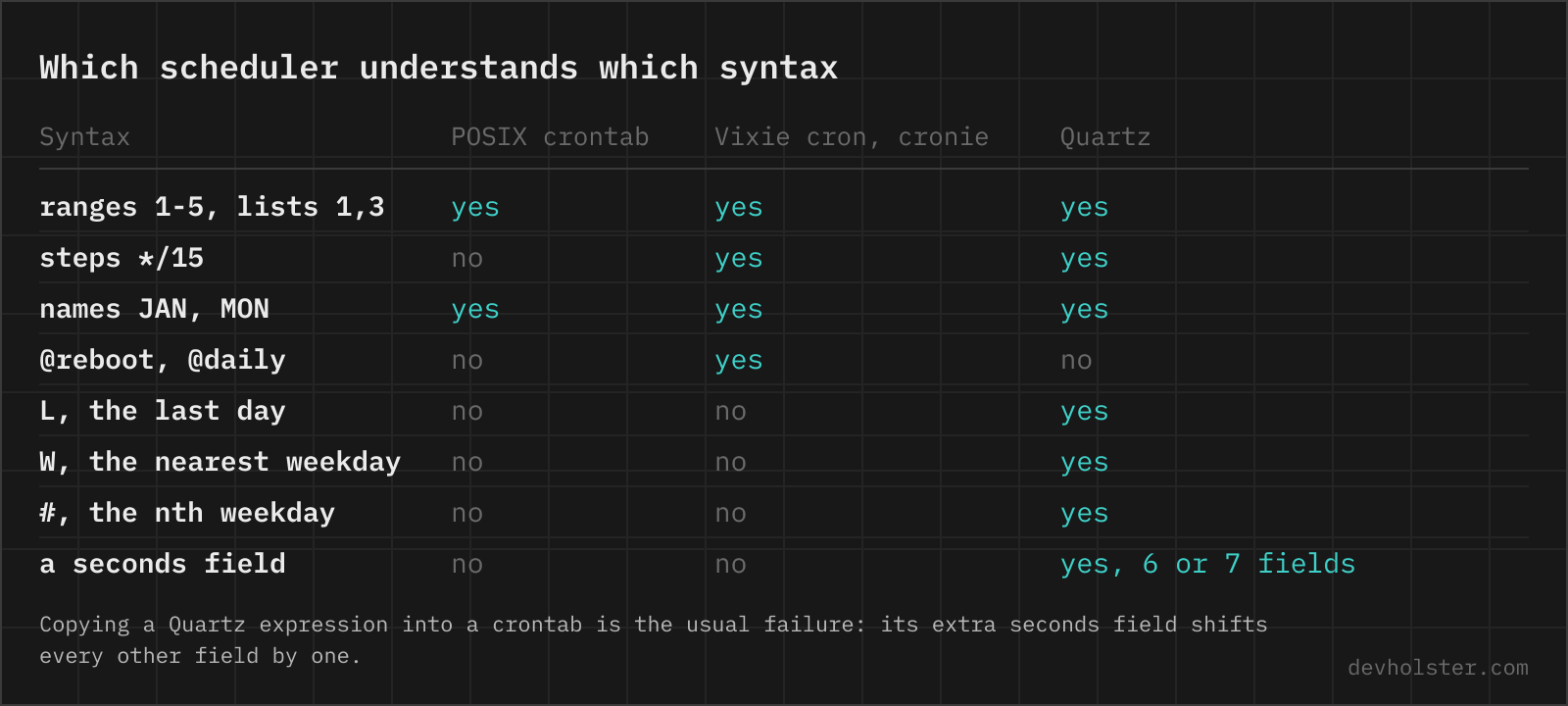
Six asterisks are not a typo, they are a different language. Spring's @Scheduled and the Java Quartz scheduler both put a seconds field first, and because both are "cron with six fields", people treat them as the same dialect. They are not, and the differences are exactly the ones that do not throw an error:
| crontab | Spring | Quartz | systemd OnCalendar | |
|---|---|---|---|---|
| fields | 5 | 6, seconds first | 6-7, seconds first, optional year | date-time pattern |
| Sunday | 0 or 7 | 0 or 7 | 1 | Sun |
? L W # | none of them | all, since Spring 5.3 | all, ? required in one day field | ~ for last day |
| both day fields restricted | OR: either matches | AND: both must match | rejected as an error | AND |
| every weekday, 9:00 | 0 9 * * 1-5 | 0 0 9 * * MON-FRI | 0 0 9 ? * 2-6 | Mon..Fri 09:00 |
The weekday row is the trap with the longest fuse. Quartz counts 1 as Sunday through 7 as Saturday; crontab and Spring count 0 to 6 with 0 (or 7) as Sunday. 0 0 9 ? * 2-6 means Monday to Friday in Quartz and Tuesday to Saturday in Spring, both parse without complaint, and the report lands on the wrong desk five days later. Names (MON-FRI) mean the same thing everywhere, which makes them the only sane spelling in any six-field expression.
The day-field row is the second one worth memorising. The same five date fields fire on every 13th plus every Friday under cron, only on Friday the 13th under Spring, and not at all under Quartz, which insists on a ?: its documentation says support for specifying both "is not complete". Spring's semantics are not spelled out in its reference docs at all; they follow from CronExpression applying each field as a filter, which is also why pre-5.3 Spring code using CronSequenceGenerator had no L, W or # to offer.
The parser above reads all three dialects natively, seconds, ?, L, W and # included, applies the correct day-field logic per dialect, and shows the crontab translation whenever one exists. A six-field expression defaults to the Spring reading with a toggle for Quartz, since the expression alone cannot tell you which scheduler it was written for. An H is named as Jenkins load-spreading rather than a syntax error. Every one of these would otherwise die in crontab -e with the least helpful message in this whole topic, "bad minute", with no hint that the expression was fine, just written for a different scheduler.
Kubernetes, for the record, is not another dialect: CronJob.spec.schedule takes standard five-field expressions plus the macros. Its traps are operational, from the unquoted */5 that YAML reads as an alias to the 100-missed-schedules limit, and they are covered in the pitfalls article too.
Expressions to copy
The schedules people actually look up, ready to paste. Every one of them can also go straight into the parser above to see its next runs against your clock, and a schedule that is not in the list is quickest to click together in the cron expression generator.
| Expression | Runs |
|---|---|
*/5 * * * * | every 5 minutes |
0 * * * * | every hour, on the hour |
0 */6 * * * | every 6 hours: 00:00, 06:00, 12:00, 18:00 |
30 4 * * * | daily at 04:30, safely outside the DST window |
0 9 * * 1-5 | weekdays at 09:00 |
0 22 * * 0 | Sunday at 22:00 |
15 3 1 * * | the 1st of every month at 03:15 |
0 6 1 1,4,7,10 * | quarterly: Jan, Apr, Jul, Oct 1st at 06:00 |
*/10 8-18 * * 1-6 | every 10 minutes during business hours, Monday through Saturday |
0 0-23/2 * * * | every other hour, on the hour |
One deliberate choice in that table: the daily example says 04:30, not midnight and not 02:30. Midnight is where every default job already runs, and 02:00 to 03:00 is the hour DST deletes and duplicates. A boring minute in a boring hour is the most reliable schedule cron has to offer.
For Spring, prepend a seconds field of 0 to any row: 0 0 9 * * 1-5 is the weekday-morning schedule. For Quartz, additionally put ? into the day field you are not using and remember the shifted weekday numbers, or sidestep both by writing names. A longer reference, including the step-value traps, the hosted schedulers from EventBridge to Vercel and the systemd translation table, is in our cron cheatsheet.
Reading cron expressions
What does * * * * * mean in cron?
Every minute, around the clock: 1440 runs per day. The five stars are minute, hour, day-of-month, month and day-of-week, and a star means "every value" in its field. It is the highest frequency plain cron can express; there is no sixth field for seconds in a crontab. Running something that often is usually a sign the job wants to be a daemon or a systemd timer instead, especially if one run can take longer than a minute.
How many fields does a cron expression have?
A crontab schedule has exactly five fields: minute, hour, day-of-month, month, day-of-week. Six or seven fields mean you are looking at a different dialect: Quartz and Spring @Scheduled put a seconds field first and optionally a year field last, and node-cron and NestJS accept an optional leading seconds field too. The direction matters when copying: a five-field expression pasted into Spring fails to start, and a six-field Quartz expression pasted into crontab -e is rejected with "bad minute".
What is the difference between cron and Quartz cron expressions?
Quartz has six or seven fields (seconds first, optional year last) and extra tokens crontab does not know: ? for "no specific value", L for the last day, W for the nearest weekday and # for the nth weekday of a month, as in 6#3 for the third Friday. The subtle trap is the weekday numbering: Quartz counts 1 as Sunday through 7 as Saturday, while cron uses 0 to 6 with 0 (or 7) as Sunday, so every numeric day-of-week shifts by one when a schedule moves between the two. Quartz lives in Java schedulers and Spring; crontab syntax lives in cron daemons, Kubernetes CronJobs and most CI schedulers.
Is Sunday 0 or 7 in a cron expression?
Both work in the cron you are probably running: Vixie cron, cronie and busybox accept 0 and 7 for Sunday, and Spring does the same. The POSIX specification only defines 0 through 6, so 0 (or the name SUN) is the portable spelling. The number to be careful with is 1: in cron and Spring it is Monday, in Quartz it is Sunday, which is exactly the kind of off-by-one that ships a weekly report on the wrong day.
Are Spring cron expressions the same as Quartz?
No, and the differences are silent. Both are six fields with seconds first, but Spring (the CronExpression class behind @Scheduled since Spring 5.3) numbers weekdays 0-7 with 0 or 7 as Sunday, exactly like a crontab, while Quartz counts 1 as Sunday through 7 as Saturday. Spring also requires both day fields to match when both are restricted (AND), while Quartz rejects that combination and demands a ? in one field. Both support ?, L, W and #; Quartz additionally takes an optional seventh year field, which Spring does not. A numeric day-of-week copied between the two shifts by one day without any error, so use names like MON-FRI, which mean the same thing in both.
What do L, W and # mean in a cron expression?
They are Quartz and Spring tokens for the day fields; a classic crontab rejects all three. L in day-of-month is the last day of the month (L-3 is three days before it, LW the last weekday); in day-of-week, 6L in Quartz or FRIL in Spring means the last Friday of the month. W picks the nearest weekday: 15W fires on the weekday closest to the 15th without leaving the month. # selects the nth weekday, so 6#3 (Quartz) or FRI#3 (Spring) is the third Friday. In a plain crontab the equivalents need a guard in the command, like 0 23 28-31 * * with a test that tomorrow is the 1st.
What does the question mark (?) mean in a cron expression?
No specific value. It exists only in the Quartz and Spring dialects, and only in the two day fields. Quartz makes it mandatory: because it refuses a restriction in both day-of-month and day-of-week at once, one of the two must carry a ?. Spring accepts ? as an alias for * in those fields. A classic crontab does not know the character at all and rejects the line, which is the usual reason a schedule copied from a Java project fails to install with crontab -e.
Do cron expressions support seconds?
No. The finest resolution of a crontab is one minute; the minute field is the first field, and there is no seconds field. Schedulers that do take seconds (Quartz, Spring @Scheduled, node-cron with its optional sixth field) use their own dialects, which is why a six-field expression fails in a crontab. If a Unix job has to run more often than once a minute, the usual options are a systemd timer with OnUnitActiveSec, or a loop with sleep inside a single cron-started process.
How do I write a cron job for every weekday at 9 am?
0 9 * * 1-5 runs at 09:00 from Monday through Friday. The equivalent 0 9 * * MON-FRI reads better, but crontab(5) still documents ranges of names as unsupported: current cronie and busybox take it, old vixie builds reject the whole line, so the numeric form is the safe one for scripts that write crontabs. Keep the day-of-month field as *, because restricting it alongside day-of-week does not narrow the schedule, it widens it (the two day fields are OR, not AND).
How do I run a cron job every 30 seconds?
Cron cannot express it; one minute is the floor. The classic workaround is two crontab lines for the same script, the second wrapped in a delay: * * * * * /opt/job.sh and * * * * * sleep 30; /opt/job.sh. It works, but the two runs can overlap and drift, so for anything serious a systemd timer with OnUnitActiveSec=30s is the cleaner tool, and it also gives you logs in the journal. Application-level schedulers (Quartz, APScheduler, node-cron) handle sub-minute intervals natively.
How do I schedule a cron job on the last day of the month?
Crontab has no last-day token, so schedule the candidates and test inside the command: 0 23 28-31 * * [ "$(date -d tomorrow +\%d)" = "01" ] && /opt/report.sh runs at 23:00 on the 28th through 31st and only proceeds when tomorrow is the 1st. Note the escaped percent signs: unescaped % is special in a crontab. On BSD and macOS, date -v+1d +\%d replaces the GNU -d tomorrow. Quartz expresses this directly with L in the day-of-month field, and systemd timers with OnCalendar=*-*~01.
What does @reboot do in a crontab?
@reboot runs the command once when the cron daemon starts, which on a normal machine means at boot. Restarting the cron service fires every @reboot line again, which surprises people during package upgrades. It is a Vixie extension, not POSIX: cronie and vixie descendants support it, busybox crond does not, and in a container it never fires unless cron is the entrypoint process. For anything that must survive crashes and restart on failure, a systemd service is the better home; @reboot starts a process exactly once and never looks at it again.
Why does crontab -e say "errors in crontab file, can't install"?
The editor saved a file that cron cannot parse, and the message names a line further up: typically "bad minute" or "bad day-of-week". The usual causes are a schedule with the wrong number of fields (six schedule-looking tokens because a Quartz expression was pasted in), a value out of range like minute 60, a range running backwards like 22-6, or a stray line that is neither a job, a comment nor a NAME=value assignment. Old vixie builds also report "premature EOF" when the file does not end with a newline. Answer "y" to the retry prompt, fix the named line, and the install goes through.
What is the difference between cron and systemd timers?
A systemd timer is a unit file pair (.timer plus .service) instead of a crontab line, and its OnCalendar syntax is different: Mon..Fri *-*-* 09:00:00 rather than 0 9 * * 1-5. What you get for the extra verbosity: Persistent=true runs a schedule that was missed while the machine was off, RandomizedDelaySec spreads load, output lands in the journal instead of a mail queue, and the service can declare dependencies, resource limits and a restart policy. Cron wins on ubiquity and one-line simplicity. On servers that never sleep, either is fine; on laptops and VMs that suspend, timers with Persistent=true are the version that actually runs.