Why Base64 breaks in URLs
Standard Base64 was designed for email, and two of its 64 characters are landmines anywhere near a URL. The / is the path separator, so a token containing one splits into path segments. The + is worse because it fails quietly: form decoding turns it into a space on the server, the string is now subtly different, and the decode error happens far from the cause. The = padding adds a third hazard in query strings, where it separates keys from values.
Escaping all three with percent encoding works until some layer decodes twice, and in real stacks (proxy, framework, application) some layer eventually does. So RFC 4648 §5 defined a second alphabet that sidesteps the problem instead of escaping it.
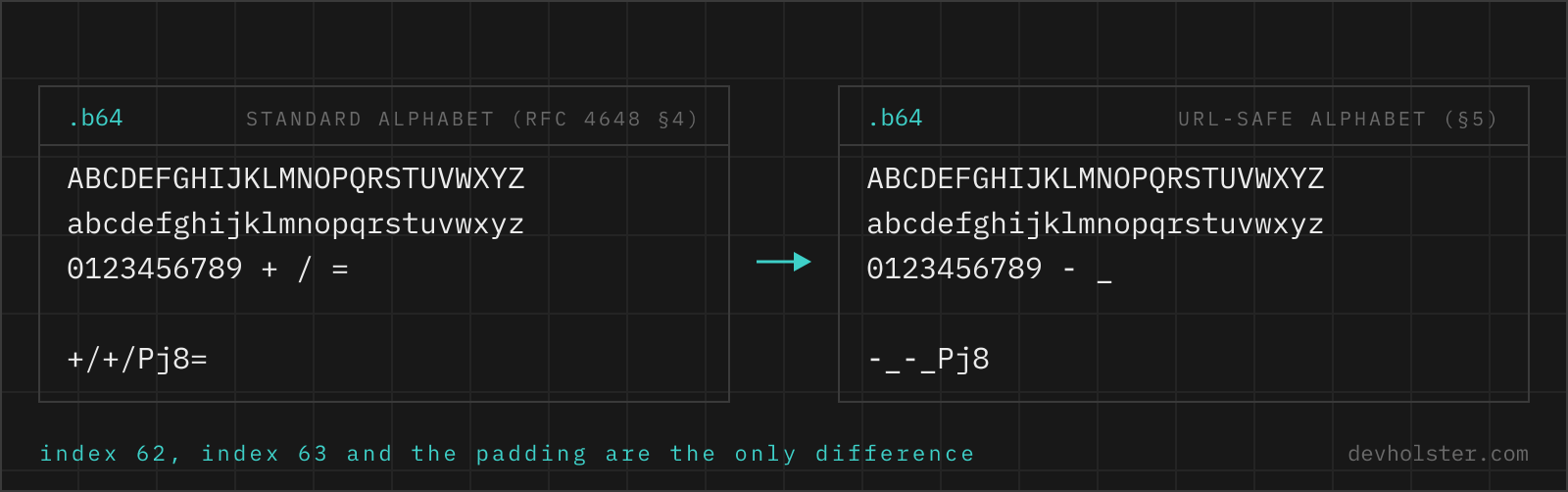
The two-character fix
| Standard Base64 | Base64URL | |
|---|---|---|
| Character 62 | + | - |
| Character 63 | / | _ |
| Padding | = required | usually omitted |
| Validation regex | ^[A-Za-z0-9+/]+={0,2}$ | ^[A-Za-z0-9_-]+$ |
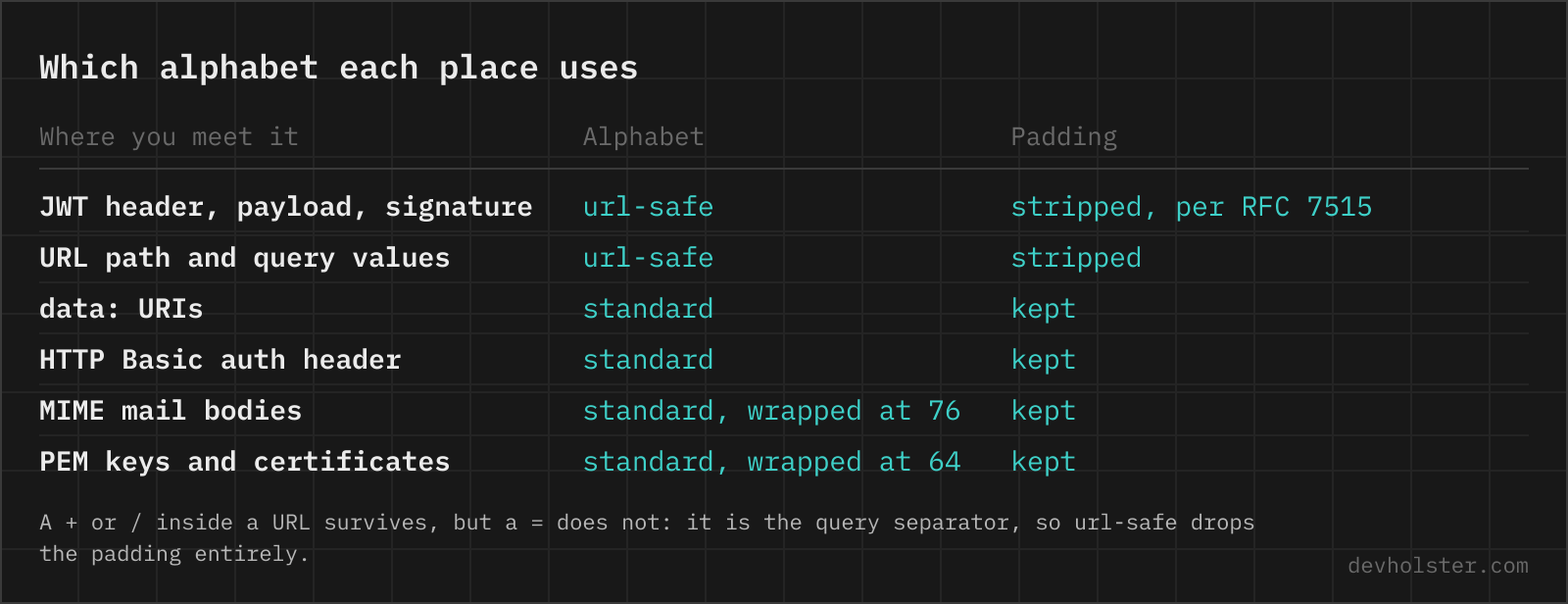
| Typical home | MIME, data URIs, Basic auth | JWTs, URLs, filenames, cookies |
Everything else is identical: same 6-bits-per-character math, same 33% size overhead, same byte stream underneath. Converting between the variants is a two-character swap plus padding repair, which is also why this page accepts standard Base64 in decode mode and just mentions the mismatch in a note instead of failing.
Padding, and why it vanishes
The = signs at the end of standard Base64 mark how many bytes the final block really carries. They are also redundant: the decoded length follows from the string length, so a decoder never strictly needs them. Base64URL leans into that. The JWS spec behind JWTs mandates unpadded output, and most of the token ecosystem followed, which is why a JWT segment's length is often not a multiple of 4.
The catch is that many decoders still insist on padding, Python's urlsafe_b64decode among them. The repair is mechanical, append = until the length divides by 4, but you have to know to do it. This tool strips padding on encode (that is what nearly every consumer expects; --pad keeps it for the ones that do not) and reconstructs it on decode.
How to use this converter
- Encoding: type or paste text and the Base64URL string appears live, UTF-8 handled correctly, padding stripped unless
--padis on. - Decoding: turn on
--decodeand paste. Whitespace is stripped, standard-alphabet input is converted, missing padding is rebuilt. Payloads that are not text come back as a hex dump you can download as a file. - Watch the note. If the input to encode already looks like a token, the tool says so before you double-encode it, which is the most common mistake this page can prevent.
The JWT connection
Base64URL is the encoding of the JWT format: header and payload are Base64URL-encoded JSON, the signature is Base64URL-encoded bytes, dots in between. That is why every JWT starts with eyJ (the encoding of {") and why pasting one into a standard decoder fails on the first dot.
Paste a complete three-part token here in decode mode and it is recognised and split, header and payload pretty-printed, signature shown raw. For the full treatment, registered claims explained and expiry times turned into real dates, the JWT decoder is the dedicated page. Either way the signature is not verified, since that requires the key, and a page that asks for your signing key is a page to close.
Base64URL in code
| Environment | Encode | Decode |
|---|---|---|
| Node.js ≥ 16 | buf.toString('base64url') | Buffer.from(s, 'base64url') |
| Modern browsers | bytes.toBase64({alphabet:'base64url'}) | Uint8Array.fromBase64(s, {alphabet:'base64url'}) |
| Older browsers | btoa + swap +/ → -_, strip = | swap back, re-pad, atob |
| Python | urlsafe_b64encode(b).rstrip(b'=') | urlsafe_b64decode(s + '=' * (-len(s) % 4)) |
| Java | Base64.getUrlEncoder().withoutPadding() | Base64.getUrlDecoder() |
The pattern across the table: encoders differ on whether they strip padding, decoders differ on whether they demand it. When two systems disagree about a token, that mismatch is the first thing to check, and running the string through this page in --decode mode tells you immediately whether the payload itself is intact.
base64url, the questions that follow
What is the difference between Base64 and Base64URL?
Two characters and the padding policy. Standard Base64 uses + and / as characters 62 and 63 and pads with =; Base64URL replaces them with - and _ and usually drops the padding, so the string survives inside URLs, filenames and HTTP headers without further escaping. The encoded bytes are otherwise identical, and converting between the variants is a character swap plus padding repair, no re-encoding involved. If a string contains - or _, you are looking at Base64URL; that is the variant JWTs use.
Is Base64URL the same as URL encoding?
No, they solve different problems. URL encoding (percent encoding) escapes individual unsafe characters in existing text, turning a space into %20 and leaving everything else readable. Base64URL re-encodes entire byte sequences into a URL-safe alphabet, so the output looks nothing like the input. Use percent encoding for human-readable values in query strings, and Base64URL for binary data or opaque tokens. The anti-pattern is combining them by percent-encoding a standard Base64 string: it works, but the %2B and %2F sequences break the moment any layer decodes twice.
How do I Base64URL encode in JavaScript?
The modern way: bytes.toBase64({ alphabet: "base64url", omitPadding: true }) on a Uint8Array, shipping in browsers since 2024 (Chrome 133, Firefox 133, Safari 18.2) and Node.js 24. In Node.js any version since 16: Buffer.from(str).toString("base64url"), padding already stripped. Where neither exists, do the swap by hand: btoa(s).replace(/\+/g,"-").replace(/\//g,"_").replace(/=+$/,""), remembering the usual btoa caveat that non-ASCII input has to go through TextEncoder first.
How do I Base64URL encode and decode in Python?
base64.urlsafe_b64encode(data) encodes with the -_ alphabet but keeps the = padding, which surprises people who expect JWT-style output; strip it with .rstrip(b"="). Decoding is the reverse trap: base64.urlsafe_b64decode raises binascii.Error on unpadded input, so restore the padding first with s + "=" * (-len(s) % 4). Those two lines cover nearly every JWT-segment decode in Python. PyJWT and similar libraries do this internally, which is why tokens decode there but fail with the raw base64 module.
Why do JWTs have no = padding?
Because the JWS specification (RFC 7515) defines its encoding as base64url without padding, and every JWT segment follows it. The = signs are technically redundant, since the decoded length is derivable from the string length, and inside URLs the character causes escaping trouble, so the spec dropped it. This is why a JWT segment fails in strict decoders: they see a length that is not a multiple of 4 and refuse. Reconstruct the padding from the length before handing segments to strict tooling.
Why does atob() fail on a JWT segment?
Two reasons stack up. atob only accepts the standard alphabet, so the first - or _ in the segment throws InvalidCharacterError. Fix the alphabet and it can still throw on the missing padding, depending on length. The working recipe: swap the characters back (s.replace(/-/g,"+").replace(/_/g,"/")), add "=".repeat((4 - s.length % 4) % 4), then atob, then TextDecoder for correct UTF-8. Or skip the ceremony and paste the segment above, where all three repairs happen automatically.
When should I use Base64URL instead of standard Base64?
Whenever the string travels somewhere + / or = has a meaning: URL paths and query parameters, filenames, cookie values, HTTP headers, HTML form fields, anywhere in the JWT and OAuth ecosystem. Standard Base64 stays the right choice for MIME email, data URIs, HTTP Basic auth and any API whose documentation shows + and / in its examples. When you control both ends, pick one variant and write it down; the mixed-alphabet bug where one service encodes URL-safe and another decodes strict is a classic integration failure.
Can a Base64URL string contain a plus sign or slash?
No. The Base64URL alphabet is A–Z, a–z, 0–9, - and _, full stop. A + or / means you are holding standard Base64, and a string containing both styles at once has been corrupted, usually by a partial find-and-replace or by one system re-encoding another system's output. A related giveaway: a + that arrives at your server as a space means the string went through form decoding on the way, which is percent-encoding damage, not a Base64 problem. This page decodes standard input anyway, but tells you in a note that it was not Base64URL.