Five fields, four choices each
A cron expression is minute, hour, day of month, month and day of week, in that order, and each field is one of four things. The builder above offers exactly those four, so clicking cannot produce a token a crontab would reject. What comes out is the plain five-field dialect every cron daemon, Kubernetes and most CI schedulers read.
| Choice | Token | Example | Means |
|---|---|---|---|
| every | * | * in hour | any hour, no restriction |
| every N | */N | */15 in minute | :00, :15, :30, :45, counted from the start of the field and restarting every hour |
| specific | a,b,c | 6,18 in hour | exactly those values, any number of them |
| range | a-b | 1-5 in day of week | every value from a through b, both ends included |
Typing into the big field works in the other direction. The builder reads the expression and sets its controls. A token that mixes forms, say 1,3-5/2, is valid cron but has no single control, so that column shows it as custom and leaves the text alone. Months and weekdays appear as names in the builder, and --names writes them into the expression too.
Ranges do not wrap. 22-6 in the hour field is an error, not "overnight", and the builder's range selects will not let you build it. Type 22-23,0-6 if you need it.
Schedules ready to copy
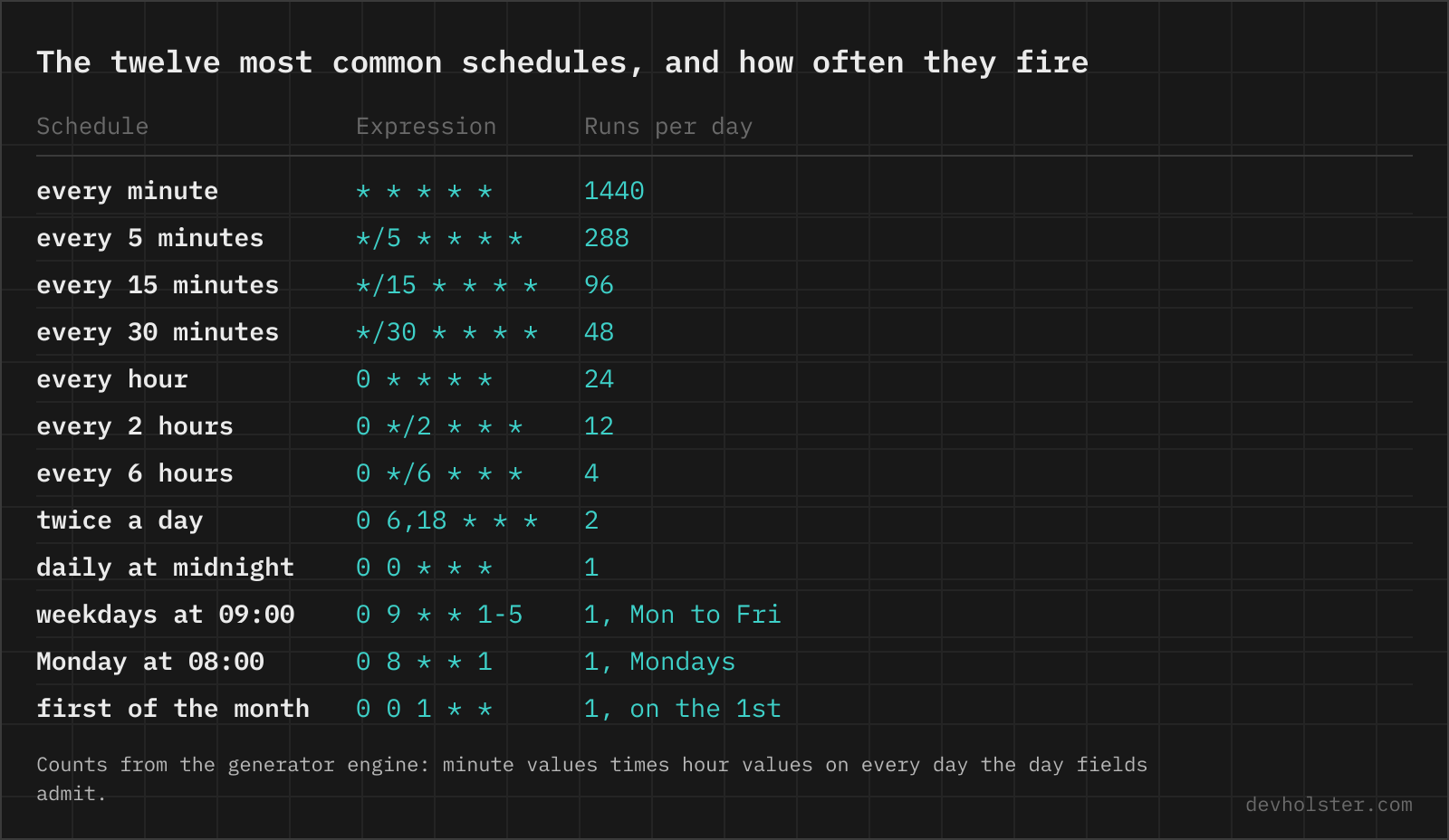
The schedules people search for, as the expression the generator would build. Paste any of them into the field above to see the next runs against your own clock and the six export snippets. The syntax behind them, token by token, is on the cron cheatsheet.
| Schedule | Expression | Note |
|---|---|---|
| every minute | * * * * * | 1440 starts a day |
| every 5 minutes | */5 * * * * | 288 a day, the GitHub Actions minimum |
| every 10 minutes | */10 * * * * | |
| every 15 minutes | */15 * * * * | |
| every 30 minutes | */30 * * * * | same as 0,30 * * * * |
| every hour | 0 * * * * | @hourly |
| every 2 hours | 0 */2 * * * | even hours, 0 1-23/2 * * * for odd |
| every 6 hours | 0 */6 * * * | 00, 06, 12, 18 |
| every 90 minutes | 0 0-21/3 * * * + 30 1-22/3 * * * | two lines, the minute field resets every hour |
| twice a day | 0 6,18 * * * | or 0 */12 * * * for 00 and 12 |
| every day at midnight | 0 0 * * * | @daily, shared with every other default job |
| every day at 6am | 0 6 * * * | |
| every night at 03:30 | 30 3 * * * | outside the DST hour, unlike 02:30 |
| every Monday | 0 0 * * 1 | 0 0 * * MON |
| every Monday at 8am | 0 8 * * 1 | |
| every Sunday at midnight | 0 0 * * 0 | @weekly |
| weekdays at 9 | 0 9 * * 1-5 | |
| every weekend | 0 10 * * 0,6 | Saturday and Sunday at 10:00 |
| every 10 minutes between 9 and 5 | */10 9-16 * * 1-5 | last run 16:50, add 0 17 * * 1-5 for 17:00 sharp |
| every 15 minutes, business hours | */15 9-17 * * 1-5 | last run 17:45 |
| first day of month | 0 0 1 * * | @monthly |
| 15th of the month at noon | 0 12 15 * * | |
| every quarter | 0 0 1 */3 * | Jan, Apr, Jul, Oct, same as 1,4,7,10 |
| every year | 0 0 1 1 * | @yearly |
| last day of month | 0 23 28-31 * * + a date test | not in cron, see the parser FAQ |
| last Friday of month | 0 17 25-31 * * + [ "$(date +\%u)" = 5 ] | the last seven days hold exactly one Friday, Quartz writes 6L |
| every 30 seconds | none | cron has no seconds, two lines with sleep 30 or a systemd timer |
Two entries say "none" or need a date test, and that is deliberate. A generator that silently emits 0 0 13 * 5 for "Friday the 13th" or */90 for "every 90 minutes" produces an expression that installs fine and runs on the wrong days, and we would rather the table says so than the crontab does at 3 am.
One schedule, every scheduler
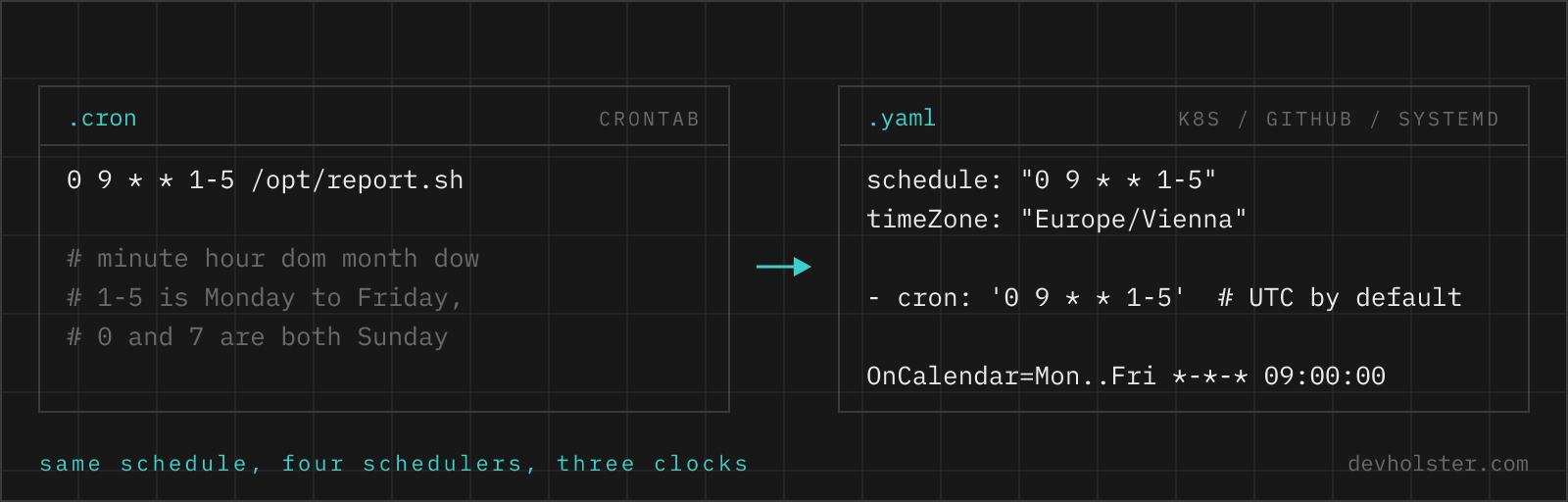
"Weekdays at 09:00" in every place a schedule string goes. The five-field core is the same in the first four rows, the Java and AWS rows add a seconds or year field and count Sunday differently, which is why the export writes MON-FRI there instead of 1-5. Type a 7 for Sunday and the builder writes it back as 0, the one spelling Kubernetes and GitHub accept as well.
| Scheduler | Weekdays at 09:00 | Fields | Sunday is |
|---|---|---|---|
| crontab | 0 9 * * 1-5 | 5 | 0 or 7 |
| Kubernetes CronJob | schedule: "0 9 * * 1-5" | 5, plus @daily and friends | 0 only, 7 is rejected |
| GitHub Actions | - cron: '0 9 * * 1-5' | 5, no macros | 0, the docs list 0-6 |
| Jenkins | H 9 * * 1-5 | 5, H spreads the minute | 0 or 7 |
| systemd timer | OnCalendar=Mon..Fri *-*-* 09:00:00 | weekday, date, time | Sun |
Spring @Scheduled | 0 0 9 * * MON-FRI | 6, seconds first | 0 or 7 |
| Quartz | 0 0 9 ? * MON-FRI | 6 or 7, ? in one day field | 1 |
| AWS EventBridge | cron(0 9 ? * MON-FRI *) | 6, year last, ? required | 1 |
The export panel writes the first six of these for whatever you built. Jenkins is not there because its whole point is the H token, which picks the concrete minute per job from a hash of the job name. You write H where this page would write a number. Quartz is not there either, because a Quartz expression without L, W or # is the Spring line with a ? in the unused day field. If you need those tokens you are no longer building a five-field schedule.
Which clock each platform reads
The expression never carries a timezone. Each scheduler supplies its own, and that is where "runs at 9" turns into 7 or 10.
| Platform | Default clock | How to change it |
|---|---|---|
| crontab | system timezone of the machine | CRON_TZ=Europe/Vienna at the top of the crontab with cronie, plain vixie cron and macOS have nothing |
| Kubernetes CronJob | kube-controller-manager, normally UTC | spec.timeZone: "Europe/Vienna", GA since 1.27 |
| GitHub Actions | UTC | timezone: "Europe/Vienna" under the cron entry, a skipped DST hour moves the run to the next valid time |
| systemd timer | system timezone | append a zone: OnCalendar=*-*-* 09:00:00 Europe/Vienna |
Spring @Scheduled | JVM default | zone = "Europe/Vienna" on the annotation |
| AWS EventBridge | UTC for rules | EventBridge Scheduler takes ScheduleExpressionTimezone per schedule |
| Jenkins | controller timezone | TZ=Europe/Vienna as the first line of the spec |
The next-runs list above uses your browser's timezone by default and shows UTC beside it. With --utc on, the schedule is read in UTC outright, which is the honest view for an EventBridge rule. The Kubernetes, GitHub and Spring exports carry your timezone name in timeZone, timezone and zone, because that is what the schedule you just built actually means. Whether the job itself should then store its results in UTC is a separate question, answered in store dates in UTC.
The three traps the findings catch
The findings panel is not a validator, the builder already cannot produce invalid syntax. It catches the expressions that are valid and wrong.
- Both day fields restricted.
0 0 13 * 5is every 13th plus every Friday, about 62 days a year, not Friday the 13th. POSIX defines the two day fields as either-or once both carry a value. The finding shows both counts for your expression, and the systemd and EventBridge snippets go blank because neither can say OR. - The hour DST deletes. The generator probes your browser's timezone for the next spring-forward night and names the date and hour that will not exist. A job at 02:30 in Vienna lands in that hour once a year, and whether it then runs once, never or twice depends on the daemon.
30 3 * * *is the same job without the question. - A step that does not divide its field.
*/7in minutes is 00, 07, 14 ... 56 and then 00 again, a 4-minute gap every hour.*/5in hours leaves 4 hours between 20:00 and midnight. The finding names the short interval. Steps that divide 60 and 24 cleanly are 1, 2, 3, 4, 5, 6, 10, 12, 15, 20, 30 and 1, 2, 3, 4, 6, 8, 12.
Each of these has a longer write-up. The field-by-field reading and the dialect differences on the cron parser page, the environment and DST stories in cron pitfalls.
What the export snippets assume
The crontab line logs to a file with >> /var/log/job.log 2>&1, redirect order included, so a failing job leaves evidence. The CronJob manifest quotes the schedule (the YAML linter catches the unquoted */5 if you forget), sets concurrencyPolicy: Forbid and uses busybox:1.36 as a placeholder image. The GitHub workflow adds workflow_dispatch so it can be run by hand, and a timezone key unless --utc is on. The systemd timer sets Persistent=true, which runs a missed schedule at the next boot, something cron never does. Replace the placeholders, keep the flags.
--utc and --names
--utc reads the schedule on the UTC clock for the next-runs list, writes Etc/UTC into the Kubernetes and Spring snippets and drops the timezone key from the GitHub workflow. --names spells months and weekdays as JAN and MON-FRI in the expression itself. Single names are in crontab(5), ranges of names are documented as unsupported there but cronie, busybox and Kubernetes take them, and names are the one spelling that survives a move to Quartz or EventBridge, where 1 is Sunday. The GitHub Actions docs list SUN-SAT as well, so that snippet follows the flag too.
The schedule is in the address bar as ?e=, so copy link hands a colleague the same builder state. The parser link in the corner opens the same expression on the parser page for the field-by-field reading.
Scheduling questions, by platform
How do I run a cron job every 5 minutes starting at a different minute, like :02, :07, :12?
2-57/5 * * * *. A step counts from the start of its range, so 2-57/5 fires at 02, 07, 12 and so on up to 57. Plain */5 always starts at :00.
Is 0 * * * * the same as */60 * * * *?
In effect yes, both fire once an hour at minute 0, because a step of 60 over the range 0-59 only ever hits 0. Write 0 * * * * anyway. */60 reads like "every 60 minutes" but means nothing of the sort once the hour field is restricted (0 */60 is not every 60 hours).
How do I schedule a cron job at midnight?
0 0 * * * runs every day at 00:00, and @daily or @midnight mean the same thing. Midnight is also when every other default job on the box runs, from logrotate to package indexes, so a busy server sees a spike exactly then. Anything that is not tied to the date boundary is better off at 00:17 or 03:40.
How do I run a cron job every Monday at 8am?
0 8 * * 1, or 0 8 * * MON with names. Leave day of month as *, cron ORs both day fields.
What is the cron expression for the first day of the month?
0 0 1 * * for midnight on the 1st, @monthly is the shorthand. For a fixed time use the minute and hour fields, 15 3 1 * * is 03:15. The 1st falls on a weekend about two months in seven. If the job must land on a working day, schedule 1-3 and test date +%u in the command, because "first weekday" has no cron syntax.
What is the cron expression for every 2 hours?
0 */2 * * * fires at 00:00, 02:00 and every even hour after that. For the odd hours write 0 1-23/2 * * *. A step in the hour field restarts at midnight, which is why */5 in hours gives a 4-hour gap between 20:00 and 00:00.
How do I run a cron job every 15 minutes during business hours?
*/15 9-17 * * 1-5 runs at :00, :15, :30 and :45 from 09:00 through 17:45, Monday to Friday. The hour range is inclusive, so hour 17 means the whole hour. If the last run must be 17:00 sharp, use two lines: */15 9-16 * * 1-5 and 0 17 * * 1-5.
How do I run a cron job twice a day?
List both hours: 0 6,18 * * * runs at 06:00 and 18:00, 0 */12 * * * at 00:00 and 12:00.
How do I set up a cron job in Kubernetes?
Create a CronJob resource: kind: CronJob in batch/v1, spec.schedule with a five-field expression in quotes, and spec.jobTemplate with the pod spec. The quotes matter, */5 * * * * unquoted is read by YAML as an alias and kubectl fails with "did not find expected alphabetic or numeric character". Set spec.timeZone (stable since 1.27) and concurrencyPolicy: Forbid if two runs must never overlap. Test a run without waiting: kubectl create job test --from=cronjob/name.
How do I schedule a GitHub Actions workflow with cron?
Add on: schedule: with a list item - cron: '0 9 * * 1-5' to the workflow file on the default branch. The expression is read in UTC unless a timezone: "Europe/Vienna" line sits under the cron entry, the shortest interval is 5 minutes, and runs start late when GitHub's queue is busy, worst at the top of the hour. Add workflow_dispatch: next to schedule so the same workflow can be started by hand for a test.
Do Kubernetes CronJobs run in UTC?
Yes, unless spec.timeZone is set. The controller manager clock is UTC on practically every managed cluster. spec.timeZone is stable since Kubernetes 1.27.
How do I convert a crontab expression for Spring @Scheduled?
Put a seconds field in front: 0 9 * * 1-5 becomes @Scheduled(cron = "0 0 9 * * MON-FRI"). Spring numbers weekdays like cron (0 or 7 is Sunday), so the numbers would survive too, but names keep the meaning if the same string ever lands in Quartz, where 1 is Sunday. Two differences remain: Spring ANDs the two day fields where cron ORs them, and without zone = "..." the schedule runs on the JVM default timezone.
How do I test a cron expression before deploying it?
Read the next run times instead of waiting for one. This page lists the next five in your timezone and UTC. On a server, systemd-analyze calendar 'Mon..Fri *-*-* 09:00:00' does the same for a timer, and kubectl create job --from=cronjob/name fires a CronJob immediately. For the command itself, run it once with the environment cron provides: env -i HOME=$HOME SHELL=/bin/sh PATH=/usr/bin:/bin /path/to/command.