What percent encoding does
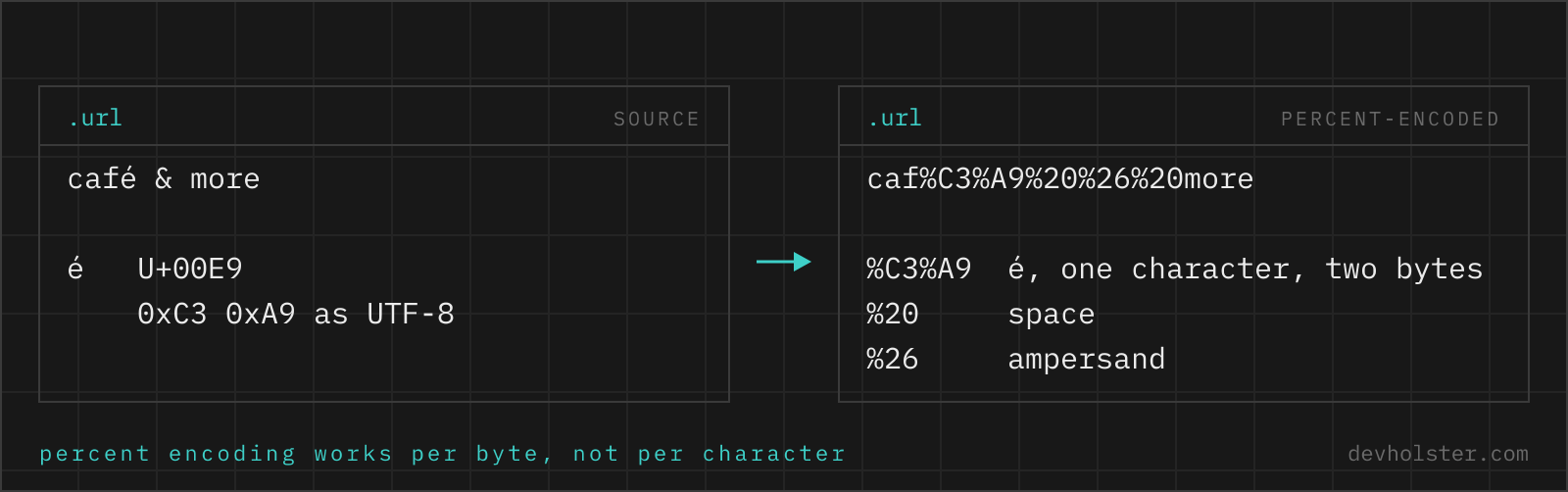
A URL is a structured string built from a small ASCII vocabulary. Characters like ?, &, # and / mark where one part ends and the next begins, and anything outside ASCII has no place in it at all. Percent encoding solves both problems the same way: take the character's UTF-8 bytes and write each as % plus two hex digits. A space becomes %20, & becomes %26, ü becomes %C3%BC because UTF-8 spends two bytes on it.
The point is separation of data from structure. A search for coffee & cake placed raw into ?q=coffee & cake creates a second parameter called cake; encoded to ?q=coffee%20%26%20cake, it stays one value. That is the whole job.
How to use this encoder
Type or paste on the left, read the encoded result on the right. The default mode encodes a component, which is what you want for a single parameter value, a path segment or anything going into a URL as data.
- Paste the value. Text, a search phrase, a redirect target or a whole URL.
- Pick the mode. Leave the flags off for a parameter value; turn on
--full-urlwhen the input is a complete address. - Check the count. The strip under the panes shows how many characters were encoded, an easy sanity check that the mode matches your intent.
--full-url
Switches from encodeURIComponent to encodeURI: the structural characters : / ? # [ ] @ & = + $ , stay as they are, while spaces, umlauts and other unsafe characters get encoded. Use it to clean up a URL that contains a space or an umlaut without shredding its slashes.
--form
Produces application/x-www-form-urlencoded output: spaces become +, and ! ' ( ) are escaped as well, which makes the result byte-identical to URLSearchParams and to what a browser submits from a form. Useful when you are reproducing a request signature, where %20 versus + decides whether the HMAC matches. Combine it with --full-url only if you know why you want that; on its own it is the right mode for query-string values.
Component vs whole URL, with a worked example
Take the redirect target https://shop.example.com/search?q=café&page=2 that needs to ride along inside another URL.
| Mode | Result | Fit for |
|---|---|---|
| Component (default) | https%3A%2F%2Fshop.example.com%2Fsearch%3Fq%3Dcaf%C3%A9%26page%3D2 | Passing the URL as a parameter value |
--full-url | https://shop.example.com/search?q=caf%C3%A9&page=2 | Making a URL with a special character usable as-is |
Pick the wrong one and the failure is quiet. Full-URL encoding on a parameter value leaves the inner &page=2 alive, so the outer URL gains a stray page parameter and the redirect target arrives truncated. That is the mechanism behind a good share of broken OAuth callbacks.
Which characters change
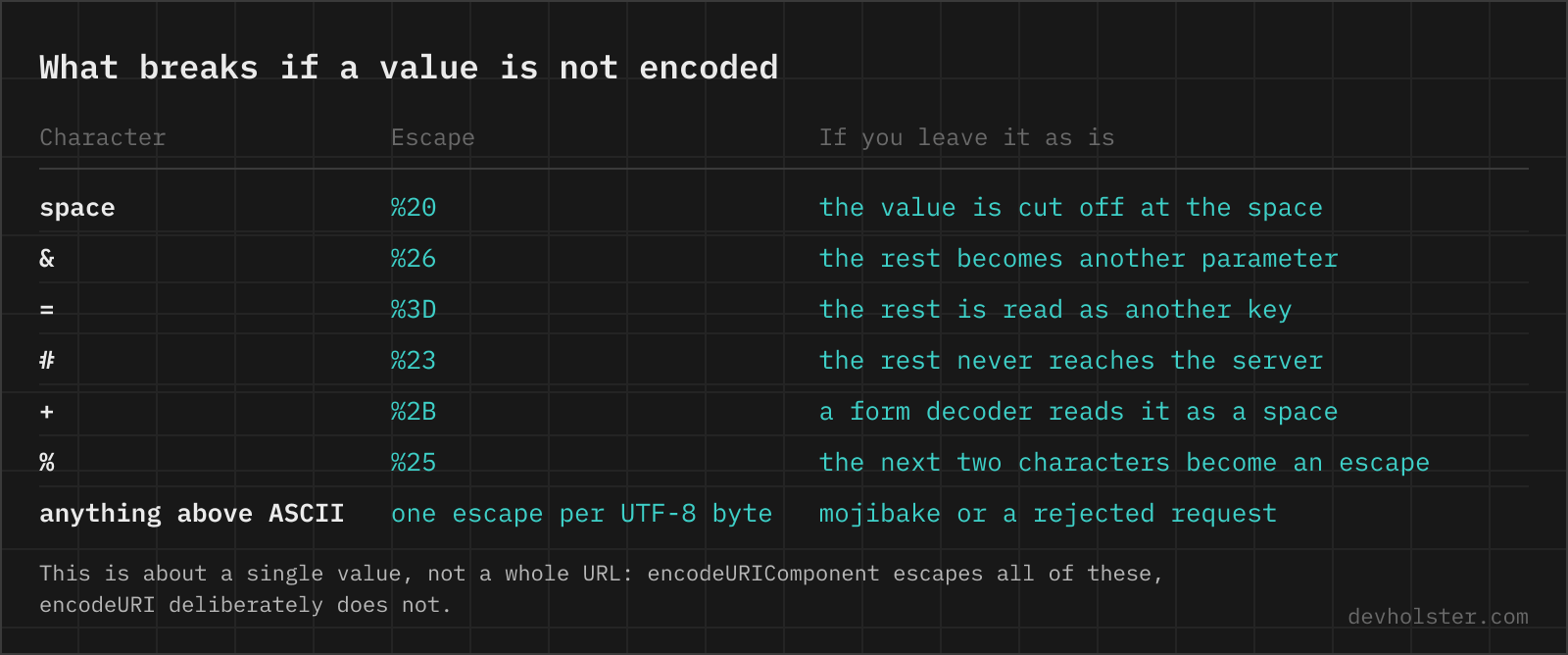
| Character | Encoded | Why it matters |
|---|---|---|
| space | %20 (or + in form mode) | Terminates the URL in some parsers, breaks copy-paste in chat clients |
& | %26 | Otherwise starts a new query parameter |
= | %3D | Otherwise splits key from value |
# | %23 | Everything after it is a fragment and never reaches the server |
? | %3F | Starts the query string |
/ | %2F | Path separator; encoded inside a value, kept in full-URL mode |
+ | %2B | Reads as a space in form-encoded query strings, so a literal plus must be escaped |
% | %25 | Starts an escape sequence; forgetting this causes double-decoding bugs |
ü, €, emoji | %C3%BC, %E2%82%AC, four groups | URLs are ASCII; UTF-8 bytes are encoded one by one |
A–Z a–z 0–9 - _ . ~ | unchanged | The unreserved set from RFC 3986 |
The space problem, once and for all
Two encodings coexist, and the difference is only about the space character. RFC 3986 percent encoding uses %20 everywhere. The older application/x-www-form-urlencoded format, which HTML forms have used since the early nineties, uses + and escapes a literal plus as %2B.
Where does each belong? In a path segment, always %20, because + there is a literal plus. In a query string, both usually work, since virtually every server-side query parser decodes + as a space. In a POST body with a form content type, + is the expected form. Default to %20 and only switch to --form when you are reproducing what a browser form or a specific client library sends, for example when you are debugging a signature mismatch, where the two encodings produce different bytes and therefore different signatures.
Mistakes that bite later
- Double encoding. Encoding a value that was already encoded turns
%20into%2520. The URL still works, but the parameter now contains the literal text%20. Any%25you did not intend is the tell. - Encoding the separators. Running a whole query string through component encoding kills the
&and=that hold it together. Encode values, then join them. - Encoding by string replacement. Hand-rolled
replace(' ', '%20')chains always miss a character. UseURLSearchParams,urlencode()or this page. - Assuming encoding equals safety. A percent-encoded value is decoded again before it reaches your template or your database. It still needs HTML escaping on output and parameterised queries for storage.
- Forgetting that fragments never travel. An unencoded
#in a value silently truncates everything after it before the request is even sent, which makes the bug invisible in server logs.
When a URL misbehaves, run it through the URL decoder first: seeing what it decodes to (and how many rounds it takes) usually identifies which side of the chain encoded too much or too little.
URL encoding questions
Is it safe to use an online URL encoder for links with tokens?
Only with an encoder that works in your browser. URLs are where signed download links, password-reset links and API keys travel as query parameters, and a server-side encoder writes all of them into its own logs. Encoding runs here as JavaScript in your tab, so nothing is uploaded, and the page still works with the network off. If you are using someone else's tool, watch the Network tab in devtools while you type: a request firing on every keystroke means your URL is leaving the machine.
What is URL encoding?
URL encoding, also called percent encoding, replaces characters that have a special meaning in a URL (or no valid representation in one) with a % followed by their byte value in hexadecimal. A space becomes %20, an ampersand %26, and the ü in "für" becomes %C3%BC because UTF-8 stores it as two bytes. It is defined in RFC 3986 and it is what keeps a value from being read as URL structure.
What is the difference between encodeURI and encodeURIComponent?
encodeURIComponent escapes everything that is not unreserved, including / ? # & = : @, because it assumes the string is one piece of data going into a URL. encodeURI assumes the string is already a complete URL and leaves those structural characters alone. Rule of thumb: a single parameter value takes encodeURIComponent, an entire address takes encodeURI. Using encodeURI on a parameter value is the bug that lets an & inside the value split it into two parameters.
Why is a space sometimes %20 and sometimes +?
Two different specifications. RFC 3986 percent encoding, used in paths and generic URLs, encodes a space as %20. The older application/x-www-form-urlencoded format, which HTML forms and most HTTP clients use for query strings and POST bodies, encodes it as +. Both are correct in their own context; a + in a path segment stays a literal plus, while a + in a query string is usually a space. Servers normally accept %20 in both places, which makes it the safer choice when in doubt.
Do I need to encode umlauts and emoji in a URL?
Yes, for anything you construct programmatically. A URL is defined over ASCII, so non-ASCII characters get encoded to their UTF-8 bytes: ü becomes %C3%BC, € becomes %E2%82%AC, an emoji becomes four percent groups. Browsers display the decoded form in the address bar and encode silently on the wire, which is why a URL that looks fine when pasted breaks when your code sends it verbatim.
Which characters are never encoded?
The unreserved set from RFC 3986: A–Z, a–z, 0–9 and the four characters - _ . ~. Everything else is either reserved (structural) or must be encoded. The form-urlencoded serializer that browsers use has a slightly different list, keeping only alphanumerics plus * - . _ , which is why JavaScript's encodeURIComponent and URLSearchParams disagree on ! ' ( ). With --form on, this tool produces byte-identical output to URLSearchParams.
How do I URL encode in JavaScript, Python or PHP?
JavaScript: encodeURIComponent(value) for a parameter, or let new URLSearchParams({q: value}).toString() build the whole query string. Python: urllib.parse.quote(value) for path segments, quote_plus(value) for form data. PHP: rawurlencode() for RFC 3986, urlencode() for the plus-sign form variant. In all three languages, building query strings with the dedicated helper rather than string concatenation removes an entire class of injection bug.
Should I encode a URL twice?
Almost never, and doing it by accident is a common bug: encoding %20 again produces %2520, which decodes back to the literal text "%20" rather than a space. Double encoding is only correct when a URL is genuinely carried inside another URL, as with an OAuth redirect_uri parameter. If your redirect target contains %2520 or you see %25 in unexpected places, something in the chain encoded an already-encoded value.
Why does my link break at the & or # in a parameter?
Because both characters are structure, not text. An unencoded & ends the current parameter and starts the next one, so ?title=Bed & Breakfast arrives as title=Bed plus an empty parameter called Breakfast. An unencoded # starts the fragment, and everything after it is never sent to the server at all, which is why the failure looks like truncation. Encode them inside values as %26 and %23 and the whole string arrives intact. The same applies to + (reads as a space), = and ? in a value.
Should I encode a slash inside a path segment?
Yes when it is data, but expect the server to fight you. %2F inside a path is legal per RFC 3986 and means a literal slash rather than a segment boundary, yet Apache rejects such requests with 404 unless AllowEncodedSlashes NoDecode is set, and several proxies and frameworks normalise the path before your route ever sees it. If a value can contain slashes, dates, file paths or IDs like a/b, put it in a query parameter instead of the path. It is the one case where the correct encoding still does not get you a working URL.
How long can a URL be?
There is no limit in the standard, but around 2000 characters is where practice ends. Internet Explorer capped at 2083 and that number still drives most guidance; current Chrome, Firefox and Safari handle far more, while servers cut in first, with nginx defaulting to an 8 KB request line and many CDNs and load balancers sitting near the same mark. Anything longer belongs in a POST body. Long URLs also break in email clients, chat apps and QR codes, which wrap or truncate them long before a server would.
Does URL encoding protect against injection attacks?
It prevents a value from breaking out of its slot in the URL, so it stops parameter splitting and some open-redirect tricks. It is not an XSS defence: a percent-encoded value gets decoded before it reaches your template, so output still needs HTML escaping, and it is not a defence against SQL injection either, which needs parameterised queries. Encode for the transport, escape for the destination.