Reading a percent-encoded URL
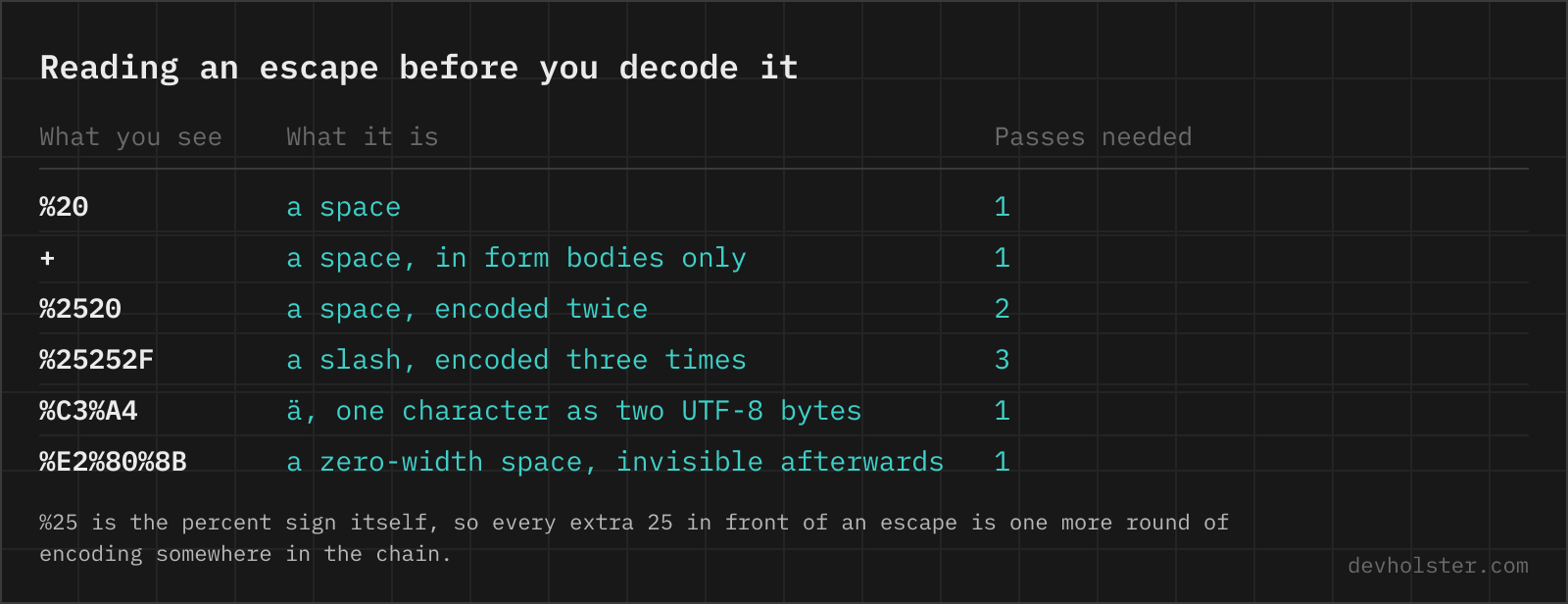
Percent encoding writes a byte as % plus two hex digits, so decoding is the reverse lookup: %20 is byte 0x20, a space; %3A is a colon; %2F a slash. Non-ASCII characters take more than one group because they take more than one byte in UTF-8. ü is %C3%BC, € is %E2%82%AC, and a single emoji is four groups. A decoder that handles each group in isolation produces mojibake; the sequences have to be reassembled into bytes and then read as UTF-8, which is what this page does.
Once decoded, a URL is readable but no longer structurally reliable: an encoded & inside a value becomes a real separator to the eye. Fine for inspection, wrong as input to a parser.
How to use this decoder
Paste on the left, read on the right. The default treats + as a space, which matches the query strings and form submissions most people paste here.
- Paste the URL or parameter value. A whole address, a single value, or a log line containing one.
- Check the sequences count. The strip under the panes counts the percent groups found in the input. Zero means the string was never encoded and you are looking at a different problem.
- Copy the result or download it as a text file.
--plus-as-space
On by default. Turn it off when the plus signs in your input are literal, for example in a Base64 string, a version number like 1.0.0+build.5, or a path segment. With the flag off, only percent sequences are touched.
--repeat
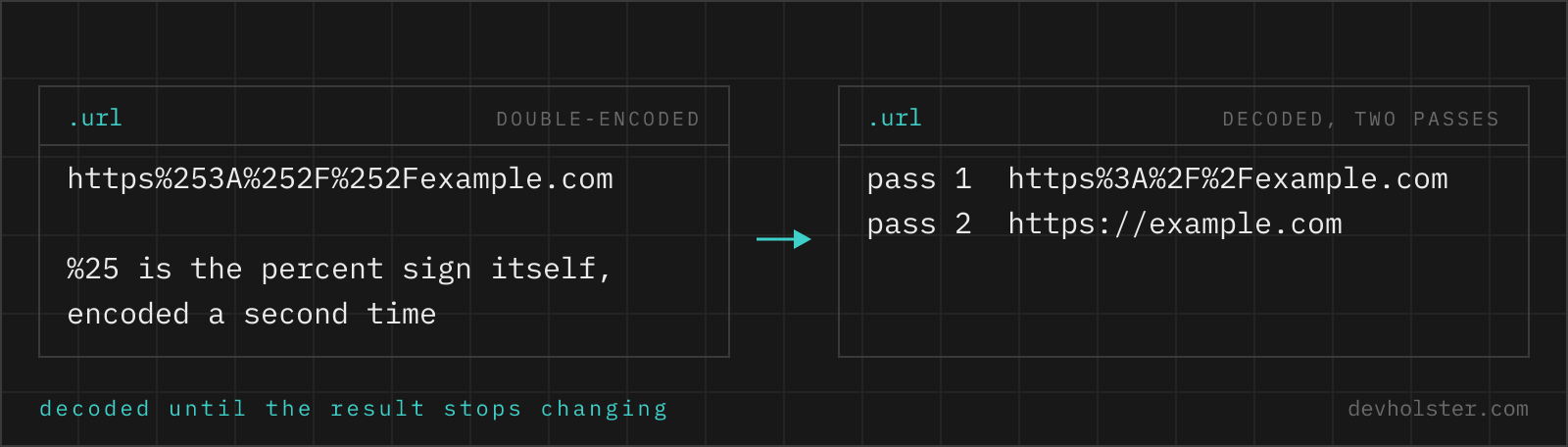
Decodes repeatedly until the output stops changing, up to five rounds. This is the fast way to read a double- or triple-encoded value: %2520 becomes %20 becomes a space in one step. Keep it off when you specifically want to know what one decoding round produces, which is the question that matters when you are hunting the extra encode in a pipeline.
--params
On by default. When the input contains a ?, the query string is split at every & and each parameter is listed on its own line with its name and value decoded separately:
| What you paste | What you get under the decoded line |
|---|---|
…/search?q=caf%C3%A9+au+lait&price=%3C+%E2%82%AC20&utm_source=news%20letter | q = café au laitprice = < €20utm_source = news letter |
Decoding the parameters individually is not the same as decoding the whole URL, and that is the point. A value that legitimately contains an & or an = stays inside its own row instead of being read as a parameter boundary, and a fragment after # is left out of the list because it is not part of the query. This is the shape you want when you are reading a tracking link, an OAuth redirect or a callback URL out of a log; the one long decoded line answers no question about which parameter carries what. Switch it off if you only want the plain decoded string in the output.
Double encoding, and how to spot it
Double encoding happens when a value passes through two encoding steps: a form helper encodes it, then a URL builder encodes the result again. The output stays a valid URL, so nothing errors, and the bug only surfaces as a filename with %20 in it or a redirect that lands on a 404.
| Rounds | A space looks like | An ü looks like |
|---|---|---|
| 0 (raw) | a space | ü |
| 1 | %20 | %C3%BC |
| 2 | %2520 | %25C3%25BC |
| 3 | %252520 | %2525C3%2525BC |
The pattern to look for is %25 in places you did not put a percent sign. Each extra round adds another 25 in front. Counting the rounds tells you how many encoders sit in the chain, which is more useful than just decoding it away, because the same extra step is corrupting every other value too.
One legitimate case for double encoding exists: a URL carried inside another URL, like an OAuth redirect_uri or a proxy target. There the inner value must survive the outer parsing, so it is encoded twice on purpose.
When a decode fails
A malformed input produces an explicit error here rather than a partially decoded string, because a silently half-decoded URL is worse than no output. Three causes:
- A stray percent sign. Text like
20% offthat was never encoded. The%plus the following characters do not form a valid escape. This is the single most common one. - Truncation. A URL cut short by a log field or a chat message, leaving something like
%C3at the end: a valid escape, but an incomplete UTF-8 character. - Wrong charset. Latin-1 bytes such as
%FCforü. Valid percent syntax, invalid UTF-8. These come from legacy systems and from Windows tooling that defaults to the ANSI code page.
The error message names the position, so you can look at the surrounding characters and decide which of the three you have. For the third case, note that no decoder can guess the intended charset reliably; the fix belongs in the system that built the URL.
The sequences you see most
| Sequence | Character | Where it shows up |
|---|---|---|
%20 | space | Search queries, filenames |
%2F | / | Paths passed as a parameter value |
%3A | : | Encoded https:// in redirect targets |
%3F | ? | A query string inside a parameter |
%26 | & | An ampersand that is data, not a separator |
%3D | = | Base64 padding in a URL parameter |
%2B | + | A literal plus, often in email addresses |
%25 | % | The double-encoding tell |
%C3%BC | ü | German text, any UTF-8 pipeline |
%E2%82%AC | € | Prices, three-byte UTF-8 |
%0A | line break | Multi-line values; also the marker of a header-injection attempt |
Debugging URLs in practice
A workflow that has saved us time more than once. Paste the failing URL here with --repeat off and read one round: if the result still contains % groups, you have double encoding and the producer encodes once too often. If it decodes cleanly but a value looks truncated at a special character, the producer encoded too little and something split the URL early. If the decode errors on a % that was meant literally, the value was concatenated into the URL instead of being encoded at all.
Those three outcomes map to three different fixes, and one decoding round tells you which. When you then need to rebuild the URL correctly, the URL encoder has the matching modes for component and full-URL encoding. And if a decoded parameter turns out to be a long eyJ… string, it is Base64-encoded JSON, which the Base64 decoder opens up.
Percent-encoding, read back
Is it safe to decode a URL with a session token in an online tool?
Only in a decoder that runs in your browser. The URLs worth decoding are the interesting ones, full of signed parameters, password-reset tokens and callback identifiers, and a server-side decoder keeps a copy of every one of them. Decoding happens here as JavaScript in your tab, nothing is uploaded, and the page works with the network disconnected. With any other tool, check the Network tab in devtools before you paste something you would not want in a stranger's log file.
What does %20 mean in a URL?
%20 is an encoded space. The percent introduces a two-digit hexadecimal byte value, and 0x20 is the ASCII code for space. The same mechanism explains %2F for a slash, %3A for a colon and %C3%BC for the two UTF-8 bytes of ü. Any character that would otherwise be read as URL structure, or that has no ASCII representation, travels this way.
Why does my decoded text show weird characters like ü?
That is a UTF-8 sequence decoded as Latin-1, and it usually means the producing system encoded byte by byte in the wrong charset before percent-encoding. %C3%BC is correct UTF-8 for ü; %FC is Latin-1 for the same character and will not decode as UTF-8 at all. If you consistently see à followed by another character, the URL was built with a Latin-1 pipeline and the fix belongs on that side.
What is the difference between + and %20 in a URL?
Both can mean a space, depending on which specification applies. In application/x-www-form-urlencoded data, which is what HTML forms send and what most query strings use, + is a space. In a path segment or under plain RFC 3986 rules, + is a literal plus character. That ambiguity is real, not academic: decode a chemical formula or a version string containing a plus with form rules and you silently lose it, which is why this tool exposes the behaviour as a flag.
How do I decode a URL in JavaScript, Python or PHP?
JavaScript: decodeURIComponent(str), or new URL(str) plus searchParams.get(name) when you want the parameters individually already decoded. Python: urllib.parse.unquote(str), or unquote_plus if plus signs should become spaces. PHP: rawurldecode() for strict RFC 3986, urldecode() for the plus-sign variant. All of them throw or misbehave on malformed input, so validate before you decode in production code.
What does %2520 mean?
It is a double-encoded space and a reliable sign that something in your chain encoded an already-encoded value. %25 is an encoded percent sign, so %2520 decodes to %20 in the first round and to a space only in the second. Turn on --repeat here to see the final value. In the actual system, the fix is to remove one encoding step rather than to decode twice, because the extra round also affects every other parameter.
Can I decode a whole URL at once or do I need each parameter separately?
You can paste the whole thing, and for reading it that is the fastest route. Be aware of the caveat: decoding the complete URL also turns an encoded %26 inside a value into a real &, so the result is readable but no longer safe to re-parse as a URL. When you need the exact value of one parameter, decode that parameter alone; when you just want to see what a link contains, decode everything.
Why does the decoder say "URI malformed"?
Because a percent is not followed by two valid hex digits, or the byte sequence is not valid UTF-8. Common causes: a literal percent sign in the text that was never encoded (a discount code like "20% off"), a URL truncated mid-sequence by a log line limit, or Latin-1 bytes such as %FC. This tool names the offending position instead of just reporting a failure, which usually identifies the cause immediately.
How do I find out where a wrapped or tracking link actually points?
Decode it, do not click it. Corporate mail scanners and marketing platforms wrap the real destination as a percent-encoded parameter inside their own URL: Microsoft Defender uses safelinks.protection.outlook.com/?url=…, Proofpoint uses urldefense.com/v3/__…, and newsletter tools use click.<domain>/?u=… or a similar redirect. Copy the link without opening it, paste it into a decoder and read the url parameter to see the target domain. This is the fastest phishing check there is, because the wrapper hides exactly the part you need to judge. Short links (bit.ly, t.co) contain no encoded target and can only be resolved by following the redirect, for example with curl -I.
What is the difference between URL decoding and HTML decoding?
They undo two different escaping schemes that happen to appear in the same places. URL decoding turns %20 back into a space and works on bytes, because a URL is defined over ASCII. HTML decoding turns &amp; back into & and works on characters, because HTML needs a way to write its own syntax as text. A link inside an HTML page can carry both layers at once, in which case you decode the entities first and the percent sequences second. Mixing the order produces values that look right and are wrong, which is where a lot of broken redirect parameters come from.
Does decoding a URL make it safe to use?
No, the opposite. Decoding turns data back into characters that may have structural or executable meaning, so a decoded value must never be pasted straight into HTML, a shell command or a SQL query. Decode to read and to debug; escape again for whatever destination the value ends up in. Security filters that inspect decoded input while the application decodes a second time are the classic double-decoding vulnerability.