Most Content-Security-Policy headers in the wild are weaker than the people who wrote them think, and the header never says so. A bare self without quotes is accepted as a hostname. A typo in a directive name is ignored without a word. 'unsafe-inline' in script-src makes the rest of the directive decorative. The analyzer above names every one of those, the table turns the same header into something you can click together, and the export writes the line for nginx, Apache, a raw header or a meta tag.
One header, one job
A Content-Security-Policy is a response header that tells the browser where each kind of resource may come from, and whether inline code may run. It does not sanitize anything and it does not stop injection. What it stops is execution: the attacker gets a <script> into your markup and the browser refuses to run it, because the tag carries no nonce the policy recognises. That single behaviour is the reason to have the header at all, and it is also why script-src is the only directive worth arguing about at length.
The value is a list of directives separated by semicolons, each a name followed by its sources: default-src 'self'; script-src 'self' https://cdn.example.com; object-src 'none'. Paste that into the field above, or paste the whole add_header line from nginx, the Header set line from Apache, a <meta http-equiv> tag or the output of curl -I. The wrapper is detected and stripped, the CSP line is picked out of the header dump, and the export remembers which server the policy came from. Everything below the field is the same policy: the directive table edits it chip by chip, the textarea edits it as text, and each rewrites the other. --report-only switches the export to Content-Security-Policy-Report-Only (a pasted report-only header turns it on by itself), --explain prints what each directive governs and what it falls back to.
Nothing leaves the tab, which matters here because a production policy lists internal hostnames.
The fallback chain
Directives are not independent. A fetch directive you leave out is governed by default-src, and the two script and style directives introduced in CSP3 fall back one more level. Reading a policy means reading it through that chain, and the analyzer does exactly that: when script-src is missing, the script checks run against default-src, because that is what the browser consults.
| Directive | Falls back to | Governs |
|---|---|---|
script-src-elem | script-src, then default-src | <script> elements |
script-src-attr | script-src, then default-src | event handler attributes, javascript: URLs |
style-src-elem / -attr | style-src, then default-src | <style> and <link> / style="" |
worker-src | child-src, script-src, default-src | Worker, SharedWorker, ServiceWorker |
frame-src | child-src, then default-src | <iframe> content |
img-src, font-src, connect-src, media-src, object-src, manifest-src | default-src | one resource type each |
base-uri, form-action, frame-ancestors | nothing | document and navigation rules, always explicit |
The last row is the one that costs sites their protection. default-src 'self' feels like a safe default, and it is, for fetches. It says nothing about who may frame the page, where forms may post, or whether an injected <base href> may repoint every relative URL. Those three have to be written out, and the findings list them as missing until they are.
A default-src 'none' at the start and explicit directives after it is the tidiest shape. Anything you forget is then blocked rather than open, and the console tells you what you forgot.
Source expressions
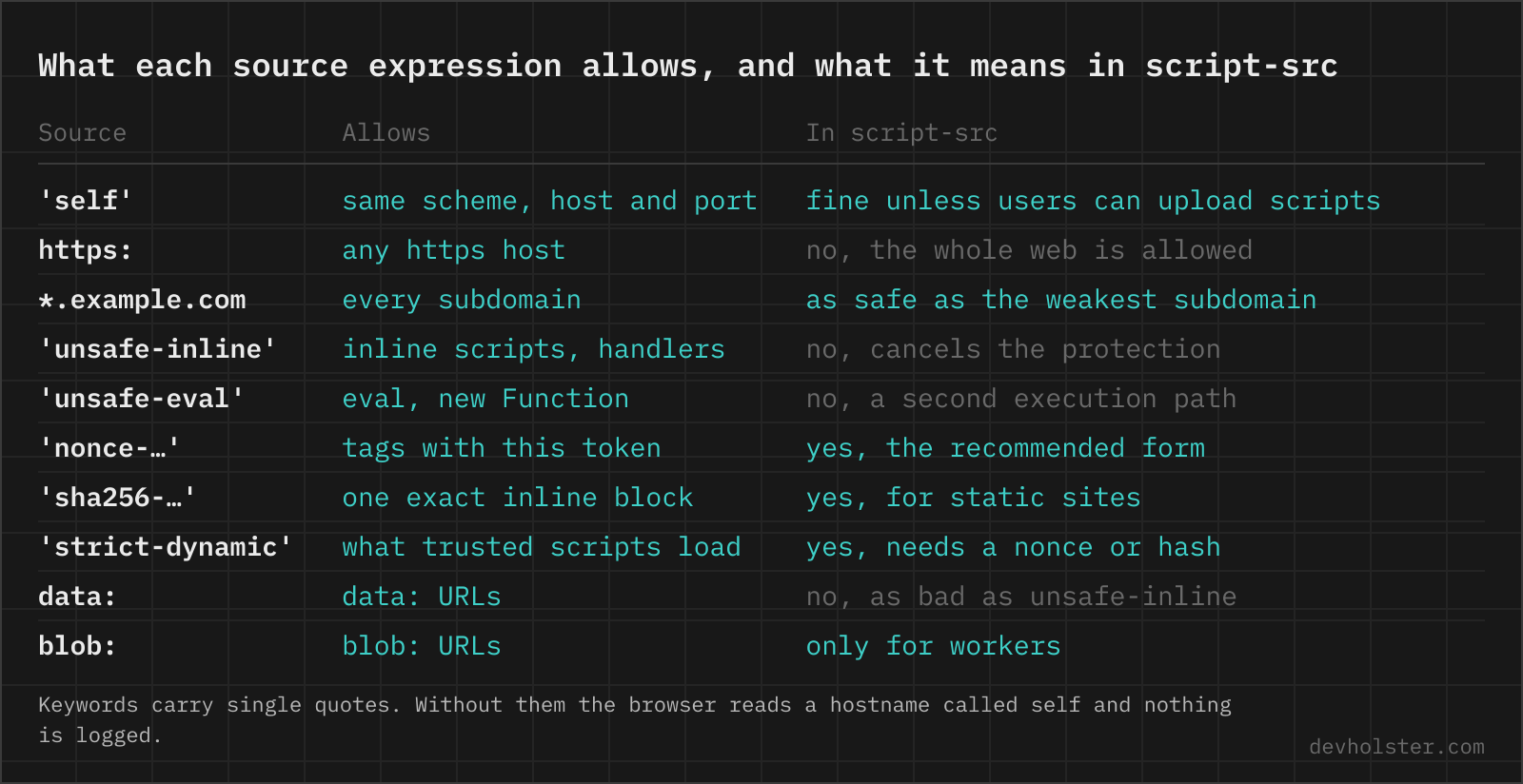
Every fetch directive takes the same grammar, and three of its rules are where policies go wrong.
Keywords are quoted. 'self', 'none', 'unsafe-inline', 'unsafe-eval', 'strict-dynamic', nonces and hashes all carry single quotes, and without them the browser reads a hostname. font-src self is a syntactically valid policy that allows fonts from a server called self, so nothing is logged at parse time and the fonts simply fail to load. The table above paints those chips red and the findings call it an error, because nothing else in CSP fails this quietly.
Hosts are bare. cdn.example.com, https://cdn.example.com, *.example.com, https://cdn.example.com/libs/ with a path prefix, localhost:3000 with a port. A scheme alone, https: or data:, matches every URL with that scheme. And 'none' is only 'none' when it stands alone: next to other sources it is ignored and the others apply, the opposite of what most people expect.
| Source | Allows | In script-src |
|---|---|---|
'self' | same scheme, host and port as the page | fine, as long as users cannot upload files that are served back as scripts |
https: | any https host | an allowlist of the whole web, a bypass |
*.example.com | every subdomain | as safe as the least careful subdomain |
'unsafe-inline' | inline scripts, handlers, javascript: URLs | cancels the protection, unless a nonce or hash makes it a fallback |
'unsafe-eval' | eval, new Function, string timers | a second execution path for injected strings |
'nonce-…' | tags carrying this per-response token | the recommended form |
'sha256-…' | one exact inline block | the static-site form, breaks on a whitespace change |
'strict-dynamic' | what a trusted script loads | makes host sources irrelevant, needs a nonce or hash to trust anything |
data: | data: URLs | as bad as unsafe-inline, fine in img-src and font-src |
blob: | blob: URLs | needed for some workers, otherwise leave it out |
The nonce is the part with the most hidden rules. It has to be base64 (the analyzer flags other characters), at least 128 bits long (22 characters unpadded, and short values are flagged), and different on every response. A nonce like abc123 is flagged as too short, a long one that still starts with abc or r4nd0m is flagged as static, and a template placeholder like {random} is flagged as info so you remember to replace it. A hash is the base64 of the raw SHA-256 digest of the exact bytes between the tags, 44 characters with padding, and the console prints the right one for you when a block is refused.
The strict policy
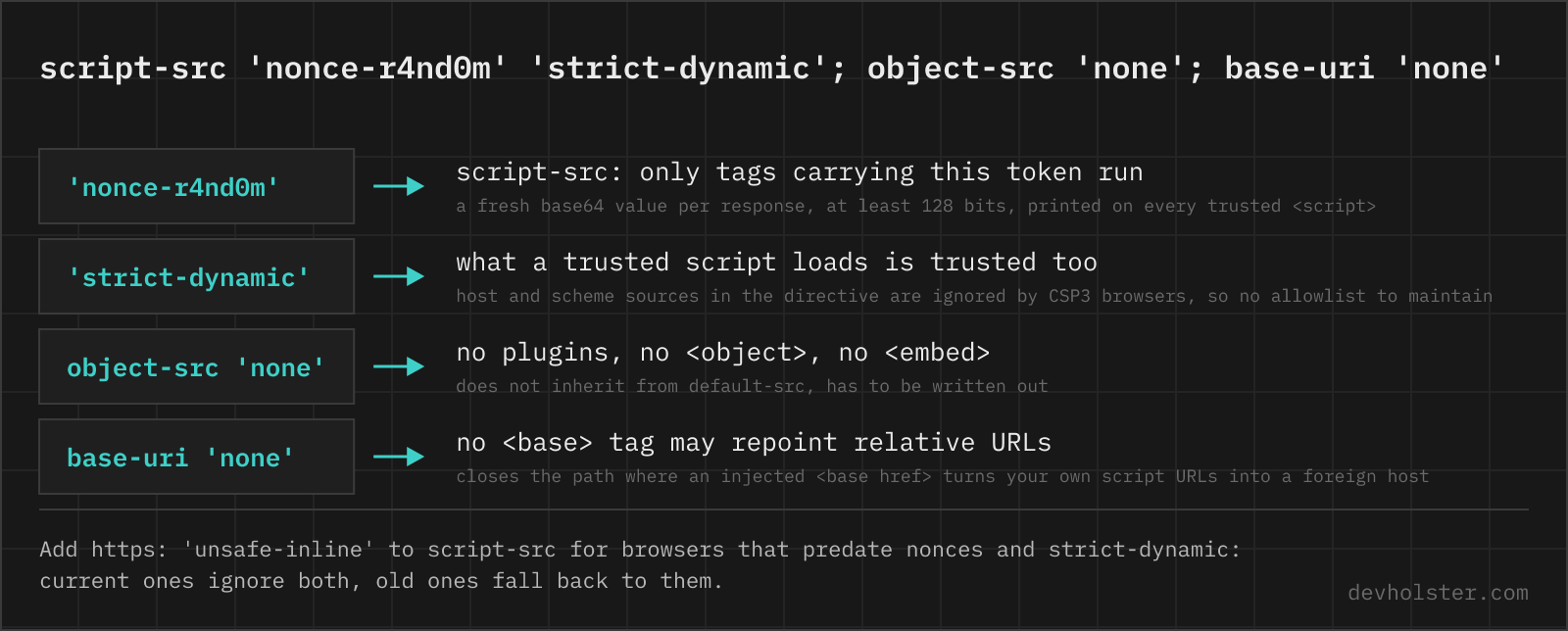
The policy Google's security team publishes as the recommended starting point is short, and every part of it is there for a reason the analyzer can check:
script-src 'nonce-{random}' 'strict-dynamic' https: 'unsafe-inline'; object-src 'none'; base-uri 'none';
The nonce identifies the scripts you wrote. 'strict-dynamic' extends that trust to whatever those scripts load, which is how a bundler's chunks, a tag manager's tags and a widget's dependencies run without a host list. Then come two entries that look wrong: https: and 'unsafe-inline'. Both are fallbacks for browsers that predate the keyword in front of them. A CSP3 browser that sees 'strict-dynamic' ignores host and scheme sources in the directive, and a CSP2 browser that sees a nonce ignores 'unsafe-inline'. The two words cost nothing in a current browser and keep the site working in an old one. The "strict nonce-based (recommended)" preset loads exactly this with the usual additions (frame-ancestors, form-action, upgrade-insecure-requests), and the verdict line says "strict nonce-based policy" when a pasted policy meets the bar: nonce or hash plus 'strict-dynamic', object-src 'none', base-uri set.
object-src 'none' closes the plugin path. base-uri 'none' stops an injected <base> tag from turning your own relative script URLs into requests to another host, which would otherwise be a way around the nonce without touching script-src. Neither inherits from default-src, so both are written out.
For static hosting without a per-response nonce, the hash form of the same policy works with build-time hashes, at the price that every edit to an inline script changes the policy. For a static site we would still pick hashes over a policy that waits for nonces the host cannot generate, and the cost is real: a build step that recomputes every hash on deploy, and a blocked script the first time someone edits a template by hand and skips it.
Why allowlists fail
A host in script-src says "anything this server returns may run". Large CDNs return JSONP responses whose callback parameter is chosen by the caller, and they host AngularJS builds and other libraries whose features amount to an interpreter. A policy that allows ajax.googleapis.com or cdnjs.cloudflare.com therefore allows an attacker to run code through a URL on that host, and the 2016 paper behind 'strict-dynamic' measured that roughly 95 percent of allowlist policies in the wild were bypassable this way.
The analyzer carries a list of such hosts, the same class Google's CSP Evaluator flags, and warns when one is allowed in a script directive without 'strict-dynamic' covering it. The list is deliberately short. A host not on it is not endorsed, it just has not been measured.
What the console says
Every violation is logged with the directive that caused it and the value the browser saw. The messages are stable enough to search for, and most of them contain their own fix.
Refused to load the script 'https://cdn.example.com/app.js' because it violates the following Content Security Policy directive: "script-src 'self'". Note that 'script-src-elem' was not explicitly set, so 'script-src' is used as a fallback. The host is not in script-src. Add https://cdn.example.com to script-src, or give the tag a nonce and let 'strict-dynamic' cover what it loads. The note about script-src-elem is Chrome explaining the fallback chain, not a second error.
Refused to execute inline script because it violates the following Content Security Policy directive: "script-src 'self'". Either the 'unsafe-inline' keyword, a hash ('sha256-Hd+3bLwiCQd…'), or a nonce ('nonce-…') is required to enable inline execution. An inline <script> without nonce or hash. The hash in the message is the real digest of the blocked block: paste it into script-src to allow exactly that script, or put a nonce on the tag. Moving the code into a file is the third option.
Refused to apply inline style because it violates the following Content Security Policy directive: "style-src 'self'". Either the 'unsafe-inline' keyword, a hash ('sha256-…'), or a nonce ('nonce-…') is required to enable inline execution. Same rule for styles. A nonce works for <style> elements, not for style="" attributes, which is why CSS-in-JS sites end up with style-src 'unsafe-inline'.
Refused to connect to 'https://api.example.com/v1/items' because it violates the following Content Security Policy directive: "connect-src 'self'". fetch, XHR, WebSocket, EventSource and sendBeacon all go through connect-src. Add the API host. A wss:// socket on another port counts as another host.
Refused to frame 'https://example.com/' because an ancestor violates the following Content Security Policy directive: "frame-ancestors 'none'". The page inside the iframe forbids being framed. That is its policy, not yours, and only the owner of the framed page can change it. If it is your page and you want to embed it on your own site, frame-ancestors 'self' is the value.
Refused to load the font 'https://fonts.gstatic.com/s/inter/v13/UcCO3Fwr.woff2' because it violates the following Content Security Policy directive: "font-src 'self'". Fonts from a CDN need the CDN in font-src. For Google Fonts that is font-src https://fonts.gstatic.com plus style-src https://fonts.googleapis.com for the stylesheet that references them.
Refused to evaluate a string as JavaScript because 'unsafe-eval' is not an allowed source of script in the following Content Security Policy directive: "script-src 'self'". Something calls eval, new Function or setTimeout with a string. The stack trace names the library. Upgrading it usually removes the call. If the library needs it for WebAssembly only, 'wasm-unsafe-eval' is the narrower keyword.
The source list for the Content Security Policy directive 'script-src' contains an invalid source: ''strict-dynamic''. It will be ignored. Doubled quotes, usually from pasting a single-quoted policy into a single-quoted config string. The keyword is 'strict-dynamic' with one pair. The analyzer flags the same token before it reaches a browser.
The Content Security Policy directive 'frame-ancestors' is ignored when delivered via a <meta> element. frame-ancestors, sandbox and report-uri only work in the HTTP header. The meta export above drops them and says which ones it dropped. Clickjacking protection on a static host means a header set at the CDN or hosting layer.
Ignoring duplicate Content-Security-Policy directive 'script-src'. The same directive twice, often from a framework adding its own CSP fragment next to yours. The first occurrence wins and the second is dropped entirely, not merged. Combine the sources into one directive.
Inline styles
style-src 'unsafe-inline' is in most real policies and it is a different risk class from the script version. Injected CSS cannot run code. It can exfiltrate attribute values through selectors like input[value^="a"] with a background URL per guess, and it can overlay the page for phishing, which is why it is not nothing. But a site with a strict script-src and a permissive style-src has closed the door that matters, and the analyzer reports the style keyword as info rather than as a finding that needs fixing tonight.
Nonces and hashes do work for <style> elements and <link> tags, and a site without runtime style attributes can drop the keyword entirely.
Deploy and verify
The header belongs on HTML responses. Assets do not need it, and sending a long policy on every image is wasted bytes. The export pane writes the line for each server and switches to the one the pasted policy came from.
| Where | How |
|---|---|
| nginx | add_header Content-Security-Policy "…" always; in the server block |
| Apache | Header always set Content-Security-Policy "…" with mod_headers, also valid in .htaccess |
| Express | helmet.contentSecurityPolicy({ directives }), or res.setHeader in a middleware, generating the nonce per request |
| Next.js | headers() in next.config.js for a static policy, middleware for a per-request nonce |
| Cloudflare | a Response Header Transform Rule, or a Worker that sets the header on HTML responses |
| static hosting | the host's header config (_headers, vercel.json), and only as a last resort the meta tag |
Verification is two commands and a tab. curl -sI https://example.com/ | grep -i content-security shows what is actually sent, including whether it is the report-only header or the enforcing one. In devtools, the first request in the Network tab shows the header, and the Console tab shows every violation with its directive. Pasting the curl output into the analyzer works as is, the CSP line is found among the others.
Report-only is the way to measure a policy before it blocks anything. Content-Security-Policy-Report-Only with the same value evaluates everything, logs everything and enforces nothing, and report-to (with a Reporting-Endpoints header) or the older report-uri sends the violations to an endpoint you run. Two directives do nothing in that mode: upgrade-insecure-requests and sandbox change how the page loads rather than what is blocked, and the report-only header never changes loading. The findings say so when the option is on. The meta tag is the weakest delivery: it covers only what comes after it in the document, cannot carry frame-ancestors, sandbox or report-uri, and has no report-only form at all. The rollout process itself, from the first report-only week to triaging extension noise, is in the CSP rollout guide.
CSP questions from the console
How do I fix "Refused to execute inline script because it violates the following Content Security Policy directive"?
Give the script a nonce or a hash, or move it into a file. The console message itself contains the fix: Chrome prints the sha256 hash of the blocked block, and adding that value to script-src as 'sha256-…' allows exactly that script. For server-rendered pages a per-response nonce on the tag and in the header is the cleaner route. Adding 'unsafe-inline' also makes the error go away, but it turns script-src off for every injected inline script too.
What does 'unsafe-inline' mean in a Content Security Policy?
It allows inline code: <script> blocks without src, onclick= handlers, javascript: URLs and, in style-src, <style> blocks and style attributes. In script-src it cancels the XSS protection, because an injected payload is an inline script. The keyword is ignored by CSP2+ browsers as soon as the same directive contains a nonce or hash, which is why the strict policy can keep it as a fallback for old browsers.
How do I allow Google Fonts in CSP?
style-src https://fonts.googleapis.com for the stylesheet, font-src https://fonts.gstatic.com for the font files. Both hosts, or the fonts fail with a font-src or style-src violation.
How do I allow Google Analytics or Google Tag Manager in CSP?
Read the console, not a blog post: every blocked request names the directive and the URL, and the hosts change with product versions. Typically Tag Manager needs the loader host in script-src, Analytics needs its collection host in connect-src and img-src, and the snippet itself is inline, so it needs a nonce (GTM propagates the nonce to the tags it injects when you add it to the loader tag). With 'strict-dynamic' the hosts become irrelevant and only the nonce on the snippet matters.
Does CSP prevent XSS?
It prevents the execution, not the injection. A strict policy (nonce or hash, strict-dynamic, object-src none, base-uri none) stops an injected script from running in current browsers. A policy with unsafe-inline in script-src, or a wide host allowlist, stops almost nothing. Encoding output correctly stays the first line, CSP is the second.
What does object-src 'none' do?
It forbids <object> and <embed> content. Plugins were a script execution path of their own, so every sane policy closes it with one line.
How do I add a Content-Security-Policy header in nginx?
add_header Content-Security-Policy "default-src 'self'" always; in the server block. The always flag keeps the header on error pages.
How do I set CSP in Express?
With helmet: app.use(helmet.contentSecurityPolicy({ directives: { defaultSrc: ["'self'"], scriptSrc: ["'self'", (req, res) => `'nonce-${res.locals.nonce}'`] } })). helmet's default CSP is already fairly strict and blocks inline scripts, which is the first thing people notice after installing it. Without helmet, res.setHeader('Content-Security-Policy', policy) in a middleware does the same.
How do I check which Content-Security-Policy a site sends?
curl -sI https://example.com | grep -i content-security-policy shows the header as sent. In devtools, the Network tab, first document request, Response Headers section shows the same line, and the Console tab shows every violation with the directive that caused it.
How long should a CSP nonce be?
At least 128 bits of randomness from a CSPRNG, base64 encoded, which is 22 characters unpadded. Generated fresh for every response, never reused across pages.
Can I use CSP with inline styles without 'unsafe-inline'?
Yes for <style> elements and <link> tags: a nonce or a hash on them works exactly like for scripts. No for style="" attributes set by JavaScript or written in the markup, a nonce cannot be attached to an attribute. CSP3 adds 'unsafe-hashes' so a hash can cover attribute values, which helps with a handful of static ones and not with a CSS-in-JS library writing hundreds at runtime. That is the case where style-src 'unsafe-inline' is the honest answer.
Why does CSP block my WebSocket connection?
connect-src covers WebSocket, fetch, XMLHttpRequest, EventSource and sendBeacon. If the page allows connect-src 'self' and the socket is on another host or port, add it as wss://socket.example.com. 'self' matches the page's scheme and host, and a ws:// or wss:// URL on another port is a different origin.
What is the difference between script-src and script-src-elem?
script-src-elem governs <script> elements, script-src-attr governs inline event handlers and javascript: URLs, and script-src covers both when the specific one is absent. The split exists so a site can allow scripts from a CDN while keeping onclick= attributes blocked. script-src alone is still the one to write, with the specific ones only as an override, since older browsers know only the combined directive.