What semver actually promises
Semantic versioning is a contract with three numbers: major.minor.patch. Bump patch for bug fixes, minor for backwards-compatible features, major for breaking changes. The spec everyone points at is semver 2.0.0, published in June 2013 by Tom Preston-Werner, GitHub’s co-founder, and npm’s entire range syntax is built on top of it.
Worth saying out loud: it’s a promise, not a proof. Nothing verifies that a patch release is actually harmless. The maintainer decides what counts as breaking, and maintainers are wrong about that regularly (or, as we’ll get to, occasionally hostile). Every range operator in package.json is you deciding how much of that promise to trust automatically.
The caret rule, precisely
The npm docs describe ^ as allowing “compatible” updates, and most developers translate that to “minor and patch are fine”. The actual rule is different, and the difference matters: the caret allows changes that do not modify the leftmost non-zero digit of the version you wrote.
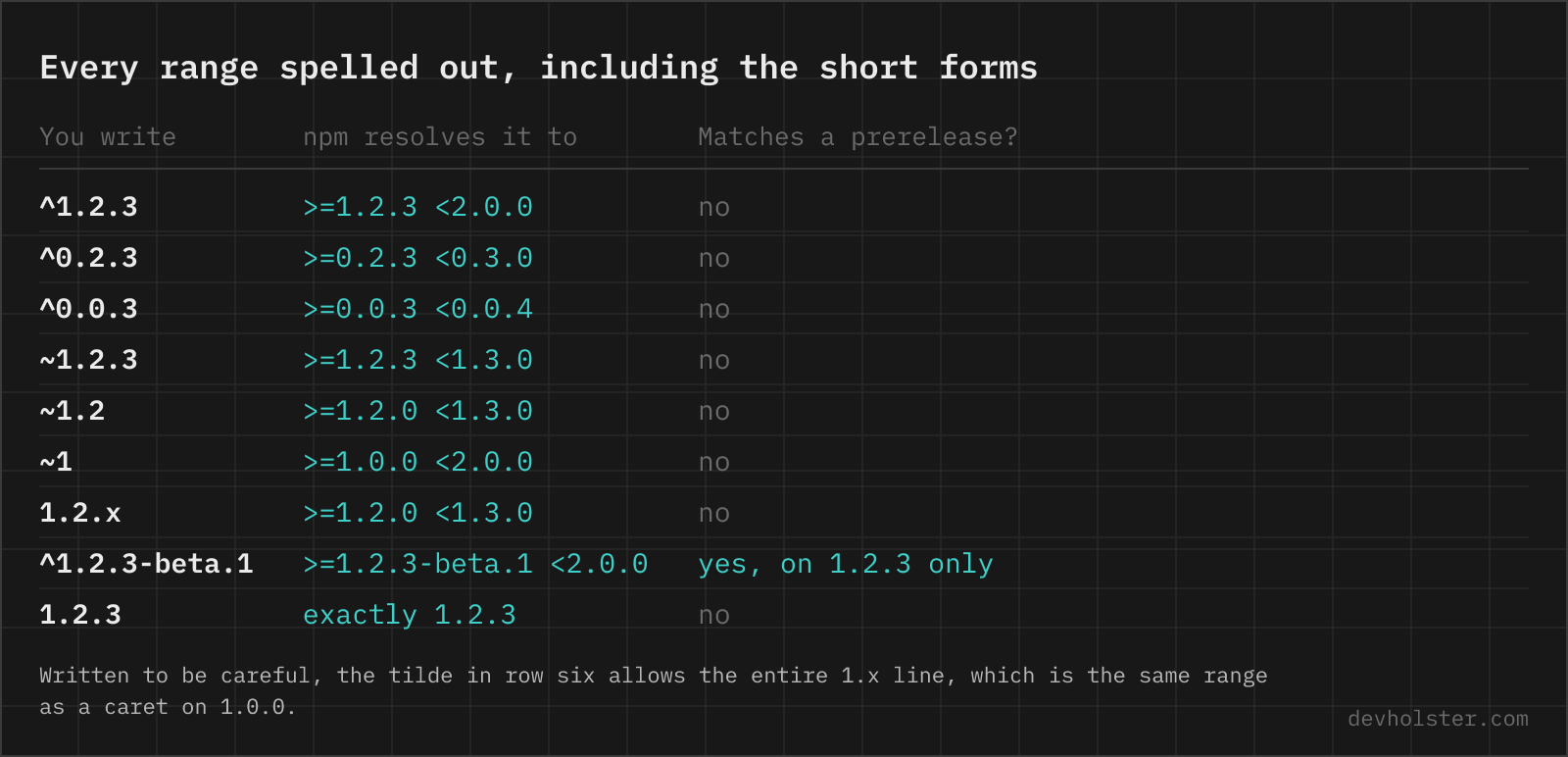
For ^1.2.3 the leftmost non-zero digit is the 1, so anything below 2.0.0 is allowed: >=1.2.3 <2.0.0. That matches the folk version of the rule, which is why the folk version survives.
The caret is also what you get by default. Plain npm install some-package writes ^ into package.json; the prefix comes from npm’s save-prefix config, which defaults to the caret and can be switched to ~ or (via save-exact=true) to nothing at all. So the loosest common range is also the one nearly every dependency ends up with, not because anyone chose it, but because nobody changed a config default.
The 0.x trap
^1.2.3   →  >=1.2.3 <2.0.0
^0.2.3   →  >=0.2.3 <1.0.0
^0.0.3   →  >=0.0.3 <1.0.0
^1.2.3   →  >=1.2.3 <2.0.0
^0.2.3   →  >=0.2.3 <0.3.0
^0.0.3   →  >=0.0.3 <0.0.4
Apply the leftmost-non-zero-digit rule to a 0.x version and the caret quietly changes meaning. In ^0.2.3 the leftmost non-zero digit is the minor version, so that’s the digit that can’t change: the range is >=0.2.3 <0.3.0, patch updates only. And in ^0.0.3 the first non-zero digit is the patch itself, so the range is >=0.0.3 <0.0.4. That matches exactly one version.
| Range | Resolves to | In words |
|---|---|---|
^1.2.3 | >=1.2.3 <2.0.0 | minor + patch updates |
^0.2.3 | >=0.2.3 <0.3.0 | patch updates only |
^0.0.3 | >=0.0.3 <0.0.4 | that version, full stop |
This isn’t npm being weird for fun. Item 4 of the semver spec says that before 1.0.0, anything may change at any time, so npm treats a 0.x minor bump as a potential breaking change and refuses to cross it automatically. Sensible, but it means the same character in the same file has three different strengths depending on the number after it. We’ve watched people “loosen” a 0.0.x dependency by adding a caret and achieve exactly nothing.
Tilde, and the ~1.2 vs ~1 nuance
The tilde is the conservative sibling: ~1.2.3 means >=1.2.3 <1.3.0, patch updates only. For fully specified versions that’s the whole story, and for 0.x versions tilde and caret happen to behave the same, since both stop at the next minor.
The short forms are where it gets sneaky. The actual rule from node-semver: tilde allows patch-level changes if you specified a minor version, and minor-level changes if you didn’t. So ~1.2 is >=1.2.0 <1.3.0, as you’d guess. But ~1 is >=1.0.0 <2.0.0, the entire 1.x line. Someone writing ~1 to be “extra careful” has written the same thing as ^1.0.0. If you want strict, write all three numbers.
The lockfile does the real pinning
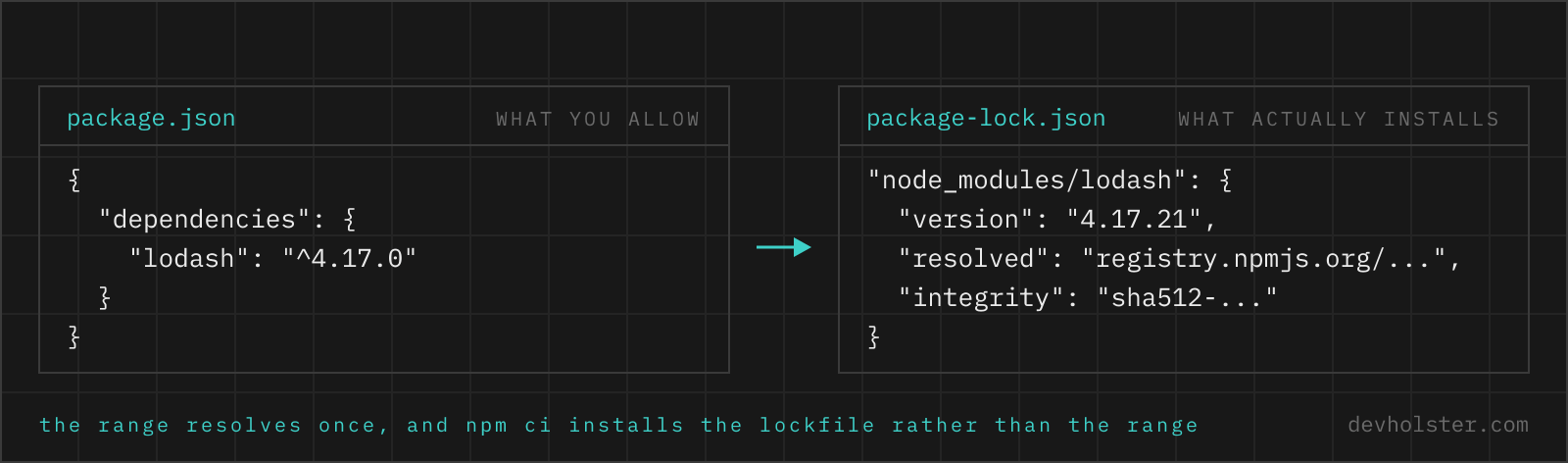
Here’s the part that defuses most caret anxiety: ranges only matter at resolution time. Since npm 5 (2017), every install writes package-lock.json with the exact resolved version and integrity hash of every package in the tree. On later installs the lockfile wins, as long as it still satisfies package.json. Your ^4.17.0 doesn’t float on every install; it floated once, and the result got locked.
The catch is that npm install is allowed to update the lockfile whenever package.json and the lockfile disagree, and it re-resolves ranges when it does. That’s why npm ci exists (added in npm 5.7, early 2018): it deletes node_modules, installs exactly what the lockfile says, fails hard if the lockfile is missing or out of sync with package.json, and never writes to either file. Build servers, Docker images, anything that should be reproducible: npm ci. Your laptop, when you’re deliberately changing dependencies: npm install.
All of which only works if the lockfile is actually in the repo. Committing it is npm’s official recommendation, and still we keep meeting projects with package-lock.json in .gitignore, usually because someone got annoyed by merge conflicts in 2019. If yours ignores it and Git won’t pick it back up, that’s a tracked-vs-untracked problem, which we’ve covered in why .gitignore seems to stop working.
Left-pad and colors, or how everyone got paranoid
Two incidents explain the modern pinning reflex better than any policy document.
March 22, 2016: left-pad. After a trademark dispute in which npm handed the package name kik to the messenger company, Azer Koçulu unpublished all of his packages, around 273 of them. One was left-pad, 11 lines of string padding. Thousands of projects, Babel and React among them, stopped building within minutes, because some dependency deep in their tree needed those 11 lines and the registry suddenly returned nothing. npm restored the package within hours and later restricted unpublishing so that an established package can’t vanish with one command anymore. The lesson was about availability: your build transitively depends on strangers not having a bad day.
January 8, 2022: colors. Marak Squires, maintainer of colors (over 20 million weekly downloads at the time) and faker, published colors 1.4.1 and 1.4.44-liberty-2 with an infinite loop that ran on import, printing “LIBERTY LIBERTY LIBERTY” and then garbled Zalgo text forever. faker got an empty 6.6.6 release in the same protest against unpaid open-source work. The detail that makes it a semver story: 1.4.1 is a patch bump. Every project depending on ^1.4.0 (the AWS CDK was a prominent victim) pulled the sabotaged release automatically on its next unlocked install. Nobody upgraded anything. The range did.
Same conclusion from both: ranges express trust, and the lockfile is the seatbelt. Projects that installed from a committed lockfile watched the colors mess from the sidelines.
Pinning transitive dependencies with overrides
Ranges and lockfiles cover your direct dependencies. But the versions three levels down were chosen by other people’s ranges, and sometimes one of them is broken or vulnerable while the package in between hasn’t updated yet. Since npm 8.3 (December 2021), package.json accepts an overrides field for exactly this: "overrides": { "minimist": "1.2.6" } forces that version everywhere in the tree, regardless of what any intermediate package asked for. Yarn calls the same idea resolutions, pnpm has pnpm.overrides.
Treat every override as a loan. The forced version was never tested with the packages sitting above it, and a forgotten override will silently hold a dependency back for years. Since package.json is JSON and JSON has no comments, you can’t even annotate why the override exists; we keep a note next to the entry in a //-style dummy key or in the PR description, and we review the list every few months. (If you hand-edit an overrides block and want to check you didn’t break the file, our JSON formatter validates and re-indents it in the browser, which beats finding out from a failing CI run.)
Prereleases don’t match your ranges
One rule that surprises people on both sides of the publish button: versions with a prerelease tag, like 1.3.0-beta.2, do not satisfy normal ranges. ^1.2.3 will never resolve to 1.3.0-beta.2, even though the number is technically inside the range. node-semver only lets a prerelease through if the range itself names a prerelease on the exact same major.minor.patch tuple: ^1.2.3-beta.1 matches 1.2.3-beta.4, but still not 1.2.4-beta.1.
For consumers this is protection: nobody’s caret range drags in an rc build. For publishers it’s a footgun with a second trigger: npm publish tags releases as latest by default, prerelease or not. Publish 2.0.0-rc.1 without --tag next and plain npm install your-package starts handing the rc to everyone, no ranges involved. Semver ranges won’t match prereleases, but dist-tags happily will.
Version range questions
What does the caret (^) mean in package.json?
The caret allows any version that does not change the leftmost non-zero digit of the version you wrote. For ^1.2.3 that means anything from 1.2.3 up to (but not including) 2.0.0. For ^0.2.3 the leftmost non-zero digit is the 2, so only patch updates below 0.3.0 are allowed. And ^0.0.3 allows nothing but 0.0.3 itself. It is npm’s default range: plain npm install writes a caret in front of the version unless you change the save-prefix config.
What is the difference between ^ (caret) and ~ (tilde) in npm?
Tilde is stricter: ~1.2.3 allows only patch updates (up to but not including 1.3.0), while ^1.2.3 also allows minor updates (up to but not including 2.0.0). The two behave identically for 0.x versions, since the caret then also stops at the next minor. Watch the short forms though: ~1.2 means 1.2.x as expected, but ~1 means the whole 1.x line, which is no stricter than ^1.0.0.
Does ^0.2.3 allow version 0.3.0?
No. The caret never moves the leftmost non-zero digit, so ^0.2.3 stops just below 0.3.0. Below 1.0.0, npm treats every minor as breaking.
Should I commit package-lock.json?
Yes, always. It is the only record of the exact tree you resolved, and npm ci refuses to run without one.
What is the difference between npm install and npm ci?
npm ci installs exactly what the lockfile says, and npm install is allowed to change the lockfile. npm ci deletes node_modules first, errors out if package-lock.json is missing or out of sync with package.json, and never writes to either file. npm install resolves ranges again when package.json and the lockfile disagree and updates the lockfile to match. That is why CI pipelines and Docker builds should run npm ci: same input, same tree, every time.
How do I pin an exact version of a dependency in npm?
Write the bare version with no prefix in package.json, for example "lodash": "4.17.21", or install with npm install --save-exact. To make exact versions the default for every future install, set save-exact=true in your .npmrc (or save-prefix to ~ if you only want to drop to patch-level ranges). Note that this pins only your direct dependency; its own dependencies still resolve through ranges, which is what the lockfile and the overrides field are for.
How do I fix a vulnerable transitive dependency without waiting for the maintainer?
Use the overrides field in package.json, supported since npm 8.3 (shipped December 2021). An entry like "overrides": { "minimist": "1.2.6" } forces that version everywhere in the tree, no matter which package depends on it. Yarn has the same feature under resolutions, pnpm under pnpm.overrides. Treat it as a temporary patch: the forced version was never tested by the packages that depend on it, so remove the override once the chain updates properly.
Why did colors.js break thousands of builds in January 2022?
Because its author intentionally published a corrupted release, and caret ranges pulled it in automatically. On January 8, 2022, Marak Squires released colors 1.4.1 and 1.4.44-liberty-2, which entered an infinite loop on import and printed “LIBERTY LIBERTY LIBERTY” followed by garbage text. Since 1.4.1 is a patch bump, every project depending on ^1.4.0 (colors had over 20 million weekly downloads, including via the AWS CDK) got it on the next unlocked install. Projects that installed from a committed lockfile were untouched.