The whole algorithm fits in a paragraph
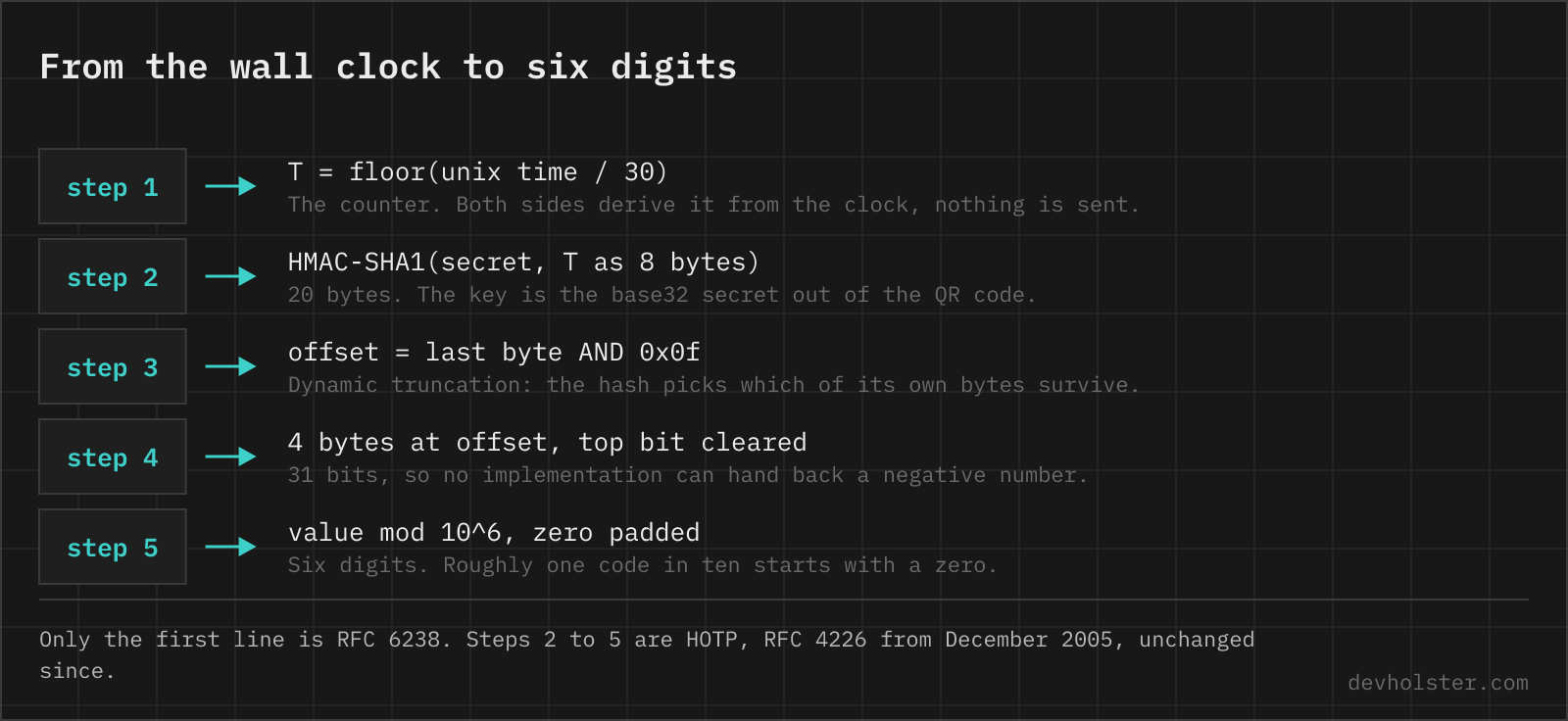
Take the current Unix time, divide by 30 and round down. That integer is your counter. Compute HMAC-SHA1 over the counter (as an 8-byte big-endian value) using the shared secret from the QR code as the key. From the resulting 20 bytes, pick 4 in a slightly odd way we’ll get to, clear the top bit so you have a 31-bit number, take it modulo 10^6, and pad to 6 digits. Done. That’s the code on your screen. The HMAC step is nothing exotic, it is the same keyed hash you can run on the HMAC generator, just fed with the counter bytes instead of a text message.
No network involved. Your phone computes this locally, the server computes the same thing, and they match because they share two inputs: the secret (exchanged once, at enrollment) and the time (which everyone has). That’s why an authenticator app works in airplane mode, and why “the server sends a code to your app” is the most common wrong mental model of TOTP. Nothing is sent. Ever.
The spec is RFC 6238, published May 2011, and it’s refreshingly short because it delegates nearly everything to an earlier RFC.
HOTP came first, and TOTP is one line on top
The heavy lifting lives in HOTP, RFC 4226 from December 2005, an initiative of the OATH industry group (no relation to OAuth, confusingly). HOTP defines everything: the HMAC, the truncation, the digits. Its counter is an event counter, a number that increments each time you press a button, which is how those keychain hardware tokens from the 2000s worked. The server tracks the counter too and resynchronizes within a look-ahead window when you press the button a few times without logging in.
TOTP’s entire contribution is replacing that event counter with floor(unixtime / 30). The counter now increments itself every 30 seconds, no button and no counter-desync headaches. The 30 seconds is the default time step; RFC 6238 allows other values, but 30 is what essentially everything uses in practice. One consequence worth knowing: the code doesn’t expire 30 seconds after you see it. It expires at the next multiple of 30 on the wall clock, so a code you read at second 29 of its window dies almost immediately. The countdown ring in your app shows exactly this.
RFC 4226 also sets rules for the secret itself: at least 128 bits, with 160 bits recommended. Worth checking what your library generates before you ship enrollment.
Dynamic truncation, the genuinely odd bit
HMAC-SHA1 gives you 20 bytes and you need 6 digits, so you have to throw most of it away. The obvious approach, always taking the first 4 bytes, is not what the spec does. Instead, RFC 4226 does what it calls dynamic truncation: read the low 4 bits of the last byte, use that value (0 to 15) as an offset into the hash, and take the 4 bytes starting there. The hash itself decides which of its own bytes survive.
Why the dance? The RFC’s appendix explains that letting the output pick the extraction point avoids any fixed-position bias and spreads the selection across the hash. And the top bit of the extracted 4 bytes is masked off to sidestep signed-versus-unsigned trouble: 31 bits always fit in a positive signed 32-bit integer, so implementations in Java and friends can’t accidentally produce negative codes. Small, boring, deliberate. It’s a well-designed spec.
Then mod 10^6, pad with leading zeros, and you have your six digits. The padding matters: about one code in ten starts with a zero, and every developer who stored TOTP codes as integers has learned this from a bug report.
Why secrets are base32, not base64 or hex
The secret in the QR code is encoded in base32 (the RFC 4648 flavour: letters A to Z plus digits 2 to 7). That looks like a strange pick until you remember the fallback flow: when the camera fails, a human types the secret by hand. Base32 is built for that. It’s case-insensitive, and the digits 0 and 1 don’t exist in the alphabet, so nobody squints at O versus 0 or l versus 1 on a tiny screen. Base64 fails both tests, needs shift-key gymnastics for + and /, and saves little space; hex would double the typing.
Base32 is the sibling nobody talks about in the encoding family, and this is its one mainstream gig. If the encoding-versus-encryption distinction is fuzzy territory, we’ve written up why base64 is not encryption; everything there applies to base32 too. The encoding hides nothing: anyone who reads the QR code owns the account’s second factor, which is why enrollment screens deserve the same care as password fields.
The QR code is just a URL
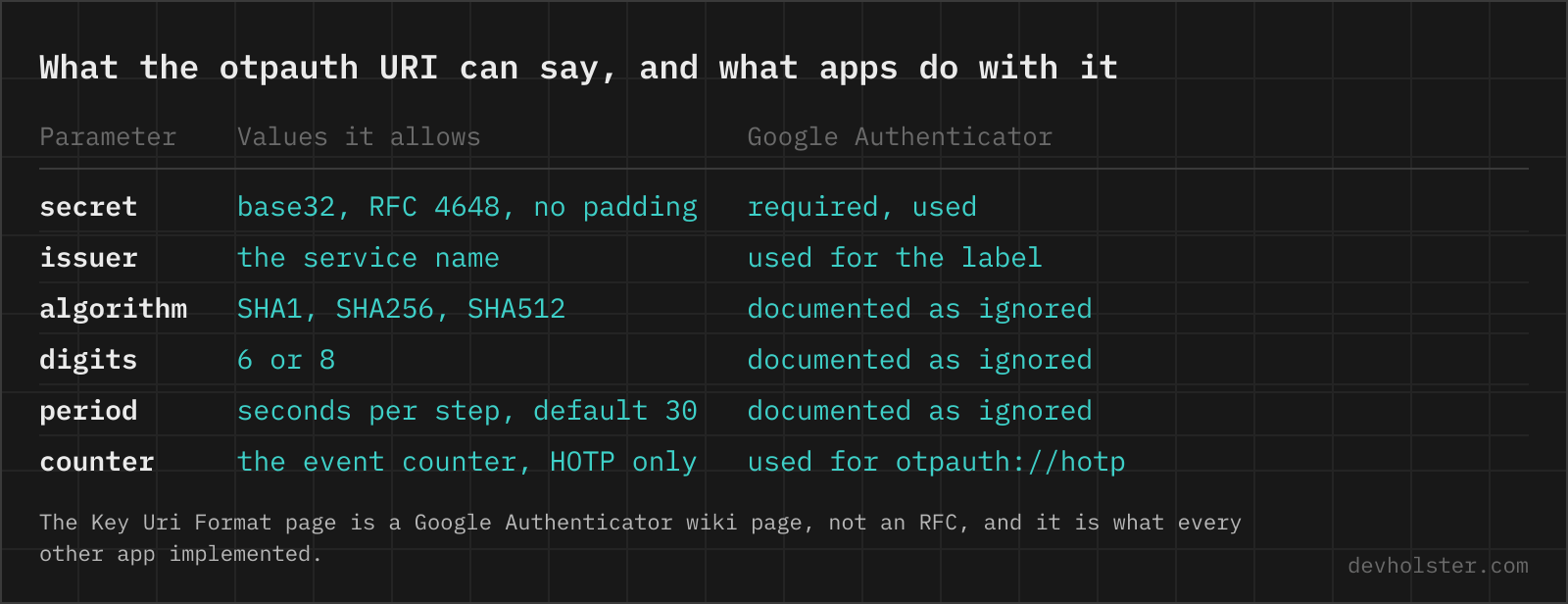
Point any QR scanner at a 2FA enrollment screen and you’ll see something like otpauth://totp/GitHub:alice?secret=JBSWY3DPEHPK3PXP&issuer=GitHub. That’s the whole handshake: a URI scheme that Google Authenticator introduced and documented in its Key Uri Format wiki page, never formalized in any RFC, and now the de facto standard every authenticator app and every service implements. The label before the query names the account, and optional parameters can specify algorithm (SHA1, SHA256, SHA512), digits (6 or 8) and period.
The URI carries the secret in plaintext, which has practical consequences. Screenshots of enrollment QR codes are credentials. So are the codes themselves in old emails from services that mail them (they exist). And migration exports, like Google Authenticator’s otpauth-migration:// batch format, bundle all your secrets into one QR code, worth remembering before you show that screen on a projector.
Clock drift and the ±1 window
Two clocks are never perfectly in sync, and the user needs time to read and retype the code, so a server that accepts only the current 30-second step would reject valid logins constantly. RFC 6238’s recommendation: accept a window of adjacent time steps, and at most one step backward. In practice most implementations accept the previous, current and next step, so a code is effectively valid for up to 90 seconds. Every extra step widens the guessing and phishing surface, which is why the RFC is stingy about it.
For clients that drift further (hardware tokens sitting in a drawer for two years do), the RFC describes resynchronization: the server records which offset within the window each successful login used and tracks that per-token drift over time. Authenticator apps mostly dodge the problem by syncing with NTP, and Google Authenticator on Android carries its own “Time correction for codes” feature that fetches Google’s time, for phones whose clocks wander.
What Google Authenticator ignores in your URI
Here’s the trap for implementers: those algorithm, digits and period parameters you can put in the URI? Google Authenticator’s own Key Uri Format documentation states they are ignored, and the app historically did SHA-1, 6 digits, 30 seconds regardless of what you asked for. Enroll a user with algorithm=SHA256 and the classic app silently generates SHA-1 codes that never match your server. Newer releases have reportedly added SHA-256/SHA-512 support (a 2024 Keycloak issue tracks exactly this), but the installed base is enormous and other apps copied the ignore-the-parameters behaviour.
The practical rule that saves you support tickets: generate SHA-1, 6 digits, 30 seconds, full stop. It’s what RFC 6238’s reference implementation does, it’s what every app handles, and deviating buys you nothing measurable. If SHA-1 makes you nervous, see the FAQ below; HMAC-SHA1 is not where TOTP’s weaknesses live.
The attack TOTP was never designed to stop
TOTP’s threat model is a stolen password. It’s excellent at that: password dumps from one of the breaches we covered in our password hashing guide are worthless against an account that also demands a code from a secret the attacker doesn’t hold. What TOTP can’t do is verify who is asking. A phishing page that looks like your login and proxies everything to the real site in real time gets the password and the current code handed over voluntarily, forwards both within the validity window, and keeps the session cookie. Tooling for this (Evilginx is the well-known one, public since 2017) turned it from a skilled attack into a config file.
This is the gap passkeys close. A WebAuthn credential is bound to the origin it was registered on, and the browser enforces it: the private key will not sign a challenge for login-github.example.com, no matter how convincing the page looks. The user can’t be tricked into it because the user isn’t part of the check. That’s why the industry push is toward passkeys for phishing resistance, with TOTP as the widely-compatible fallback. Still a very good fallback. Just know which attack each one answers.
Questions about TOTP and authenticator apps
How does TOTP actually work?
Your phone and the server share a secret key, exchanged once via the QR code. Every 30 seconds, both sides independently compute HMAC-SHA1 over the current Unix time divided by 30, truncate the result to 31 bits, and take the last 6 decimal digits. Because both sides run the same math on the same secret and the same clock, they arrive at the same code without any network connection. That’s the entire trick: no server contact, no SMS, just synchronized arithmetic, as specified in RFC 6238.
Why is my authenticator code always wrong?
Almost always a clock problem. TOTP codes are computed from the current time, so if your phone’s clock is more than about a minute off, your codes fall outside the window the server accepts (typically the current 30-second step plus one step either side). Check that the phone has automatic network time enabled; Google Authenticator on Android even has a built-in “Time correction for codes” sync option. If the clock is fine, the secret was probably re-generated server-side and the old QR code enrollment is stale.
Is TOTP more secure than SMS 2FA?
Yes, meaningfully. SMS codes can be intercepted by SIM-swapping attacks, where an attacker convinces or bribes a carrier into porting your number, and by SS7-level attacks on the phone network; NIST has discouraged SMS for authentication since its SP 800-63B guidance in 2016. TOTP never crosses the phone network at all, the secret stays on your device, and codes are generated locally. TOTP still doesn’t stop real-time phishing relays, which is what passkeys are for, but against everything SMS is weak to, it’s a clear upgrade.
What happens to TOTP codes during a leap second?
Nothing, by construction. TOTP counts 30-second steps of Unix time, and Unix time is defined to ignore leap seconds: when one is inserted, Unix time effectively repeats a second (or systems smear it across the day, as Google’s NTP servers do). Both your phone and the server experience the same repeated second, so their counters stay in agreement. At worst, a code is valid for one extra second. Ordinary clock drift is the real-world problem, not leap seconds.
Can TOTP codes be phished?
Yes. TOTP proves you hold the secret, but it doesn’t verify who you’re giving the code to. A phishing site proxying the real login page (tools like Evilginx automate this) forwards your password and your current code to the real site within the 30-to-90-second validity window and captures the resulting session. The code being short-lived doesn’t help when the relay is instant. Phishing-resistant 2FA needs origin binding, which is exactly what WebAuthn passkeys and FIDO2 security keys add: the credential simply won’t sign for the wrong domain.
Why are TOTP codes 6 digits?
The truncated HMAC is taken modulo 10^6. RFC 4226 allows 7 or 8 digits. Store codes as strings, leading zeros count.
Is it a problem that TOTP uses SHA-1?
No. TOTP uses SHA-1 inside HMAC, and HMAC-SHA1 never relied on collision resistance. Staying on it is a compatibility choice, not a security hole.